


Configuring an Active Directory (AD) User Directory Collector


 Suggest changes

 PDFs
PDFs
Configure the User Directory Collector before the ONTAP SVM Data Collector.
Workload Security uses directory data to resolve identities in file-access activity. User Directory collectors do not provide a Test Connection function.
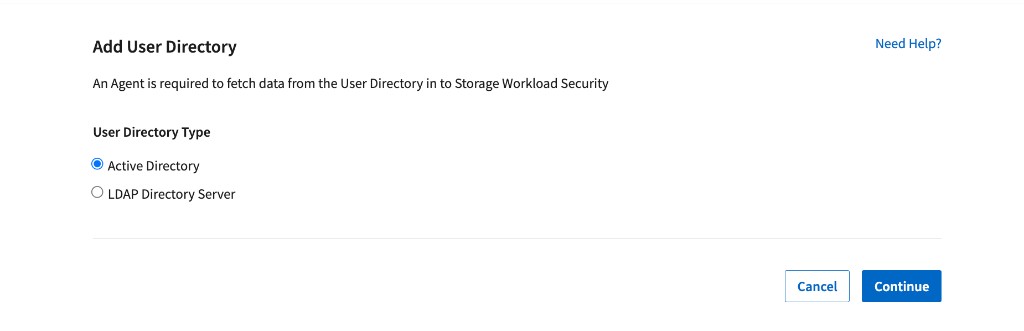
| Select | Use it when |
|---|---|
Active Directory |
Users are stored in Active Directory and monitored activity is SMB; or Unix users are stored in Active Directory with uidNumber values and perform NFS activity. |
LDAP Directory Server |
Unix users are stored primarily in an LDAP directory and monitored activity is NFS. |
Both |
Identities are split across Active Directory and LDAP. Add one collector for each authoritative directory so all monitored identities can be resolved. |
| This page covers Active Directory Use this collector for SMB identities and for NFS identities whose Unix IDs are maintained in Active Directory. |
|---|
Before you begin
-
Sign in as a Data Infrastructure Insights Administrator or Account Owner.
-
Deploy and connect a Workload Security Agent that can reach the directory server.
-
Collect the Active Directory server IP address or FQDN, Forest Name, Bind DN, and Bind password.
-
Allow the Agent to reach the directory service. Typical ports are 389 for LDAP or StartTLS and 636 for LDAPS; use the port configured on your server.
-
Use a Bind DN account that can search the required directory scope and read every attribute mapped in the collector.
Add the Active Directory collector
1. Go to Workload Security > Collectors > User Directory Collectors and select + User Directory Collector.
2. Select Active Directory and select Continue.
3. Complete the connection fields and attribute mappings described below.
4. Review Advanced Configuration if computer or service accounts must be resolved.
5. Validate the configuration with AD Explorer or ldapsearch, then select Save Collector.
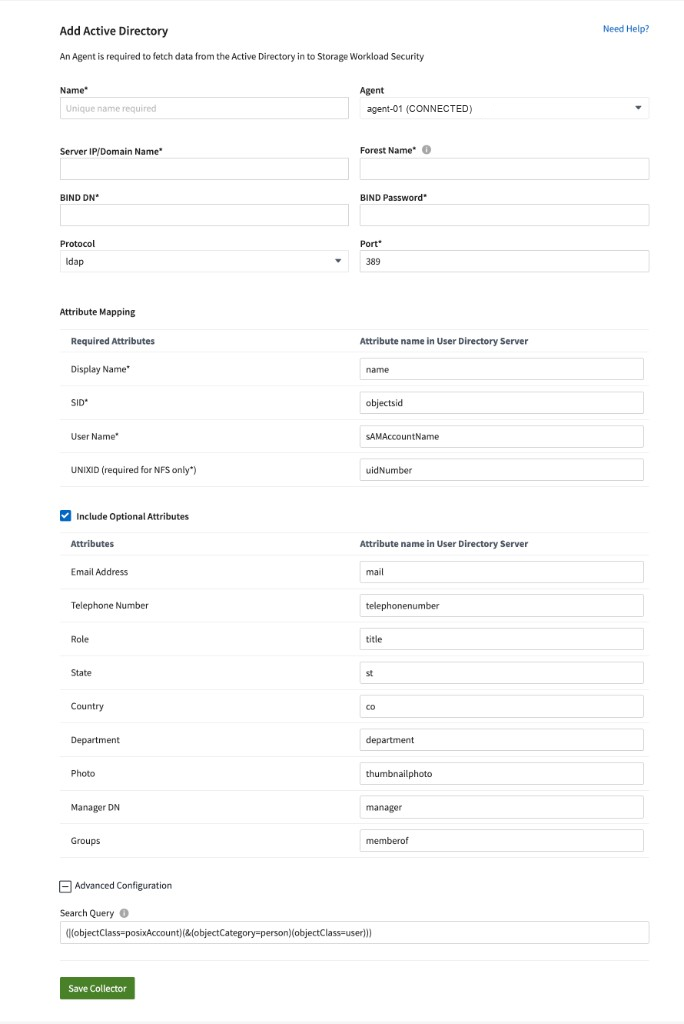
Active Directory collector fields and default attribute mappings.
Connection fields
| Field | Requirement | What to enter |
|---|---|---|
Name* |
Mandatory |
A unique collector name. |
Agent |
Mandatory |
A connected Agent that can reach this AD server. |
Server IP/Domain Name* |
Mandatory |
The AD server IP address or FQDN. |
Forest Name* |
Mandatory |
A DNS domain such as hq.example.com; a DN such as DC=hq,DC=example,DC=com; or a narrower OU/CN DN when only that scope should be searched. Trusted AD domains are supported. |
Bind DN* |
Mandatory |
An account permitted to search the scope, such as ws-reader@example.com. Grant only the directory read permissions required for the mapped attributes. |
Bind Password* |
Mandatory |
The password for the Bind DN account. |
Protocol |
Defaulted |
LDAP, LDAPS, or LDAP with StartTLS. Select the protocol used by your server. |
Port* |
Mandatory |
The numeric directory port; commonly 389 or 636. |
Mandatory attribute mappings
Fields marked with an asterisk must have valid mappings. Keep the defaults unless your AD schema uses different attribute names.
| Workload Security field | Default AD attribute | When required |
|---|---|---|
Display Name* |
name |
Always |
SID* |
objectsid |
Always; resolves SMB security identifiers |
User Name* |
sAMAccountName |
Always |
UNIXID |
uidnumber |
Required when NFS activity must be resolved for Unix users stored in AD |
Optional attribute mappings
Select Include Optional Attributes only for profile data you want to import. Each mapping must match the actual AD schema. Empty or incorrect mappings do not prevent identity resolution but the profile value will not be populated.
| Profile value | Default AD attribute |
|---|---|
Email Address |
|
Telephone Number |
telephonenumber |
Role |
title |
State |
st |
Country |
co |
Department |
department |
Photo |
thumbnailphoto |
Manager DN |
manager |
Groups |
memberof |
Advanced Configuration: include the accounts you need
The Search Query controls which directory objects are imported. The default query includes POSIX accounts and standard AD user objects:
| (|(objectClass=posixAccount)(&(objectCategory=person)(objectClass=user))) |
|---|
A computer account, managed service account, or custom service-account object that does not match this filter remains unresolved. Inspect the object's objectClass in AD Explorer, then extend the query only for the required object types. For example:
| (|(objectClass=posixAccount) (&(objectCategory=person)(objectClass=user)) (objectClass=computer) (objectClass=msDS-ManagedServiceAccount) (objectClass=msDS-GroupManagedServiceAccount)) |
|---|
| Do not broaden the query without checking the result Confirm that every added branch returns only the accounts Workload Security should import. A broader query can increase sync time and import unwanted directory objects. |
|---|
Validate the configuration
| Test Connection is not available for User Directory collectors Validate network access, bind credentials, search scope, query results, and mapped attributes from a host with equivalent access before you save the collector. |
|---|
Use AD Explorer
Connect to the Active Directory server with the intended Bind DN account. Verify that the account can browse the configured Forest Name or OU and read name, objectSid, sAMAccountName, uidNumber when used, and any optional attributes.
Use ldapsearch
Run a scoped search using the intended Bind DN. Replace the examples with your directory values and add the collector's Search Query as the LDAP filter.
| ldapsearch -o ldif-wrap=no -LLL -x -H ldap://ad.example.com:389 -D "ws-reader@example.com" -W -b "DC=hq,DC=example,DC=com" '(|(objectClass=posixAccount)(&(objectCategory=person)(objectClass=user)))' name objectSid sAMAccountName uidNumber |
|---|
-
The bind succeeds with the exact account and password that the collector will use.
-
The search returns the expected human, computer, or service account.
-
Every mandatory mapped attribute exists and has a value on the returned object.
-
The Agent has the same DNS resolution and network path to the directory server.
After you save
-
The Active Directory sync starts when the collector starts or restarts.
-
A directory with approximately 300,000 users can take about 15 minutes to sync.
-
User data refreshes automatically every 12 hours.
-
If the directory becomes unavailable, previously fetched user details remain, but new or changed users cannot be fetched until connectivity is restored.
-
User data is retained for 13 months without a refresh. User-directory data cannot be deleted independently of the tenant.
Troubleshooting
| Message or symptom | What to check |
|---|---|
Invalid credentials provided for the LDAP server. |
Verify the Bind DN and password. Also confirm that the account can search the configured Forest Name. |
Failed to get the object corresponding to DN=… provided as forest name. |
Correct the Forest Name. Use the exact domain, DN, OU, or other supported scope. |
Failed to establish LDAP connection. |
Verify the AD server IP/FQDN, DNS resolution, protocol, port, and firewall path from the Agent. |
Failed to retrieve LDAP users…connection is null. |
Restart the collector. If it recurs, validate connectivity and the search with ldapsearch from an equivalent network location. |
Collector is RETRYING or reports AGENT008. |
Verify the server address and Forest Name; then confirm the Agent can reach the directory service. |
A user or optional attribute is not displayed. |
Verify that the Search Query includes the object and that the mapped attribute name matches the directory schema, including case where applicable. Save to restart and resync. |
AcceptSecurityContext error, data 52e. |
Verify the credentials and Forest Name. In Active Directory, data 52e indicates invalid credentials. |
ldap-port has type STRING rather than NUMBER. |
Enter a numeric port |