


Requirements for cabling data compute nodes for AI Data Engine


 Suggest changes

 PDFs
PDFs
Data compute nodes integrate with your AFX 1K storage system through host network and cluster network connections. Review the I/O slot configuration, cable types, and connection requirements for your deployment.
Cabling configuration
Data compute nodes connect to the same cluster switches as the AFX 1K controller nodes, extending your storage system with compute resources optimized for AI and machine learning workloads.
The initial AI Data Engine (AIDE) configuration supports a minimum of three data compute nodes. For comprehensive configuration details and slot priorities, see NetApp Hardware Universe.
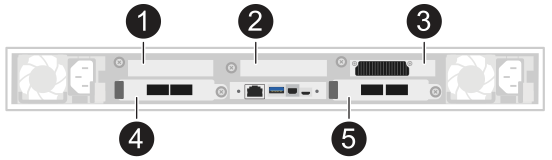

|
Unused slot on the data compute node. |

|
Unused slot on the data compute node. |

|
GPU slot on the data compute node. |

|
I/O slot on the data compute node. |

|
I/O slot on the data compute node. |
I/O slot configuration
The data compute node uses a specific slot numbering scheme that differs from standard server configurations. Understanding the slot layout is essential for proper cabling.
-
Slot 3: Reserved for GPU (not accessible for I/O cabling)
-
Slots 4 and 5: I/O slots used for network connections
-
Port a: Cluster network connections
-
Port b: Host network connections
-
-
Slots 1 and 2: Unpopulated and inaccessible for use
Network connections
Data compute nodes require two types of network connections to integrate with the AFX 1K storage system.
-
Host network connections
Host network connections provide access to client data and enable the data compute nodes to process workloads. Each data compute node uses ports e4b and e5b for redundant connections to separate host network switches.
Port assignments:
-
e4b: Connects to host network switch A
-
e5b: Connects to host network switch B
-
-
Cluster network connections
Cluster network connections enable communication between data compute nodes and AFX 1K controller nodes within the storage cluster. Each data compute node uses ports e4a and e5a for redundant connections to separate cluster network switches.
Port assignments:
-
e4a: Connects to cluster network switch A
-
e5a: Connects to cluster network switch B
-
Supported hardware components
The data compute nodes require specific cables and switches to ensure proper connectivity and performance with the AFX 1K storage system.
| Data Compute Node | Supported Switches | Supported Cables |
|---|---|---|
Data compute nodes (minimum of three required) |
|
|

|
Breakout cables provide four 100GbE connections from each 400GbE switch port. Connect the 400GbE end to the switches and the 100GbE end to the data compute node I/O ports. |
Cable orientation
When connecting cables to data compute nodes, proper cable orientation ensures reliable connections.
The cabling graphics in the installation procedures show arrow icons indicating the correct orientation (up or down) of the cable connector pull-tab when inserting a connector into a port. As you insert the connector, you should feel it click into place. If you do not feel it click, remove it, turn it over, and try again.
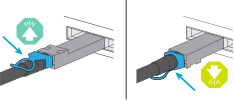

|
Handle the delicate connector components carefully when clicking them into place. |
After reviewing the cabling configuration, cable the hardware for your data compute nodes.