


Cable the hardware for the ASA C30 storage system

 Suggest changes

 PDFs
PDFs
Connect the ASA C30 storage system to your network and storage shelves to enable cluster communication, management access, and SAN host connectivity. This procedure includes cabling for cluster/HA interconnect, management network, host network, and storage shelf connections.
Contact your network administrator for information about connecting the storage system to your network switches.
-
These procedures show common configurations. The specific cabling depends on the components ordered for your storage system. For comprehensive configuration and slot priority details, see NetApp Hardware Universe.
-
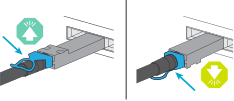
The cabling graphics have arrow icons showing the proper orientation (up or down) of the cable connector pull-tab when inserting a connector into a port.
As you insert the connector, you should feel it click into place; if you do not feel it click, remove it, turn it over and try again.
-
If cabling to an optical switch, insert the optical transceiver into the controller port before cabling to the switch port.
Step 1: Cable the cluster/HA connections
Cable the controllers to create the ONTAP cluster connections. For switchless clusters, connect the controllers to each other. For switched clusters, connect the controllers to the cluster network switches.

|
The cluster interconnect traffic and the HA traffic share the same physical ports. |
Use this cabling option when the two controllers are directly connected to each other without using cluster network switches.
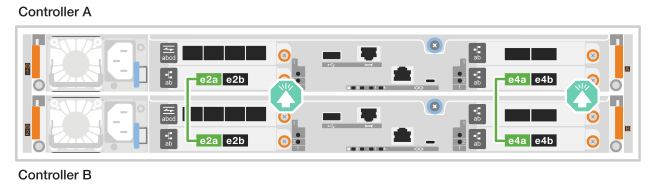
Cable the cluster/HA interconnect ports on the I/O modules in slots 2 and 4.
|
|
The cluster interconnect traffic and the HA traffic share the same physical ports (on the I/O modules in slots 2 and 4). The ports are 40/100 GbE. |
-
Connect controller A port e2a to controller B port e2a.
-
Connect controller A port e4a to controller B port e4a.
I/O module ports e2b and e4b are unused and available for host network connectivity. 100 GbE Cluster/HA interconnect cables

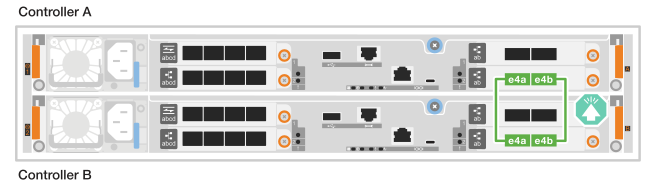
Cable the cluster/HA interconnect ports on the I/O module in slot 4.
|
|
The cluster interconnect traffic and the HA traffic share the same physical ports (on the I/O module in slot 4). The ports are 40/100 GbE. |
-
Connect controller A port e4a to controller B port e4a.
-
Connect controller A port e4b to controller B port e4b.
100 GbE Cluster/HA interconnect cables
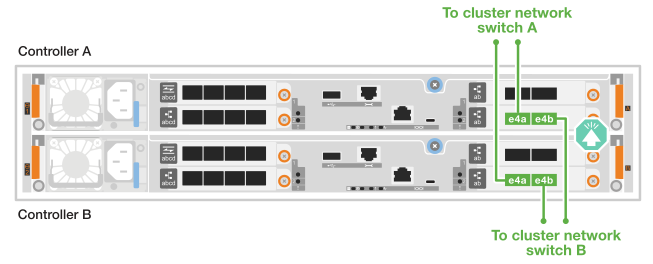
Use this cabling option when the controllers connect to cluster network switches instead of being directly connected to each other.
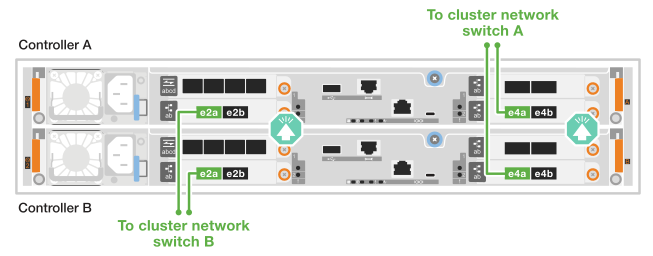
Cable the cluster/HA interconnect ports on the I/O modules in slots 2 and 4 to the cluster network switches.
|
|
The cluster interconnect traffic and the HA traffic share the same physical ports (on the I/O modules in slots 2 and 4). The ports are 40/100 GbE. |
-
Connect controller A port e4a to cluster network switch A.
-
Connect controller A port e2a to cluster network switch B.
-
Connect controller B port e4a to cluster network switch A.
-
Connect controller B port e2a to cluster network switch B.
I/O module ports e2b and e4b are unused and available for host network connectivity. 40/100 GbE Cluster/HA interconnect cables
Cable the cluster/HA interconnect ports on the I/O module in slot 4 to the cluster network switches.
|
|
The cluster interconnect traffic and the HA traffic share the same physical ports (on the I/O module in slot 4). The ports are 40/100 GbE. |
-
Connect controller A port e4a to cluster network switch A.
-
Connect controller A port e4b to cluster network switch B.
-
Connect controller B port e4a to cluster network switch A.
-
Connect controller B port e4b to cluster network switch B.
40/100 GbE Cluster/HA interconnect cables
Step 2: Cable the host network connections
Connect the Ethernet module ports or the Fibre Channel (FC) module ports to your host network.
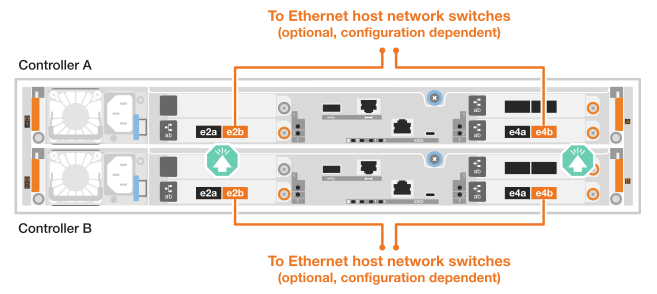
Connect the controllers to your Ethernet host network using the appropriate ports based on your I/O module configuration.
On each controller, cable ports e2b and e4b to the Ethernet host network switches.
|
|
The ports on I/O modules in slot 2 and 4 are 40/100 GbE (host connectivity is 40/100 GbE). |
40/100 GbE cables

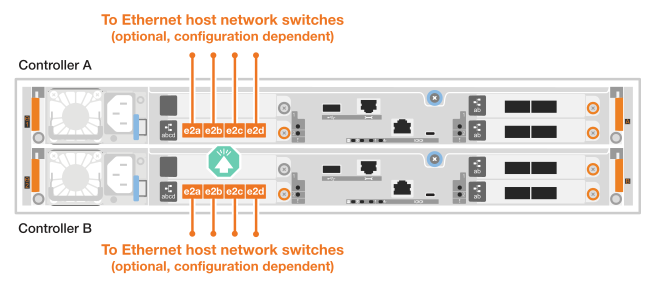
On each controller, cable ports e2a, e2b, e2c, and e2d to the Ethernet host network switches.
10/25 GbE cables
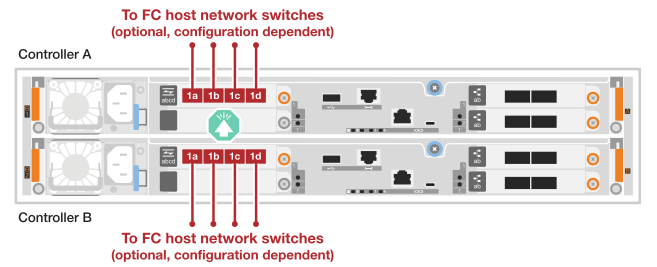
Connect the controllers to your Fibre Channel host network using the FC I/O module in your system.
On each controller, cable ports 2a, 2b, 2c, and 2d to the FC host network switches.
64 Gb/s FC cables
Step 3: Cable the management network connections
Connect the controllers to your management network.
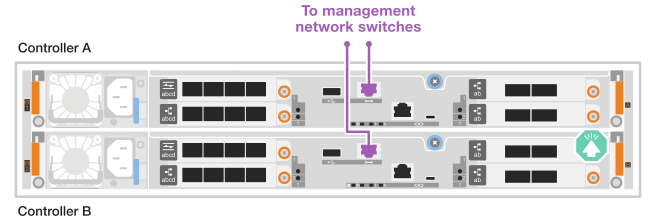
Connect the management (wrench) ports on each controller to the management network switches.
1000BASE-T RJ-45 cables


|
Do not plug in the power cords yet. |
Step 4: Cable the shelf connections
The NS224 shelf cabling procedure shows NSM100B modules instead of NSM100 modules. The cabling is the same regardless of the type of NSM modules used, only the port names are different:
-
NSM100B modules use ports e1a and e1b on an I/O module in slot 1.
-
NSM100 modules use built-in (onboard) ports e0a and e0b.
For the maximum number of shelves supported for your storage system and for all of your cabling options, such as optical and switch-attached, see NetApp Hardware Universe.
Cable each controller to each NSM module on the NS224 shelf using the storage cables that came with your storage system.
100 GbE QSFP28 copper cables
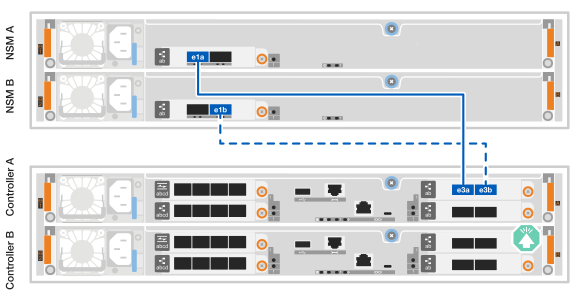
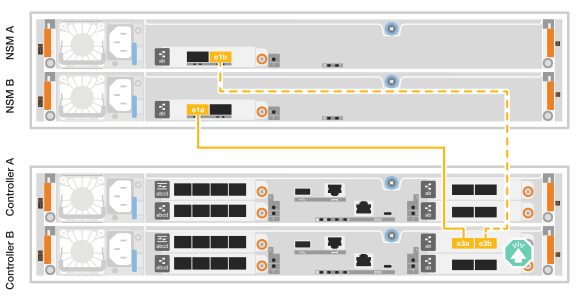
The graphics show controller A cabling in blue and controller B cabling in yellow.
-
Connect controller A port e3a to NSM A port e1a.
-
Connect controller A port e3b to NSM B port e1b.
-
Connect controller B port e3a to NSM B port e1a.
-
Connect controller B port e3b to NSM A port e1b.
After you've connected the storage controllers to your network and then connected the controllers to your storage shelves, you power on the ASA r2 storage system.