


Protect ONTAP volumes workloads with NetApp Backup and Recovery

 Suggest changes

 PDFs

Use NetApp Backup and Recovery to protect and restore your ONTAP volume data and to archive backups for the long term. You can implement a 3-2-1 strategy with three copies of your source data on two different storage systems and one copy in the cloud.
After you enable protection for a system, Backup and Recovery creates block-level, incremental-forever copies of your volumes. In addition to your source volume, you have:
-
A snapshot of the volume on the source system
-
A replicated volume on a different ONTAP storage system
-
A backup of the volume in object storage

The 3-2-1 approach provides the following benefits:
-
Multiple data copies protect against internal and external cybersecurity threats.
-
Using different types of media helps you recover if one type fails.
-
You can quickly restore from the onsite copy, and use the offsite copies if the onsite copy is compromised.
When necessary, you can restore an entire volume, a folder, or one or more files, from any of the copies to the same or a different system.
How protection for ONTAP volumes works
When you enable Backup and Recovery for a Cloud Volumes ONTAP or on-premises ONTAP system, the service performs a full baseline transfer of your volume data. After that, all transfers are incremental: only changed and new blocks are transferred, which keeps network traffic to a minimum.
Backup and Recovery uses ONTAP SnapMirror technology to keep your copies synchronized. It creates snapshots on the source volume and transfers them to the replication and backup locations. Backup to object storage is built on NetApp SnapMirror Cloud technology.
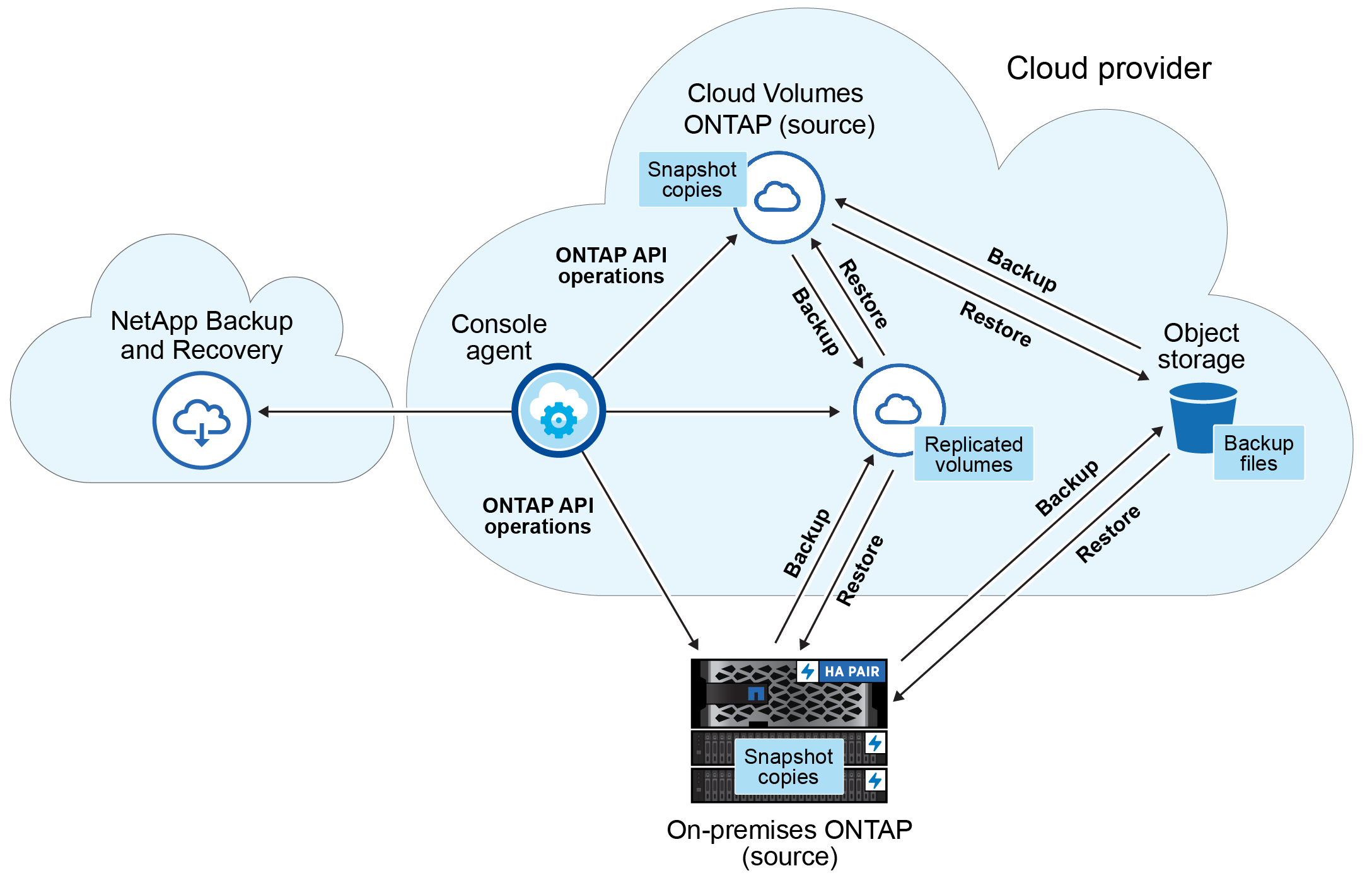
This diagram shows volumes being replicated to a Cloud Volumes ONTAP system, but you can replicate volumes to an on-premises ONTAP system as well.
Each type of copy resides in a different location:
-
Snapshots reside on the source volume in the source system.
-
Replicated volumes reside on the secondary storage system, which can be a Cloud Volumes ONTAP or on-premises ONTAP system.
-
Backup copies reside in an object store in your cloud account or on your premises. The Console creates one object store for each cluster. Refer to Where backups reside in object store locations for details about how the Console creates and names the object store.

|
Do not manage or change backup files directly from your storage systems or your cloud provider environment. Doing so can corrupt the files and results in an unsupported configuration. |
To plan which copies and architecture to use, refer to Plan ONTAP volume protection.
Features
Replication
-
Replicate data between ONTAP storage systems to support backup and disaster recovery.
-
Replicate multiple FlexVol volumes at a time to a secondary system.
-
Use native ONTAP in-flight encryption with a pre-shared key (PSK) between the two systems.
-
Rely on self-healing replication in the event of a transfer failure.
-
Restore a replicated volume to the source system or to a different system.
For features in NetApp Replication that are unavailable when you replicate with Backup and Recovery, refer to Replication limitations for ONTAP volumes.
Backup to object storage
-
Back up independent copies of your volumes to low-cost object storage, from on-premises or cloud systems to public or private cloud.
-
Apply a single backup policy to all volumes in a cluster, assign different policies to volumes with unique recovery point objectives, or create a policy that applies to all future volumes in the cluster. Refer to Manage policies for ONTAP volumes.
-
Protect backups from deletion and ransomware with DataLock and ransomware scans. Refer to DataLock and Ransomware protection options.
-
Tier older backups to archival storage to save costs. Refer to Archival storage options.
-
Delete the backup relationship so that you can retire source volumes while retaining their backups.
-
Keep up to 4,000 backups of a single volume.
-
Secure backup data with AES-256 bit encryption at rest and TLS 1.2 HTTPS connections in flight, or use your own customer-managed keys instead of the default cloud provider keys.
Restore
-
Restore data from a specific point in time from local snapshots, replicated volumes, or backups in object storage.
-
Restore a volume, a folder, or individual files to the source system or to a different system, including a system that uses a different subscription or account, or is in a different region.
-
Perform a quick restore of a volume from object storage to a Cloud Volumes ONTAP or on-premises system when you need to provide access to the volume as soon as possible, such as in a disaster recovery situation.
-
Restore data at the block level directly to the location you specify, preserving the original ACLs.
-
Browse or search file catalogs to select individual folders and files to restore.
Refer to Restore ONTAP volumes workloads for restore options.
Supported volumes
NetApp Backup and Recovery supports the following types of volumes:
-
FlexVol read-write volumes
-
FlexGroup volumes (requires ONTAP 9.12.1 or later)
-
SnapLock Enterprise volumes (requires ONTAP 9.11.1 or later)
-
SnapLock Compliance for on-premises volumes (requires ONTAP 9.14 or later)
-
SnapMirror data protection (DP) destination volumes

|
NetApp Backup and Recovery does not support backups of FlexCache volumes. |
For the source systems, secondary systems, object storage destinations, restore destinations, and regions that Backup and Recovery supports, refer to Supported backup and restore destinations in NetApp Backup and Recovery. For additional requirements and restrictions, refer to Known limitations with NetApp Backup and Recovery for ONTAP volumes.
Cost and licensing
You pay nothing to create snapshots or replicated volumes, other than the disk space they use. Resource charges from your cloud provider and service charges from NetApp apply only to backup to object storage.
For details about costs and licensing options, refer to Learn about NetApp Backup and Recovery and Set up licensing.