


Switch Console agents when using NetApp Disaster Recovery

 Suggest changes

 PDFs
PDFs
The NetApp Console supports using multiple Console agents with a single working environment. Using multiple Console agents can be helpful for maintaining access to resources while performing maitenance on another Console agent or if a Console agent fails. Because each Console agent has a unique identifier, improperly switching Console agents can compromise the availability of resources in a working environment.
Before you begin
-
You must have added at least two Console agents for your working environment.
-
Both Console agents must contain the same ONTAP clusters.
Steps
-
In Disaster Recovery, select Sites.
-
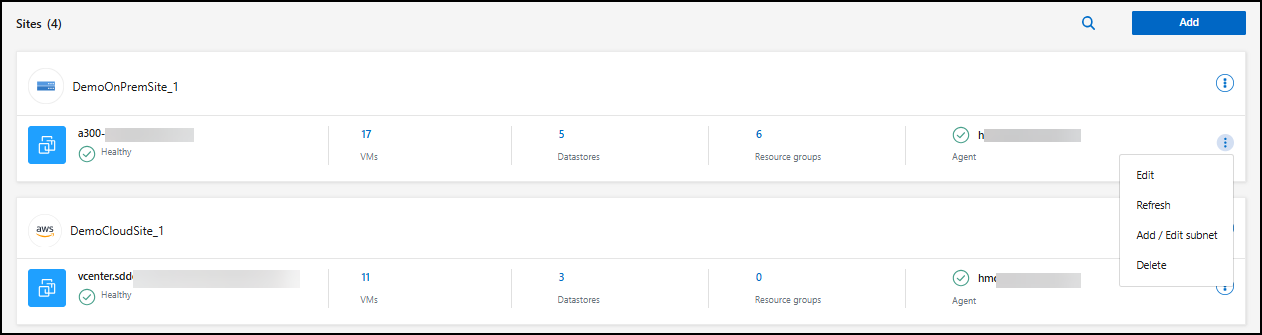
You must change the Console agent for both the source and destination vCenters. Identify the vCenters you want to modify. Select the action menu for the vCenter then Edit.
-
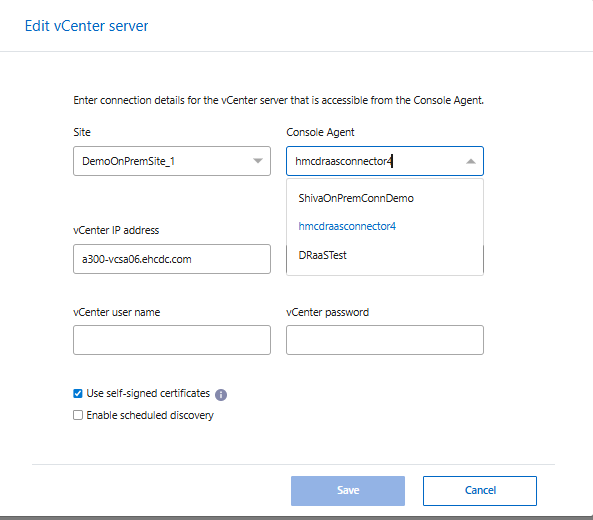
Select the Console agent you want to use from the dropdown menu and reenter your vCenter username and password. Select Save.
-
Repeat steps 2 and 3 for each additional vCenter you want to modify.
-
In the vCenter that you modified, refresh the vCenter to discover the new Console agent. Repeat this step for every vCenter you've modified.
-
In Disaster Recovery, navigate to Replication plans.
-
Identify the replication plans that you want to use to resume workflows. Select the action menu
…then Refresh resources. You can monitor the status of the jobs in Job monitoring.