


What's new with Workload Factory in the NetApp Console


 Suggest changes

 PDFs

Learn what's new with Workload Factory in the NetApp Console like updates and enhancements for workload management, service administration, storage features, permissions, and more.
01 November 2026
Workload Factory administration enhancements
Check and refresh custom dashboard data
You can now see when your custom dashboard metrics were last updated and manually refresh them. Hover over Refresh data to view the last Updated date and time.
Select Refresh data to start a new scan. A banner confirms that the scan has started, and the button is disabled until the scan finishes.
When new data is available, select Load it now in the notification banner to update the dashboard.
Both Refresh data and Load it now create data collection events in Tracker.
Specify regions for custom dashboards
Custom dashboards now ask you to choose one or more regions if your request does not include them. Dashboard data is limited to the regions you select.
IAM policy for FSx for ONTAP link creation
The CloudFormation template and Terraform code for creating links now use an IAM policy instead of inline Lambda permissions.
Audit and tracking for AI agent actions
You can now use Tracker to review changes to AI agent settings and, in read/write mode, each approval request, including the agent's question and the user's answer.
Resource changes made through Workload Factory APIs are logged by the Workload Factory service that performs the operation.
Amazon FSx for NetApp ONTAP enhancements
Initiator group diagram enhancements
The diagram that displays initiator groups for block devices on the Manage Client Access page now includes more details for hosts. When you hover over a host in the diagram, host details appear, including the host name, instance ID, workload type, region, and iSCSI Qualified Name (IQN).
Email enhancement for well-architected issues
The new email design provides more details and context for configuration issues detected by Workload Factory. The email includes the number of analyzed resources, how many have warning or critical issues, and what those issues are. The email also links to the FSx for ONTAP well-architected dashboard so you can address issues right away.
Well-architected dashboard enhancements
Support for selected configuration checks
You can manually run analysis on selected configurations so that you analyze only the configurations you're interested in and reduce wait time.
New recommendations in the well-architected analysis
Workload Factory now includes the following configurations in the well-architected analysis for FSx for ONTAP file systems:
For storage workloads:
-
Connect host to failover node: checks whether hosts are connected to the failover node in an active-passive FSx for ONTAP file system for reliability.
-
Connect host to preferred node: checks whether hosts are connected to their block devices using the preferred node for performance efficiency.
-
ARP/AI multi-device detection gap: ARP/AI provides full protection coverage when a volume has only one block device attached to it. If a volume has multiple block devices attached, Workload Factory moves the block devices to new volumes so that each volume has only one block device.
-
Clone cleanup: checks whether there are any volume clones older than 30 days that can be deleted to optimize storage usage and reduce costs.
-
Match igroup OS to host: checks whether the operating system of the initiator group (igroup) matches the host's operating system to prevent I/O or performance issues.
For Kubernetes workloads:
-
QoS configuration: checks whether Kubernetes persistent volumes are protected with an ONTAP QoS policy for performance efficiency.
-
Dedicated Kubernetes storage VM: checks whether the file system is using a dedicated storage VM for Kubernetes workloads to improve isolation and simplify storage management.
-
Dedicated Kubernetes export policy: checks whether each Kubernetes persistent volume has a dedicated export policy that only allows access from the cluster's worker nodes.
-
Bidirectional CHAP for Kubernetes iSCSI backends: checks whether Trident iSCSI backends have mutual CHAP authentication enabled for security.
-
Disable
showmounton the application storage VM: checks whethershowmountis disabled on the application storage VM to prevent clients from listing exports they can't access.
For database workloads:
-
SAP HANA snapshot policy: checks whether the snapshot policy is set to "None" for SAP HANA volumes to lower storage costs and improve performance for active database data.
-
MySQL snapshot policy: checks whether the snapshot policy is set to "None" for MySQL volumes to lower storage costs and improve performance for active database data.
-
PostgreSQL snapshot policy: checks whether the snapshot policy is set to "None" for PostgreSQL volumes to lower storage costs and improve performance for active database data.
Current and recommended values for configurations
You can view the current and recommended values for some unoptimized configurations in the well-architected dashboard. This tells you what the recommended value is before you fix it.
-
Cold data tiering
-
Snapshot policy
-
SSD capacity headroom
Cost improvements
Cost forecasting and insights
You can now forecast costs for your FSx for ONTAP file systems using the cost forecasting feature. This helps you plan your budget and optimize your resources effectively. You can also view insights about your costs and usage patterns to identify opportunities for cost optimization.
AWS Cost and Usage Reports (CUR)
Workload Factory now uses AWS Cost and Usage Reports (CUR) instead of AWS Cost Explorer to provide detailed billing records delivered to customer-owned S3 buckets. CUR offers better cost granularity and serves as the foundation for advanced FinOps, chargeback, and cost allocation use cases.
Storage VM migration improvements
Workload Factory provides enhanced guidance within the user interface for migrating storage VMs. This includes step-by-step instructions and a test run before committing the migration to production.
Replication lag email notification improvement
When a large number of related replication lag events occur, Workload Factory automatically consolidates them into a single email notification so you won't get overwhelmed by notifications.
Automatic capacity management enhancement
You can now turn on automatic capacity management notifications to try out the feature before asking Workload Factory to manage your capacity automatically. You'll be notified when your file system is running low on capacity.
Database configurations included in well-architected dashboard
The well-architected dashboard now includes recommendations for your database configurations, allowing you to assess and optimize your setup based on best practices. The first configurations included in the dashboard are:
-
Cold data tiering
-
Storage efficiencies
-
Snapshot policy
-
SSD capacity headroom
-
Block device space management
-
OS type
-
Match block device OS type to host
-
Inactive block devices (LUNs)
-
Data files (.mdf) placement
-
Log files (.ldf) placement
-
Multipath I/O status
-
Multipath I/O timeout
-
Cluster quorum
-
Compute rightsizing
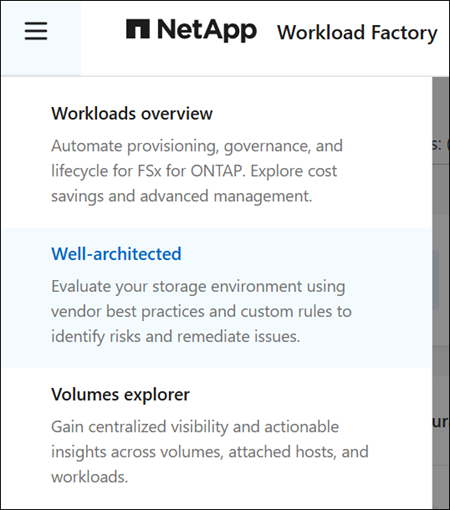
Select the main menu in the Workload Factory console, and then select Well-architected to find the well-architected dashboard.
Throughput decision points
You can now see client throughput recommendations and automation decision points. Hover over a decision point to view details, such as the current and recommended SKU or breached metrics in time window (%).
Workload Factory for VMware enhancements
These enhancements cover the EVS TCO calculator for VMware migrations.
Support for i7i.metal-24xl and i7i.metal-48xl instances in the EVS TCO calculator
The EVS TCO calculator now supports AWS i7i.metal-24xl and i7i.metal-48xl EC2 instances as cluster hosts. Compared to i4i.metal configurations, i7i.metal-24xl instances lower the EVS starting cost by about 33% for compute and 25% for vSAN storage.
The calculator compares all instance types and automatically selects the lowest-cost option. A new comparison section displays EVS host configurations side by side, making it easier to choose the best setup for your needs.
Workload Factory for EDA enhancements
These enhancements cover volume details in latency analysis, a file system pressure check, throughput decision points, and running a latency analysis again.
View volume details during latency analysis
You can view more volume details in Workload Factory while you analyze a latency event so that you can see how the volume is configured. The Detailed latency analysis page shows Volume type (RW or DP) and Volume style (FlexVol or FlexGroup).
Check file system pressure for a latency event
In Workload Factory, you can check whether file system pressure affected performance when a latency event occurred so that you can decide whether to investigate the file system. For a volume with a latency alert, you can view CloudWatch data from the 40 minutes before the event and open the file system to investigate further.
Review throughput decision points for EDA
You can review client throughput decision points on the EDA Overview dashboard so that you can see when Workload Factory recommended or applied a throughput change. Hover over a decision point to view details, such as the current and recommended SKU or the breached metrics in the time window.
Run a latency analysis again
You can run a latency analysis again in Workload Factory for a volume so that you can refresh the results after you investigate or make a change. Select Run analysis again to start a new analysis and update the results.
Google Cloud NetApp Volumes enhancements
View Google Cloud NetApp Volumes storage pools
You can now view your Google Cloud NetApp Volumes storage pools in NetApp Workload Factory. Filter by projects, credentials, and region, and select a storage pool's name to view its full details, including zone, replica zone, throughput, description, and labels.
OCI NetApp Storage Service enhancements
Well-architected analysis for OCI NSS systems
NetApp Workload Factory includes the well-architected assessment for OCI NSS systems. The assessment provides insights, recommendations, and fixes to help you achieve operational excellence.
Configuration assessments are available for the following pillars of the OCI Well-Architected Framework:
-
Reliability: file object capacity, snapshot policy, and SSD capacity headroom
-
Operational excellence: host-visible capacity reporting and volume capacity headroom
-
Cost optimization: cold data tiering, snapshot cleanup, and storage efficiencies
Learn more about the well-architected analysis for OCI NSS systems and about implementing well-architected configurations.
30 September 2026
Initial release of Oracle Cloud Infrastructure NetApp Storage Service for Workload Factory
The initial release of OCI NetApp Storage Service (OCI NSS) for Workload Factory offers onboarding, system discovery, credential management, and link creation and association. To request access to OCI NSS, open a support ticket with Oracle.
Workload Factory documentation for NetApp Console users
You can find detailed documentation for Workload Factory in the NetApp Console, including guides for onboarding, system discovery, credential management, and link creation and association.