


6. Data Mobility with NetApp XCP

 Suggest changes

 PDFs
PDFs
Karthikeyan Nagalingam, NetApp
NetApp XCP provides the controlled transfer path between the ONTAP NAS prepared-data tier and the active training tier. Airflow performs the preflight and invokes the copy operation through the XCP host; xcp_copy_destination selects ONTAP S3 or LustreFS for each run. The same selected destination is used by model training, fine-tuning, and inference to keep data and artifacts on a consistent tier.
6.1 Why NetApp XCP
XCP is a parallel, multi-threaded copy engine that supports the NFS source, ONTAP S3, and LustreFS destinations used by this architecture. Its -newid <run_stamp> option associates each transfer with the pipeline execution, supporting traceability across prepared data, training input, and model-artifact locations.
6.2 XCP Preflight Validation Flow
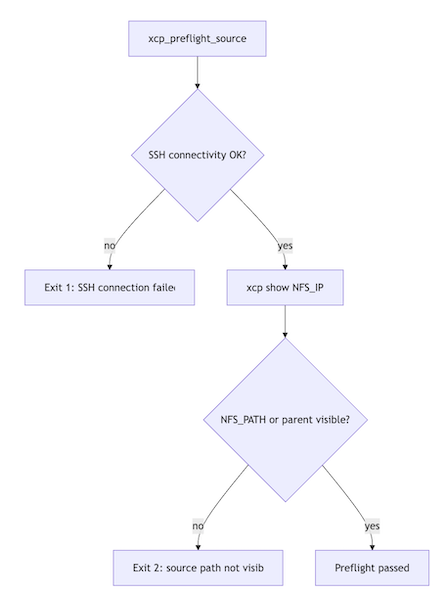
The preflight task runs before an XCP copy. It verifies that Airflow can reach the XCP host through SSH and that the configured ONTAP NAS NFS source path is visible to XCP. The explicit exit conditions stop the pipeline before a copy begins when connectivity or source visibility is incorrect.
6.3 XCP Copy to S3 — Command Template
Use this path when xcp_copy_destination=s3. XCP reads the prepared, run-stamped data from the ONTAP NAS NFS export and writes it to the configured ONTAP S3 bucket and prefix. The named XCP S3 profile supplies destination credentials on the XCP host; model stages then discover both data and artifacts through xcp_s3_training_prefix.
xcp copy -newid <run_stamp> \
  -s3.profile <xcp_s3_profile> \
  -s3.endpoint <xcp_s3_endpoint> \
  <xcp_nfs_source_ip>:<xcp_nfs_source_path> \
  s3://<xcp_s3_bucket>/<xcp_s3_dest_prefix>
Example: copy the prepared ONTAP NAS dataset to the ONTAP S3 training bucket
/usr/src/xcp/linux/xcp copy -newid 20260901_120000 \
    -s3.profile ontaps3 \
    -s3.endpoint http://10.63.150.161 \
    10.63.150.159:/prepnasbucket/example_ai_pipeline \
    s3://trainingbucket/example_ai_pipeline
This example uses 20260901_120000 as the XCP job identity. The training task discovers the copied files under the configured xcp_s3_training_prefix, such as example_ai_pipeline/formatted/20260901_120000/data/.
6.4 XCP Copy to LustreFS — Command Template
Use this path when xcp_copy_destination=lustrefs. XCP copies prepared data from the mounted ONTAP NAS source to the mounted LustreFS destination. Both mounts must be available on the XCP host, and LustreFS must also be mounted on the Airflow worker that performs model training, fine-tuning, and inference.
findmnt -T <xcp_lustrefs_source_path> -o FSTYPE,TARGET -n | grep -E '^nfs[0-9]* '  # source mount type
findmnt -T <xcp_lustrefs_dest_path> -o FSTYPE,TARGET -n | grep -E '^lustre '   # destination mount type
xcp copy -newid <run_stamp> \
  file://<xcp_lustrefs_source_path> \
  file://<xcp_lustrefs_dest_path>
Example: copy the prepared ONTAP NAS dataset to the LustreFS training mount
findmnt -T /prepnasbucket/example_ai_pipeline -o FSTYPE,TARGET -n | grep -E '^nfs[0-9]* '
findmnt -T /mnt/lustre/client -o FSTYPE,TARGET -n | grep -E '^lustre '

/usr/src/xcp/linux/xcp copy -newid 20260901_120000 \
    file:///prepnasbucket/example_ai_pipeline \
    file:///mnt/lustre/client
The two findmnt commands verify that the source path is mounted through NFS and the destination path is mounted through LustreFS on the XCP host before the copy starts. With xcp_lustrefs_training_subpath=example_ai_pipeline, training reads the run-stamped data under /mnt/lustre/client/example_ai_pipeline/formatted/20260901_120000/data/.
6.5 XCP Destination Decision Flow
This decision diagram shows how one runtime parameter determines the copy target and the training read path. Select s3 for the ONTAP S3 object destination or lustrefs for the parallel filesystem destination. Downstream stages use the matching source automatically, avoiding changes to model code when storage placement changes.

6.6 XCP Failure Handling and Guardrails
These guardrails make configuration and infrastructure failures observable at the earliest practical point. Preflight failures prevent an invalid transfer, filesystem-type checks validate the ONTAP NAS and LustreFS mounts, and S3 credential validation applies only when ONTAP S3 is the selected XCP destination.
| Condition | Guard Behavior |
|---|---|
Unsupported |
Pipeline rejects the value before any data movement |
LustreFS mount not present |
Filesystem-type validation fails; copy halted before data movement |
SSH unreachable |
Preflight exits with code 1 before any copy |
NFS path not visible |
Preflight exits with code 2 before any copy |
Missing XCP S3 credentials (S3 mode only) |
|