


Deploy hybrid AI training with Union.ai and NetApp FlexCache


 Suggest changes

 PDFs
PDFs
Learn how to deploy a hybrid AI training environment using Union.ai orchestration with NetApp FlexCache and Trident for Kubernetes storage provisioning.
David Espejo, Union.ai
Sathish Thyagarajan, NetApp
Overview
Union.ai’s hybrid orchestration platform integrates seamlessly with NetApp ONTAP and FlexCache to accelerate AI/ML training workflows. This solution allows data to remain securely on-premises while leveraging cloud-based GPU compute for AI training workloads. NetApp FlexCache ensures only necessary data is cached in the cloud, enabling efficient, secure, and scalable hybrid AI/ML pipelines.
Customer Use Case: Hybrid Cloud AI Training
-
On-premises data: Stored on NetApp ONTAP for compliance and security.
-
Cloud compute: Scalable GPU training on EKS/GKE/AKS.
-
AI/ML orchestration: Union.ai coordinates data processing and training
across environments. -
Storage provisioning: NetApp Trident automates PVC/PV provisioning.
Customer Value
-
Run AI workloads on massive datasets using NetApp ONTAP’s scale-out
capabilities. -
Move and sync data across on-prem and cloud using NetApp’s hybrid
cloud features. -
Quickly cache on-prem data in the cloud using FlexCache.
-
Union.ai simplifies orchestration across environments with versioning,
lineage tracking, and artifact management. -
Execute training in the cloud while keeping sensitive data
on-premises.
Enabling the Plugin – Prerequisites
Requirement |
Details |
ONTAP Version |
ONTAP 9.7+ (FlexCache license not required) |
FlexCache License |
Required on ONTAP 9.6 and earlier |
Kubernetes |
On-prem and cloud clusters (EKS/GKE/AKS) |
Trident |
Installed on both on-prem and cloud clusters |
Union.ai |
Control plane deployed (Union Cloud or self-hosted) |
Networking |
Inter-cluster connectivity (if ONTAP clusters are separate) |
Permissions |
Admin access to ONTAP and Kubernetes clusters. ✅ Use correct ONTAP credentials (e.g., vsadmin) |
New to Union.ai? |
See the companion guide at the end of this doc |
Reference Architecture
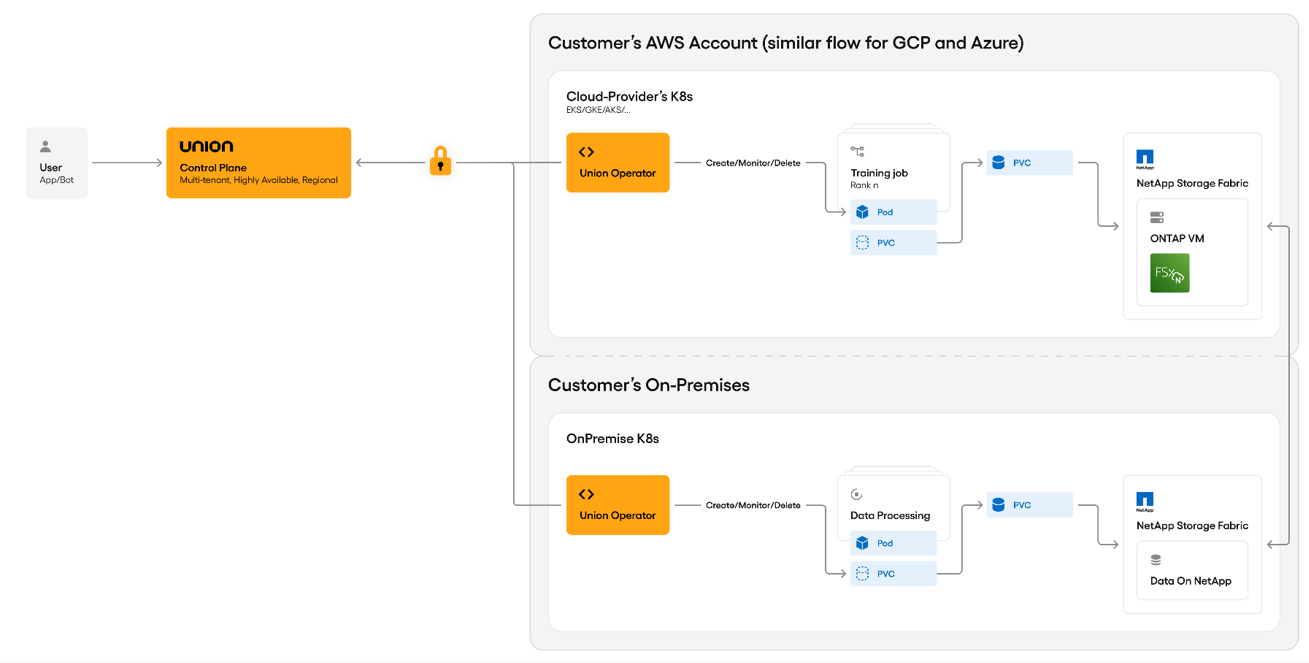
The following figure shows the Union.ai control plane integrated with NetApp storage for hybrid AI training.
-
Union.ai Control Plane: Orchestrates workflows, manages data movement,
and integrates with NetApp APIs. -
NetApp ONTAP + FlexCache: Provides efficient data caching from on-prem
to cloud. -
Hybrid Training Clusters: Training jobs run in cloud K8s clusters
(e.g., EKS) with data cached from on-prem.
Step 1: Create a FlexCache Volume
Using ONTAP System Manager
-
Navigate to Storage > Volumes.
-
Click Add.
-
Select More Options.
-
Enable Add as cache for a remote volume.
-
Choose your source (on-prem) and destination (cloud) volumes.
-
Define QoS or performance level (optional).
-
Click Create.
💡If the NetApp DataOps Toolkit is not working due to permission or aggregate issues, create the FlexCache volume directly using ONTAP System Manager or CLI.
Step 2: Configure Trident
Install Trident on both clusters:
Create Trident Backend
apiVersion: trident.netapp.io/v1
kind: TridentBackendConfig
metadata:
name: ontap-flexcache
spec:
version: 1
storageDriverName: ontap-nas
managementLIF: <ONTAP-MGMT-IP>
dataLIF: <ONTAP-DATA-IP>
svm: <SVM-NAME>
username: vsadmin
password: <password>

Apply: kubectl apply -f backend-flexcache.yaml
If you receive a 401 Unauthorized error, verify that the ONTAP user has sufficient API permissions and that the correct username (vsadmin) and password are used.
Define StorageClass
apiVersion: storage.k8s.io/v1
kind: StorageClass
metadata:
name: flexcache-sc
provisioner: csi.trident.netapp.io
parameters:
backendType: "ontap-nas"
Apply:
kubectl apply -f storageclass-flexcache.yaml
Step 3: Deploy Union.ai Workflows
Union uses PVCs to mount FlexCache volumes into training jobs.
Example PodTemplate
apiVersion: v1
kind: PodTemplate
metadata:
name: netapp-podtemplate
namespace: flytesnacks-development
template:
metadata:
labels:
default-storage: netapp
spec:
containers:
- name: primary
volumeMounts:
- name: flexcache-storage
mountPath: /data/flexcache
volumes:
- name: flexcache-storage
persistentVolumeClaim:
claimName: flexcache-pvc
Example Workflow
from union import task, workflow
@task(pod_template="netapp-podtemplate")

def train_model(pvc_path: str):
Load and train on data from the PVC
@workflow

def training_pipeline():

train_model(pvc_path="/data/flexcache")
Union Operator will:
-
Create the PVC
-
Mount the FlexCache volume
-
Schedule the job in the cloud K8s cluster
Step 4: Validate Integration_
| Task | Validation |
|---|---|
PVC Mount |
Training pods should mount /data/flexcache successfully |
Data Access |
Training jobs can read/write from FlexCache |
Cache Behavior |
Monitor cache hit/miss in ONTAP. Ensure aggregates |
Performance |
Validate latency and throughput for training workloads |
Use NetApp BlueXP or ONTAP CLI to monitor performance.
Security Considerations
-
Use VPC endpoints for FSx for NetApp ONTAP
-
Enable encryption in transit and at rest
-
Apply RBAC/IAM for ONTAP access
-
Union.ai does not access or store customer data
Monitoring and Optimization
Tool |
Purpose |
NetApp BlueXP |
Monitor FlexCache usage and performance |
Union.ai UI |
Track pipeline status and metrics |
Trident Logs |
Debug PVC or backend issues |
Optional Enhancements
-
Automate FlexCache creation using BlueXP APIs
-
Use Union SDK to warm up cache before training
-
Add batch inference or model serving pipelines post-training
-
If DataOps Toolkit fails, fall back to manual FlexCache creation via
System Manager
Troubleshooting
| Issue | Resolution |
|---|---|
PVC stuck in Pending |
Check Trident logs and backend config |
401 Unauthorized from ONTAP API |
Use vsadmin and verify permissions |
Job failed: No suitable storage |
Ensure ONTAP aggregate supports |
Slow training performance |
Check cache hit ratio and network latency |
Data not syncing |
Validate FlexCache relationship health in ONTAP |
Next Steps
-
Validate FlexCache with test data
-
Deploy Union.ai training pipelines
-
Monitor and optimize performance
-
Document customer-specific setup
Conclusion
You now have a validated hybrid AI training environment using Union.ai and NetApp FlexCache. Training jobs can run in the cloud while accessing on-premises data securely and efficiently—without replicating entire datasets or compromising governance.
Union.ai - Companion Guide
Step 1: Choose Deployment Model
Option A: Union Cloud
-
Visit: console.union.ai
-
Create org → Create project
Option B: Self-hosted
-
Follow:
Self-Hosted Guide -
Deploy via Helm:
helm repo add unionai https://unionai.github.io/helm-charts/
helm install union unionai/union -n union-system -f values.yaml
Step 2: Install Union Operator
kubectl get pods -n union-system
Step 3: Install Union CLI
pip install unionai
union login
Step 4: Register Workflow
union project create hybrid-ai
union register training_pipeline.py --project hybrid-ai
Step 5: Run & Monitor
union run training_pipeline --project hybrid-ai
union watch training_pipeline
View logs in the Union UI
Step 6: Register Compute Cluster (Optional)
union cluster register --name cloud-k8s --kubeconfig ~/.kube/config
Step 7: Track Artifacts & Lineage
Union automatically tracks:
-
Input/output parameters
-
Data versions
-
Logs and metrics
-
Execution lineage