


KV Cache Offloading with NetApp

 Suggest changes

 PDFs
PDFs
The first wave of enterprise AI investment focused on model training and fine-tuning building capability, not serving it at scale. As organizations move from experimentation to production, the center of gravity shifts to real-time inference: search assistants, chatbots, copilots, and agent workflows that users interact with continuously. In these environments, GPU utilization rises quickly not because every request runs a full training pass, but because every follow-up question, every new turn in a conversation, and every concurrent user adds load to the inference stack.
Introduction
A pattern soon becomes visible: the GPU is doing a surprising amount of repeated work, recomputing attention over tokens it has already processed. That repetition is not a tuning issue alone; it is a memory architecture issue. The industry’s response is a tiered memory strategy built around the KV cache.
What is KV Cache?
Simply put, KV (key-value) caching is a technique that is used to optimize large language model (LLM) inference by storing previously calculated values in a KV cache so that these values don't need to be calculated again for every new token that is generated, which would otherwise be necessary.
Note: For a deeper technical overview please review Hugging Face KV caching overview.
What is KV Cache Offloading?
Most inference engines store the KV cache in GPU memory by default. That works well until demand grows. KV cache size scales linearly with batch size (the number of prompts processed at the same time) and sequence length, (the length of each conversation or generation stream). As context windows expand, multi-turn chats become common, and more users and agents consume inference services, KV cache requirements can quickly exceed available GPU memory. When that happens, useful cache entries are often evicted, and the engine must recompute attention for tokens it has already processed.
KV cache offloading addresses that constraint by moving a previously processed prompt’s KV cache to an external target outside GPU or accelerator memory such as system RAM, local disk, or shared storage. Offloaded entries can be retained as long as capacity allows and referenced again when a similar prefix or follow-up request arrives, instead of being discarded when GPU memory fills up. In effect, these offload targets function as tiered swap space for GPU memory: slower than VRAM, but larger and more durable, extending how much conversational context and concurrent workload the system can sustain without repeated prefill work.
Importance of a shared storage tier
KV cache offloading already helps when a single inference engine outgrows GPU memory. Moving cache blocks to CPU RAM extends capacity on one server. That is useful, but it solves only part of the production problem. Real inference platforms rarely run as a single serving engine instance. They run behind load balancers, scale horizontally, and serve many concurrent users and agents. In that world, shared storage is what turns KV cache from a local optimization into a platform capability.
-
Shared storage enables reuse across serving instances
One of the primary benefits of shared storage is the ability to access the same files or objects across multiple instances and nodes. This is especially true in case of a scaled deployment of two or more serving engine instances behind a load balancer, each configured to offload KV cache blocks to the same shared bucket or NAS volume. For example, when one instance processes a prompt prefix and offloads the resulting cache blocks, another instance can load those blocks on a cache hit instead of recomputing the same prefill work. That matters because production traffic is distributed, a user's first question might hit instance A; a follow-up or another user with a similar system prompt might hit instance B. Without shared storage, each instance maintains its own private cache world. -
CPU memory alone is not enough for multi-instance deployments
The CPU tier is fast, but it is local to each serving engine process. One instance cannot access KV cache entries that another instance offloaded to its local CPU RAM unless you implement a peer-to-peer channel, which introduces additional latency and operational complexity.Shared storage removes that barrier. CPU RAM remains valuable as a fast-staging tier on each node, but shared S3 or NAS provides the common memory plane that multiple engines can read and write. You are no longer scaling GPUs in isolation you are scaling with shared cache infrastructure. -
Enabling a three-tier design strategy
A preferable architecture combines:-
GPU memory — active cache for in-flight requests.
-
CPU memory — fast staging as prompts enter the queue.
-
Shared storage — durable, large, shareable backing store.
With this architecture, KV cache blocks can be staged from the shared tier into CPU memory as new requests arrive, keeping the GPU focused on active work while still retaining durable cache on storage.
-
-
Economics of inference, not just speed
From a production perspective, the importance of shared storage is not only latency. It is control over memory, concurrency, and cost.Serving engines like vLLM manage KV cache efficiently inside one node. KV cache offload frameworks like LMCache turn KV cache into a portable, shareable asset that can move across CPU memory and storage. Shared storage platforms like NetApp ONTAP and StorageGRID provide the durable tier that makes that sharing practical across multiple instances. With LMCache connected to shared storage, multiple vLLM instances can access the same offloaded KV cache entries, improving throughput and reducing redundant computation as concurrency grows. That reduces wasted GPU cycles on repeated prefill directly relevant for chatbots, search assistants, agents, and any workload with multi-turn threads, shared system prompts, or recurring context patterns. -
Boost Inference Performance and GPU investment
This benchmark compares inference performance as conversation length and concurrent load increase. When KV cache is kept only in GPU memory, available headroom is exhausted quickly and throughput drops (orange line). With a three-tier design (GPU for active work, CPU for fast staging, and shared storage for durable, shareable cache), the platform sustains more sessions and avoids the same steep performance decline. In practice, tiering helps you get more work from the same GPUs by reducing repeated prefill computation.-
In simple terms:
-
GPU tier — handles active, in-flight work.
-
CPU tier — keeps recently used cache close to the serving engine.
-
Shared storage tier — preserves cache across servers and frees GPU/CPU memory for new sessions.
-
Figure 1 - Multi-round Inference Benchmark
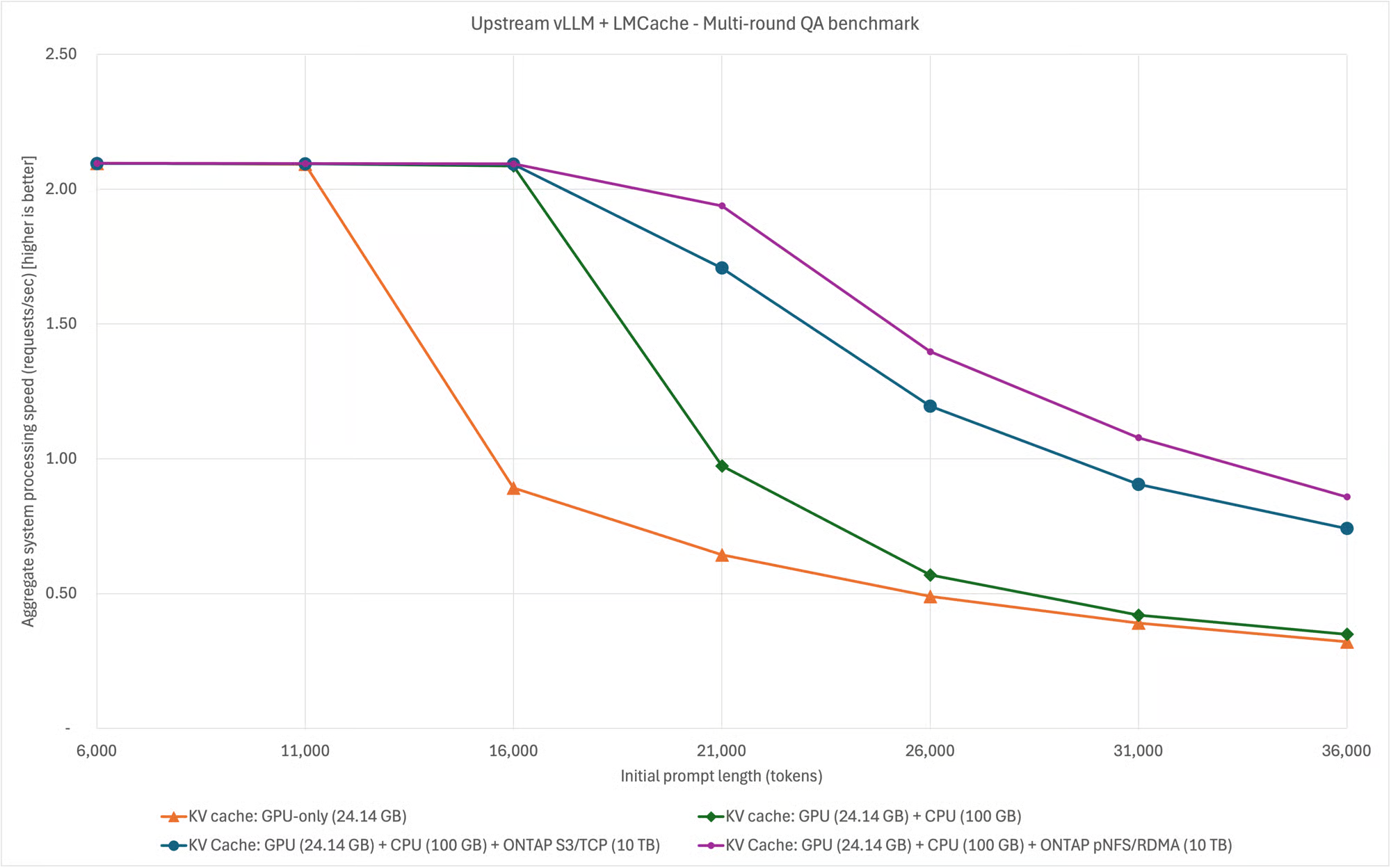
The benchmark indicates that adding shared storage alongside CPU memory does not reduce performance; it extends the usable operating range before throughput degradation appears. Tiering effectively adds memory layers for inference, reducing the need to add GPUs every time session counts, context length, or concurrency increases.
-
-
Enterprise fit: standard protocols, no proprietary client
Shared storage is important, but not all shared storage is created equal. NetApp supports KV cache offloading using industry-standard protocols and tooling:-
StorageGRID S3
-
NFS / pNFS for ONTAP NAS
No custom proprietary inference client is required. Operations teams can use the same storage protocols they already operate for other data services, with familiar data protection, security, and multicloud mobility behind them.
-
Deploy KV cache offloading
Shared storage extends KV cache capacity and enables reuse across serving instances. To use that tier in production, you configure an inference engine and a KV cache offloading framework. The following sections describe how to implement this stack using common tooling options.
vLLM
vLLM a popular high-performance open-source LLM inference engine. In this solution, it is the engine that receives user requests, generates responses, and manages KV cache inside GPU memory during inference. vLLM is pluggable – you can choose which offloading framework you want to use. The following sections describe how to implement a vLLM-based serving stack with popular offloading frameworks.
LMCache (in-process mode)
LMCache is a popular open-source KV cache offloading framework. This section describes how to implement a vLLM-based serving stack that uses LMCache for KV cache offloading. In this implementation, LMCache works with vLLM to move KV cache out of GPU memory into larger tiers such as CPU RAM, local disk, or shared storage (like StorageGRID S3 or an ONTAP NAS mount).
In a default setup, vLLM keeps KV cache only in GPU memory. As system load grows, that becomes the bottleneck. In this solution, vLLM is paired with LMCache where vLLM serves the model, while LMCache offloads and reuses cache across CPU and shared NetApp storage. LMCache connects to vLLM through a connector; you enable it at startup with vLLM’s --kv-transfer-config flag, so vLLM and LMCache save cache to storage and reload it on a cache hit.
In-process mode is the original method of running LMCache with vLLM. When you use in-process mode, LMCache runs inside the vLLM process. Later LMCache versions added multiprocess mode, which is the currently recommended approach for better feature support and performance. This section covers in-process mode, which is marked as deprecated in current LMCache documentation. For new deployments, consider using multiprocess mode instead.
For this deployment, you will:
-
Install vLLM together with LMCache
-
Start vLLM with the LMCache connector enabled
-
Deploy a three-tier setup (GPU + CPU + shared storage) with two vLLM instances (on separate GPUs) behind a vLLM router, both using the same shared storage backend.
Prerequisites
-
Linux GPU server with NVIDIA drivers (including CUDA) and at least one GPU (two GPUs or multiple servers for the full two-instance + router layout)
-
Python and uv installed
-
Docker and NVIDIA Container Toolkit installed (required for the vLLM router in Step 4)
-
Network access to download the model (for example, Hugging Face) and to reach your storage endpoint
StorageGRID S3 backend
-
S3 bucket created for KV cache use
-
Read/write credentials for the bucket
-
Network connectivity from the GPU server to the S3 endpoint
-
Virtual hosted-style S3 requests enabled
ONTAP pNFS/NFS backend
-
ONTAP volume exported to the GPU server(s)
-
Mount path created (for example, /mnt/kvcache) on each server that runs vLLM. Example mount command for high-performance pNFS over RDMA (RoCE):
mount -o vers=4.1,proto=rdma,trunkdiscovery,write=eager,rsize=262144,wsize=262144 my_storage.my_company.net:/kvcache /mnt/kvcache
1. Install vLLM and LMCache
Create a virtual environment and install the vLLM and LMCache. Refer to the LMCache installation documentation for further details. It is critical that you follow the correct install path for your CUDA version.
uv venv .venv
source .venv/bin/activate
uv pip install --upgrade lmcache vllm
At this point you have the inference engine (vLLM) and the cache layer (LMCache).
2. Configure LMCache
vLLM does not offload KV cache by itself. You enable LMCache through vLLM’s KV transfer connector. Create a YAML file (lmcache-config.yaml) that defines CPU and shared storage tier configuration. LMCache reads this YAML file as part of vLLM inference startup sequence.
Sample Snippet: StorageGRID S3 shared tier
local_cpu: True
max_local_cpu_size: 100
save_decode_cache: True
remote_url: "s3://<bucket>.<storagegrid_s3_endpoint_fqdn>"
remote_serde: "naive"
extra_config:
  s3_num_io_threads: 320
  s3_prefer_http2: False
  s3_enable_s3express: False
  save_chunk_meta: False
  disable_tls: <True/False>
  aws_access_key_id: "<storagegrid_s3_access_key>"
  aws_secret_access_key: "<storagegrid_s3_secret_key>"
  s3_region: "us-east-1"
Note: Replace bucket name, endpoint, credentials, and disable_tls to match your environment.
Sample Snippet: ONTAP pNFS/NAS shared tier
local_cpu: true
max_local_cpu_size: 100
save_decode_cache: true
remote_storage_plugins: ["fs"]
extra_config:
  remote_storage_plugin.fs.base_path: /mnt/kvcache
  save_chunk_meta: false
Mount the ONTAP export using your site’s NFS/pNFS procedure before Step 3.
3. Run two vLLM instances (shared cache across servers)
Set common environment variables on both instances:
export LMCACHE_CONFIG_FILE=$(pwd)/lmcache-config.yaml
export PYTHONHASHSEED=0
export VLLM_API_KEY='<shared_api_key>'
Instance 1 (GPU 0, port 8001):
export CUDA_VISIBLE_DEVICES=0
vllm serve Qwen/Qwen3-8B \
  --tensor-parallel-size 1 \
  --kv-transfer-config '{"kv_connector":"LMCacheConnectorV1","kv_role":"kv_both"}' \
  --port 8001
Instance 2 (GPU 1, port 8002 — separate terminal):
export CUDA_VISIBLE_DEVICES=1
vllm serve Qwen/Qwen3-8B \
  --tensor-parallel-size 1 \
  --kv-transfer-config '{"kv_connector":"LMCacheConnectorV1","kv_role":"kv_both"}' \
  --port 8002
Use the same config file and hash seed so both instances agree on cache block identity and can read each other’s offloaded data from shared storage. Set VLLM_API_KEY on both instances; the router passes this value as OPENAI_API_KEY so that routed requests are accepted by the instances.
Note: A single GPU instance can also be used to implement a tiered storage architecture. In such an instance skip step 4.
4. Deploy the vLLM router (single entry point)
After both instances are healthy, deploy a router so clients use one OpenAI-compatible URL.
docker run -d --rm --name vllm-router \
  --network host \
  -e OPENAI_API_KEY="${VLLM_API_KEY}" \
  ghcr.io/vllm-project/production-stack/router:latest \
  --port 8000 \
  --service-discovery static \
  --static-backends "http://localhost:8001,http://localhost:8002" \
  --static-models "Qwen/Qwen3-8B,Qwen/Qwen3-8B" \
  --routing-logic roundrobin
Send traffic to http://localhost:8000/v1. The router distributes requests; LMCache and shared storage allow cache reuse across instances, not only within one GPU.
For example, you can send a request to the router using curl as follows (replace <shared_api_key> with your respective API key):
curl -s http://localhost:8000/v1/chat/completions \
  -H "Content-Type: application/json" \
  -H 'Authorization: Bearer <shared_api_key>' \
  -d '{
    "model": "Qwen/Qwen3-8B",
    "messages": [{"role": "user", "content": "What is 2+2?"}]
  }' | jq .
5. Validate that tiering is working
-
Both vLLM processes listen on 8001 and 8002; router responds on 8000.
-
Send a request with a long prefix through the router.
-
Confirm objects or files appear on shared storage (S3 bucket or ls -ltr /mnt/kvcache).
-
Send a similar request again - second request should show faster prefill or cache-hit behavior in logs.
-
Repeat through the router so traffic may hit the other instance.
Conclusion
Deploying a tiered KV cache architecture moves KV cache from GPU memory to CPU memory and shared NetApp storage, so inference can scale with users and context length without wasting GPU cycles on repeated prefill. Shared storage turns cache into reusable infrastructure across serving instances and helps you get more value from your existing GPU investment.
NetApp storage is a strong fit for this tier because it delivers what production inference needs beyond raw capacity: standard access over S3 and NFS/pNFS, shared cache that multiple serving engine instances can use at the same time, and enterprise data services you already rely on for durability, protection, and governance. You do not need a proprietary client; KV cache offloading frameworks connect to StorageGRID S3 or an ONTAP NAS mount using familiar protocols.
NetApp gives you a familiar storage foundation for KV cache offloading without changing how you run inference or how your teams manage data.