


TR-5020: Oracle Standalone Instance Deployment on Google Cloud NetApp Volumes with NFS

 Suggest changes

 PDFs
PDFs
Allen Cao, Niyaz Mohamed, NetApp
This solution provides overview and details for Oracle deployment on Google Cloud NetApp Volumes as primary database storage over NFS protocol and Oracle database is deployed as a standalone container database with dNFS enabled.
Purpose
Running performance-intensive and latency-sensitive Oracle workloads in the cloud can be challenging. Google Cloud NetApp Volumes (GCNV) makes it easy for enterprise line-of-business (LOB) and storage professionals to migrate and run demanding Oracle workloads without code change. Google Cloud NetApp Volumes is widely used as the underlying shared file-storage service in various scenarios, such as new deployment or migration (lift and shift) of Oracle databases from on-premises to Google Cloud.
This documentation demonstrates the GCNV DB volumes configuration in Google cloud console and simplified deployment of Oracle databases in Google Cloud NetApp Volumes via NFS mounts using Ansible automation. The Oracle database deploys in a container database (CDB) and pluggable databases (PDB) configuration with Oracle dNFS protocol enabled to boost performance. Furthermore, it demonstrates a detailed database backup, restore, and clone strategy and provides an automation toolkit for Oracle database backup management in Google Cloud.
This solution addresses the following use cases:
-
Automated Oracle database deployment on Google Cloud NetApp Volumes in Google Cloud with NFS protocol.
-
Oracle database backup, recovery, clone on Google Cloud NetApp Volumes in Google Cloud.
Audience
This solution is intended for the following people:
-
A DBA who would like to deploy Oracle on Google Cloud NetApp Volumes.
-
A database solution architect who would like to test Oracle workloads on Google Cloud NetApp Volumes.
-
A storage administrator who would like to deploy and manage an Oracle database on Google Cloud NetApp Volumes.
-
An application owner who would like to stand up an Oracle database on Google Cloud NetApp Volumes.
Solution test and validation environment
The testing and validation of this solution were performed in a lab setting that might not match the final deployment environment. See the section Key factors for deployment consideration for more information.
Architecture
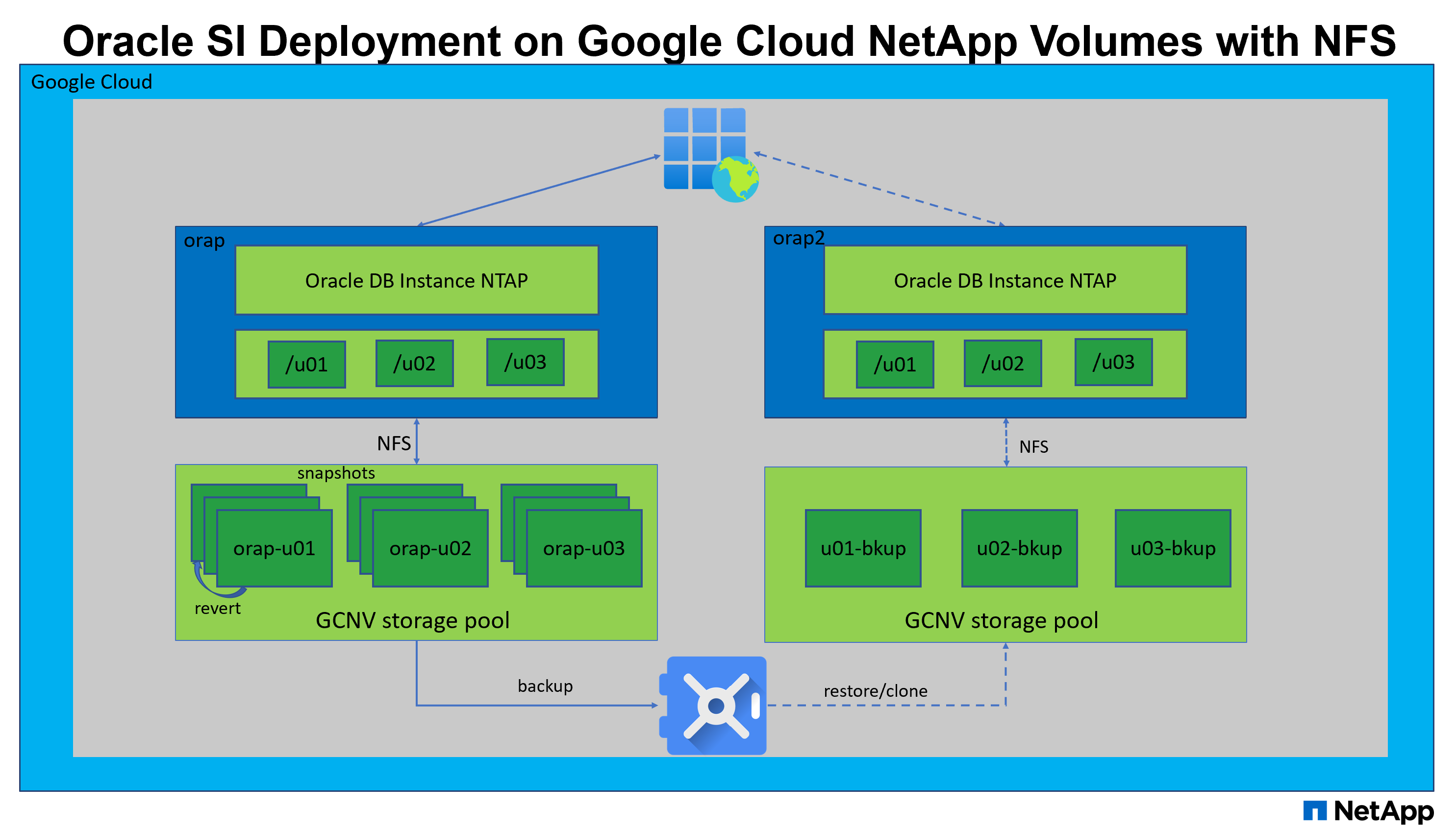
Hardware and software components
Hardware |
||
Google Cloud NetApp Volumes |
Current offering in Google Cloud by Google |
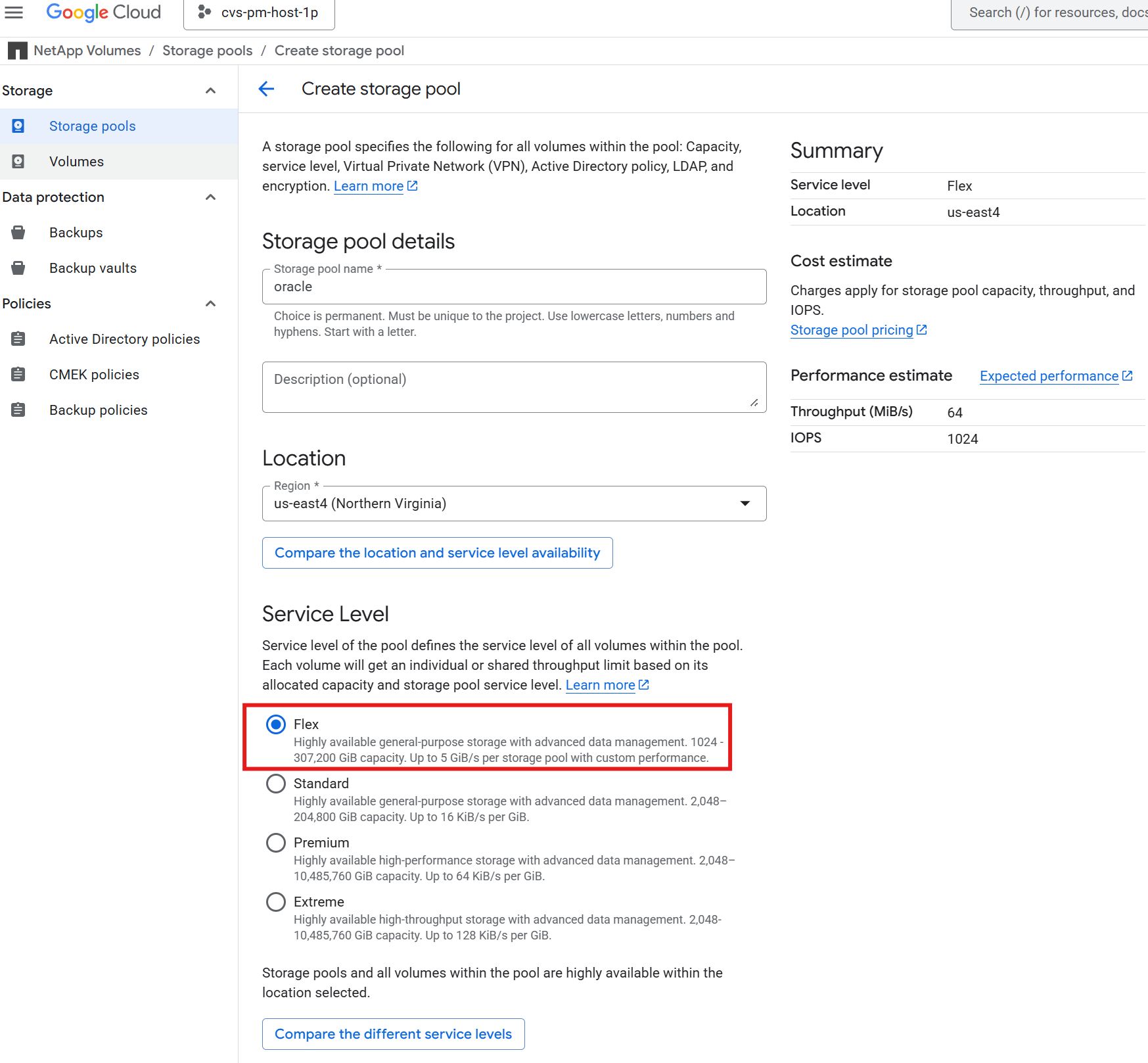
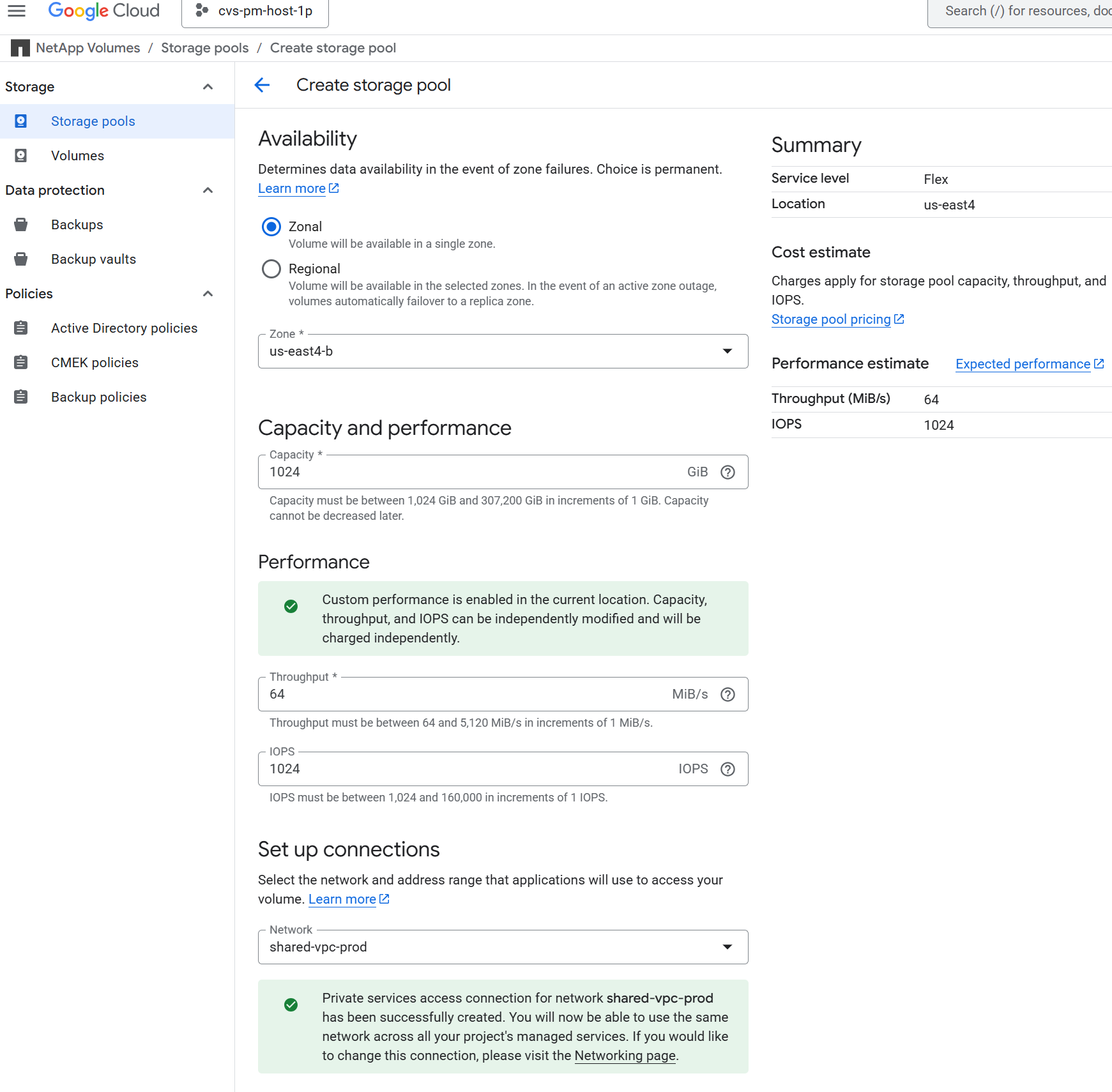
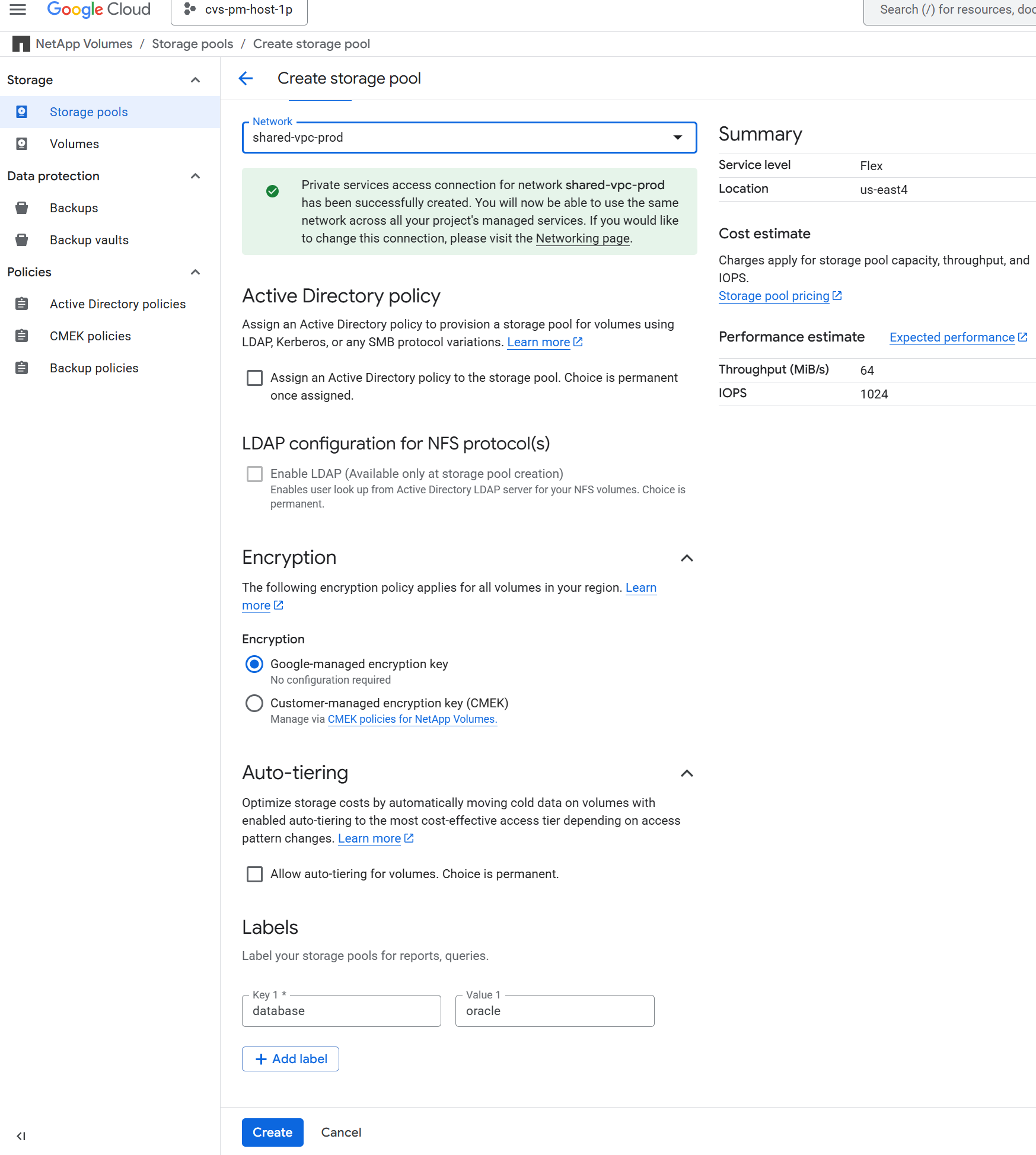
One storage pool with Flex service level, 2 TiB capacity, 64 MiB/s throughput, and 1024 IOPS provisioned for Oracle database storage |
Google Compute Engine VMs for DB servers |
n1-standard-4 (4 vCPUs, 15 GB Memory) |
Two Linux virtual machine instances for deployment and recovery demonstration |
Software |
||
RedHat Linux |
RHEL Linux 8.10 (LVM) - x64 Gen2 |
Deployed RedHat subscription for testing |
Oracle Database |
Version 21.19 |
Applied RU patch p38068980_210000_Linux-x86-64.zip |
Oracle OPatch |
Version 12.2.0.1.48 |
Latest patch p6880880_210000_Linux-x86-64.zip |
NFS |
Version 3.0 |
Oracle dNFS enabled |
Ansible |
core 2.16.2 |
Python 3.10.13 |
Oracle database configuration in the lab environment
Server |
Database |
DB Storage |
orap - primary DB server |
NTAP(NTAP_PDB1,NTAP_PDB2,NTAP_PDB3) |
/u01, /u02, /u03 NFS mounts on Google Cloud NetApp Volumes storage pool |
orap2 - restored from backup |
NTAP(NTAP_PDB1,NTAP_PDB2,NTAP_PDB3) |
/u01, /u02, /u03 NFS mounts on Google Cloud NetApp Volumes storage pool |
Key factors for deployment consideration
-
GCNV storage pool service level and throughput. GCNV offer four different service levels: Standard, Premium, Extreme, and Flex. For Standard, Premium, Extreme service levels, IO throughput is determined and fixed based on the size of a DB volume. The total IO throughput is capped based on the storage pool sizing. For Flex service level, IO throughput is not fixed on a DB volume size but shared among all DB volumes and capped at the storage pool sizing level. This accommodates smaller volume database with occasional IOPs surges. For reference, Standard, Premium, Extreme service level provides 16 KiB/s per GiB, 64 KiB/s per GiB, 128 KiB/s per GiB throughput respectively. On the other hand, Flex service level offers up to 5 GiB/s per storage pool with custom performance setting. It is important to right-size the service level and storage pool based on the expected IO throughput and IOPS requirements of the Oracle database workload.
-
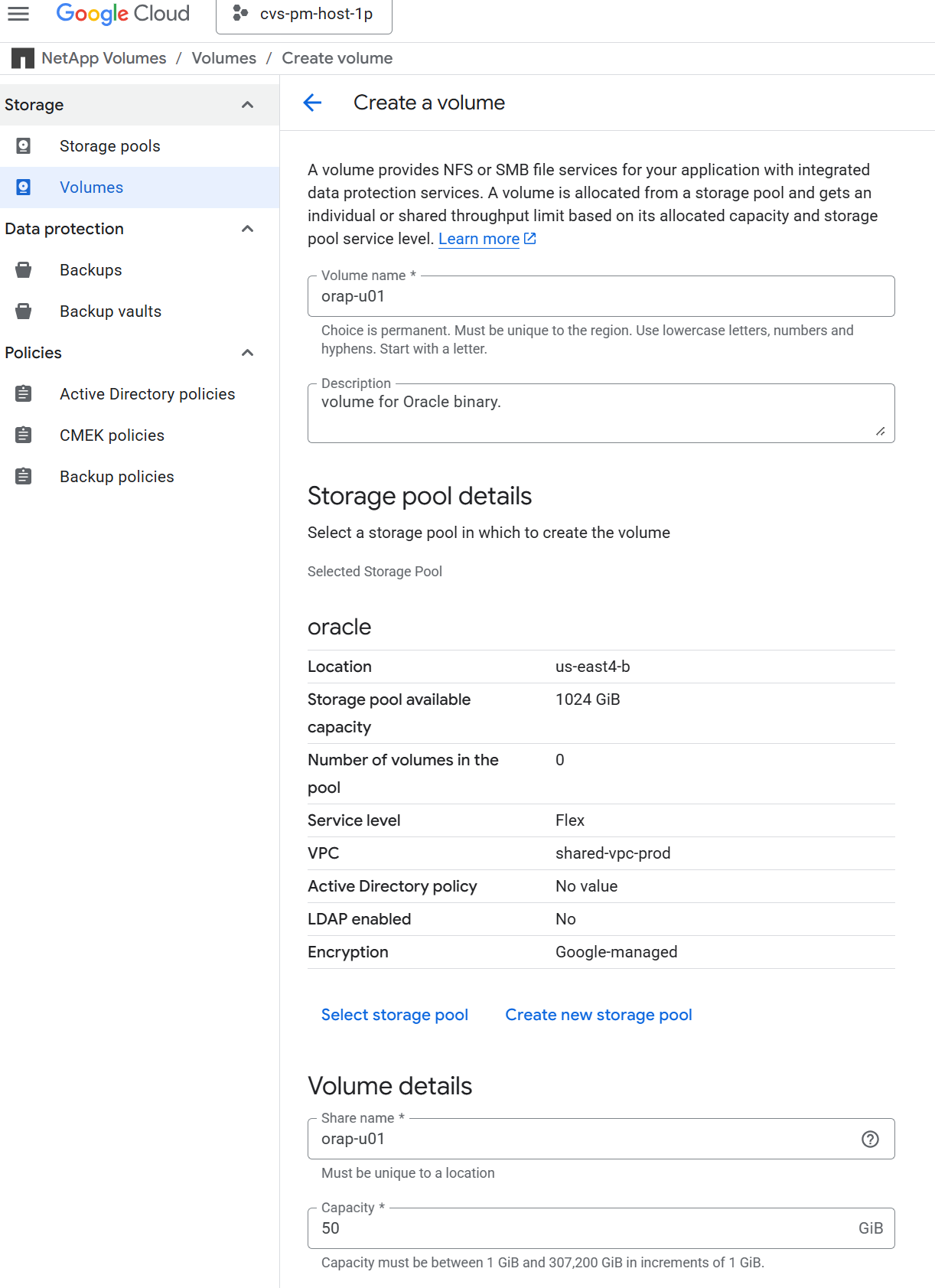
Database storage layout. In this automated Oracle deployment, we provision three database volumes for each database to host Oracle binary, data, and logs by default. The volumes are mounted on Oracle DB server as /u01 - binary, /u02 - data, /u03 - logs via NFS. Dual control files are configured on /u02 and /u03 mount points for redundancy.
-
dNFS configuration. By using Oracle dNFS (available since Oracle 11g), an Oracle database running on Google Compute Engine with Google Cloud NetApp Volumes storage can drive significantly more I/O than the native NFS client. Automated Oracle deployment configures dNFS on NFSv3 by default.
-
Snapshot and Vault backup. Rather than traditional RMAN database backup, NetApp recommends implementing storage efficient, app-consistent snapshot and vault backup to achieve fast (seconds) snapshot backup, quick (minutes) database restore, recovery and clone from snapshots or backups in storage vault. A snapshot is a point-in-time copy of the database volumes that can be created in seconds and does not consume additional storage space at the time of creation. It coexists with the primary database volumes and may be lost if the primary volumes are compromised. A vault backup is a copy of the snapshot that is stored in object storage and in a different location for disaster recovery purposes.
-
RTO/RPO considerations. When setting up database backup strategies, it is important to consider the Recovery Time Objective (RTO) and Recovery Point Objective (RPO) requirements. While performance impact on database is minimal with snapshot based backup, there is tradeoff between the frequency of backups, which affects the RTO/RPO, and the storage expenditure. More frequent backups can help achieve lower RTO/RPO but may increase storage costs. It is important to find the right balance based on the business requirements and budget. The automation solution provides an automation toolkit based on Ansible playbook to manage Oracle database backup with user configurable retention and backup schedule.
Solution deployment
The following sections provide step-by-step procedures for automated Oracle 21c deployment and database backup, recovery, clone on Google Cloud NetApp Volumes with directly mounted database volumes via NFS to Google Cloud Compute Engine VMs as database servers.
Prerequisites for deployment
Details
Deployment requires the following prerequisites.
-
An Google Cloud account has been set up, and the necessary VPC and network settings have been created within your Google Cloud account specific project.
-
From the Google Cloud console, deploy Google Compute Engine VMs as Oracle DB servers. Ensure to turn off firewall and enable VM SSH private/public key authentication with an admin user to DB servers for automation. See the architecture diagram in the previous section for details about the environment setup.

Ensure that you have allocated at least 50G in the VM root disk to have sufficient space to stage Oracle installation files and add OS swap file. -
Provision a Linux VM as the Ansible controller node with the version of Ansible and Git installed as listed in the automation toolkit README. For help with Ansible automation, refer to the following link: Getting Started with NetApp solution automation^ in section -
Setup the Ansible Control Node for CLI deployments on RHEL / CentOSor
Setup the Ansible Control Node for CLI deployments on Ubuntu / Debian.
The Ansible controller node can locate either on-premisses or in Google Cloud as far as it can reach Google Cloud DB server VMs via ssh port. -
Clone a copy of the NetApp Oracle deployment automation toolkit for NFS.
git clone https://bitbucket.ngage.netapp.com/scm/ns-bb/na_oracle_deploy_nfs.git
The toolkit can only be accessed by NetApp internal user with bitbucket access at this moment. For interested external users, please request access from your account team or reach out to NetApp Solutions Engineering team. -
Stage following Oracle 21c installation files on Google Cloud DB VM /tmp/archive directory with 777 permission.
installer_archives:
  - "LINUX.X64_213000_db_home.zip"
  - "p34765931_210000_Linux-x86-64.zip"
  - "p6880880_210000_Linux-x86-64.zip"
Google Cloud NetApp Volumes configuration for Oracle database storage
Details
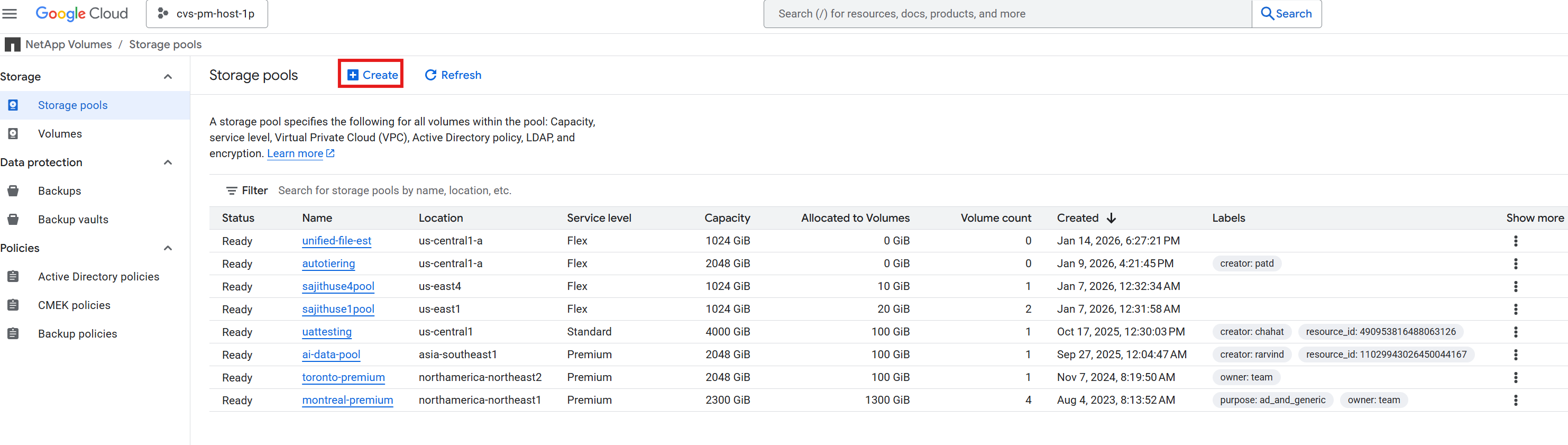
Following are the steps to configure Google Cloud NetApp Volumes for Oracle database storage with screen shots for demonstration.
-
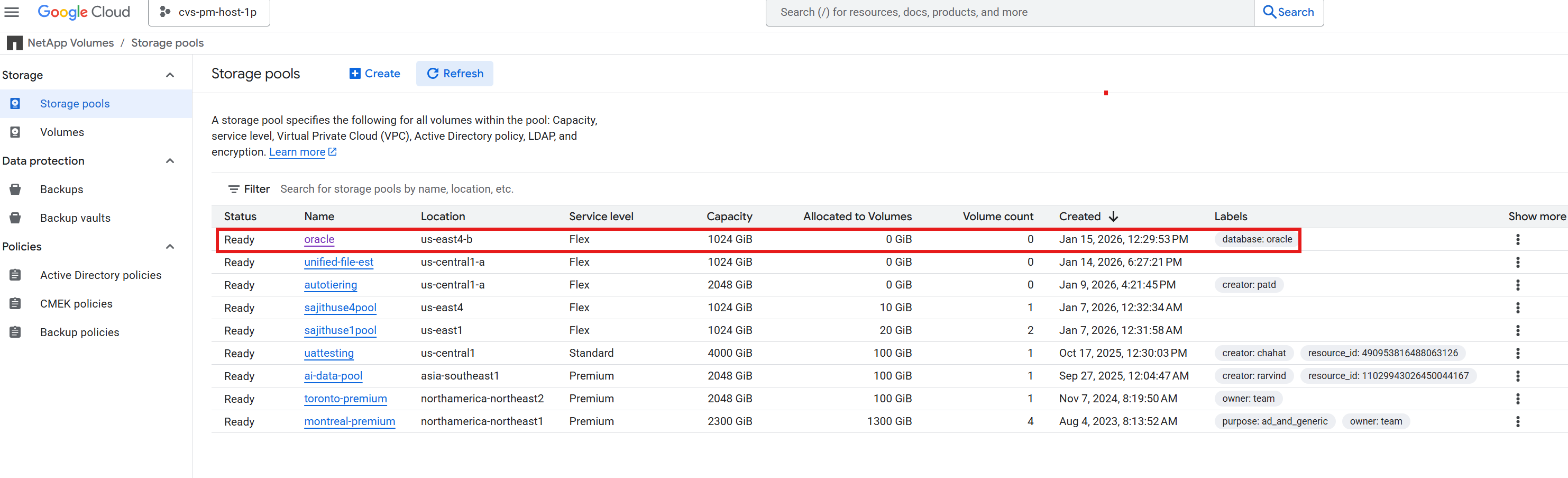
Create a storage pool with the desired service level and capacity for Oracle database storage.
+
+
+
+
+
-
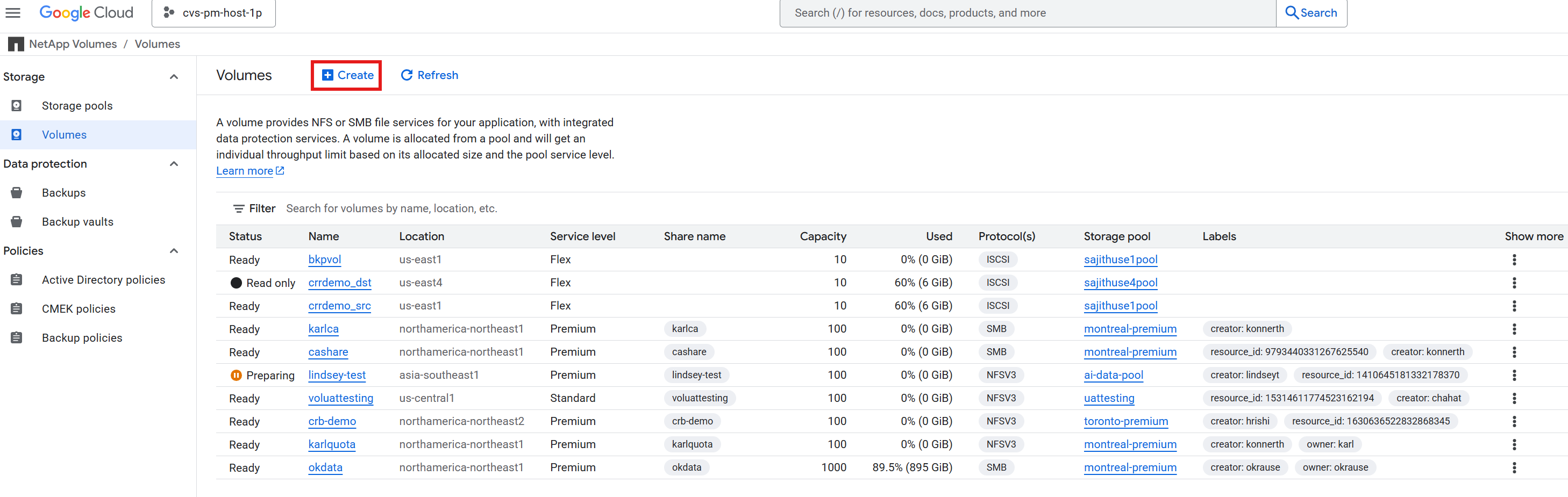
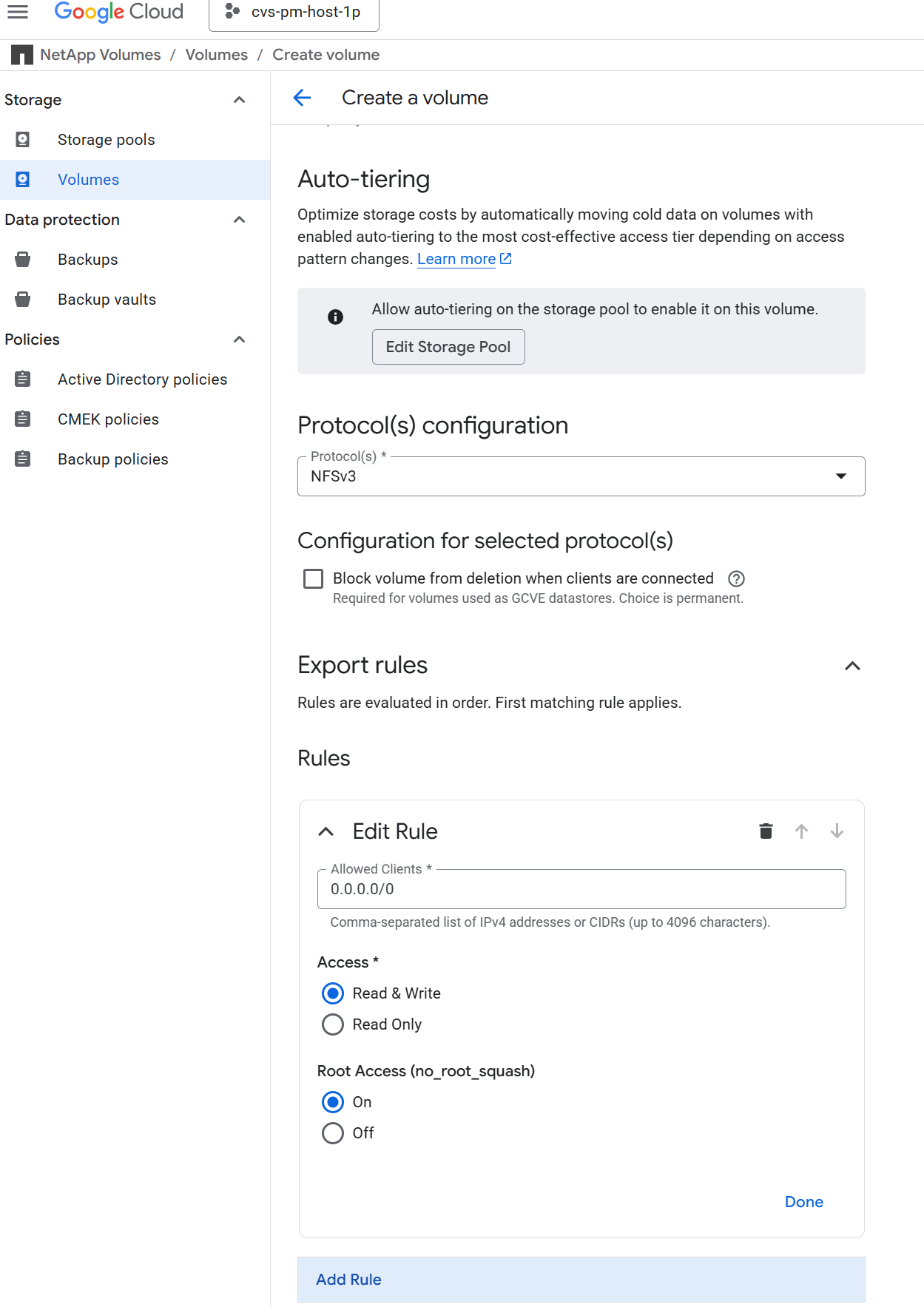
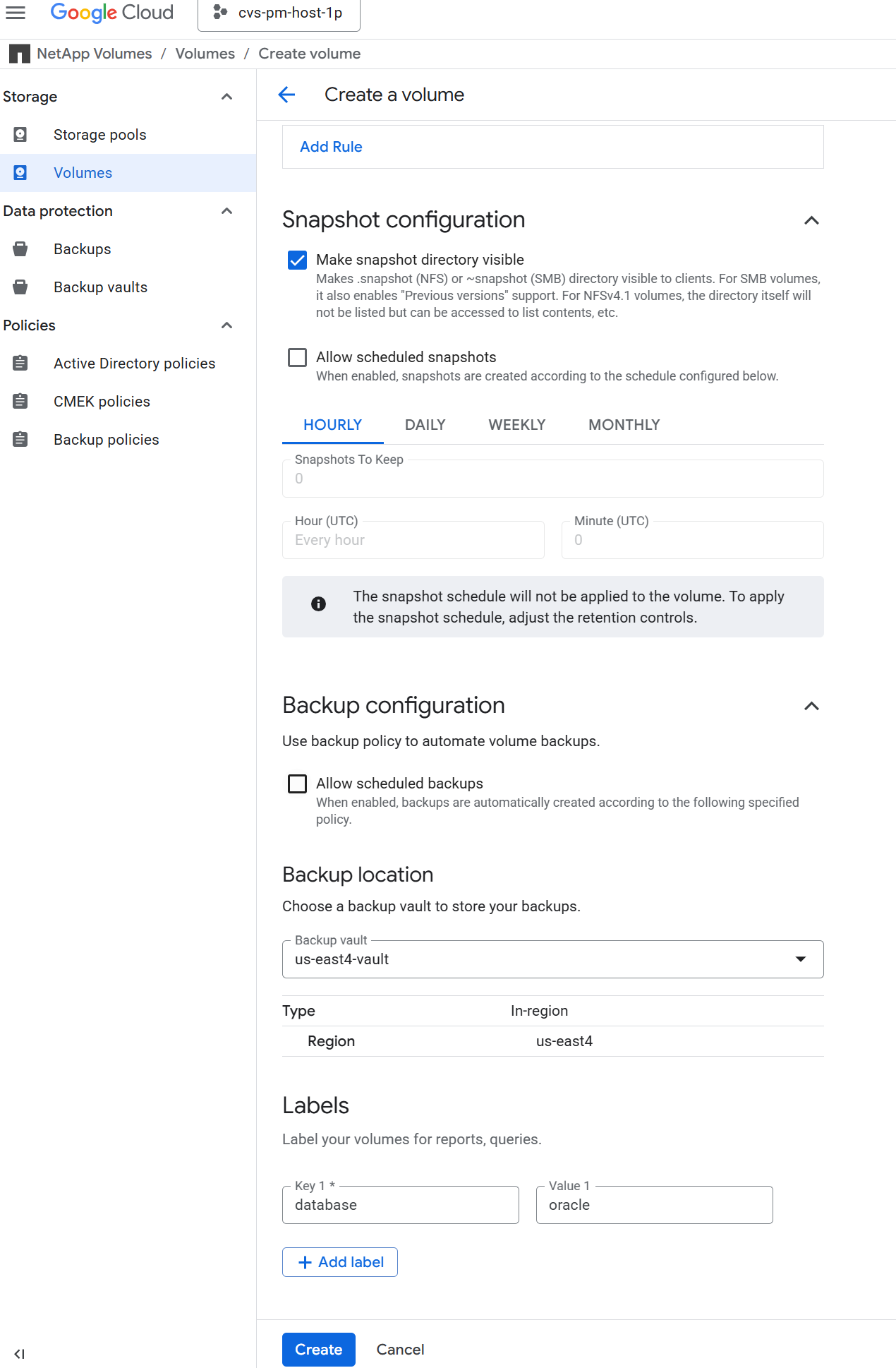
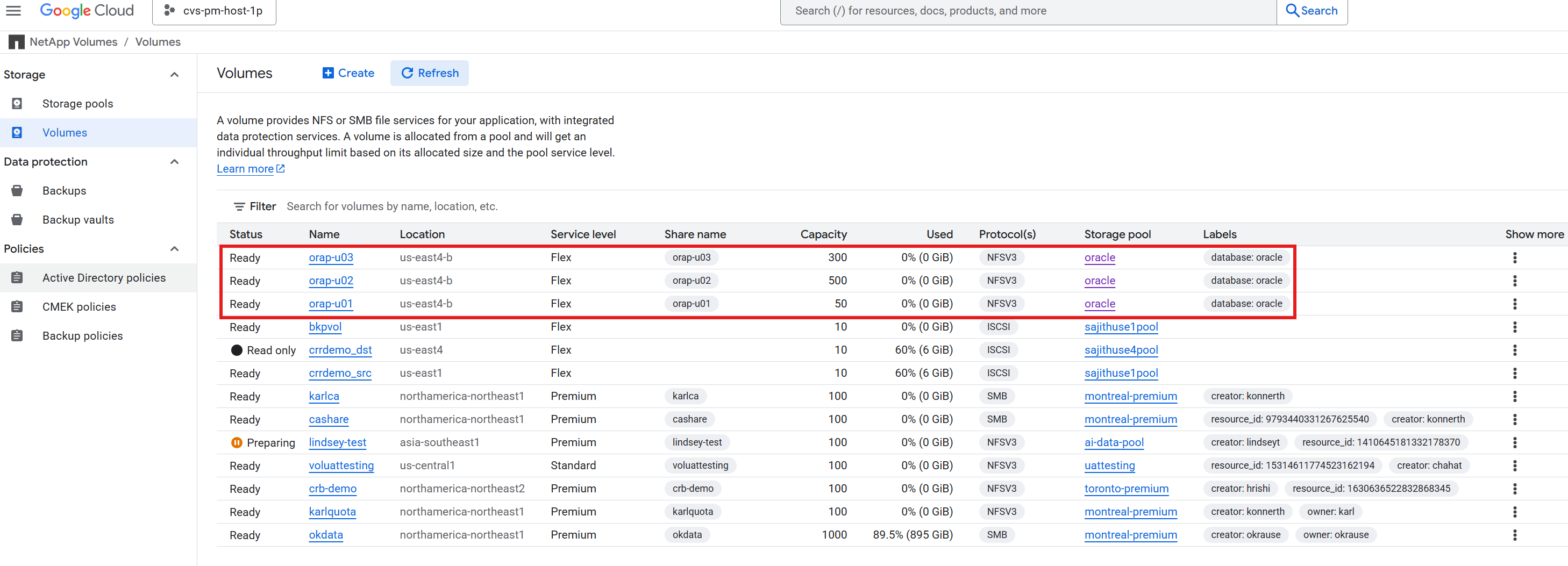
Create three DB volumes for Oracle database with the desired size in storage pool for database storage. For example, /u01 for binary files, /u02 for data files, and /u03 for redo logs and control files with NFSv3 protocol and mount option as demonstrated in the following screen shots.
+
+
+
+
+
|
|
Do not turn on scheduled backup in Google Cloud NetApp Volumes at this moment since the built-in backup scheme is not app-consistent. The backup automation toolkit provided for this solution will manage app-consistent database backup with user defined schedule and retention. |
Automated Oracle deployment with Ansible playbook
Automation parameter files
Details
Ansible playbook executes database installation and configuration tasks with predefined parameters. The toolkit currently supports Oracle database version 19c and 21c deployment. For this Oracle automation solution, there are three user-defined parameter files that need user input before playbook execution.
-
hosts - define targets that the automation playbook is running against.
-
vars/vars.yml - the global variable file that defines variables that apply to all targets.
-
host_vars/host_name.yml - the local variable file that defines variables that apply only to a named target. In our use case, these are the Oracle DB servers.
In addition to these user-defined variable files, there are several default variable files that contain default parameters that do not require change unless necessary. The following sections show how to configure the user-defined variable files.
Parameter files configuration
Details
-
Ansible target
hostsfile configuration:#Oracle hosts [oracle] orap ansible_host=10.61.180.6 ansible_ssh_private_key_file=ora_01.pem orap2 ansible_host=10.61.180.8 ansible_ssh_private_key_file=ora_02.pem
-
Global
vars/vars.ymlfile configuration########################################### ### ONTAP env specific config variables ### ########################################### # Prerequisite to create three volumes in NetApp ONTAP storage from System Manager or cloud dashboard with following naming convention: # {{ inventory_hostname}}_u01 or {{ inventory_hostname}}-u01 -- Oracle binary # {{ inventory_hostname}}_u02 or {{ inventory_hostname}}-u02 -- Oracle data # {{ inventory_hostname}}_u03 or {{ inventory_hostname}}-u03 -- Oracle redo # It is important to strictly follow the name convention or the automation will fail. host_datastores_nfs: - {vol_name: "{{ inventory_hostname}}-u01", lif: "{{ nfs_lif }}"} - {vol_name: "{{ inventory_hostname}}-u02", lif: "{{ nfs_lif }}"} - {vol_name: "{{ inventory_hostname}}-u03", lif: "{{ nfs_lif }}"} ########################################### ### Linux env specific config variables ### ########################################### redhat_sub_username: "xxxxxxxxxx" redhat_sub_password: "xxxxxxxxxx" #################################################### ### DB env specific install and config variables ### #################################################### # Database version: support 19c and 21c, 19c|19.0.0 or 21c|21.0.0 ora_version: 21c ora_version_num: 21.0.0 # Set initial password for all required Oracle passwords. Change them after installation. initial_pwd_all: "xxxxxxxxxx" # Database domain name db_domain: cvs-pm-host-1p.internal -
Local DB server
host_vars/host_name.ymlconfiguration such as orap.yml, orap2.yml …# User configurable Oracle host specific parameters # Database SID. By default, a container DB is created with 3 PDBs within the CDB oracle_sid: NTAP # CDB is created with SGA at 75% of memory_limit, MB. Consider how many databases to be hosted on the node and how much ram to be allocated to each DB. The grand total of SGA should not exceed 75% available RAM on node. memory_limit: 8192 # NFS server ip address to access database volumes - retrieved from Google Cloud console within the volume details. nfs_lif: 10.165.128.242
Playbook execution
Details
There are a total of five playbooks in the automation toolkit. Each performs different task blocks and serves different purposes.
0-all_playbook.yml - execute playbooks from 1-4 in one playbook run.
1-ansible_requirements.yml - set up Ansible controller with required libs and collections.
2-linux_config.yml - execute Linux kernel configuration on Oracle DB servers.
4-oracle_config.yml - install and configure Oracle on DB servers and create a container database.
5-destroy.yml - optional to undo the environment to dismantle all.
There are three options to run the playbooks with the following commands.
-
Execute all deployment playbooks in one combined run.
ansible-playbook -i hosts 0-all_playbook.yml -u admin -e @vars/vars.yml -
Execute playbooks one at a time with the number sequence from 1-4.
ansible-playbook -i hosts 1-ansible_requirements.yml -u admin -e @vars/vars.ymlansible-playbook -i hosts 2-linux_config.yml -u admin -e @vars/vars.ymlansible-playbook -i hosts 4-oracle_config.yml -u admin -e @vars/vars.yml -
Execute 0-all_playbook.yml with a tag.
ansible-playbook -i hosts 0-all_playbook.yml -u admin -e @vars/vars.yml -t ansible_requirementsansible-playbook -i hosts 0-all_playbook.yml -u admin -e @vars/vars.yml -t linux_configansible-playbook -i hosts 0-all_playbook.yml -u admin -e @vars/vars.yml -t oracle_config -
Undo the environment
ansible-playbook -i hosts 5-destroy.yml -u admin -e @vars/vars.yml
Post execution validation
Details
After the playbook run, login to the Oracle DB server VM to validate that Oracle is installed and configured and a container database is created successfully. Following is an example of Oracle database validation on host orap.
-
Validate NFS mounts
[oracle@orap ~]$ df -h
Filesystem                Size  Used Avail Use% Mounted on
devtmpfs                  7.2G     0  7.2G   0% /dev
tmpfs                     7.3G     0  7.3G   0% /dev/shm
tmpfs                     7.3G  8.5M  7.2G   1% /run
tmpfs                     7.3G     0  7.3G   0% /sys/fs/cgroup
/dev/sda2                  50G   31G   20G  62% /
/dev/sda1                 200M  5.9M  194M   3% /boot/efi
10.165.128.242:/orap-u02  500G  410G   91G  82% /u02
10.165.128.242:/orap-u03  300G  2.5G  298G   1% /u03
10.165.128.242:/orap-u01   50G   11G   40G  21% /u01
tmpfs                     1.5G     0  1.5G   0% /run/user/1010

[admin@orap ~]$ cat /etc/fstab

#
# /etc/fstab
# Created by anaconda on Wed Jul  9 15:09:30 2025
#
# Accessible filesystems, by reference, are maintained under '/dev/disk/'.
# See man pages fstab(5), findfs(8), mount(8) and/or blkid(8) for more info.
#
# After editing this file, run 'systemctl daemon-reload' to update systemd
# units generated from this file.
#
UUID=c829892e-02dc-40d8-b1b0-42a3b90b6315 /                       xfs     defaults        0 0
UUID=6275-3342          /boot/efi               vfat    defaults,uid=0,gid=0,umask=077,shortname=winnt 0 2
/root/swapfile swap swap defaults 0 0
10.165.128.242:/orap-u01 /u01 nfs rw,bg,hard,vers=3,proto=tcp,timeo=600,rsize=262144,wsize=262144 0 0
10.165.128.242:/orap-u02 /u02 nfs rw,bg,hard,vers=3,proto=tcp,timeo=600,rsize=262144,wsize=262144 0 0
10.165.128.242:/orap-u03 /u03 nfs rw,bg,hard,vers=3,proto=tcp,timeo=600,rsize=262144,wsize=262144 0 0
-
As oracle user, validate Oracle listener
[oracle@orap ~]$ lsnrctl status listener

LSNRCTL for Linux: Version 21.0.0.0.0 - Production on 17-FEB-2026 20:34:06

Copyright (c) 1991, 2021, Oracle.  All rights reserved.

Connecting to (DESCRIPTION=(ADDRESS=(PROTOCOL=TCP)(HOST=orap.us-east4-b.c.cvs-pm-host-1p.internal)(PORT=1521)))
STATUS of the LISTENER
------------------------
Alias                     LISTENER
Version                   TNSLSNR for Linux: Version 21.0.0.0.0 - Production
Start Date                17-FEB-2026 16:03:25
Uptime                    0 days 4 hr. 30 min. 41 sec
Trace Level               off
Security                  ON: Local OS Authentication
SNMP                      OFF
Listener Parameter File   /u01/app/oracle/homes/OraDB21Home1/network/admin/listener.ora
Listener Log File         /u01/app/oracle/diag/tnslsnr/orap/listener/alert/log.xml
Listening Endpoints Summary...
  (DESCRIPTION=(ADDRESS=(PROTOCOL=tcp)(HOST=orap.us-east4-b.c.cvs-pm-host-1p.internal)(PORT=1521)))
  (DESCRIPTION=(ADDRESS=(PROTOCOL=ipc)(KEY=EXTPROC1521)))
  (DESCRIPTION=(ADDRESS=(PROTOCOL=tcps)(HOST=orap.us-east4-b.c.cvs-pm-host-1p.internal)(PORT=5500))(Security=(my_wallet_directory=/u01/app/oracle/homes/OraDB21Home1/admin/NTAP/xdb_wallet))(Presentation=HTTP)(Session=RAW))
Services Summary...
Service "48ea7bc6e662ab02e063130b460ac1b5.cvs-pm-host-1p.internal" has 1 instance(s).
  Instance "NTAP", status READY, has 1 handler(s) for this service...
Service "48ea7e8e7de8ab6de063130b460a341d.cvs-pm-host-1p.internal" has 1 instance(s).
  Instance "NTAP", status READY, has 1 handler(s) for this service...
Service "48ea7ff1feb4ab7ce063130b460ac700.cvs-pm-host-1p.internal" has 1 instance(s).
  Instance "NTAP", status READY, has 1 handler(s) for this service...
Service "NTAP.cvs-pm-host-1p.internal" has 1 instance(s).
  Instance "NTAP", status READY, has 1 handler(s) for this service...
Service "NTAPXDB.cvs-pm-host-1p.internal" has 1 instance(s).
  Instance "NTAP", status READY, has 1 handler(s) for this service...
Service "ntap_pdb1.cvs-pm-host-1p.internal" has 1 instance(s).
  Instance "NTAP", status READY, has 1 handler(s) for this service...
Service "ntap_pdb2.cvs-pm-host-1p.internal" has 1 instance(s).
  Instance "NTAP", status READY, has 1 handler(s) for this service...
Service "ntap_pdb3.cvs-pm-host-1p.internal" has 1 instance(s).
  Instance "NTAP", status READY, has 1 handler(s) for this service...
The command completed successfully
-
Validate Oracle database and dNFS
[oracle@orap ~]$ cat /etc/oratab # # This file is used by ORACLE utilities. It is created by root.sh # and updated by either Database Configuration Assistant while creating # a database or ASM Configuration Assistant while creating ASM instance. # A colon, ':', is used as the field terminator. A new line terminates # the entry. Lines beginning with a pound sign, '#', are comments. # # Entries are of the form: # $ORACLE_SID:$ORACLE_HOME:<N|Y>: # # The first and second fields are the system identifier and home # directory of the database respectively. The third field indicates # to the dbstart utility that the database should , "Y", or should not, # "N", be brought up at system boot time. # # Multiple entries with the same $ORACLE_SID are not allowed. # # NTAP:/u01/app/oracle/product/21.0.0/NTAP:Y [oracle@orap ~]$ sqlplus / as sysdba SQL*Plus: Release 21.0.0.0.0 - Production on Wed Jan 28 18:18:02 2026 Version 21.19.0.0.0 Copyright (c) 1982, 2021, Oracle. All rights reserved. Connected to: Oracle Database 21c Enterprise Edition Release 21.0.0.0.0 - Production Version 21.19.0.0.0 SQL> select name, open_mode, log_mode from v$database; NAME OPEN_MODE LOG_MODE --------- -------------------- ------------ NTAP READ WRITE ARCHIVELOG SQL> show pdbs CON_ID CON_NAME OPEN MODE RESTRICTED ---------- ------------------------------ ---------- ---------- 2 PDB$SEED READ ONLY NO 3 NTAP_PDB1 READ WRITE NO 4 NTAP_PDB2 READ WRITE NO 5 NTAP_PDB3 READ WRITE NO SQL> select name from v$datafile; NAME -------------------------------------------------------------------------------- /u02/oradata/NTAP/system01.dbf /u02/oradata/NTAP/sysaux01.dbf /u02/oradata/NTAP/undotbs01.dbf /u02/oradata/NTAP/pdbseed/system01.dbf /u02/oradata/NTAP/pdbseed/sysaux01.dbf /u02/oradata/NTAP/users01.dbf /u02/oradata/NTAP/pdbseed/undotbs01.dbf /u02/oradata/NTAP/NTAP_pdb1/system01.dbf /u02/oradata/NTAP/NTAP_pdb1/sysaux01.dbf /u02/oradata/NTAP/NTAP_pdb1/undotbs01.dbf /u02/oradata/NTAP/NTAP_pdb1/users01.dbf NAME -------------------------------------------------------------------------------- /u02/oradata/NTAP/NTAP_pdb2/system01.dbf /u02/oradata/NTAP/NTAP_pdb2/sysaux01.dbf /u02/oradata/NTAP/NTAP_pdb2/undotbs01.dbf /u02/oradata/NTAP/NTAP_pdb2/users01.dbf /u02/oradata/NTAP/NTAP_pdb3/system01.dbf /u02/oradata/NTAP/NTAP_pdb3/sysaux01.dbf /u02/oradata/NTAP/NTAP_pdb3/undotbs01.dbf /u02/oradata/NTAP/NTAP_pdb3/users01.dbf /u02/oradata/NTAP/NTAP_pdb1/soe_01.pdf /u02/oradata/NTAP/NTAP_pdb1/soe_02.pdf /u02/oradata/NTAP/NTAP_pdb1/soe_03.pdf NAME -------------------------------------------------------------------------------- /u02/oradata/NTAP/NTAP_pdb1/soe_04.pdf /u02/oradata/NTAP/NTAP_pdb1/soe_05.pdf /u02/oradata/NTAP/NTAP_pdb1/soe_06.pdf /u02/oradata/NTAP/NTAP_pdb1/soe_07.pdf /u02/oradata/NTAP/NTAP_pdb1/soe_08.pdf /u02/oradata/NTAP/NTAP_pdb1/soe_09.pdf /u02/oradata/NTAP/NTAP_pdb1/soe_10.pdf /u02/oradata/NTAP/NTAP_pdb1/soe_11.pdf /u02/oradata/NTAP/NTAP_pdb1/soe_12.pdf 31 rows selected. SQL> select name from v$controlfile; NAME -------------------------------------------------------------------------------- /u02/oradata/NTAP/control01.ctl /u03/orareco/NTAP/control02.ctl SQL> select name from v$tempfile; NAME -------------------------------------------------------------------------------- /u02/oradata/NTAP/temp01.dbf /u02/oradata/NTAP/pdbseed/temp012026-01-21_17-35-36-638-PM.dbf /u02/oradata/NTAP/NTAP_pdb1/temp01.dbf /u02/oradata/NTAP/NTAP_pdb2/temp01.dbf /u02/oradata/NTAP/NTAP_pdb3/temp01.dbf /u02/oradata/NTAP/NTAP_pdb1/temp02.dbf 6 rows selected. SQL> select member from v$logfile; MEMBER -------------------------------------------------------------------------------- /u03/orareco/NTAP/onlinelog/redo03.log /u03/orareco/NTAP/onlinelog/redo02.log /u03/orareco/NTAP/onlinelog/redo01.log SQL> select svrname, dirname from v$dnfs_servers; SVRNAME -------------------------------------------------------------------------------- DIRNAME -------------------------------------------------------------------------------- 10.165.128.242 /orap-u02 10.165.128.242 /orap-u03 10.165.128.242 /orap-u01 -
Validate Oracle service for auto start and shutdown.
[admin@orap ~]$ sudo systemctl status oracle_NTAP
● oracle_NTAP.service - Oracle Database Start/Stop Service
   Loaded: loaded (/etc/systemd/system/oracle_NTAP.service; enabled; vendor preset: disabled)
   Active: active (running) since Wed 2026-01-28 16:59:10 UTC; 1h 22min ago
    Tasks: 79 (limit: 94156)
   Memory: 7.1G
   CGroup: /system.slice/oracle_NTAP.service
           ├─1368 /u01/app/oracle/product/21.0.0/NTAP/bin/tnslsnr LISTENER -inherit
           ├─1903 ora_pmon_NTAP
           ├─1907 ora_clmn_NTAP
           ├─1911 ora_psp0_NTAP
           ├─1915 ora_vktm_NTAP
           ├─1921 ora_gen0_NTAP
           ├─1925 ora_mman_NTAP
           ├─1931 ora_gen1_NTAP
           ├─1933 ora_gen2_NTAP
           ├─1935 ora_vosd_NTAP
           ├─1937 ora_diag_NTAP
           ├─1939 ora_ofsd_NTAP
           ├─1941 ora_dbrm_NTAP
           ├─1943 ora_vkrm_NTAP
           ├─1945 ora_svcb_NTAP
           ├─1947 ora_pman_NTAP
           ├─1949 ora_dia0_NTAP
           ├─1955 ora_dbw0_NTAP
           ├─1957 ora_lgwr_NTAP
           ├─1961 ora_ckpt_NTAP
           ├─1965 ora_smon_NTAP
           ├─1969 ora_smco_NTAP
           ├─1971 ora_reco_NTAP
           ├─1973 ora_bg00_NTAP
           ├─1975 ora_lreg_NTAP
           ├─1981 ora_pxmn_NTAP
           ├─1991 ora_mmon_NTAP
           ├─1993 ora_mmnl_NTAP
           ├─2000 ora_lg00_NTAP
           ├─2003 ora_bg01_NTAP
           ├─2006 ora_d000_NTAP
           ├─2008 ora_w000_NTAP
           ├─2010 ora_s000_NTAP
           ├─2015 ora_lg01_NTAP
           ├─2017 ora_tmon_NTAP
           ├─2019 ora_w001_NTAP
           ├─2026 ora_m000_NTAP
           ├─2036 ora_tt00_NTAP
           ├─2038 ora_arc0_NTAP
           ├─2040 ora_tt01_NTAP
           ├─2042 ora_arc1_NTAP
           ├─2044 ora_arc2_NTAP
           ├─2048 ora_arc3_NTAP
           ├─2050 ora_tt02_NTAP
           ├─2063 ora_w002_NTAP
           ├─2065 ora_rcbg_NTAP
           ├─2069 ora_aqpc_NTAP
           ├─2073 ora_p000_NTAP
           ├─2075 ora_p001_NTAP
           ├─2077 ora_p002_NTAP
           ├─2079 ora_p003_NTAP
           ├─2081 ora_p004_NTAP
           ├─2083 ora_p005_NTAP
           ├─2085 ora_p006_NTAP
           ├─2087 ora_p007_NTAP
           ├─2092 ora_w003_NTAP
           ├─2164 ora_w004_NTAP
           ├─2279 ora_qm02_NTAP
           ├─2289 ora_q005_NTAP
           ├─2296 ora_cjq0_NTAP
           ├─2450 ora_m001_NTAP
           ├─2454 ora_m002_NTAP
           ├─2458 ora_m003_NTAP
           ├─2508 ora_w005_NTAP
           ├─2510 ora_m004_NTAP
           ├─2512 ora_m005_NTAP
           ├─2514 ora_m006_NTAP
           ├─2516 ora_w006_NTAP
           ├─2540 ora_q00i_NTAP
           ├─2550 ora_w007_NTAP
           └─2559 ora_cl00_NTAP

Jan 28 16:58:29 orap systemd[1]: Starting Oracle Database Start/Stop Service...
Jan 28 16:58:31 orap dbstart[1519]: Processing Database instance "NTAP": log file /u01/app/oracle/homes/OraDB21Home1/rdbms/log/startup.log
Jan 28 16:59:10 orap systemd[1]: Started Oracle Database Start/Stop Service.

[admin@orap ~]$
Oracle database backup with Google Cloud NetApp Volumes
Oracle database snapshot and vault backup
Details
To facilitate easy setting up Oracle database backup, NetApp Solutions Engineering team has developed an Ansible playbook to automate Oracle database backup with user configurable retention and backup schedule. The playbook leverages Google Cloud NetApp Volumes snapshot and vault backup features to achieve fast (seconds) snapshot backup, quick (minutes) database restore, recovery and clone from snapshots or backups in storage vault.
-
Clone a copy of the NetApp Oracle database backup automation toolkit for GCNV.
git clone https://bitbucket.ngage.netapp.com/scm/ns-bb/na_oracle_bkup_gcnv.git
The toolkit can only be accessed by NetApp internal user with bitbucket access at this moment. For interested external users, please request access from your account team or reach out to NetApp Solutions Engineering team. -
Read the README file in the toolkit and follow instructions below on how to configure and schedule the backup job from the crontab or any other scheduling tool. The playbook is designed to be run on Ansible controller node with access to Oracle DB server VMs and Google NetApp Volumes. It will create app-consistent snapshots of the database volumes based on the defined schedule and retention policy, and copy the snapshots to vault for disaster recovery purposes.
-
By default, the playbook creates a daily snapshot backup and an hourly snapshots every hour. The default snapshots retention is 7 daily snapshots and 24 hourly snapshots. Any additional snapshots exceeding retention are pruned and maintain a rolling copies of 7 daily snapshots and 24 hourly snapshots. You can adjust the backup frequency and retention based on your RTO/RPO requirements and storage cost consideration. While daily snapshot backup all DB volumes, hourly snapshot backup only log volumes and save storage space. During the daily snapshot backup, the playbook also prune Oracle archive log files based on the defined retention to save storage space on DB log volumes.
-
The following is an example of the crontab entry to create snapshot backup and copy to vault.
[admin@ansiblectl na_oracle_bkup_gcnv]$ crontab -l
0 0 * * * /home/admin/na_oracle_bkup_gcnv/oracle_standalone_snapshot_daily.sh
0 1-23 * * * /home/admin/na_oracle_bkup_gcnv/oracle_standalone_snapshot_hourly.sh
5 0 * * 7 /home/admin/na_oracle_bkup_gcnv/oracle_standalone_vaultbkup_weekly.sh
5 0 * * 1-6 /home/admin/na_oracle_bkup_gcnv/oracle_standalone_vaultbkup_daily.sh
5 1-23 * * * /home/admin/na_oracle_bkup_gcnv/oracle_standalone_vaultbkup_hourly.sh
-
The vault backup can be executed at weekly, daily, or hourly interval depending on your RTO/RPO requirements. While weekly, daily backup includes all DB volumes, hourly vault backup only includes log volumes to save storage space. The very first vault backup takes longer time as it creates the baseline. Once the baseline backup is established, all additional vault backups are incremental using incremental forever methodology. All vault backups are created from most recent app-consistent snapshots at the time of execution to ensure recoverbility. Unlike typical baseline and incremental backups, the baseline vault backup data is rolled up to every incremental backup. In other words, every incremental vault backup contains the full data set and can be used for recovery without the need to restore the baseline backup. This approach simplifies backup management and recovery process while providing efficient storage utilization in vault. There is no need to worry about the backup chain and dependencies when you need to delete any backup since all backups are independent in this approach. The backup automation script trims the backups automatically to meet retention goal defined.
-
The following log file recording is an example of the snapshot backup and retention management.
Begin Oracle DB snapshot backup at 2026-0217-160001 PLAY [Enable Oracle bkup mode for consistent snapshot] ************************* TASK [Gathering Facts] ********************************************************* ok: [orap] TASK [Call presnap tasks block before snapshot] ******************************** TASK [oracle : Copy presnap script to prod host] ******************************* ok: [orap] TASK [oracle : Stage prod DB for snapshot] ************************************* changed: [orap] PLAY [Take a volume snapshot or vault backup] ********************************** TASK [Gathering Facts] ********************************************************* ok: [localhost] TASK [ontap : Open a GCP connection via cli] *********************************** included: /home/admin/na_oracle_bkup_gcnv/roles/ontap/tasks/gcp_open_conn.yml for localhost TASK [ontap : Login to GCP with service key from cli] ************************** changed: [localhost] TASK [ontap : Take app consistent snapshots for DB volumes] ******************** included: /home/admin/na_oracle_bkup_gcnv/roles/ontap/tasks/gcp_vol_snapshot.yml for localhost TASK [ontap : Obtain current date, time] *************************************** ok: [localhost] => { "ansible_date_time": { "date": "2026-02-17", "day": "17", "epoch": "1771362008", "epoch_int": "1771362008", "hour": "16", "iso8601": "2026-02-17T21:00:08Z", "iso8601_basic": "20260217T160008243394", "iso8601_basic_short": "20260217T160008", "iso8601_micro": "2026-02-17T21:00:08.243394Z", "minute": "00", "month": "02", "second": "08", "time": "16:00:08", "tz": "EST", "tz_dst": "EDT", "tz_offset": "-0500", "weekday": "Tuesday", "weekday_number": "2", "weeknumber": "07", "year": "2026" } } TASK [ontap : Take a snapshot of all DB data volumes in sequence] ************** skipping: [localhost] => (item=orap-u01) skipping: [localhost] => (item=orap-u02) skipping: [localhost] => (item=orap-u03) skipping: [localhost] TASK [ontap : Take a snapshot of all DB logs volumes in sequence] ************** changed: [localhost] => (item=orap-u03) TASK [ontap : Pause to allow snapshots to complete] **************************** Pausing for 15 seconds ok: [localhost] TASK [ontap : Take app consistent vault backups from DB volume snapshots] ****** skipping: [localhost] TASK [ontap : Take app consistent vault backups from DB volumes] *************** skipping: [localhost] PLAY [End Oracle backup mode after snapshot] *********************************** TASK [Gathering Facts] ********************************************************* ok: [orap] TASK [Call postsnap tasks block after snapshot] ******************************** TASK [oracle : Copy postsnap script to prod host] ****************************** ok: [orap] TASK [oracle : Execute postsnapshot script] ************************************ changed: [orap] PLAY [Prune volume snapshot based on defined retention goals] ****************** TASK [Gathering Facts] ********************************************************* ok: [localhost] TASK [Call snapshot management tasks block] ************************************ TASK [ontap : Login to GCP with service key from cli] ************************** changed: [localhost] TASK [ontap : Process snapshots for each volume] ******************************* included: /home/admin/na_oracle_bkup_gcnv/roles/ontap/tasks/gcp_process_vol_snapshot.yml for localhost => (item=orap-u01) included: /home/admin/na_oracle_bkup_gcnv/roles/ontap/tasks/gcp_process_vol_snapshot.yml for localhost => (item=orap-u02) included: /home/admin/na_oracle_bkup_gcnv/roles/ontap/tasks/gcp_process_vol_snapshot.yml for localhost => (item=orap-u03) TASK [ontap : List an existing snapshot of a DB volume in sequence if exist] *** changed: [localhost] TASK [ontap : Debug orap-u01 snapshot list] ************************************ ok: [localhost] => { "snapshots.stdout_lines": [ "projects/cvs-pm-host-1p/locations/us-east4-b/volumes/orap-u01/snapshots/snap-daily-orap-u01-20260209t153007", "projects/cvs-pm-host-1p/locations/us-east4-b/volumes/orap-u01/snapshots/snap-daily-orap-u01-20260213t103635", "projects/cvs-pm-host-1p/locations/us-east4-b/volumes/orap-u01/snapshots/snap-daily-orap-u01-20260213t000008", "projects/cvs-pm-host-1p/locations/us-east4-b/volumes/orap-u01/snapshots/snap-daily-orap-u01-20260205t153007", "projects/cvs-pm-host-1p/locations/us-east4-b/volumes/orap-u01/snapshots/snap-daily-orap-u01-20260206t153007", "projects/cvs-pm-host-1p/locations/us-east4-b/volumes/orap-u01/snapshots/snap-daily-orap-u01-20260212t125953", "projects/cvs-pm-host-1p/locations/us-east4-b/volumes/orap-u01/snapshots/snap-daily-orap-u01-20260210t153007" ] } TASK [ontap : Parse orap-u01 snapshots count] ********************************** ok: [localhost] TASK [ontap : Parse orap-u01 snapshots by backup frequency] ******************** ok: [localhost] => (item=['projects/cvs-pm-host-1p/locations/us-east4-b/volumes/orap-u01/snapshots/snap-daily-orap-u01-20260209t153007', 'projects/cvs-pm-host-1p/locations/us-east4-b/volumes/orap-u01/snapshots/snap-daily-orap-u01-20260213t103635', 'projects/cvs-pm-host-1p/locations/us-east4-b/volumes/orap-u01/snapshots/snap-daily-orap-u01-20260213t000008', 'projects/cvs-pm-host-1p/locations/us-east4-b/volumes/orap-u01/snapshots/snap-daily-orap-u01-20260205t153007', 'projects/cvs-pm-host-1p/locations/us-east4-b/volumes/orap-u01/snapshots/snap-daily-orap-u01-20260206t153007', 'projects/cvs-pm-host-1p/locations/us-east4-b/volumes/orap-u01/snapshots/snap-daily-orap-u01-20260212t125953', 'projects/cvs-pm-host-1p/locations/us-east4-b/volumes/orap-u01/snapshots/snap-daily-orap-u01-20260210t153007']) TASK [ontap : list orap-u01 daily snapshot] ************************************ ok: [localhost] => { "daily_snapshot_raw_0": [ "projects/cvs-pm-host-1p/locations/us-east4-b/volumes/orap-u01/snapshots/snap-daily-orap-u01-20260205t153007", "projects/cvs-pm-host-1p/locations/us-east4-b/volumes/orap-u01/snapshots/snap-daily-orap-u01-20260206t153007", "projects/cvs-pm-host-1p/locations/us-east4-b/volumes/orap-u01/snapshots/snap-daily-orap-u01-20260209t153007", "projects/cvs-pm-host-1p/locations/us-east4-b/volumes/orap-u01/snapshots/snap-daily-orap-u01-20260210t153007", "projects/cvs-pm-host-1p/locations/us-east4-b/volumes/orap-u01/snapshots/snap-daily-orap-u01-20260212t125953", "projects/cvs-pm-host-1p/locations/us-east4-b/volumes/orap-u01/snapshots/snap-daily-orap-u01-20260213t000008", "projects/cvs-pm-host-1p/locations/us-east4-b/volumes/orap-u01/snapshots/snap-daily-orap-u01-20260213t103635" ] } TASK [ontap : list orap-u01 hourly snapshot] *********************************** ok: [localhost] => { "hourly_snapshot_raw_0": [] } TASK [ontap : Report snapshots count per volume] ******************************* ok: [localhost] => { "msg": [ "Volume orap-u01 has 7 daily snapshots", "Volume orap-u01 has 0 hourly snapshots" ] } TASK [ontap : Check if cleanup is needed] ************************************** ok: [localhost] TASK [ontap : Report cleanup status for orap-u01 daily snapshot after check against retention policy] *** skipping: [localhost] TASK [ontap : Report cleanup status for orap-u01 hourly snapshot after check against retention policy] *** skipping: [localhost] TASK [ontap : Deletion plan for orap-u01 daily snapshots, if cleanup needed] *** skipping: [localhost] TASK [ontap : Deletion plan for orap-u01 hourly snapshots, if cleanup needed] *** skipping: [localhost] TASK [ontap : Get the orap-u01 excess daily snapshots] ************************* skipping: [localhost] => (item=[]) skipping: [localhost] TASK [ontap : Get the orap-u01 excess hourly snapshots] ************************ skipping: [localhost] => (item=[]) skipping: [localhost] TASK [ontap : Delete orap-u01 excess daily snapshots] ************************** skipping: [localhost] TASK [ontap : Delete orap-u01 excess hourly snapshots] ************************* skipping: [localhost] TASK [ontap : List an existing snapshot of a DB volume in sequence if exist] *** changed: [localhost] TASK [ontap : Debug orap-u02 snapshot list] ************************************ ok: [localhost] => { "snapshots.stdout_lines": [ "projects/cvs-pm-host-1p/locations/us-east4-b/volumes/orap-u02/snapshots/snap-daily-orap-u02-20260210t153007", "projects/cvs-pm-host-1p/locations/us-east4-b/volumes/orap-u02/snapshots/snap-daily-orap-u02-20260213t000008", "projects/cvs-pm-host-1p/locations/us-east4-b/volumes/orap-u02/snapshots/snap-daily-orap-u02-20260206t153007", "projects/cvs-pm-host-1p/locations/us-east4-b/volumes/orap-u02/snapshots/snap-daily-orap-u02-20260205t153007", "projects/cvs-pm-host-1p/locations/us-east4-b/volumes/orap-u02/snapshots/snap-daily-orap-u02-20260212t125953", "projects/cvs-pm-host-1p/locations/us-east4-b/volumes/orap-u02/snapshots/snap-daily-orap-u02-20260209t153007", "projects/cvs-pm-host-1p/locations/us-east4-b/volumes/orap-u02/snapshots/snap-daily-orap-u02-20260213t103635" ] } TASK [ontap : Parse orap-u02 snapshots count] ********************************** ok: [localhost] TASK [ontap : Parse orap-u02 snapshots by backup frequency] ******************** ok: [localhost] => (item=['projects/cvs-pm-host-1p/locations/us-east4-b/volumes/orap-u02/snapshots/snap-daily-orap-u02-20260210t153007', 'projects/cvs-pm-host-1p/locations/us-east4-b/volumes/orap-u02/snapshots/snap-daily-orap-u02-20260213t000008', 'projects/cvs-pm-host-1p/locations/us-east4-b/volumes/orap-u02/snapshots/snap-daily-orap-u02-20260206t153007', 'projects/cvs-pm-host-1p/locations/us-east4-b/volumes/orap-u02/snapshots/snap-daily-orap-u02-20260205t153007', 'projects/cvs-pm-host-1p/locations/us-east4-b/volumes/orap-u02/snapshots/snap-daily-orap-u02-20260212t125953', 'projects/cvs-pm-host-1p/locations/us-east4-b/volumes/orap-u02/snapshots/snap-daily-orap-u02-20260209t153007', 'projects/cvs-pm-host-1p/locations/us-east4-b/volumes/orap-u02/snapshots/snap-daily-orap-u02-20260213t103635']) TASK [ontap : list orap-u02 daily snapshot] ************************************ ok: [localhost] => { "daily_snapshot_raw_1": [ "projects/cvs-pm-host-1p/locations/us-east4-b/volumes/orap-u02/snapshots/snap-daily-orap-u02-20260205t153007", "projects/cvs-pm-host-1p/locations/us-east4-b/volumes/orap-u02/snapshots/snap-daily-orap-u02-20260206t153007", "projects/cvs-pm-host-1p/locations/us-east4-b/volumes/orap-u02/snapshots/snap-daily-orap-u02-20260209t153007", "projects/cvs-pm-host-1p/locations/us-east4-b/volumes/orap-u02/snapshots/snap-daily-orap-u02-20260210t153007", "projects/cvs-pm-host-1p/locations/us-east4-b/volumes/orap-u02/snapshots/snap-daily-orap-u02-20260212t125953", "projects/cvs-pm-host-1p/locations/us-east4-b/volumes/orap-u02/snapshots/snap-daily-orap-u02-20260213t000008", "projects/cvs-pm-host-1p/locations/us-east4-b/volumes/orap-u02/snapshots/snap-daily-orap-u02-20260213t103635" ] } TASK [ontap : list orap-u02 hourly snapshot] *********************************** ok: [localhost] => { "hourly_snapshot_raw_1": [] } TASK [ontap : Report snapshots count per volume] ******************************* ok: [localhost] => { "msg": [ "Volume orap-u02 has 7 daily snapshots", "Volume orap-u02 has 0 hourly snapshots" ] } TASK [ontap : Check if cleanup is needed] ************************************** ok: [localhost] TASK [ontap : Report cleanup status for orap-u02 daily snapshot after check against retention policy] *** skipping: [localhost] TASK [ontap : Report cleanup status for orap-u02 hourly snapshot after check against retention policy] *** skipping: [localhost] TASK [ontap : Deletion plan for orap-u02 daily snapshots, if cleanup needed] *** skipping: [localhost] TASK [ontap : Deletion plan for orap-u02 hourly snapshots, if cleanup needed] *** skipping: [localhost] TASK [ontap : Get the orap-u02 excess daily snapshots] ************************* skipping: [localhost] => (item=[]) skipping: [localhost] TASK [ontap : Get the orap-u02 excess hourly snapshots] ************************ skipping: [localhost] => (item=[]) skipping: [localhost] TASK [ontap : Delete orap-u02 excess daily snapshots] ************************** skipping: [localhost] TASK [ontap : Delete orap-u02 excess hourly snapshots] ************************* skipping: [localhost] TASK [ontap : List an existing snapshot of a DB volume in sequence if exist] *** changed: [localhost] TASK [ontap : Debug orap-u03 snapshot list] ************************************ ok: [localhost] => { "snapshots.stdout_lines": [ "projects/cvs-pm-host-1p/locations/us-east4-b/volumes/orap-u03/snapshots/snap-hourly-orap-u03-20260213t090008", "projects/cvs-pm-host-1p/locations/us-east4-b/volumes/orap-u03/snapshots/snap-hourly-orap-u03-20260217t120011", "projects/cvs-pm-host-1p/locations/us-east4-b/volumes/orap-u03/snapshots/snap-hourly-orap-u03-20260213t060008", "projects/cvs-pm-host-1p/locations/us-east4-b/volumes/orap-u03/snapshots/snap-daily-orap-u03-20260213t000008", "projects/cvs-pm-host-1p/locations/us-east4-b/volumes/orap-u03/snapshots/snap-daily-orap-u03-20260213t103635", "projects/cvs-pm-host-1p/locations/us-east4-b/volumes/orap-u03/snapshots/snap-hourly-orap-u03-20260212t210008", "projects/cvs-pm-host-1p/locations/us-east4-b/volumes/orap-u03/snapshots/snap-hourly-orap-u03-20260212t220008", "projects/cvs-pm-host-1p/locations/us-east4-b/volumes/orap-u03/snapshots/snap-hourly-orap-u03-20260213t100010", "projects/cvs-pm-host-1p/locations/us-east4-b/volumes/orap-u03/snapshots/snap-hourly-orap-u03-20260213t120009", "projects/cvs-pm-host-1p/locations/us-east4-b/volumes/orap-u03/snapshots/snap-hourly-orap-u03-20260217t150007", "projects/cvs-pm-host-1p/locations/us-east4-b/volumes/orap-u03/snapshots/snap-hourly-orap-u03-20260213t030007", "projects/cvs-pm-host-1p/locations/us-east4-b/volumes/orap-u03/snapshots/snap-daily-orap-u03-20260210t153007", "projects/cvs-pm-host-1p/locations/us-east4-b/volumes/orap-u03/snapshots/snap-hourly-orap-u03-20260213t080007", "projects/cvs-pm-host-1p/locations/us-east4-b/volumes/orap-u03/snapshots/snap-daily-orap-u03-20260209t153007", "projects/cvs-pm-host-1p/locations/us-east4-b/volumes/orap-u03/snapshots/snap-daily-orap-u03-20260205t153007", "projects/cvs-pm-host-1p/locations/us-east4-b/volumes/orap-u03/snapshots/snap-hourly-orap-u03-20260213t150007", "projects/cvs-pm-host-1p/locations/us-east4-b/volumes/orap-u03/snapshots/snap-hourly-orap-u03-20260213t050008", "projects/cvs-pm-host-1p/locations/us-east4-b/volumes/orap-u03/snapshots/snap-daily-orap-u03-20260206t153007", "projects/cvs-pm-host-1p/locations/us-east4-b/volumes/orap-u03/snapshots/snap-hourly-orap-u03-20260213t130008", "projects/cvs-pm-host-1p/locations/us-east4-b/volumes/orap-u03/snapshots/snap-hourly-orap-u03-20260212t230009", "projects/cvs-pm-host-1p/locations/us-east4-b/volumes/orap-u03/snapshots/snap-daily-orap-u03-20260212t125953", "projects/cvs-pm-host-1p/locations/us-east4-b/volumes/orap-u03/snapshots/snap-hourly-orap-u03-20260217t160008", "projects/cvs-pm-host-1p/locations/us-east4-b/volumes/orap-u03/snapshots/snap-hourly-orap-u03-20260213t110008", "projects/cvs-pm-host-1p/locations/us-east4-b/volumes/orap-u03/snapshots/snap-hourly-orap-u03-20260213t160007", "projects/cvs-pm-host-1p/locations/us-east4-b/volumes/orap-u03/snapshots/snap-hourly-orap-u03-20260213t020007", "projects/cvs-pm-host-1p/locations/us-east4-b/volumes/orap-u03/snapshots/snap-hourly-orap-u03-20260213t040008", "projects/cvs-pm-host-1p/locations/us-east4-b/volumes/orap-u03/snapshots/snap-hourly-orap-u03-20260217t130008", "projects/cvs-pm-host-1p/locations/us-east4-b/volumes/orap-u03/snapshots/snap-hourly-orap-u03-20260213t140007", "projects/cvs-pm-host-1p/locations/us-east4-b/volumes/orap-u03/snapshots/snap-hourly-orap-u03-20260213t070007", "projects/cvs-pm-host-1p/locations/us-east4-b/volumes/orap-u03/snapshots/snap-hourly-orap-u03-20260212t200008", "projects/cvs-pm-host-1p/locations/us-east4-b/volumes/orap-u03/snapshots/snap-hourly-orap-u03-20260213t010008", "projects/cvs-pm-host-1p/locations/us-east4-b/volumes/orap-u03/snapshots/snap-hourly-orap-u03-20260217t140008" ] } TASK [ontap : Parse orap-u03 snapshots count] ********************************** ok: [localhost] TASK [ontap : Parse orap-u03 snapshots by backup frequency] ******************** ok: [localhost] => (item=['projects/cvs-pm-host-1p/locations/us-east4-b/volumes/orap-u03/snapshots/snap-hourly-orap-u03-20260213t090008', 'projects/cvs-pm-host-1p/locations/us-east4-b/volumes/orap-u03/snapshots/snap-hourly-orap-u03-20260217t120011', 'projects/cvs-pm-host-1p/locations/us-east4-b/volumes/orap-u03/snapshots/snap-hourly-orap-u03-20260213t060008', 'projects/cvs-pm-host-1p/locations/us-east4-b/volumes/orap-u03/snapshots/snap-daily-orap-u03-20260213t000008', 'projects/cvs-pm-host-1p/locations/us-east4-b/volumes/orap-u03/snapshots/snap-daily-orap-u03-20260213t103635', 'projects/cvs-pm-host-1p/locations/us-east4-b/volumes/orap-u03/snapshots/snap-hourly-orap-u03-20260212t210008', 'projects/cvs-pm-host-1p/locations/us-east4-b/volumes/orap-u03/snapshots/snap-hourly-orap-u03-20260212t220008', 'projects/cvs-pm-host-1p/locations/us-east4-b/volumes/orap-u03/snapshots/snap-hourly-orap-u03-20260213t100010', 'projects/cvs-pm-host-1p/locations/us-east4-b/volumes/orap-u03/snapshots/snap-hourly-orap-u03-20260213t120009', 'projects/cvs-pm-host-1p/locations/us-east4-b/volumes/orap-u03/snapshots/snap-hourly-orap-u03-20260217t150007', 'projects/cvs-pm-host-1p/locations/us-east4-b/volumes/orap-u03/snapshots/snap-hourly-orap-u03-20260213t030007', 'projects/cvs-pm-host-1p/locations/us-east4-b/volumes/orap-u03/snapshots/snap-daily-orap-u03-20260210t153007', 'projects/cvs-pm-host-1p/locations/us-east4-b/volumes/orap-u03/snapshots/snap-hourly-orap-u03-20260213t080007', 'projects/cvs-pm-host-1p/locations/us-east4-b/volumes/orap-u03/snapshots/snap-daily-orap-u03-20260209t153007', 'projects/cvs-pm-host-1p/locations/us-east4-b/volumes/orap-u03/snapshots/snap-daily-orap-u03-20260205t153007', 'projects/cvs-pm-host-1p/locations/us-east4-b/volumes/orap-u03/snapshots/snap-hourly-orap-u03-20260213t150007', 'projects/cvs-pm-host-1p/locations/us-east4-b/volumes/orap-u03/snapshots/snap-hourly-orap-u03-20260213t050008', 'projects/cvs-pm-host-1p/locations/us-east4-b/volumes/orap-u03/snapshots/snap-daily-orap-u03-20260206t153007', 'projects/cvs-pm-host-1p/locations/us-east4-b/volumes/orap-u03/snapshots/snap-hourly-orap-u03-20260213t130008', 'projects/cvs-pm-host-1p/locations/us-east4-b/volumes/orap-u03/snapshots/snap-hourly-orap-u03-20260212t230009', 'projects/cvs-pm-host-1p/locations/us-east4-b/volumes/orap-u03/snapshots/snap-daily-orap-u03-20260212t125953', 'projects/cvs-pm-host-1p/locations/us-east4-b/volumes/orap-u03/snapshots/snap-hourly-orap-u03-20260217t160008', 'projects/cvs-pm-host-1p/locations/us-east4-b/volumes/orap-u03/snapshots/snap-hourly-orap-u03-20260213t110008', 'projects/cvs-pm-host-1p/locations/us-east4-b/volumes/orap-u03/snapshots/snap-hourly-orap-u03-20260213t160007', 'projects/cvs-pm-host-1p/locations/us-east4-b/volumes/orap-u03/snapshots/snap-hourly-orap-u03-20260213t020007', 'projects/cvs-pm-host-1p/locations/us-east4-b/volumes/orap-u03/snapshots/snap-hourly-orap-u03-20260213t040008', 'projects/cvs-pm-host-1p/locations/us-east4-b/volumes/orap-u03/snapshots/snap-hourly-orap-u03-20260217t130008', 'projects/cvs-pm-host-1p/locations/us-east4-b/volumes/orap-u03/snapshots/snap-hourly-orap-u03-20260213t140007', 'projects/cvs-pm-host-1p/locations/us-east4-b/volumes/orap-u03/snapshots/snap-hourly-orap-u03-20260213t070007', 'projects/cvs-pm-host-1p/locations/us-east4-b/volumes/orap-u03/snapshots/snap-hourly-orap-u03-20260212t200008', 'projects/cvs-pm-host-1p/locations/us-east4-b/volumes/orap-u03/snapshots/snap-hourly-orap-u03-20260213t010008', 'projects/cvs-pm-host-1p/locations/us-east4-b/volumes/orap-u03/snapshots/snap-hourly-orap-u03-20260217t140008']) TASK [ontap : list orap-u03 daily snapshot] ************************************ ok: [localhost] => { "daily_snapshot_raw_2": [ "projects/cvs-pm-host-1p/locations/us-east4-b/volumes/orap-u03/snapshots/snap-daily-orap-u03-20260205t153007", "projects/cvs-pm-host-1p/locations/us-east4-b/volumes/orap-u03/snapshots/snap-daily-orap-u03-20260206t153007", "projects/cvs-pm-host-1p/locations/us-east4-b/volumes/orap-u03/snapshots/snap-daily-orap-u03-20260209t153007", "projects/cvs-pm-host-1p/locations/us-east4-b/volumes/orap-u03/snapshots/snap-daily-orap-u03-20260210t153007", "projects/cvs-pm-host-1p/locations/us-east4-b/volumes/orap-u03/snapshots/snap-daily-orap-u03-20260212t125953", "projects/cvs-pm-host-1p/locations/us-east4-b/volumes/orap-u03/snapshots/snap-daily-orap-u03-20260213t000008", "projects/cvs-pm-host-1p/locations/us-east4-b/volumes/orap-u03/snapshots/snap-daily-orap-u03-20260213t103635" ] } TASK [ontap : list orap-u03 hourly snapshot] *********************************** ok: [localhost] => { "hourly_snapshot_raw_2": [ "projects/cvs-pm-host-1p/locations/us-east4-b/volumes/orap-u03/snapshots/snap-hourly-orap-u03-20260212t200008", "projects/cvs-pm-host-1p/locations/us-east4-b/volumes/orap-u03/snapshots/snap-hourly-orap-u03-20260212t210008", "projects/cvs-pm-host-1p/locations/us-east4-b/volumes/orap-u03/snapshots/snap-hourly-orap-u03-20260212t220008", "projects/cvs-pm-host-1p/locations/us-east4-b/volumes/orap-u03/snapshots/snap-hourly-orap-u03-20260212t230009", "projects/cvs-pm-host-1p/locations/us-east4-b/volumes/orap-u03/snapshots/snap-hourly-orap-u03-20260213t010008", "projects/cvs-pm-host-1p/locations/us-east4-b/volumes/orap-u03/snapshots/snap-hourly-orap-u03-20260213t020007", "projects/cvs-pm-host-1p/locations/us-east4-b/volumes/orap-u03/snapshots/snap-hourly-orap-u03-20260213t030007", "projects/cvs-pm-host-1p/locations/us-east4-b/volumes/orap-u03/snapshots/snap-hourly-orap-u03-20260213t040008", "projects/cvs-pm-host-1p/locations/us-east4-b/volumes/orap-u03/snapshots/snap-hourly-orap-u03-20260213t050008", "projects/cvs-pm-host-1p/locations/us-east4-b/volumes/orap-u03/snapshots/snap-hourly-orap-u03-20260213t060008", "projects/cvs-pm-host-1p/locations/us-east4-b/volumes/orap-u03/snapshots/snap-hourly-orap-u03-20260213t070007", "projects/cvs-pm-host-1p/locations/us-east4-b/volumes/orap-u03/snapshots/snap-hourly-orap-u03-20260213t080007", "projects/cvs-pm-host-1p/locations/us-east4-b/volumes/orap-u03/snapshots/snap-hourly-orap-u03-20260213t090008", "projects/cvs-pm-host-1p/locations/us-east4-b/volumes/orap-u03/snapshots/snap-hourly-orap-u03-20260213t100010", "projects/cvs-pm-host-1p/locations/us-east4-b/volumes/orap-u03/snapshots/snap-hourly-orap-u03-20260213t110008", "projects/cvs-pm-host-1p/locations/us-east4-b/volumes/orap-u03/snapshots/snap-hourly-orap-u03-20260213t120009", "projects/cvs-pm-host-1p/locations/us-east4-b/volumes/orap-u03/snapshots/snap-hourly-orap-u03-20260213t130008", "projects/cvs-pm-host-1p/locations/us-east4-b/volumes/orap-u03/snapshots/snap-hourly-orap-u03-20260213t140007", "projects/cvs-pm-host-1p/locations/us-east4-b/volumes/orap-u03/snapshots/snap-hourly-orap-u03-20260213t150007", "projects/cvs-pm-host-1p/locations/us-east4-b/volumes/orap-u03/snapshots/snap-hourly-orap-u03-20260213t160007", "projects/cvs-pm-host-1p/locations/us-east4-b/volumes/orap-u03/snapshots/snap-hourly-orap-u03-20260217t120011", "projects/cvs-pm-host-1p/locations/us-east4-b/volumes/orap-u03/snapshots/snap-hourly-orap-u03-20260217t130008", "projects/cvs-pm-host-1p/locations/us-east4-b/volumes/orap-u03/snapshots/snap-hourly-orap-u03-20260217t140008", "projects/cvs-pm-host-1p/locations/us-east4-b/volumes/orap-u03/snapshots/snap-hourly-orap-u03-20260217t150007", "projects/cvs-pm-host-1p/locations/us-east4-b/volumes/orap-u03/snapshots/snap-hourly-orap-u03-20260217t160008" ] } TASK [ontap : Report snapshots count per volume] ******************************* ok: [localhost] => { "msg": [ "Volume orap-u03 has 7 daily snapshots", "Volume orap-u03 has 25 hourly snapshots" ] } TASK [ontap : Check if cleanup is needed] ************************************** ok: [localhost] TASK [ontap : Report cleanup status for orap-u03 daily snapshot after check against retention policy] *** skipping: [localhost] TASK [ontap : Report cleanup status for orap-u03 hourly snapshot after check against retention policy] *** ok: [localhost] => { "msg": [ "Volume orap-u03 hourly snapshots exceeded retention limit and needs cleanup" ] } TASK [ontap : Deletion plan for orap-u03 daily snapshots, if cleanup needed] *** skipping: [localhost] TASK [ontap : Deletion plan for orap-u03 hourly snapshots, if cleanup needed] *** ok: [localhost] => { "msg": "Volume: orap-u03\nTotal hourly snapshots: 25\nWill delete excess: 1\n" } TASK [ontap : Get the orap-u03 excess daily snapshots] ************************* skipping: [localhost] => (item=[]) skipping: [localhost] TASK [ontap : Get the orap-u03 excess hourly snapshots] ************************ ok: [localhost] => (item=['projects/cvs-pm-host-1p/locations/us-east4-b/volumes/orap-u03/snapshots/snap-hourly-orap-u03-20260212t200008']) => { "msg": "The excess 1 hourly snapshots are: ['projects/cvs-pm-host-1p/locations/us-east4-b/volumes/orap-u03/snapshots/snap-hourly-orap-u03-20260212t200008']" } TASK [ontap : Delete orap-u03 excess daily snapshots] ************************** skipping: [localhost] TASK [ontap : Delete orap-u03 excess hourly snapshots] ************************* changed: [localhost] => (item=projects/cvs-pm-host-1p/locations/us-east4-b/volumes/orap-u03/snapshots/snap-hourly-orap-u03-20260212t200008) PLAY RECAP ********************************************************************* localhost : ok=40 changed=7 unreachable=0 failed=0 skipped=23 rescued=0 ignored=0 orap : ok=6 changed=2 unreachable=0 failed=0 skipped=0 rescued=0 ignored=0 End Oracle DB snapshot backup at 2026-0217-160040 -
The following log file recording captures the details of a vault backup from app-consistent snapshots.
Begin Oracle DB daily vault backup at 2026-0225-000501

PLAY [Enable Oracle bkup mode for consistent snapshot] *************************

TASK [Gathering Facts] *********************************************************
ok: [orap]

TASK [Call presnap tasks block before snapshot] ********************************
skipping: [orap]

PLAY [Take a volume snapshot or vault backup] **********************************

TASK [Gathering Facts] *********************************************************
ok: [localhost]

TASK [ontap : Open a GCP connection via cli] ***********************************
included: /home/admin/na_oracle_bkup_gcnv/roles/ontap/tasks/gcp_open_conn.yml for localhost

TASK [ontap : Login to GCP with service key from cli] **************************
changed: [localhost]

TASK [ontap : Take app consistent snapshots for DB volumes] ********************
skipping: [localhost]

TASK [ontap : Take app consistent vault backups from DB volume snapshots] ******
included: /home/admin/na_oracle_bkup_gcnv/roles/ontap/tasks/gcp_snap_bk2vault.yml for localhost

TASK [ontap : Check if an existing backup vault db-vault exist] ****************
ok: [localhost]

TASK [ontap : debug] ***********************************************************
ok: [localhost] => {
    "vault_list_raw.stdout_lines": [
        "db-vault",
        "us-east4-vault",
        "dg-backup-vault-destination-b9ec"
    ]
}

TASK [ontap : Check if db-vault is in the list] ********************************
ok: [localhost]

TASK [ontap : Create backup vault, if not exist] *******************************
skipping: [localhost]

TASK [ontap : Assign DB volumes to backup vault] *******************************
skipping: [localhost] => (item=orap-u01)
skipping: [localhost] => (item=orap-u02)
skipping: [localhost] => (item=orap-u03)
skipping: [localhost]

TASK [ontap : Purge the existing vault backups to maintain the retention] ******
included: /home/admin/na_oracle_bkup_gcnv/roles/ontap/tasks/gcp_del_vault_bkup.yml for localhost => (item=orap-u01)
included: /home/admin/na_oracle_bkup_gcnv/roles/ontap/tasks/gcp_del_vault_bkup.yml for localhost => (item=orap-u02)
included: /home/admin/na_oracle_bkup_gcnv/roles/ontap/tasks/gcp_del_vault_bkup.yml for localhost => (item=orap-u03)

TASK [ontap : List existing vault bkup of the DB volume orap-u01 if exist] *****
changed: [localhost]

TASK [ontap : Display all backups for volume orap-u01] *************************
ok: [localhost] => {
    "vol_vault_bkup.stdout_lines": [
        "projects/cvs-pm-host-1p/locations/us-east4/backupVaults/db-vault/backups/bkup-daily-orap-u01-20260220t131037",
        "projects/cvs-pm-host-1p/locations/us-east4/backupVaults/db-vault/backups/bkup-orap-u01-20260224t134624",
        "projects/cvs-pm-host-1p/locations/us-east4/backupVaults/db-vault/backups/bkup-daily-orap-u01-20260224t000504",
        "projects/cvs-pm-host-1p/locations/us-east4/backupVaults/db-vault/backups/bkup-daily-orap-u01-20260223t155123"
    ]
}

TASK [ontap : Retrieve the vault backups to purge for volume orap-u01 with retention goal] ***
ok: [localhost] => {
    "msg": [
        "projects/cvs-pm-host-1p/locations/us-east4/backupVaults/db-vault/backups/bkup-daily-orap-u01-20260220t131037"
    ]
}

TASK [ontap : Purge the extra vault backups for volume orap-u01 to maintain the retention] ***
changed: [localhost] => (item=projects/cvs-pm-host-1p/locations/us-east4/backupVaults/db-vault/backups/bkup-daily-orap-u01-20260220t131037)

TASK [ontap : List existing vault bkup of the DB volume orap-u02 if exist] *****
changed: [localhost]

TASK [ontap : Display all backups for volume orap-u02] *************************
ok: [localhost] => {
    "vol_vault_bkup.stdout_lines": [
        "projects/cvs-pm-host-1p/locations/us-east4/backupVaults/db-vault/backups/bkup-daily-orap-u02-20260224t000504",
        "projects/cvs-pm-host-1p/locations/us-east4/backupVaults/db-vault/backups/bkup-daily-orap-u02-20260223t155123",
        "projects/cvs-pm-host-1p/locations/us-east4/backupVaults/db-vault/backups/bkup-daily-orap-u02-20260220t131037",
        "projects/cvs-pm-host-1p/locations/us-east4/backupVaults/db-vault/backups/bkup-orap-u02-20260224t134624"
    ]
}

TASK [ontap : Retrieve the vault backups to purge for volume orap-u02 with retention goal] ***
ok: [localhost] => {
    "msg": [
        "projects/cvs-pm-host-1p/locations/us-east4/backupVaults/db-vault/backups/bkup-daily-orap-u02-20260220t131037"
    ]
}

TASK [ontap : Purge the extra vault backups for volume orap-u02 to maintain the retention] ***
changed: [localhost] => (item=projects/cvs-pm-host-1p/locations/us-east4/backupVaults/db-vault/backups/bkup-daily-orap-u02-20260220t131037)

TASK [ontap : List existing vault bkup of the DB volume orap-u03 if exist] *****
changed: [localhost]

TASK [ontap : Display all backups for volume orap-u03] *************************
ok: [localhost] => {
    "vol_vault_bkup.stdout_lines": [
        "projects/cvs-pm-host-1p/locations/us-east4/backupVaults/db-vault/backups/bkup-daily-orap-u03-20260224t120840",
        "projects/cvs-pm-host-1p/locations/us-east4/backupVaults/db-vault/backups/bkup-daily-orap-u03-20260224t000504",
        "projects/cvs-pm-host-1p/locations/us-east4/backupVaults/db-vault/backups/bkup-hourly-orap-u03-20260220t140451",
        "projects/cvs-pm-host-1p/locations/us-east4/backupVaults/db-vault/backups/bkup-orap-u03-20260224t134624"
    ]
}

TASK [ontap : Retrieve the vault backups to purge for volume orap-u03 with retention goal] ***
ok: [localhost] => {
    "msg": [
        "projects/cvs-pm-host-1p/locations/us-east4/backupVaults/db-vault/backups/bkup-daily-orap-u03-20260224t000504"
    ]
}

TASK [ontap : Purge the extra vault backups for volume orap-u03 to maintain the retention] ***
changed: [localhost] => (item=projects/cvs-pm-host-1p/locations/us-east4/backupVaults/db-vault/backups/bkup-daily-orap-u03-20260224t000504)

TASK [ontap : Obtain current date, time] ***************************************
ok: [localhost] => {
    "ansible_date_time": {
        "date": "2026-02-25",
        "day": "25",
        "epoch": "1771995904",
        "epoch_int": "1771995904",
        "hour": "00",
        "iso8601": "2026-02-25T05:05:04Z",
        "iso8601_basic": "20260225T000504817299",
        "iso8601_basic_short": "20260225T000504",
        "iso8601_micro": "2026-02-25T05:05:04.817299Z",
        "minute": "05",
        "month": "02",
        "second": "04",
        "time": "00:05:04",
        "tz": "EST",
        "tz_dst": "EDT",
        "tz_offset": "-0500",
        "weekday": "Wednesday",
        "weekday_number": "3",
        "weeknumber": "08",
        "year": "2026"
    }
}

TASK [ontap : Create a weekly vault backup for each volume from most recent volume snapshot] ***
skipping: [localhost] => (item=orap-u01)
skipping: [localhost] => (item=orap-u02)
skipping: [localhost] => (item=orap-u03)
skipping: [localhost]

TASK [ontap : Create a daily vault backup for each volume from most recent volume snapshot] ***
included: /home/admin/na_oracle_bkup_gcnv/roles/ontap/tasks/gcp_process_vol_vault.yml for localhost => (item=orap-u01)
included: /home/admin/na_oracle_bkup_gcnv/roles/ontap/tasks/gcp_process_vol_vault.yml for localhost => (item=orap-u02)
included: /home/admin/na_oracle_bkup_gcnv/roles/ontap/tasks/gcp_process_vol_vault.yml for localhost => (item=orap-u03)

TASK [ontap : List existing snapshots of DB volume orap-u01 if exist] **********
changed: [localhost]

TASK [ontap : Retrieve the last or most recent snapshot] ***********************
ok: [localhost] => {
    "snapshots.stdout_lines | sort | last": "projects/cvs-pm-host-1p/locations/us-east4-b/volumes/orap-u01/snapshots/snap-daily-orap-u01-20260225t000007"
}

TASK [ontap : Take a vault bkup of DB volume orap-u01 from most recent snapshot] ***
changed: [localhost]

TASK [ontap : List existing snapshots of DB volume orap-u02 if exist] **********
changed: [localhost]

TASK [ontap : Retrieve the last or most recent snapshot] ***********************
ok: [localhost] => {
    "snapshots.stdout_lines | sort | last": "projects/cvs-pm-host-1p/locations/us-east4-b/volumes/orap-u02/snapshots/snap-daily-orap-u02-20260225t000007"
}

TASK [ontap : Take a vault bkup of DB volume orap-u02 from most recent snapshot] ***
changed: [localhost]

TASK [ontap : List existing snapshots of DB volume orap-u03 if exist] **********
changed: [localhost]

TASK [ontap : Retrieve the last or most recent snapshot] ***********************
ok: [localhost] => {
    "snapshots.stdout_lines | sort | last": "projects/cvs-pm-host-1p/locations/us-east4-b/volumes/orap-u03/snapshots/snap-hourly-orap-u03-20260224t230008"
}

TASK [ontap : Take a vault bkup of DB volume orap-u03 from most recent snapshot] ***
changed: [localhost]

TASK [ontap : Create a hourly vault backup for each volume from most recent volume snapshot] ***
skipping: [localhost] => (item=orap-u03)
skipping: [localhost]

TASK [ontap : Take app consistent vault backups from DB volumes] ***************
skipping: [localhost]

PLAY [End Oracle backup mode after snapshot] ***********************************

TASK [Gathering Facts] *********************************************************
ok: [orap]

TASK [Call postsnap tasks block after snapshot] ********************************
skipping: [orap]

PLAY [Prune volume snapshot based on defined retention goals] ******************

TASK [Gathering Facts] *********************************************************
ok: [localhost]

TASK [Call snapshot management tasks block] ************************************
skipping: [localhost]

PLAY RECAP *********************************************************************
localhost                  : ok=36   changed=13   unreachable=0    failed=0    skipped=7    rescued=0    ignored=0
orap                       : ok=2    changed=0    unreachable=0    failed=0    skipped=2    rescued=0    ignored=0

End Oracle DB daily vault backup at 2026-0225-001406
|
|
If a vault backup from a snapshot is already exist, a second backup attempt against the same snapshot will be skipped without error. |
Oracle database recovery and clone with Google Cloud NetApp Volumes
Oracle database in-place, point-in-time recovery using Google Cloud NetApp Volumes snapshots
Details
Oracle database point-in-time recovery is commonly used to recover data accidentally deleted or corrupted, or to recover from a logical error. With Google NetApp Volumes snapshots, you can easily perform point-in-time recovery of an Oracle database by restoring the database to a specific snapshot. This allows you to quickly recover from data loss or corruption without having to restore from a full backup. Following demonstrates the steps to recover a dropped table using Google NetApp Volumes snapshots.
-
For the purpose of this demonstration, we first create a test table named "test" in the "NTAP" database and insert some data into the table. Then we drop the table to simulate an accidental deletion of data. After that, we will use Google NetApp Volumes snapshots to restore the database to a point in time before the table was dropped, and verify that the table and its data have been successfully recovered.
SQL> select current_timestamp from dual; CURRENT_TIMESTAMP --------------------------------------------------------------------------- 06-FEB-26 08.41.29.708302 PM +00:00 SQL> select * from test; ID ---------- DT --------------------------------------------------------------------------- EVENT -------------------------------------------------------------------------------- 1 05-FEB-26 08.14.17.000000 PM testing Oracle in-place restore and point-in-time recovery for GCNV SQL> drop table test; Table dropped. SQL> select * from test; select * from test * ERROR at line 1: ORA-00942: table or view does not exist -
Stop Oracle services to shutdown Oracle database and unmount the file systems on the host before restoring from a snapshot.
[root@orap admin]# systemctl stop oracle_NTAP
[root@orap admin]# umount /u01
[root@orap admin]# umount /u02
[root@orap admin]# umount /u03
[root@orap admin]# df -h
Filesystem      Size  Used Avail Use% Mounted on
devtmpfs        7.2G     0  7.2G   0% /dev
tmpfs           7.3G     0  7.3G   0% /dev/shm
tmpfs           7.3G   17M  7.2G   1% /run
tmpfs           7.3G     0  7.3G   0% /sys/fs/cgroup
/dev/sda2        50G   23G   28G  46% /
/dev/sda1       200M  5.9M  194M   3% /boot/efi
tmpfs           1.5G     0  1.5G   0% /run/user/1010
-
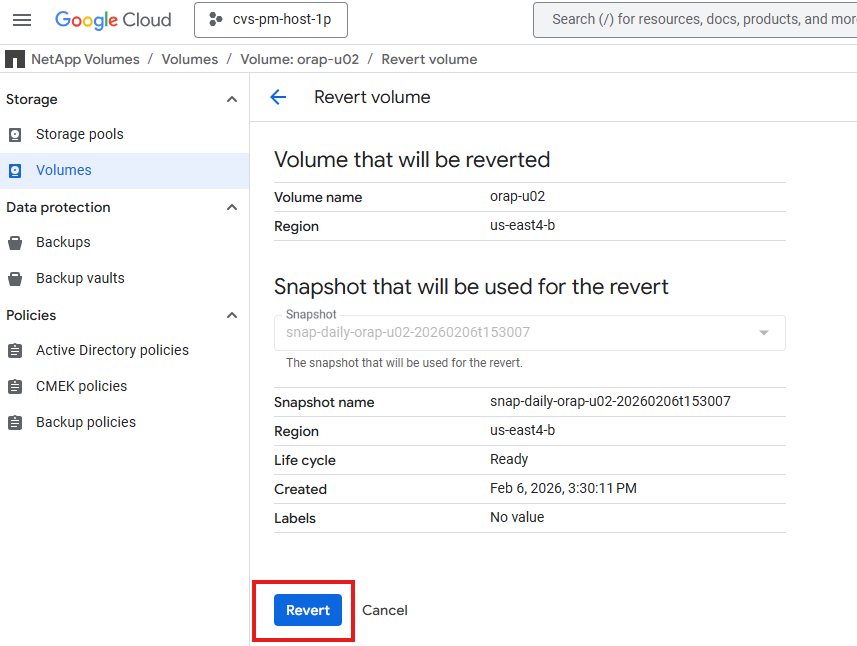
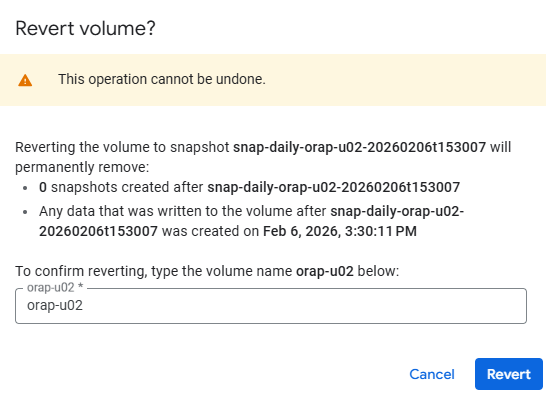
Identify the snapshot that contains the data you want to recover. You can use the Google Cloud Console or the gcloud command-line tool to list the available snapshots for your Oracle database volume. Click on the three dots at the end of the snapshot list and under
Show Moreto view the options. Select theRevertto revert to the selected snapshot. Repeat for all DB volumes.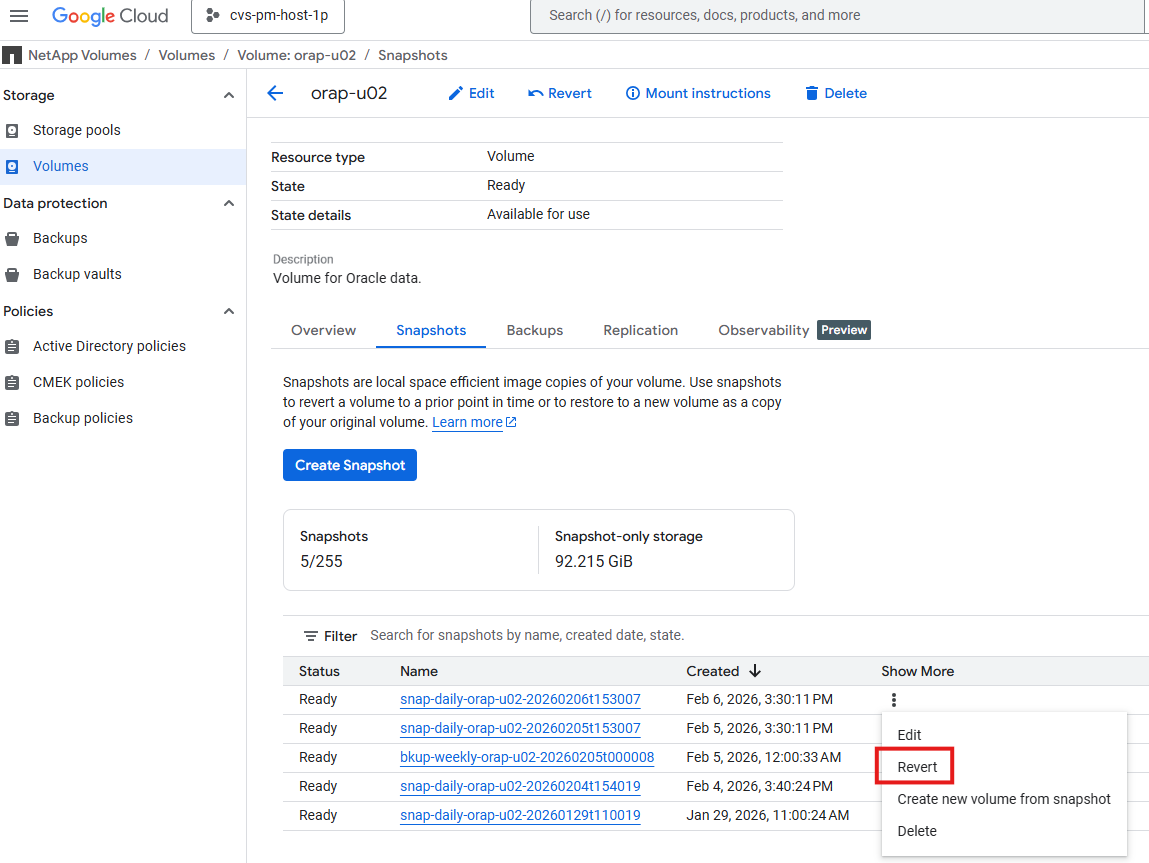
-
Mount the DB volumes after the snapshot revert is completed.
[root@orap admin]# mount -t nfs 10.165.128.242:/orap-u01 /u01 -o rw,bg,hard,vers=3,proto=tcp,timeo=600,rsize=65536,wsize=65536
[root@orap admin]# mount -t nfs 10.165.128.242:/orap-u02 /u02 -o rw,bg,hard,vers=3,proto=tcp,timeo=600,rsize=65536,wsize=65536
[root@orap admin]# mount -t nfs 10.165.128.242:/orap-u03 /u03 -o rw,bg,hard,vers=3,proto=tcp,timeo=600,rsize=65536,wsize=65536
[root@orap admin]# df -h
Filesystem                Size  Used Avail Use% Mounted on
devtmpfs                  7.2G     0  7.2G   0% /dev
tmpfs                     7.3G     0  7.3G   0% /dev/shm
tmpfs                     7.3G   17M  7.2G   1% /run
tmpfs                     7.3G     0  7.3G   0% /sys/fs/cgroup
/dev/sda2                  50G   23G   28G  46% /
/dev/sda1                 200M  5.9M  194M   3% /boot/efi
tmpfs                     1.5G     0  1.5G   0% /run/user/1010
10.165.128.242:/orap-u01   50G   11G   40G  22% /u01
10.165.128.242:/orap-u02  500G  477G   24G  96% /u02
10.165.128.242:/orap-u03  300G  4.9G  296G   2% /u03
-
Login to Oracle database server and run point-in-time recovery commands via sqlplus to recover the database to the desired point in time.
[oracle@orap ~]$ env | grep ORA ORACLE_SID=NTAP ORACLE_HOME=/u01/app/oracle/product/21.0.0/NTAP [oracle@orap ~]$ sqlplus / as sysdba SQL*Plus: Release 21.0.0.0.0 - Production on Fri Feb 6 21:08:34 2026 Version 21.19.0.0.0 Copyright (c) 1982, 2021, Oracle. All rights reserved. Connected to an idle instance. SQL> startup mount; ORACLE instance started. Total System Global Area 6442447808 bytes Fixed Size 9700288 bytes Variable Size 1342177280 bytes Database Buffers 5083496448 bytes Redo Buffers 7073792 bytes Database mounted. SQL> recover database until cancel using backup controlfile; ORA-00279: change 6239773 generated at 02/06/2026 20:30:06 needed for thread 1 ORA-00289: suggestion : /u03/orareco/NTAP/archivelog/2026_02_06/o1_mf_1_55_%u_.arc ORA-00280: change 6239773 for thread 1 is in sequence #55 [oracle@orap ~]$ ls -l /u03/orareco/NTAP/archivelog/2026_02_06 total 159376 -r--r----- 1 oracle oinstall 118324736 Feb 6 16:05 o1_mf_1_50__4lsr8joo_.arc -r--r----- 1 oracle oinstall 7432704 Feb 6 17:05 o1_mf_1_51__4p51o6k4_.arc -r--r----- 1 oracle oinstall 11385856 Feb 6 18:05 o1_mf_1_52__4sjbbr29_.arc -r--r----- 1 oracle oinstall 16721920 Feb 6 19:05 o1_mf_1_53__4wvn4ohy_.arc -r--r----- 1 oracle oinstall 8655360 Feb 6 20:30 o1_mf_1_54__51mmc8ph_.arc Specify log: {<RET>=suggested | filename | AUTO | CANCEL} /u03/orareco/NTAP/onlinelog/redo01.log Log applied. Media recovery complete. SQL> alter database open resetlogs; Database altered. Note: You may need to apply the current online logs if there are any changes when the snapshot was taken. -
After the recovery is completed, verify that the data has been successfully recovered.
SQL> alter session set container = ntap_pdb1; Session altered. SQL> select * from test; ID DT EVENT ---------- --------------------------------------------------------------------------- ---------------------------------------------------------------------------------------------------- 1 05-FEB-26 08.14.17.000000 PM testing Oracle in-place restore and point-in-time recovery for GCNV SQL> select current_timestamp from dual; CURRENT_TIMESTAMP --------------------------------------------------------------------------- 06-FEB-26 09.39.08.097365 PM +00:00 -
Shutdown and restart database as a systemd service to complete the recovery process.
SQL> alter session set container=cdb$root;

Session altered.

SQL> shutdown immediate;
Database closed.
Database dismounted.
ORACLE instance shut down.
SQL> exit


[root@orap admin]# systemctl start oracle_NTAP
[root@orap admin]# systemctl status oracle_NTAP
● oracle_NTAP.service - Oracle Database Start/Stop Service
   Loaded: loaded (/etc/systemd/system/oracle_NTAP.service; enabled; vendor preset: disabled)
   Active: active (running) since Fri 2026-02-06 21:42:19 UTC; 9s ago
  Process: 61431 ExecStop=/u01/app/oracle/product/21.0.0/NTAP/bin/dbshut /u01/app/oracle/product/21.0.0/NTAP (code=exited, status=0/SUCCESS)
  Process: 62476 ExecStart=/u01/app/oracle/product/21.0.0/NTAP/bin/dbstart /u01/app/oracle/product/21.0.0/NTAP (code=exited, status=0/SUCCESS)
    Tasks: 85 (limit: 94156)
   Memory: 6.6G
   CGroup: /system.slice/oracle_NTAP.service
           ├─62487 /u01/app/oracle/product/21.0.0/NTAP/bin/tnslsnr LISTENER -inherit
           ├─62587 ora_pmon_NTAP
           ├─62591 ora_clmn_NTAP
           ├─62595 ora_psp0_NTAP
           ├─62599 ora_vktm_NTAP
           ├─62605 ora_gen0_NTAP
           ├─62609 ora_mman_NTAP
           ├─62615 ora_gen1_NTAP
           ├─62617 ora_gen2_NTAP
           ├─62619 ora_vosd_NTAP
           ├─62621 ora_diag_NTAP
           ├─62623 ora_ofsd_NTAP
           ├─62625 ora_dbrm_NTAP
           ├─62627 ora_vkrm_NTAP
           ├─62629 ora_svcb_NTAP
           ├─62631 ora_pman_NTAP
           ├─62633 ora_dia0_NTAP
           ├─62635 ora_dbw0_NTAP
           ├─62637 ora_lgwr_NTAP
           ├─62642 ora_ckpt_NTAP
           ├─62648 ora_smon_NTAP
           ├─62651 ora_smco_NTAP
           ├─62655 ora_reco_NTAP
           ├─62657 ora_lreg_NTAP
           ├─62659 ora_bg00_NTAP
           ├─62661 ora_pxmn_NTAP
           ├─62675 ora_mmon_NTAP
           ├─62677 ora_mmnl_NTAP
           ├─62685 ora_lg00_NTAP
           ├─62688 ora_bg01_NTAP
           ├─62690 ora_d000_NTAP
           ├─62692 ora_w000_NTAP
           ├─62695 ora_s000_NTAP
           ├─62699 ora_lg01_NTAP
           ├─62701 ora_tmon_NTAP
           ├─62703 ora_w001_NTAP
           ├─62710 ora_m000_NTAP
           ├─62712 ora_m001_NTAP
           ├─62717 ora_tt00_NTAP
           ├─62719 ora_arc0_NTAP
           ├─62721 ora_tt01_NTAP
           ├─62723 ora_arc1_NTAP
           ├─62725 ora_arc2_NTAP
           ├─62727 ora_arc3_NTAP
           ├─62729 ora_tt02_NTAP
           ├─62733 ora_rcbg_NTAP
           ├─62737 ora_w002_NTAP
           ├─62739 ora_aqpc_NTAP
           ├─62743 ora_p000_NTAP
           ├─62745 ora_p001_NTAP
           ├─62747 ora_p002_NTAP
           ├─62749 ora_p003_NTAP
           ├─62751 ora_p004_NTAP
           ├─62753 ora_p005_NTAP
           ├─62755 ora_p006_NTAP
           ├─62757 ora_p007_NTAP
           ├─62759 ora_s001_NTAP
           ├─62942 ora_w003_NTAP
           ├─62949 ora_w004_NTAP
           ├─62958 ora_cjq0_NTAP
           ├─62960 ora_qm02_NTAP
           ├─63026 ora_q001_NTAP
           ├─63028 ora_qm03_NTAP
           ├─63030 ora_q003_NTAP
           ├─63032 ora_q004_NTAP
           ├─63034 ora_q005_NTAP
           ├─63036 ora_p008_NTAP
           ├─63038 ora_p009_NTAP
           ├─63040 ora_p00a_NTAP
           ├─63042 ora_p00b_NTAP
           ├─63048 ora_m002_NTAP
           ├─63050 ora_m003_NTAP
           ├─63056 ora_mz00_NTAP
           ├─63060 ora_mz03_NTAP
           ├─63062 ora_mz02_NTAP
           ├─63064 ora_mz04_NTAP
           └─63072 ora_m004_NTAP

Feb 06 21:41:55 orap systemd[1]: Starting Oracle Database Start/Stop Service...
Feb 06 21:41:55 orap dbstart[62524]: Processing Database instance "NTAP": log file /u01/app/oracle/homes/OraDB21Home1/rdbms/log/startup.log
Feb 06 21:42:19 orap systemd[1]: Started Oracle Database Start/Stop Service.
Oracle database recovery to a new host using Google Cloud NetApp Volumes vault backups
Details
In the event of a failure that requires recovery to a new host such as when the original host is no longer available and primary DB volumes are inaccessible, you can use Google Cloud NetApp Volumes vault backups to restore the Oracle database on the new host. The process is similar to the in-place recovery using snapshots, but instead of reverting to a snapshot, you will restore the database from a vault backup. This allows you to recover the database on a different host, which can be useful in scenarios where the original host is no longer available or has experienced hardware failure. The steps for restoring from a vault backup are as follows:
-
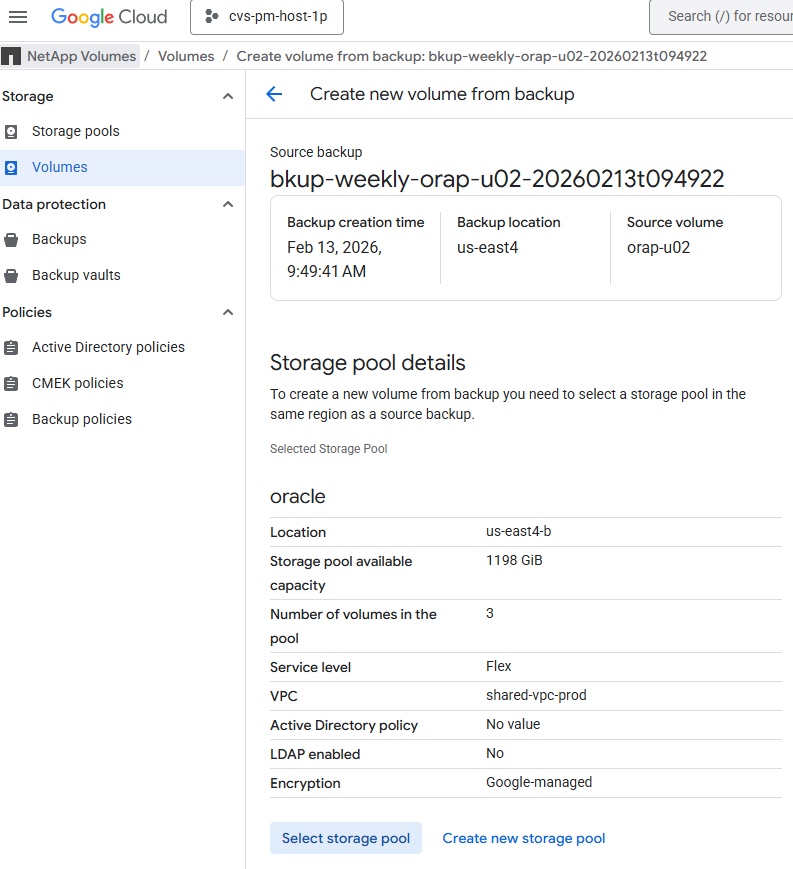
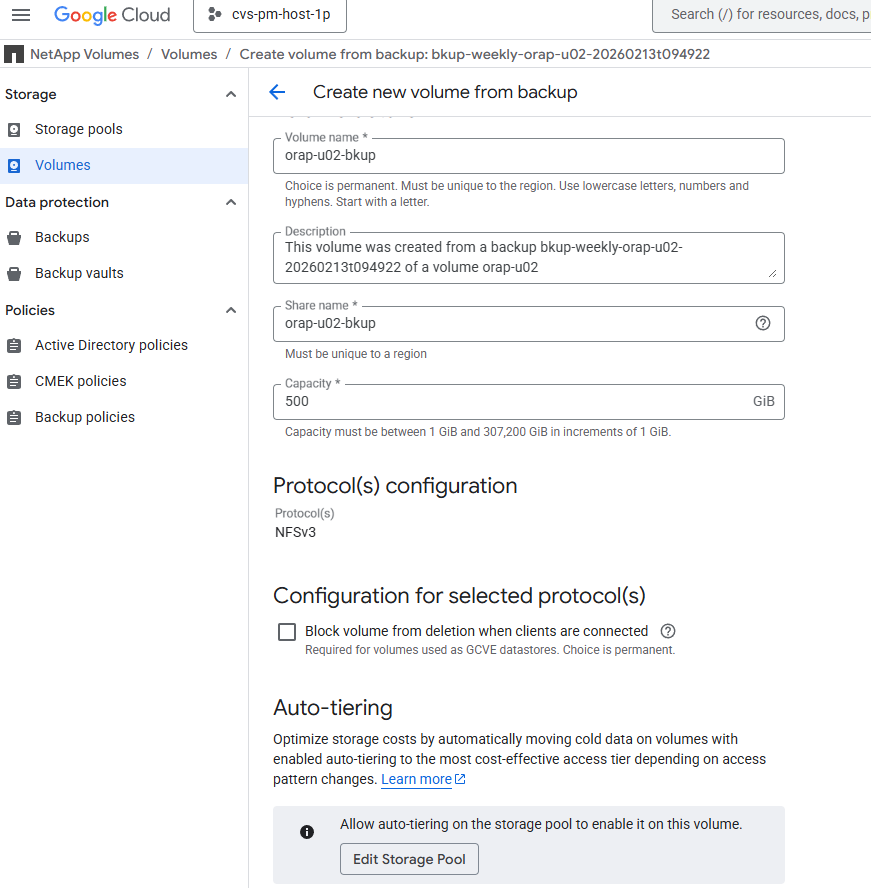
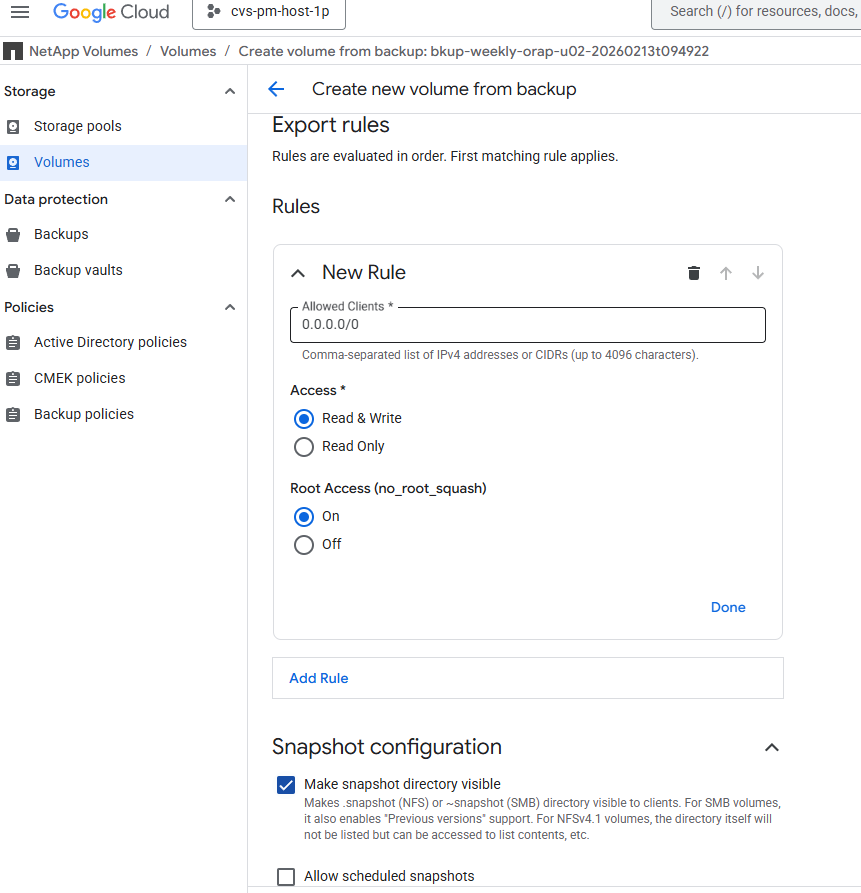
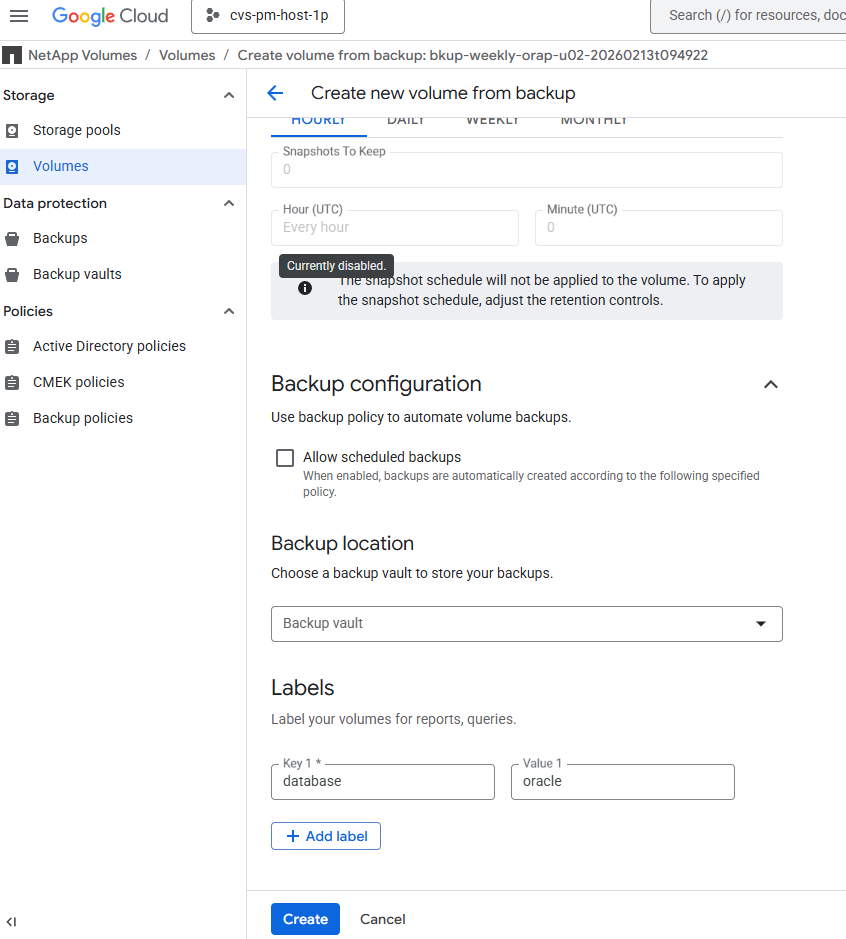
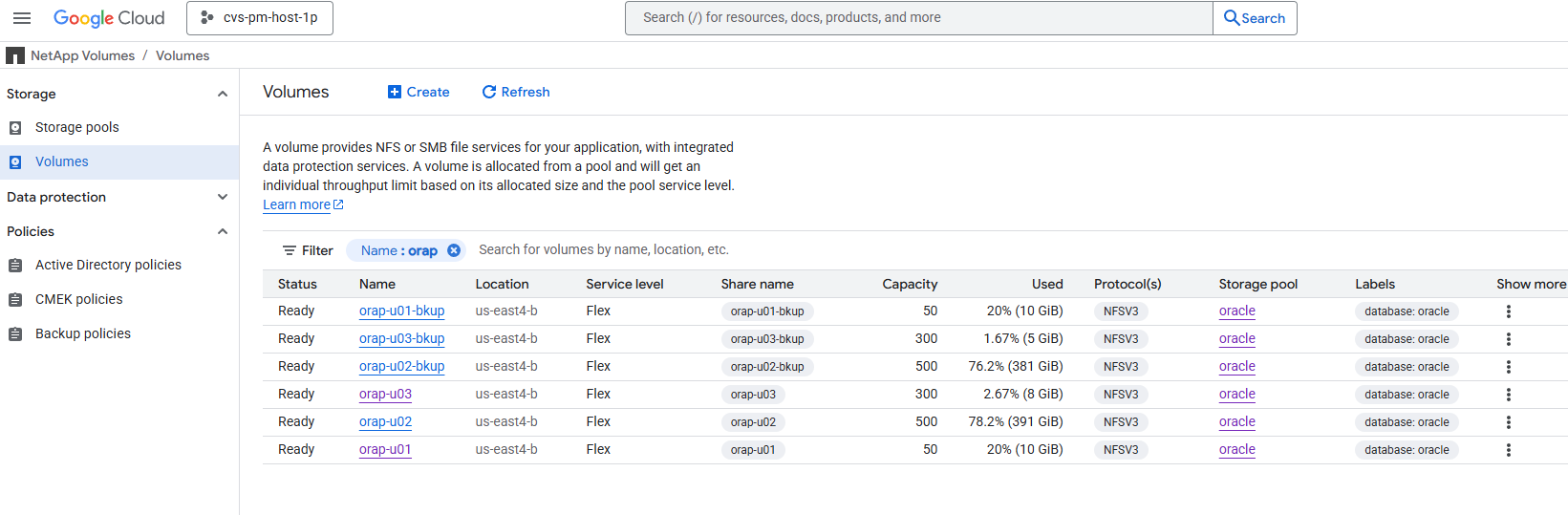
Identify the vault backup that contains the data you want to recover. You can use the Google Cloud Console or the gcloud command-line tool to list the available vault backups for your Oracle database volume. Click on the three dots at the end of the vault backup list and under
Show moreto view the options. Select theCreate new volume from backupto restore from the selected vault backup. Repeat for all DB volumes. You also have the option to restore to the same storage pool or a different storage pool if needed.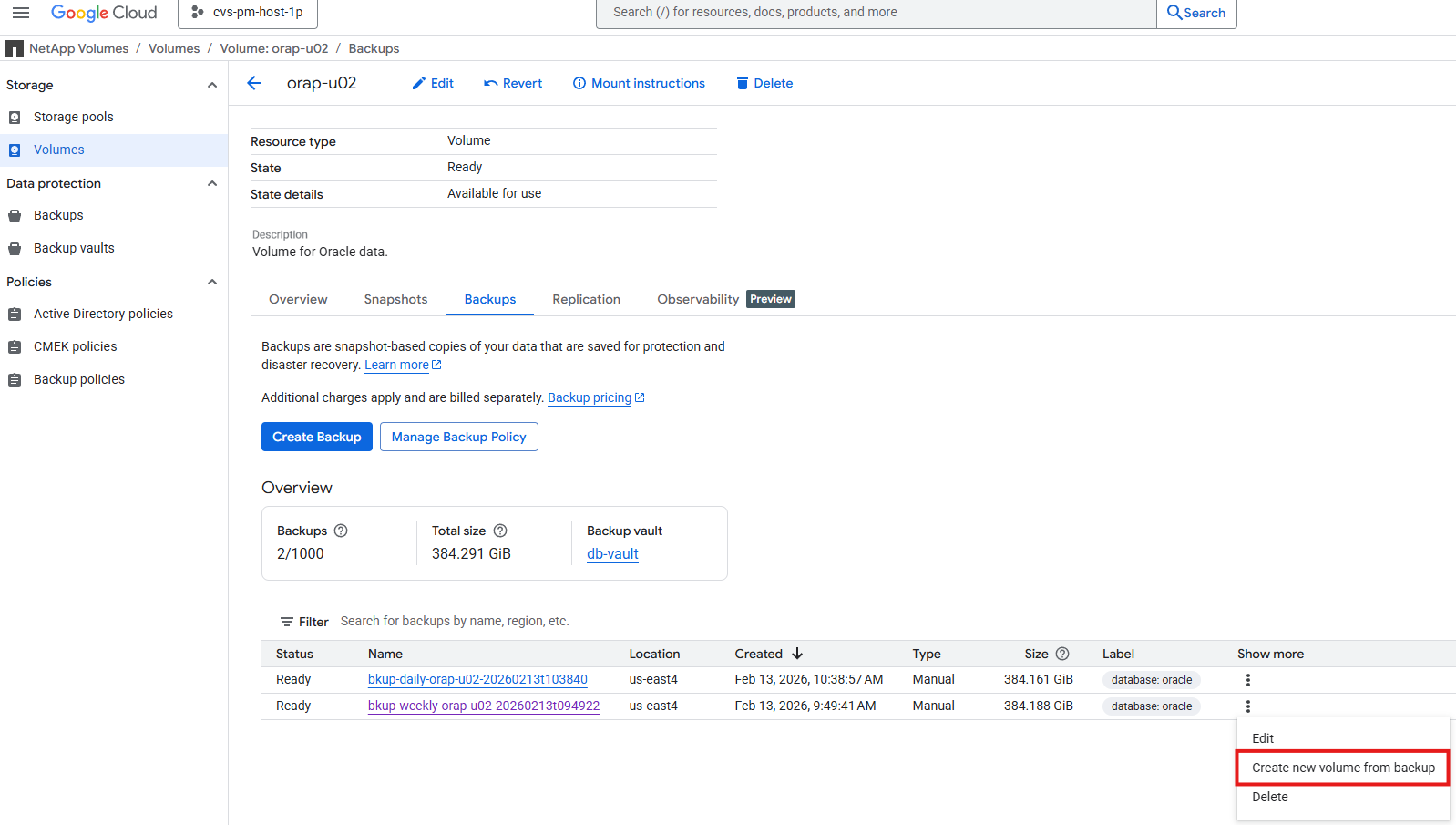
-
Create a new database server that match with the original host in terms of hardware, operating system, and OS kernel patches configurations. This will ensure that the restored database can be properly mounted and opened after the restore process is completed.
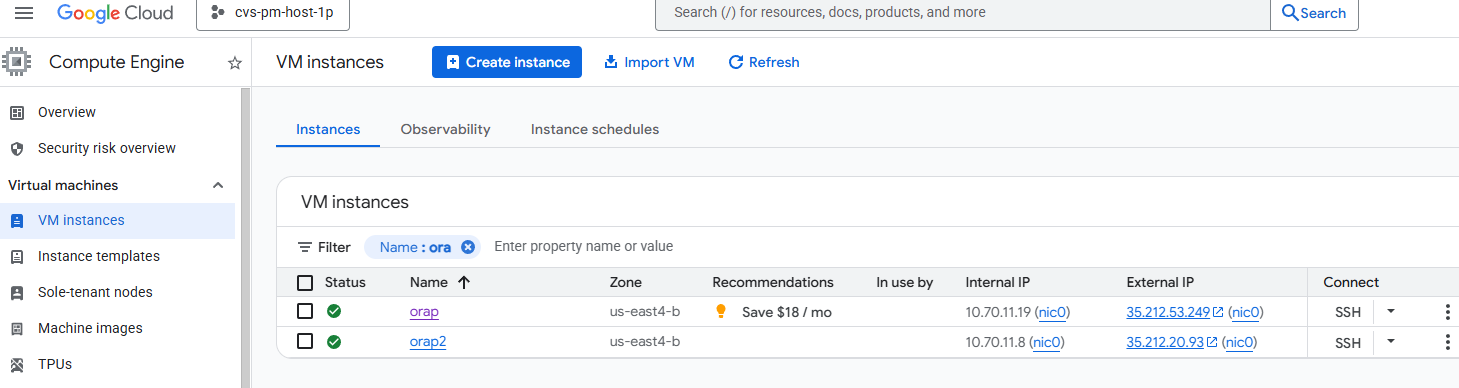
You may also use the same Ansible playbook from automated database deployment section to automate the new database server configuration for the linux only.

[admin@ansiblectl na_oracle_deploy_nfs]$ ansible-playbook -i hosts 2-linux_config.yml -u admin -e @vars/vars.yml
-
Login to the new DB server as the admin user. Mount the restored DB volumes to the same mount points as the original host. Change ownership of the mount point if needed.
[admin@orap2 ~]$ sudo mount -t nfs 10.165.128.242:/orap-u01-bkup /u01 -o rw,bg,hard,vers=3,proto=tcp,timeo=600,rsize=262144,wsize=262144 mount: (hint) your fstab has been modified, but systemd still uses the old version; use 'systemctl daemon-reload' to reload. [admin@orap2 ~]$ sudo mount -t nfs 10.165.128.242:/orap-u02-bkup /u02 -o rw,bg,hard,vers=3,proto=tcp,timeo=600,rsize=262144,wsize=262144 mount: (hint) your fstab has been modified, but systemd still uses the old version; use 'systemctl daemon-reload' to reload. [admin@orap2 ~]$ sudo mount -t nfs 10.165.128.242:/orap-u03-bkup /u03 -o rw,bg,hard,vers=3,proto=tcp,timeo=600,rsize=262144,wsize=262144 mount: (hint) your fstab has been modified, but systemd still uses the old version; use 'systemctl daemon-reload' to reload. [admin@orap2 ~]$ sudo systemctl daemon-reload [admin@orap2 ~]$ df -h Filesystem Size Used Avail Use% Mounted on devtmpfs 7.2G 0 7.2G 0% /dev tmpfs 7.3G 0 7.3G 0% /dev/shm tmpfs 7.3G 8.5M 7.2G 1% /run tmpfs 7.3G 0 7.3G 0% /sys/fs/cgroup /dev/sda2 50G 23G 28G 45% / /dev/sda1 200M 5.9M 194M 3% /boot/efi tmpfs 1.5G 0 1.5G 0% /run/user/1010 tmpfs 1.5G 0 1.5G 0% /run/user/1011 10.165.128.242:/orap-u01-bkup 50G 11G 40G 22% /u01 10.165.128.242:/orap-u02-bkup 500G 382G 119G 77% /u02 10.165.128.242:/orap-u03-bkup 300G 5.6G 295G 2% /u03 [admin@orap2 ~]$ sudo chown oracle:oinstall /u01 [admin@orap2 ~]$ sudo chown oracle:oinstall /u02 [admin@orap2 ~]$ sudo chown oracle:oinstall /u03 -
Configure Oracle database environment variables and root directory files such as oratab, oraInstall.loc files.
[admin@orap2 ~]$ sudo vi /etc/oraInst.loc
[admin@orap2 ~]$ vi /etc/oratab
[admin@orap2 ~]$ sudo vi /etc/oratab
[admin@orap2 ~]$ sudo chown oracle:oinstall /etc/oratab
[admin@orap2 ~]$ ls -l /etc/ora*
-rw-r--r--. 1 root   root      56 Feb 13 19:37 /etc/oraInst.loc
-rw-rw-r--. 1 oracle oinstall 784 Feb 13 19:38 /etc/oratab

[oracle@orap2 ~]$ env | grep ORA
ORACLE_SID=NTAP
ORACLE_HOME=/u01/app/oracle/product/21.0.0/NTAP
-
As oracle user, relink Oracle binaries.
[oracle@orap2 ~]$ cd $ORACLE_HOME/bin
[oracle@orap2 bin]$ ./relink
writing relink log to: /u01/app/oracle/homes/OraDB21Home1/install/relinkActions2026-02-13_07-45-29PM.log
-
Recover the database until last available log and open the database with resetlogs option.
[oracle@orap2 bin]$ sqlplus / as sysdba SQL*Plus: Release 21.0.0.0.0 - Production on Fri Feb 13 19:49:50 2026 Version 21.19.0.0.0 Copyright (c) 1982, 2021, Oracle. All rights reserved. Connected to an idle instance. SQL> startup mount; ORACLE instance started. Total System Global Area 6442447808 bytes Fixed Size 9700288 bytes Variable Size 1593835520 bytes Database Buffers 4831838208 bytes Redo Buffers 7073792 bytes Database mounted. SQL> recover database until cancel using backup controlfile; ORA-00279: change 7017907 generated at 02/13/2026 05:00:07 needed for thread 1 ORA-00289: suggestion : /u03/orareco/NTAP/archivelog/2026_02_13/o1_mf_1_96__938r46wf_.arc ORA-00280: change 7017907 for thread 1 is in sequence #96 Specify log: {<RET>=suggested | filename | AUTO | CANCEL} auto ORA-00279: change 7022777 generated at 02/13/2026 06:00:06 needed for thread 1 ORA-00289: suggestion : /u03/orareco/NTAP/archivelog/2026_02_13/o1_mf_1_97__96n12q2b_.arc ORA-00280: change 7022777 for thread 1 is in sequence #97 ORA-00278: log file '/u03/orareco/NTAP/archivelog/2026_02_13/o1_mf_1_96__938r46wf_.arc' no longer needed for this recovery . . Specify log: {<RET>=suggested | filename | AUTO | CANCEL} cancel Media recovery cancelled. SQL> alter database open resetlogs; Database altered. SQL> select name, open_mode, log_mode from v$database; NAME OPEN_MODE LOG_MODE --------- -------------------- ------------ NTAP READ WRITE ARCHIVELOG SQL> show pdbs; CON_ID CON_NAME OPEN MODE RESTRICTED ---------- ------------------------------ ---------- ---------- 2 PDB$SEED READ ONLY NO 3 NTAP_PDB1 READ WRITE NO 4 NTAP_PDB2 READ WRITE NO 5 NTAP_PDB3 READ WRITE NO SQL> select instance_name, host_name from v$instance; INSTANCE_NAME ---------------- HOST_NAME ---------------------------------------------------------------- NTAP orap2 SQL> alter session set container=ntap_pdb1; Session altered. SQL> select * from test; ID ---------- DT --------------------------------------------------------------------------- EVENT -------------------------------------------------------------------------------- 1 05-FEB-26 08.14.17.000000 PM testing Oracle in-place restore and point-in-time recovery for GCNV -
After the recovery is completed, you need to perform additional steps such as revising listener.ora, tnsnames.ora files to match with new hostname or IP address. If needed, setup systemd service to shutdown and restart database to complete the restore and recovery process.
|
|
In the case that duplicate copies of Oracle control files are implemented in your database configuration. The restored database may have inconsistent control files after the DB restore. In this case, you can use the controlfile located in log volume to overwrite controfile in data volume to resolve the issue. |
Oracle database cloning to a new host using Google Cloud NetApp Volumes snapshots or vault backups
Details
The Oracle database cloning to a new host using Google Cloud NetApp Volumes snapshots or vault backups is identical to the previous section describing how to use Google Cloud NetApp Volumes snapshots or vault backups to restore and recovery of an Oracle database on a new host in the event of a failure. But renaming the cloned database may be an additional steps desired, which can be easiy done using Oracle dbnewid utility. The DB clone can be useful for UAT testing, development, or other purposes.
For some customers, who needs automated cloning and clone refresh, please raise a request to NetApp Solutions Engineering team for a sample Ansible playbook that can be used as a reference for automating the cloning and refresh process with Google Cloud NetApp Volumes snapshots or vault backups. Following is the link for putting in a request to NetApp Solutions Engineering team:Request for Automation
Where to find additional information
To learn more about the information described in this document, review the following documents and/or websites:
-
Google Cloud NetApp Volumes overview
-
Deploying Oracle Direct NFS
-
Installing and Configuring Oracle Database Using Response Files