


Execute SAP HANA block consistency checks with SnapCenter

 Suggest changes

 PDFs
PDFs
Execute SAP HANA block consistency checks using the SAP hdbpersdiag tool or by executing file-based backups. Learn about configuration options including local Snapshot directory access, central verification hosts with FlexClone volumes, and SnapCenter integration for scheduling and automation.
The table below summarizes the key parameters helping to decide which method for block consistency checks fits best for your environment.
| HANA hdbpersdiag tool using local Snapshot directory | HANA hdbpersdiag tool with central verification host | File-based backup | |
|---|---|---|---|
Supported configurations |
NFS only Bare metal, ANF, FSx ONTAP, VMware or KVM in-guest mounts |
All protocols and platforms |
All protocols and platforms |
CPU load at HANA host |
Medium |
None |
High |
Network utilization at HANA host |
High |
None |
High |
Runtime |
Leverages full read throughput of storage volume |
Leverages full read throughput of storage volume |
Typically limited by write throughput of target system |
Capacity requirements |
None |
None |
At least 1 x backup size per HANA system |
SnapCenter integration |
Post backup script |
Clone create and post cloning script, clone delete |
Build-in feature |
Scheduling |
SnapCenter scheduler |
PowerShell script to execute clone create and delete workflow, externally scheduled |
SnapCenter scheduler |
The following chapters describe the configuration and execution of the different options for block consistency check operations.
Consistency checks with hdbpersdiag using the local snapshot directory
Within SnapCenter a dedicated policy for hdbpersdiag operations is created with a daily schedule and a retention of two. We don't use the weekly schedule, since we would then have at least 2 Snapshot backups (minimum retention=2), where one of them would be up to two weeks old.
Within the SnapCenter resource protection configuration of the HANA system, a post backup script is added, which executes the hdbpersdiag tool. Since the post backup script will be also called with any other policy configured for the resource, we need to check in the script which policy is currently active. Within the script we also check the current day of the week and run the hdbpersdiag operation only once per week on a Sunday. HANA hdbpersdiag is then called for each data volume in the corresponding hdb* directory of the current Snapshot backup directory. If the consistency check with hdbpersdiag reports any error the SnapCenter job will be marked as failed.

|
The example script call-hdbpersdiag.sh is provided as is and is not covered by NetApp support. You can request the script via email to ng-sapcc@netapp.com. |
The figure below shows the high-level concept of the consistency check implementation.
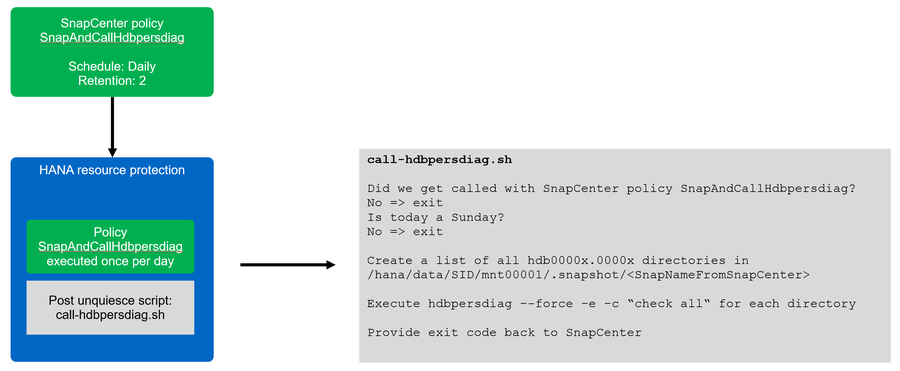
As a first step you need to allow access to the snapshot directory, so that the "".snapshot" directory is visible at the HANA database host.
-
ONTAP systems and FSX for ONTAP: You need to configure the Snapshot directory access volume parameter
-
ANF: You need to configure the Hide Snapshot path volume parameter.
As a next step, you must configure a policy which matches the name that is used in the post backup script. For our script example the name must be SnapAndCallHdbpersdiag. As discussed before a daily schedule is used to avoid keeping old Snapshots with a weekly schedule.
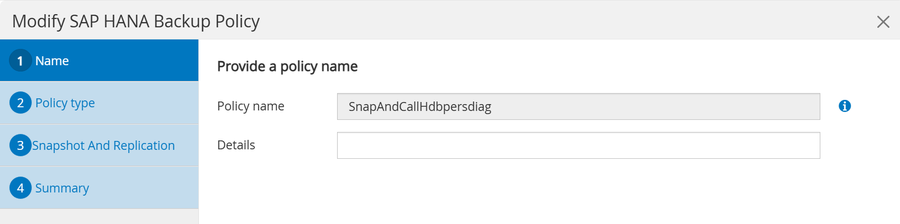
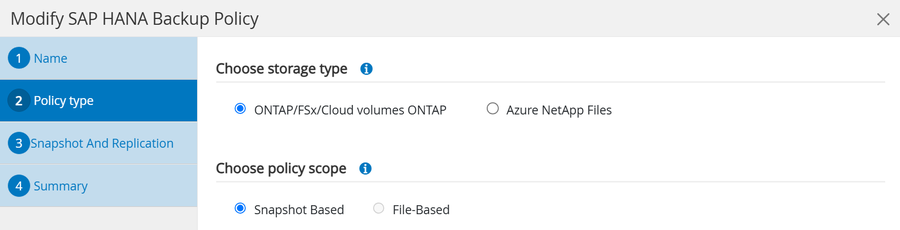
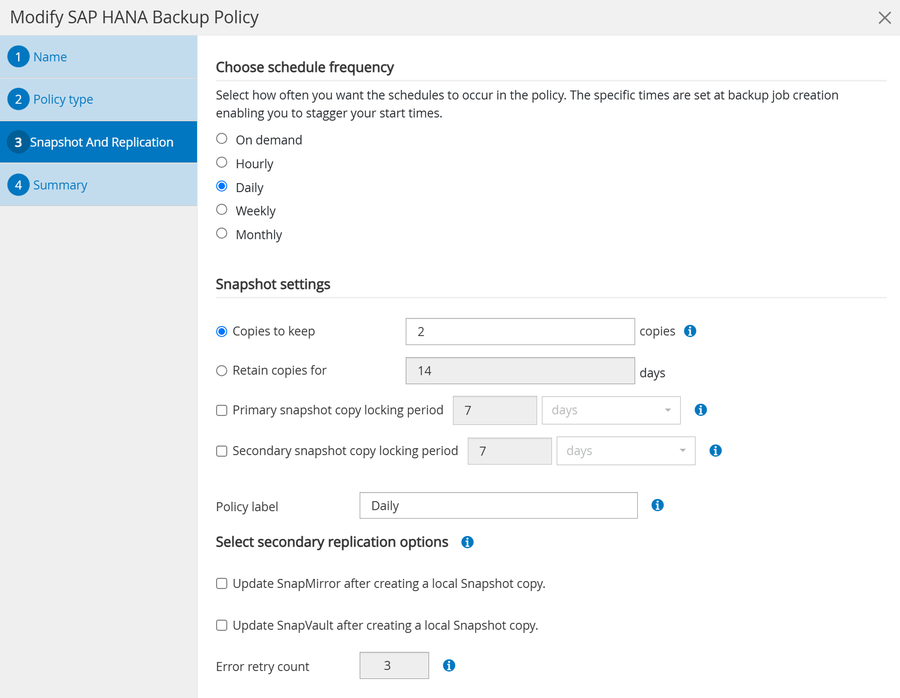
Within the resource protection configuration, the post backup script is added, and the policy is assigned to the resource.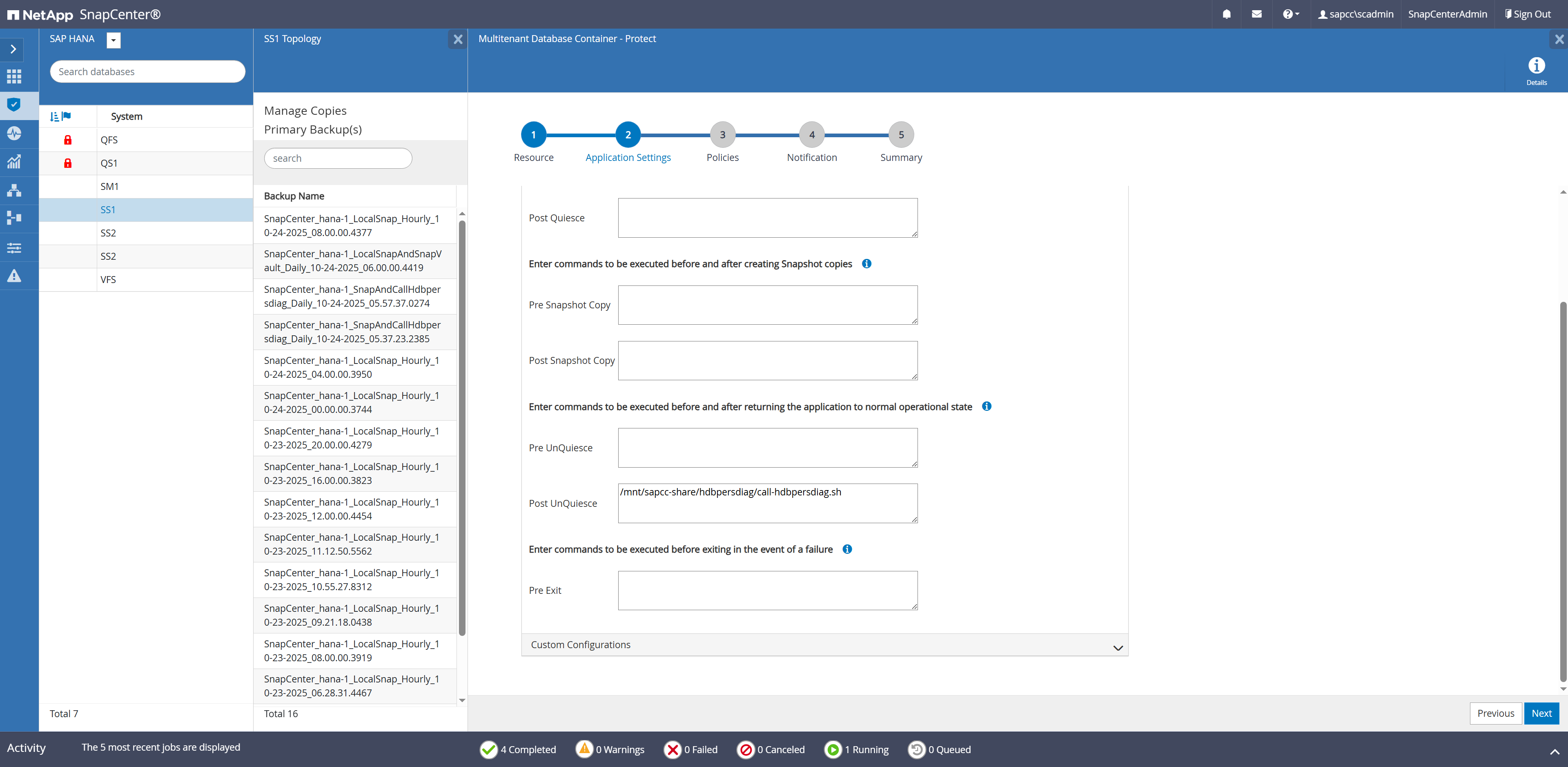
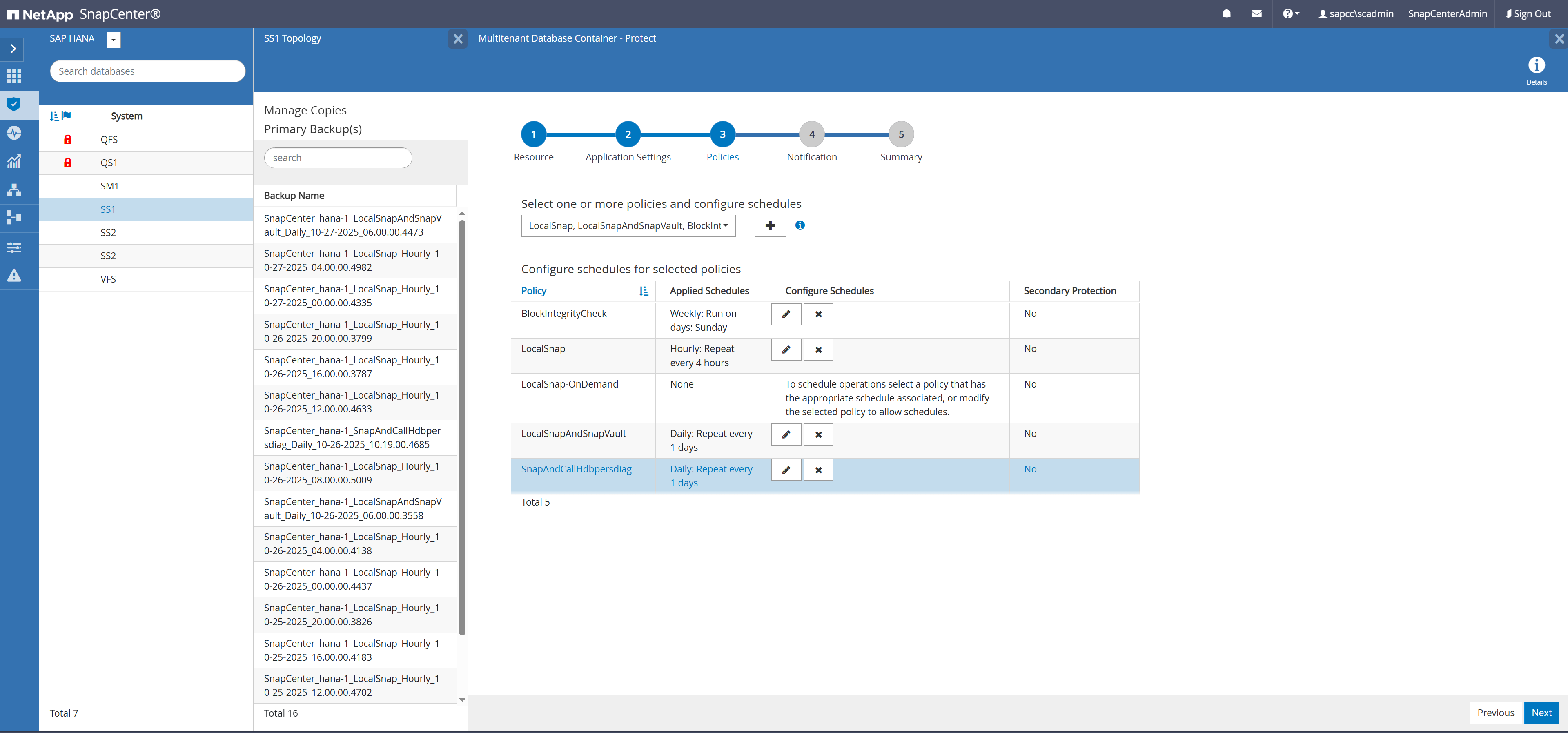
Finally, the script must be configured in the allowed_commands.config file at the HANA host.
hana-1:/ # cat /opt/NetApp/snapcenter/scc/etc/allowed_commands.config
command: mount
command: umount
command: /mnt/sapcc-share/hdbpersdiag/call-hdbpersdiag.sh
The Snapshot backup operation will now be executed once per day, and the script handles that the hdbpersdiag check is only executed once per week on Sundays.
|
|
The script calls hdbpersdiag with the “-e” command line option which is required for data volume encryption. If HANA data volume encryption is not used the parameter must be removed. |
The output below shows the log file of the script:
20251024055824###hana-1###call-hdbpersdiag.sh: Current policy is SnapAndCallHdbpersdiag
20251024055824###hana-1###call-hdbpersdiag.sh: Executing hdbpersdiag in: /hana/data/SS1/mnt00001/.snapshot/SnapCenter_hana-1_SnapAndCallHdbpersdiag_Daily_10-24-2025_05.57.37.0274/hdb00001
20251024055827###hana-1###call-hdbpersdiag.sh: Loaded library 'libhdbunifiedtable'
Loaded library 'libhdblivecache'
Trace is written to: /usr/sap/SS1/HDB00/hana-1/trace
Mounted DataVolume(s)
#0 /hana/data/SS1/mnt00001/.snapshot/SnapCenter_hana-1_SnapAndCallHdbpersdiag_Daily_10-24-2025_05.57.37.0274/hdb00001/ (4.8 GB, 5100273664 bytes)
WARNING: The data volume being accessed is in use by another process, this is most likely because a running HANA instance is operating on this data volume
Tips:
Type 'help' for help on the available commands
Use 'TAB' for command auto-completion
Use '|' to redirect the output to a specific command.
INFO: KeyPage loaded and decrypted with success
Default Anchor Page OK
Restart Page OK
Default Converter Pages OK
RowStore Converter Pages OK
Logical Pages (94276 pages) OK
Logical Pages Linkage OK
Checking entries from restart page...
ContainerDirectory OK
ContainerNameDirectory OK
FileIDMappingContainer OK
UndoContainerDirectory OK
LobDirectory OK
MidSizeLobDirectory OK
LobFileIDMap OK
20251024055827###hana-1###call-hdbpersdiag.sh: Consistency check operation successeful for volume /hana/data/SS1/mnt00001/.snapshot/SnapCenter_hana-1_SnapAndCallHdbpersdiag_Daily_10-24-2025_05.57.37.0274/hdb00001.
20251024055827###hana-1###call-hdbpersdiag.sh: Executing hdbpersdiag in: /hana/data/SS1/mnt00001/.snapshot/SnapCenter_hana-1_SnapAndCallHdbpersdiag_Daily_10-24-2025_05.57.37.0274/hdb00002.00003
20251024055828###hana-1###call-hdbpersdiag.sh: Loaded library 'libhdbunifiedtable'
Loaded library 'libhdblivecache'
Trace is written to: /usr/sap/SS1/HDB00/hana-1/trace
Mounted DataVolume(s)
#0 /hana/data/SS1/mnt00001/.snapshot/SnapCenter_hana-1_SnapAndCallHdbpersdiag_Daily_10-24-2025_05.57.37.0274/hdb00002.00003/ (320.0 MB, 335544320 bytes)
WARNING: The data volume being accessed is in use by another process, this is most likely because a running HANA instance is operating on this data volume
Tips:
Type 'help' for help on the available commands
Use 'TAB' for command auto-completion
Use '|' to redirect the output to a specific command.
INFO: KeyPage loaded and decrypted with success
Default Anchor Page OK
Restart Page OK
Default Converter Pages OK
RowStore Converter Pages OK
Logical Pages (4099 pages) OK
Logical Pages Linkage OK
Checking entries from restart page...
UndoContainerDirectory OK
DRLoadedTable OK
20251024055828###hana-1###call-hdbpersdiag.sh: Consistency check operation successeful for volume /hana/data/SS1/mnt00001/.snapshot/SnapCenter_hana-1_SnapAndCallHdbpersdiag_Daily_10-24-2025_05.57.37.0274/hdb00002.00003.
20251024055828###hana-1###call-hdbpersdiag.sh: Executing hdbpersdiag in: /hana/data/SS1/mnt00001/.snapshot/SnapCenter_hana-1_SnapAndCallHdbpersdiag_Daily_10-24-2025_05.57.37.0274/hdb00003.00003
20251024055833###hana-1###call-hdbpersdiag.sh: Loaded library 'libhdbunifiedtable'
Loaded library 'libhdblivecache'
Trace is written to: /usr/sap/SS1/HDB00/hana-1/trace
Mounted DataVolume(s)
#0 /hana/data/SS1/mnt00001/.snapshot/SnapCenter_hana-1_SnapAndCallHdbpersdiag_Daily_10-24-2025_05.57.37.0274/hdb00003.00003/ (4.6 GB, 4898947072 bytes)
WARNING: The data volume being accessed is in use by another process, this is most likely because a running HANA instance is operating on this data volume
Tips:
Type 'help' for help on the available commands
Use 'TAB' for command auto-completion
Use '|' to redirect the output to a specific command.
INFO: KeyPage loaded and decrypted with success
Default Anchor Page OK
Restart Page OK
Default Converter Pages OK
Static Converter Pages OK
RowStore Converter Pages OK
Logical Pages (100817 pages) OK
Logical Pages Linkage OK
Checking entries from restart page...
ContainerDirectory OK
ContainerNameDirectory OK
FileIDMappingContainer OK
UndoContainerDirectory OK
LobDirectory OK
DRLoadedTable OK
MidSizeLobDirectory OK
LobFileIDMap OK
20251024055833###hana-1###call-hdbpersdiag.sh: Consistency check operation successeful for volume /hana/data/SS1/mnt00001/.snapshot/SnapCenter_hana-1_SnapAndCallHdbpersdiag_Daily_10-24-2025_05.57.37.0274/hdb00003.00003.
20251024060048###hana-1###call-hdbpersdiag.sh: Current policy is LocalSnapAndSnapVault, consistency check is only done with Policy SnapAndCallHdbpersdiag
20251024080048###hana-1###call-hdbpersdiag.sh: Current policy is LocalSnap, consistency check is only done with Policy SnapAndHdbpersdiag
Consistency checks with hdbpersdiag using a central verification host
The figure below shows a high-level view of the solution architecture and workflow. With a central verification host the verification host can be used to check the consistency of multiple, different HANA systems. The solution leverages the SnapCenter clone create and delete workflows to attach a cloned volume from the HANA system which should be checked to the verification host. A post clone script is used to run the HANA hdbpersdiag tool. As a second step the SnapCenter clone delete workflow is used to unmount and delete the cloned volume.
|
|
If the HANA systems are configured with data volume encryption the encryption root keys of the source HANA system must be imported at the verification host before hdbpersdiag is executed. See also Import Backed-Up Root Keys Before Database Recovery | SAP Help Portal |
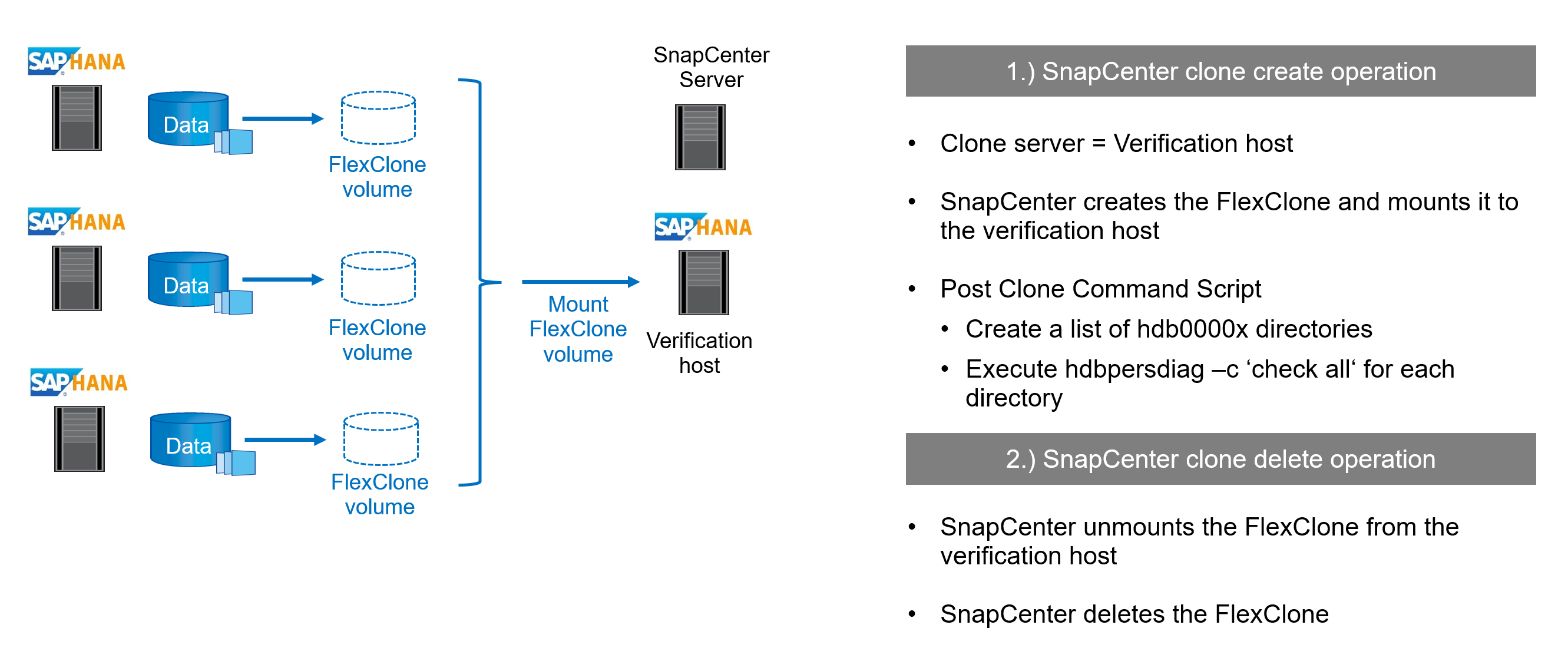
The HANA tool hdbpersdiag is included in each HANA installation but is not available as a standalone tool. Hence the central verification host must be prepared by installing a normal HANA system.
Initial one-time preparation steps:
-
Installation of SAP HANA system to be used as central verification host
-
Configuration of SAP HANA system in SnapCenter
-
Deployment of SnapCenter SAP HANA plug-in at verification host. SAP HANA system is auto discovered by SnapCenter.
-
-
The first hdbpersdiag operation after the initial installation is prepared with the following steps:
-
Shutdown target SAP HANA system
-
Unmount SAP HANA data volume.
-
You must add the scripts that should be executed at the target system to the SnapCenter allowed commands config file.
hana-7:/mnt/sapcc-share/hdbpersdiag # cat /opt/NetApp/snapcenter/scc/etc/allowed_commands.config
command: mount
command: umount
command: /mnt/sapcc-share/hdbpersdiag/call-hdbpersdiag-flexclone.sh
|
|
The example script call-hdbpersdiag-flexclone.sh is provided as is and is not covered by NetApp support. You can request the script via email to ng-sapcc@netapp.com. |
Manual workflow execution
In most cases, the consistency check operation will be run as a scheduled operation as described in the next chapter. However, being aware of the manual workflow is helpful to understand the parameters which are used for the automated process.
The clone create workflow is started by selecting a backup from the system which should be checked and by clicking on clone from backup.
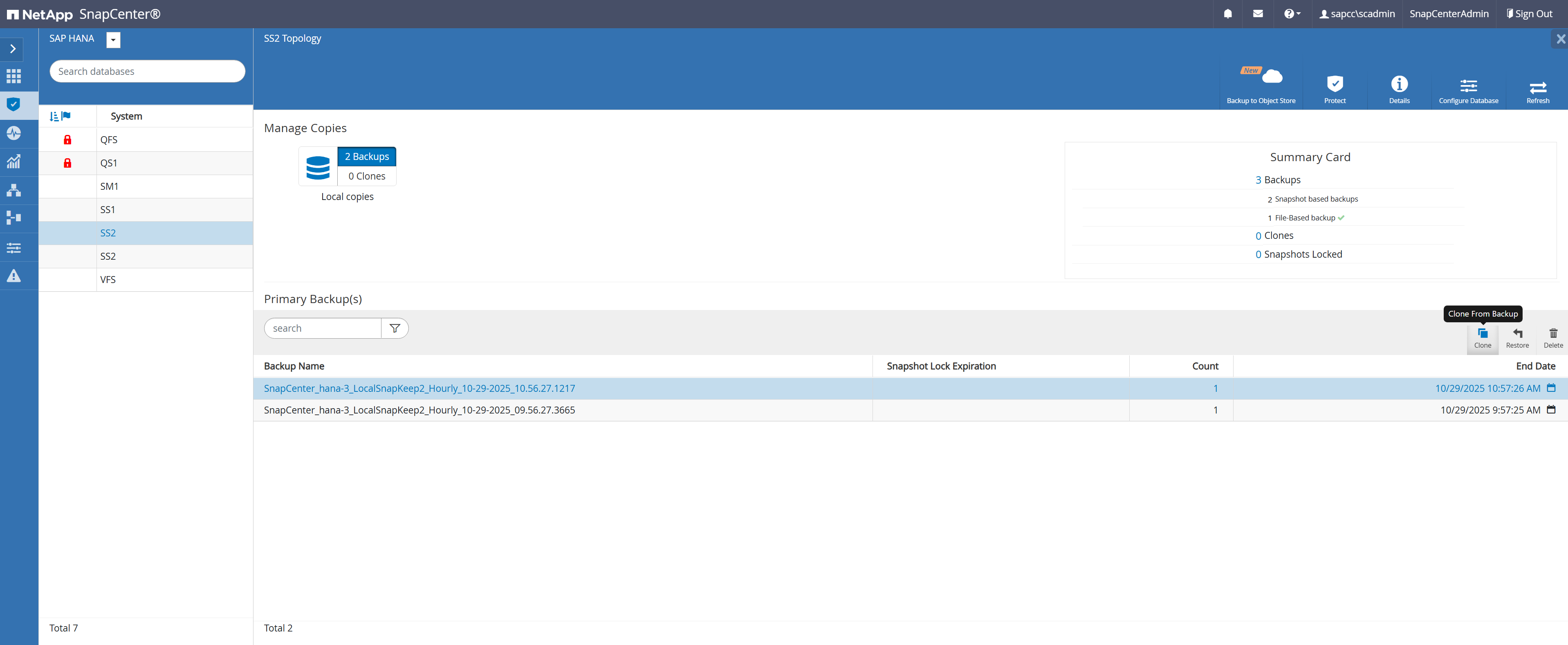
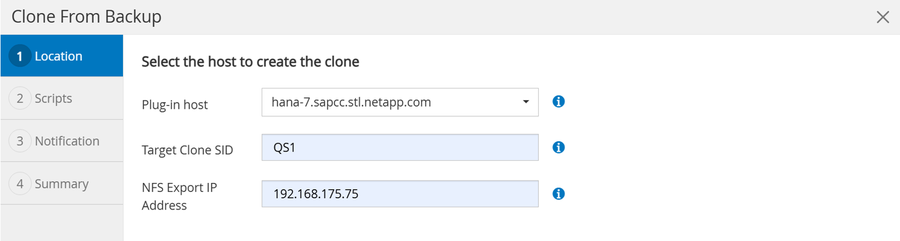
In the next screen the host name, SID and storage network interface of the verification host must be provided.
|
|
It is important to always use the SID of the HANA system installed at the verification host, otherwise the workflow will fail. |
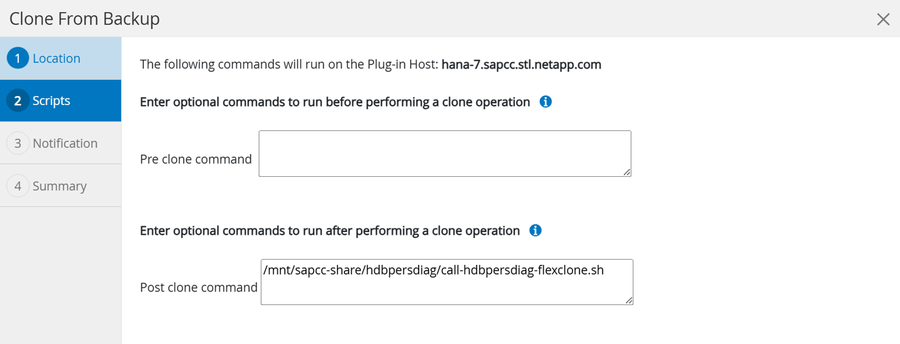
In the next screen you need to add the call-hdbpersdiag-fleclone.sh script as a post clone command.
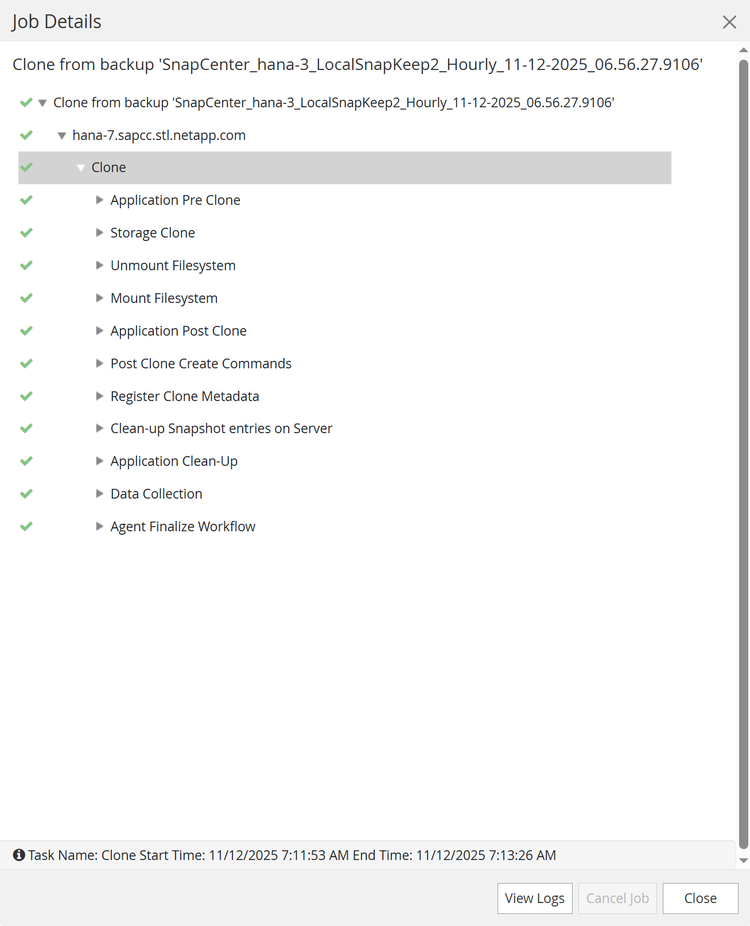
When the workflow is started, SnapCenter will create a cloned volume based on the selected Snapshot backup and mount it to the verification host.
Note: The example output below is based on HANA systems using NFS as the storage protocol. For HANA system using FC or VMware VMDKs the device will be mounted in the same way to /hana/data/SID/mnt00001.
hana-7:/mnt/sapcc-share/hdbpersdiag # df -h
Filesystem Size Used Avail Use% Mounted on
devtmpfs 16G 8.0K 16G 1% /dev
tmpfs 25G 0 25G 0% /dev/shm
tmpfs 16G 474M 16G 3% /run
tmpfs 16G 0 16G 0% /sys/fs/cgroup
/dev/mapper/system-root 60G 9.0G 48G 16% /
/dev/mapper/system-root 60G 9.0G 48G 16% /home
/dev/mapper/system-root 60G 9.0G 48G 16% /.snapshots
/dev/mapper/system-root 60G 9.0G 48G 16% /root
/dev/mapper/system-root 60G 9.0G 48G 16% /opt
/dev/mapper/system-root 60G 9.0G 48G 16% /boot/grub2/i386-pc
/dev/mapper/system-root 60G 9.0G 48G 16% /srv
/dev/mapper/system-root 60G 9.0G 48G 16% /usr/local
/dev/mapper/system-root 60G 9.0G 48G 16% /boot/grub2/x86_64-efi
/dev/mapper/system-root 60G 9.0G 48G 16% /var
/dev/mapper/system-root 60G 9.0G 48G 16% /tmp
/dev/sda1 500M 5.1M 495M 2% /boot/efi
192.168.175.117:/QS1_shared/usr-sap 251G 15G 236G 6% /usr/sap/QS1
192.168.175.86:/sapcc_share 1.4T 858G 568G 61% /mnt/sapcc-share
192.168.175.117:/QS1_log_mnt00001 251G 335M 250G 1% /hana/log/QS1/mnt00001
192.168.175.117:/QS1_shared/shared 251G 15G 236G 6% /hana/shared
tmpfs 3.2G 20K 3.2G 1% /run/user/467
tmpfs 3.2G 0 3.2G 0% /run/user/0
192.168.175.117:/SS2_data_mnt00001_Clone_10292511250337819 250G 6.4G 244G 3% /hana/data/QS1/mnt00001
The output below shows the log file of the post clone command call-hdbpersdiag-flexclone.sh.
20251029112557###hana-7###call-hdbpersdiag-flexclone.sh: Executing hdbpersdiag for source system SS2.
20251029112557###hana-7###call-hdbpersdiag-flexclone.sh: Clone mounted at /hana/data/QS1/mnt00001.
20251029112557###hana-7###call-hdbpersdiag-flexclone.sh: Executing hdbpersdiag in: /hana/data/QS1/mnt00001/hdb00001
20251029112600###hana-7###call-hdbpersdiag-flexclone.sh: Loaded library 'libhdbunifiedtable'
Loaded library 'libhdblivecache'
Trace is written to: /usr/sap/QS1/HDB11/hana-7/trace
Mounted DataVolume(s)
#0 /hana/data/QS1/mnt00001/hdb00001/ (3.1 GB, 3361128448 bytes)
Tips:
Type 'help' for help on the available commands
Use 'TAB' for command auto-completion
Use '|' to redirect the output to a specific command.
INFO: KeyPage loaded and decrypted with success
Default Anchor Page OK
Restart Page OK
Default Converter Pages OK
RowStore Converter Pages OK
Logical Pages (65388 pages) OK
Logical Pages Linkage OK
Checking entries from restart page...
ContainerDirectory OK
ContainerNameDirectory OK
FileIDMappingContainer OK
UndoContainerDirectory OK
LobDirectory OK
MidSizeLobDirectory OK
LobFileIDMap OK
20251029112600###hana-7###call-hdbpersdiag-flexclone.sh: Consistency check operation successful for volume /hana/data/QS1/mnt00001/hdb00001.
20251029112601###hana-7###call-hdbpersdiag-flexclone.sh: Executing hdbpersdiag in: /hana/data/QS1/mnt00001/hdb00002.00003
20251029112602###hana-7###call-hdbpersdiag-flexclone.sh: Loaded library 'libhdbunifiedtable'
Loaded library 'libhdblivecache'
Trace is written to: /usr/sap/QS1/HDB11/hana-7/trace
Mounted DataVolume(s)
#0 /hana/data/QS1/mnt00001/hdb00002.00003/ (288.0 MB, 301989888 bytes)
Tips:
Type 'help' for help on the available commands
Use 'TAB' for command auto-completion
Use '|' to redirect the output to a specific command.
INFO: KeyPage loaded and decrypted with success
Default Anchor Page OK
Restart Page OK
Default Converter Pages OK
RowStore Converter Pages OK
Logical Pages (4099 pages) OK
Logical Pages Linkage OK
Checking entries from restart page...
UndoContainerDirectory OK
DRLoadedTable OK
20251029112602###hana-7###call-hdbpersdiag-flexclone.sh: Consistency check operation successful for volume /hana/data/QS1/mnt00001/hdb00002.00003.
20251029112602###hana-7###call-hdbpersdiag-flexclone.sh: Executing hdbpersdiag in: /hana/data/QS1/mnt00001/hdb00003.00003
20251029112606###hana-7###call-hdbpersdiag-flexclone.sh: Loaded library 'libhdbunifiedtable'
Loaded library 'libhdblivecache'
Trace is written to: /usr/sap/QS1/HDB11/hana-7/trace
Mounted DataVolume(s)
#0 /hana/data/QS1/mnt00001/hdb00003.00003/ (3.7 GB, 3942645760 bytes)
Tips:
Type 'help' for help on the available commands
Use 'TAB' for command auto-completion
Use '|' to redirect the output to a specific command.
INFO: KeyPage loaded and decrypted with success
Default Anchor Page OK
Restart Page OK
Default Converter Pages OK
Static Converter Pages OK
RowStore Converter Pages OK
Logical Pages (79333 pages) OK
Logical Pages Linkage OK
Checking entries from restart page...
ContainerDirectory OK
ContainerNameDirectory OK
FileIDMappingContainer OK
UndoContainerDirectory OK
LobDirectory OK
DRLoadedTable OK
MidSizeLobDirectory OK
LobFileIDMap OK
20251029112606###hana-7###call-hdbpersdiag-flexclone.sh: Consistency check operation successful for volume /hana/data/QS1/mnt00001/hdb00003.00003.
|
|
The script calls hdbpersdiag with the “-e” command line option which is required for data volume encryption. If HANA data volume encryption is not used the parameter must be removed. When the post clone script is finished the SnapCenter job is finished as well. |
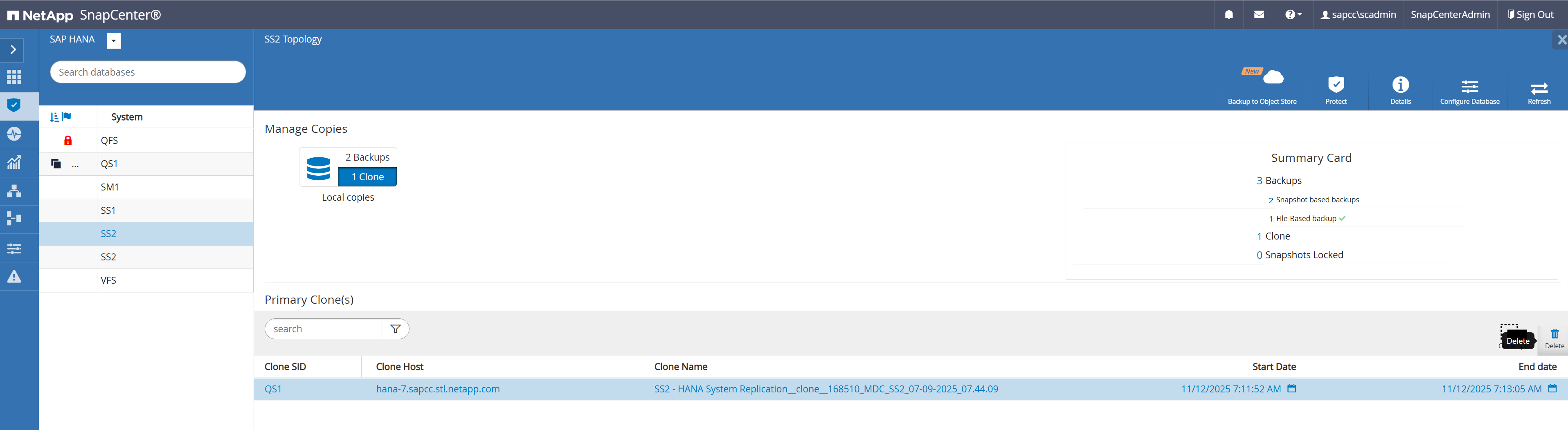
As the next step we will run the SnapCenter clone delete workflow to cleanup the verification host and to delete the FlexClone volume.
In the topology view of the source system, we select the clone and click the delete button.
SnapCenter will now unmount the cloned volume from the verification host and will delete the cloned volume at the storage system.
SnapCenter workflow automation using PowerShell scripts
In the previous section, the clone create and clone delete workflows were executed using SnapCenter UI. All the workflows can also be executed with PowerShell scripts or REST API calls, allowing further automation. The following section describes a basic PowerShell script example to execute the SnapCenter clone create and clone delete workflows.
|
|
The example script call-hdbpersdiag-flexclone.sh and clone-hdbpersdiag.ps1 are provided as is and are not covered by NetApp support. You can request the scripts via email to ng-sapcc@netapp.com. |
The PowerShell example script executes the following workflow.
-
Search for the latest Snapshot backup according to the command line parameter SID and source host
-
Executes the SnapCenter clone create workflow using the Snapshot backup defined in the step before. Target host information and hdbpersdiag information is defined in the script. The call-hdbpersdiag-flexclone.sh script is defined as a post clone script and is executed at the target host.
-
$result = New-SmClone -AppPluginCode hana -BackupName $backupName -Resources @{"Host"="$sourceHost";"UID"="$uid"} -CloneToInstance "$verificationHost" -NFSExportIPs $exportIpTarget -CloneUid $targetUid -PostCloneCreateCommands $postCloneScript
-
-
Executes the SnapCenter clone delete workflow
The text below shows the output of the example script executed at the SnapCenter server.
The text below shows the output of the example script executed at the SnapCenter server.
C:\Users\scadmin>pwsh -command "c:\netapp\clone-hdbpersdiag.ps1 -sid SS2 -sourceHost hana-3.sapcc.stl.netapp.com"
Starting verification
Connecting to SnapCenter
Validating clone/verification request - check for already existing clones
Get latest back for [SS2] on host [hana-3.sapcc.stl.netapp.com]
Found backup name [SnapCenter_hana-3_LocalSnapKeep2_Hourly_11-21-2025_07.56.27.5547]
Creating clone from backup [hana-3.sapcc.stl.netapp.com/SS2/SnapCenter_hana-3_LocalSnapKeep2_Hourly_11-21-2025_07.56.27.5547]: [hana-7.sapcc.stl.netapp.com/QS1]
waiting for job [169851] - [Running]
waiting for job [169851] - [Running]
waiting for job [169851] - [Running]
waiting for job [169851] - [Running]
waiting for job [169851] - [Running]
waiting for job [169851] - [Running]
waiting for job [169851] - [Running]
waiting for job [169851] - [Running]
waiting for job [169851] - [Running]
waiting for job [169851] - [Running]
waiting for job [169851] - [Running]
waiting for job [169851] - [Completed]
Removing clone [SS2 - HANA System Replication__clone__169851_MDC_SS2_07-09-2025_07.44.09]
waiting for job [169854] - [Running]
waiting for job [169854] - [Running]
waiting for job [169854] - [Running]
waiting for job [169854] - [Running]
waiting for job [169854] - [Running]
waiting for job [169854] - [Completed]
Verification completed

C:\Users\scadmin>
|
|
The script calls hdbpersdiag with the “-e” command line option which is required for data volume encryption. If HANA data volume encryption is not used the parameter must be removed. |
The output below shows the log file of the call-hdbpersdiag-flexclone.sh script.
20251121085720###hana-7###call-hdbpersdiag-flexclone.sh: Executing hdbpersdiag for source system SS2.
20251121085720###hana-7###call-hdbpersdiag-flexclone.sh: Clone mounted at /hana/data/QS1/mnt00001.
20251121085720###hana-7###call-hdbpersdiag-flexclone.sh: Executing hdbpersdiag in: /hana/data/QS1/mnt00001/hdb00001
20251121085723###hana-7###call-hdbpersdiag-flexclone.sh: Loaded library 'libhdbunifiedtable'
Loaded library 'libhdblivecache'
Trace is written to: /usr/sap/QS1/HDB11/hana-7/trace
Mounted DataVolume(s)
  #0 /hana/data/QS1/mnt00001/hdb00001/ (3.1 GB, 3361128448 bytes)
Tips:
  Type 'help' for help on the available commands
  Use 'TAB' for command auto-completion
  Use '|' to redirect the output to a specific command.
INFO: KeyPage loaded and decrypted with success
                     Default Anchor Page OK
                            Restart Page OK
                 Default Converter Pages OK
                RowStore Converter Pages OK
             Logical Pages (65415 pages) OK
                   Logical Pages Linkage OK
Checking entries from restart page...
                      ContainerDirectory OK
                  ContainerNameDirectory OK
                  FileIDMappingContainer OK
                  UndoContainerDirectory OK
                            LobDirectory OK
                     MidSizeLobDirectory OK
                            LobFileIDMap OK
20251121085723###hana-7###call-hdbpersdiag-flexclone.sh: Consistency check operation successful for volume /hana/data/QS1/mnt00001/hdb00001.
20251121085723###hana-7###call-hdbpersdiag-flexclone.sh: Executing hdbpersdiag in: /hana/data/QS1/mnt00001/hdb00002.00003
20251121085724###hana-7###call-hdbpersdiag-flexclone.sh: Loaded library 'libhdbunifiedtable'
Loaded library 'libhdblivecache'
Trace is written to: /usr/sap/QS1/HDB11/hana-7/trace
Mounted DataVolume(s)
  #0 /hana/data/QS1/mnt00001/hdb00002.00003/ (288.0 MB, 301989888 bytes)
Tips:
  Type 'help' for help on the available commands
  Use 'TAB' for command auto-completion
  Use '|' to redirect the output to a specific command.
INFO: KeyPage loaded and decrypted with success
                     Default Anchor Page OK
                            Restart Page OK
                 Default Converter Pages OK
                RowStore Converter Pages OK
              Logical Pages (4099 pages) OK
                   Logical Pages Linkage OK
Checking entries from restart page...
                  UndoContainerDirectory OK
                           DRLoadedTable OK
20251121085724###hana-7###call-hdbpersdiag-flexclone.sh: Consistency check operation successful for volume /hana/data/QS1/mnt00001/hdb00002.00003.
20251121085724###hana-7###call-hdbpersdiag-flexclone.sh: Executing hdbpersdiag in: /hana/data/QS1/mnt00001/hdb00003.00003
20251121085729###hana-7###call-hdbpersdiag-flexclone.sh: Loaded library 'libhdbunifiedtable'
Loaded library 'libhdblivecache'
Trace is written to: /usr/sap/QS1/HDB11/hana-7/trace
Mounted DataVolume(s)
  #0 /hana/data/QS1/mnt00001/hdb00003.00003/ (3.7 GB, 3942645760 bytes)
Tips:
  Type 'help' for help on the available commands
  Use 'TAB' for command auto-completion
  Use '|' to redirect the output to a specific command.
INFO: KeyPage loaded and decrypted with success
                     Default Anchor Page OK
                            Restart Page OK
                 Default Converter Pages OK
                  Static Converter Pages OK
                RowStore Converter Pages OK
             Logical Pages (79243 pages) OK
                   Logical Pages Linkage OK
Checking entries from restart page...
                      ContainerDirectory OK
                  ContainerNameDirectory OK
                  FileIDMappingContainer OK
                  UndoContainerDirectory OK
                            LobDirectory OK
                           DRLoadedTable OK
                     MidSizeLobDirectory OK
                            LobFileIDMap OK
20251121085729###hana-7###call-hdbpersdiag-flexclone.sh: Consistency check operation successful for volume /hana/data/QS1/mnt00001/hdb00003.00003.
hana-7:/mnt/sapcc-share/hdbpersdiag #
File-based backup
SnapCenter supports the execution of a block integrity check by using a policy in which file-based backup is selected as the backup type.
When scheduling backups using this policy, SnapCenter creates a standard SAP HANA file backup for the system and all tenant databases.
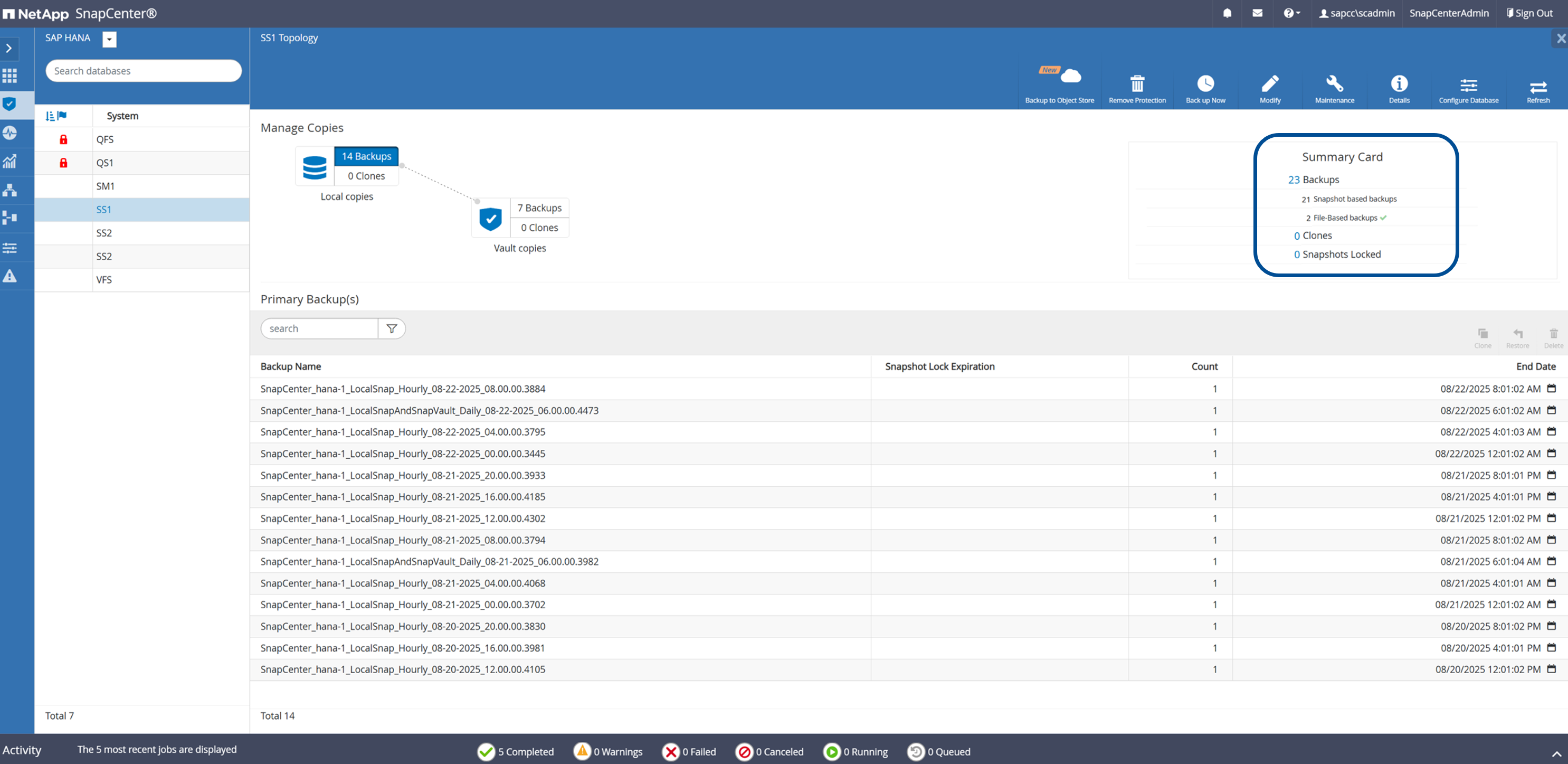
SnapCenter does not display the block integrity check in the same manner as Snapshot copy-based backups. Instead, the summary card shows the number of file-based backups and the status of the previous backup.
The SAP HANA backup catalog shows entries for both the system and the tenant databases. The following figure shows a SnapCenter block integrity check in the backup catalog of the system database.
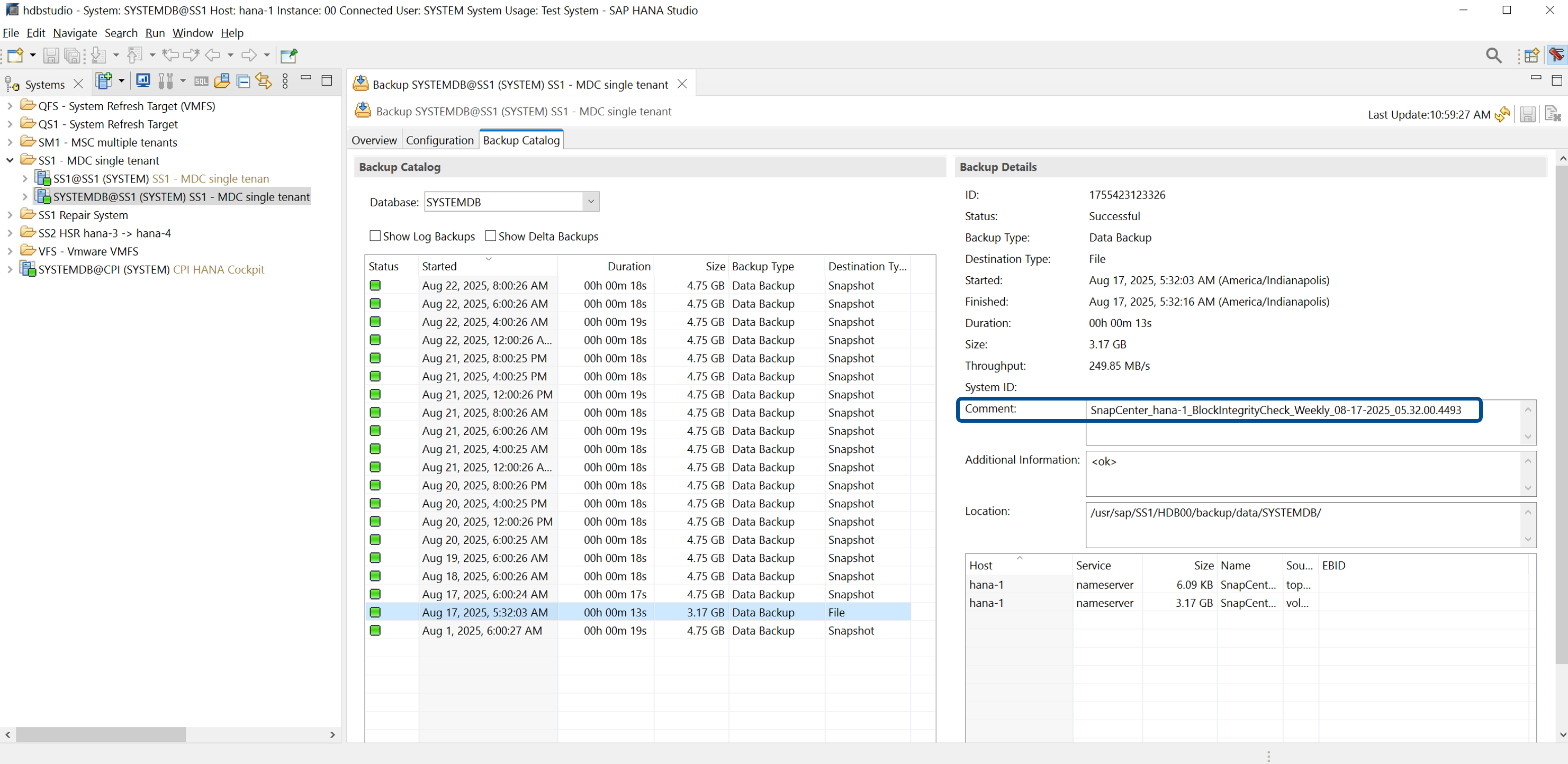
A successful block integrity check creates standard SAP HANA data backup files.
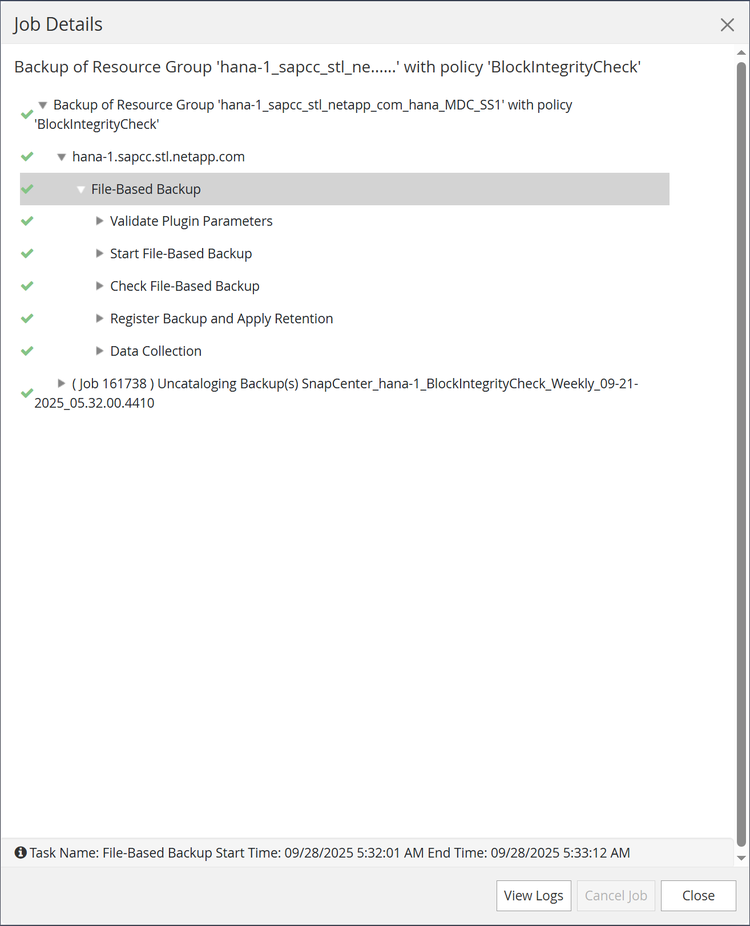
SnapCenter uses the backup path that has been configured in the HANA database for file-based data backup operations.
hana-1:/hana/shared/SS1/HDB00/backup/data # ls -al *
DB_SS1:
total 3717564
drwxr-xr-- 2 ss1adm sapsys 4096 Aug 22 11:03 .
drwxr-xr-- 4 ss1adm sapsys 4096 Jul 27 2022 ..
-rw-r----- 1 ss1adm sapsys 159744 Aug 17 05:32 SnapCenter_SnapCenter_hana-1_BlockIntegrityCheck_Weekly_08-17-2025_05.32.00.4493_databackup_0_1
-rw-r----- 1 ss1adm sapsys 83898368 Aug 17 05:32 SnapCenter_SnapCenter_hana-1_BlockIntegrityCheck_Weekly_08-17-2025_05.32.00.4493_databackup_2_1
-rw-r----- 1 ss1adm sapsys 3707777024 Aug 17 05:32 SnapCenter_SnapCenter_hana-1_BlockIntegrityCheck_Weekly_08-17-2025_05.32.00.4493_databackup_3_1
SYSTEMDB:
total 3339236
drwxr-xr-- 2 ss1adm sapsys 4096 Aug 22 11:03 .
drwxr-xr-- 4 ss1adm sapsys 4096 Jul 27 2022 ..
-rw-r----- 1 ss1adm sapsys 163840 Aug 17 05:32 SnapCenter_SnapCenter_hana-1_BlockIntegrityCheck_Weekly_08-17-2025_05.32.00.4493_databackup_0_1

-rw-r----- 1 ss1adm sapsys 3405787136 Aug 17 05:32 SnapCenter_SnapCenter_hana-1_BlockIntegrityCheck_Weekly_08-17-2025_05.32.00.4493_databackup_1_1