Learn about SAP HANA data protection with NetApp Snapshot technology

 Suggest changes

 PDFs
PDFs
Discover how NetApp Snapshot technology protects SAP HANA databases with backups that complete in minutes, regardless of database size. Learn about backup and recovery strategies using Snapshot copies, SnapRestore for fast recovery, and replication with SnapVault or Azure NetApp Files backup for secondary protection.
Companies today require continuous, uninterrupted availability for their SAP applications. They expect consistent performance levels and they need automated daily operations in the face of ever-increasing volumes of data and the need for routine maintenance tasks, such as system backups. Performing backups of SAP databases is a critical task and can have a significant performance impact on the production SAP system.
Backup windows are shrinking while the amount of data to be backed up is increasing. Therefore, it is difficult to find a time when you can perform backups with minimal effect on business processes. The time needed to restore and recover SAP systems is a concern because downtime for SAP production and nonproduction systems must be minimized to reduce costs to the business.
Backup and recovery using Snapshot backups
You can use NetApp Snapshot technology to create database backups in minutes. The time needed to create a Snapshot copy is independent of the size of the database because a Snapshot copy does not move any physical data blocks on the storage platform. In addition, the use of Snapshot technology has no performance effect on the live SAP system, since all operations are executed at the storage system. Therefore, you can schedule the creation of Snapshot copies without considering peak dialog or batch activity periods. SAP on NetApp customers typically schedule multiple online Snapshot backups during the day; for example, every six hours is common. These Snapshot backups are typically kept for three to five days on the primary storage system before being removed or tiered to cheaper storage for long term retention.
Snapshot copies also provide key advantages for restore and recovery operations. A restore operation brings back the data in the file system based on the state of a backup. A recovery operation is used to roll forward the database state to a point in time using database log backups.
NetApp SnapRestore technology enables the restoration of an entire database or, alternatively, just a portion of a database, based on the currently available Snapshot backups. The restore process is finished in a few seconds, independent of the size of the database. Because several online Snapshot backups can be created during the day, the time needed for the recovery process is significantly reduced compared to a traditional once per day backup approach. Because you can perform a restore with a Snapshot copy that is at most only a few hours old (rather than up to 24 hours), fewer transaction logs must be applied during forward recovery. The time needed for restore and recovery is significantly reduced compared to traditional streaming backups.
Because Snapshot backups are stored on the same disk system as the active online data, NetApp recommends using Snapshot copy backups as a supplement rather than a replacement for backups to a secondary location. Most restore and recovery actions are managed by using SnapRestore on the primary storage system. Restores from a secondary location are only necessary if the primary storage system containing the Snapshot copies is not available. You can also use the secondary backup if it is necessary to restore a backup that is no longer available on the primary storage.
A backup to a secondary location is based on Snapshot copies created on the primary storage. Hence the data is read directly from the primary storage system without generating load on the SAP database server and its network. The primary storage communicates directly with the secondary storage and replicates the backup data to the destination by using either SnapVault or ANF backup functionality.
SnapVault and ANF backup offer significant advantages compared to traditional backups. After an initial data transfer, where all data is transferred from the source to the destination, all subsequent backups only replicate the changed blocks to the secondary storage. Therefore, the load on the primary storage system and the time needed for a full backup are significantly reduced. Because only the changed blocks are stored at the destination, any additional full database backup consumes significantly less disk space.
Runtime of Snapshot backup and restore operations
The following figure shows a customer's HANA Studio using Snapshot backup operations. The image shows that the HANA database (approximately 4TB in size) is backed up in 1 minute and 20 seconds by using Snapshot backup technology and more than 4 hours with a file-based backup operation.
The largest part of the overall backup workflow runtime is the time needed to execute the HANA database Snapshot operation. The storage Snapshot backup itself is finished in a couple of seconds independent of the HANA database size.

Recovery time objective comparison
This section provides a recovery time objective (RTO) comparison of file-based and storage-based Snapshot backups. The RTO is defined by the sum of the time needed to restore, recover, and then to start the database.
Time needed to restore database
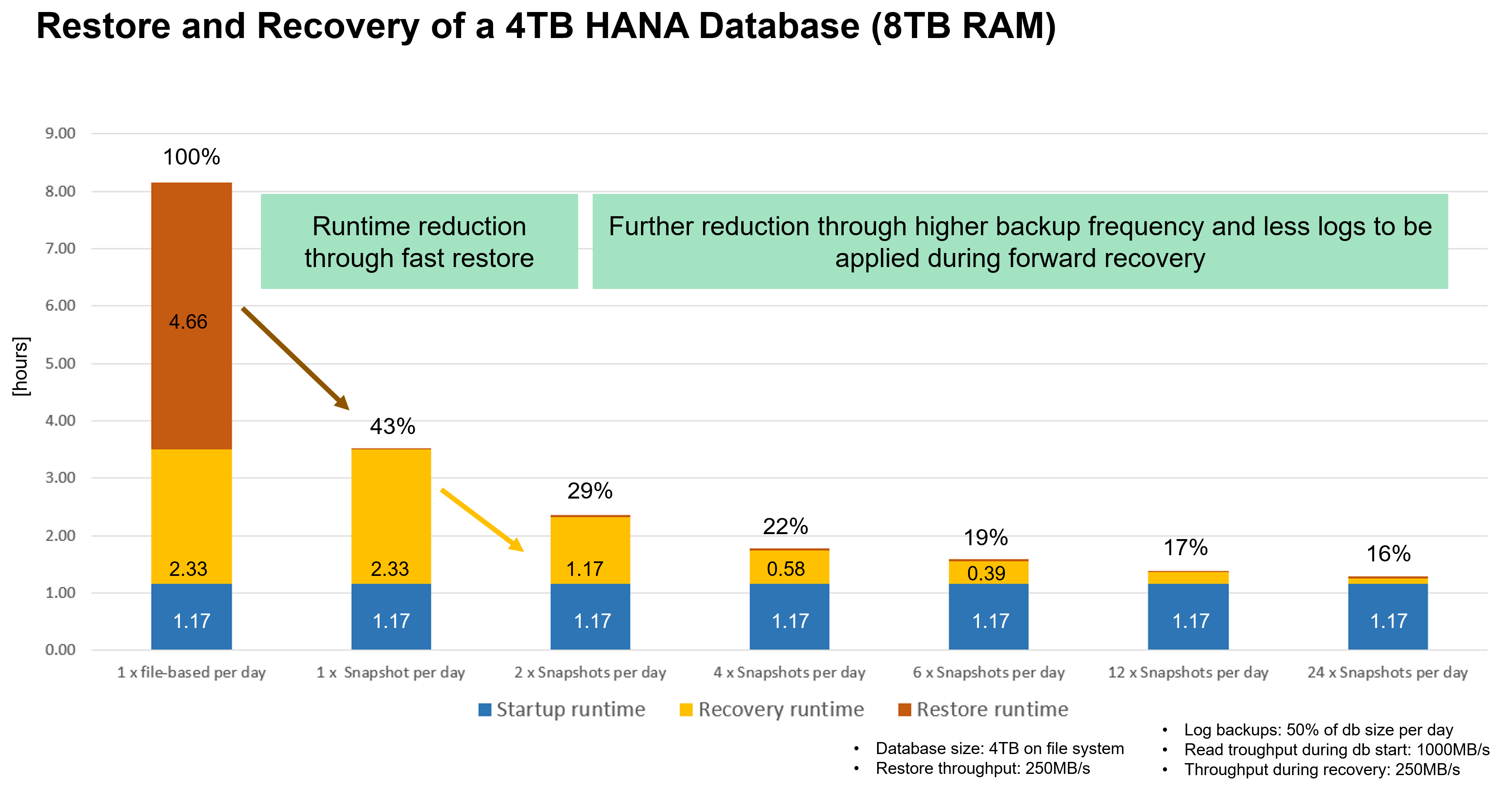
With a file-based backup, the restore time depends on the size of the database and backup infrastructure, which defines the restore speed in megabytes per second. For example, if the infrastructure supports a restore operation at a speed of 250MBps, it takes approximately 4.5 hours to restore a database 4TB in size on the persistence.
With NetApp Snapshot backups, the restore time is independent of the size of the database and is always in the range of a couple of seconds.
Time needed to recover database
The recovery time depends on the number of logs that must be applied after the restore. This number is determined by the frequency at which data backups are taken.
With file-based data backups, the backup schedule is typically once per day. A higher backup frequency is normally not possible, because the backup degrades production performance. Therefore, in the worst case, all the logs that were written during the day must be applied during forward recovery.
Snapshot backups are typically scheduled with a higher frequency because they do not have any impact on the performance of the SAP HANA database. For example, if Snapshot backups are scheduled every six hours, logs would need to be applied in the worst case for the last six hours, if the failure occurs directly before the next Snapshot would have been created. For a daily file-based backup logs for last 24 hours would need to be applied in worst case.
Time needed to start database
The database start time depends on the size of the database and the time needed to load the data into memory. In the following examples, it is assumed that the data can be loaded with 1000MBps. Loading 4TB into memory takes around 1hour and 10 minutes. The start time is the same for a file-based and Snapshot based restore and recovery operations.
Restore and recovery sample calculation
The following figure shows a comparison between restore and recovery operations with a daily file-based backup and Snapshot backups with different schedules.
The first two bars show that even with a single Snapshot backup per day, the restore and recovery is reduced to 43% due to the speed of the restore operation from a Snapshot backup. If multiple Snapshot backups per day are created, the runtime can be reduced further because less logs need to be applied during forward recovery.
The following figure also shows that four to six Snapshot backups per day makes the most sense, because a higher frequency does not have a big influence on the overall runtime anymore.
Use cases and values of accelerated backup and cloning operations
Executing backups is a critical part of any data protection strategy. Backups are scheduled on a regular basis to ensure that you can recover from system failures. This is the most obvious use case, but there are also other SAP lifecycle management tasks, where accelerating backup and recovery operations is crucial.
SAP HANA system upgrade is an example where an on-demand backup before the upgrade and a possible restore operation if the upgrade fails has a significant impact on the overall planned downtime. With the example of a 4TB database, you can reduce the planned downtime by 8 hours, or you have 8 more hours for analyzing and fixing errors by using the Snapshot-based backup and restore operations.
Another use case would be a typical test cycle, where testing must be done over multiple iterations with different data sets or parameters. When leveraging the fast backup and restore operations, you can easily create save points within your test cycle and reset the system to any of these previous save points if a test fails or needs to be repeated. This enables testing to finish earlier or enables more testing at the same time and improves test results.

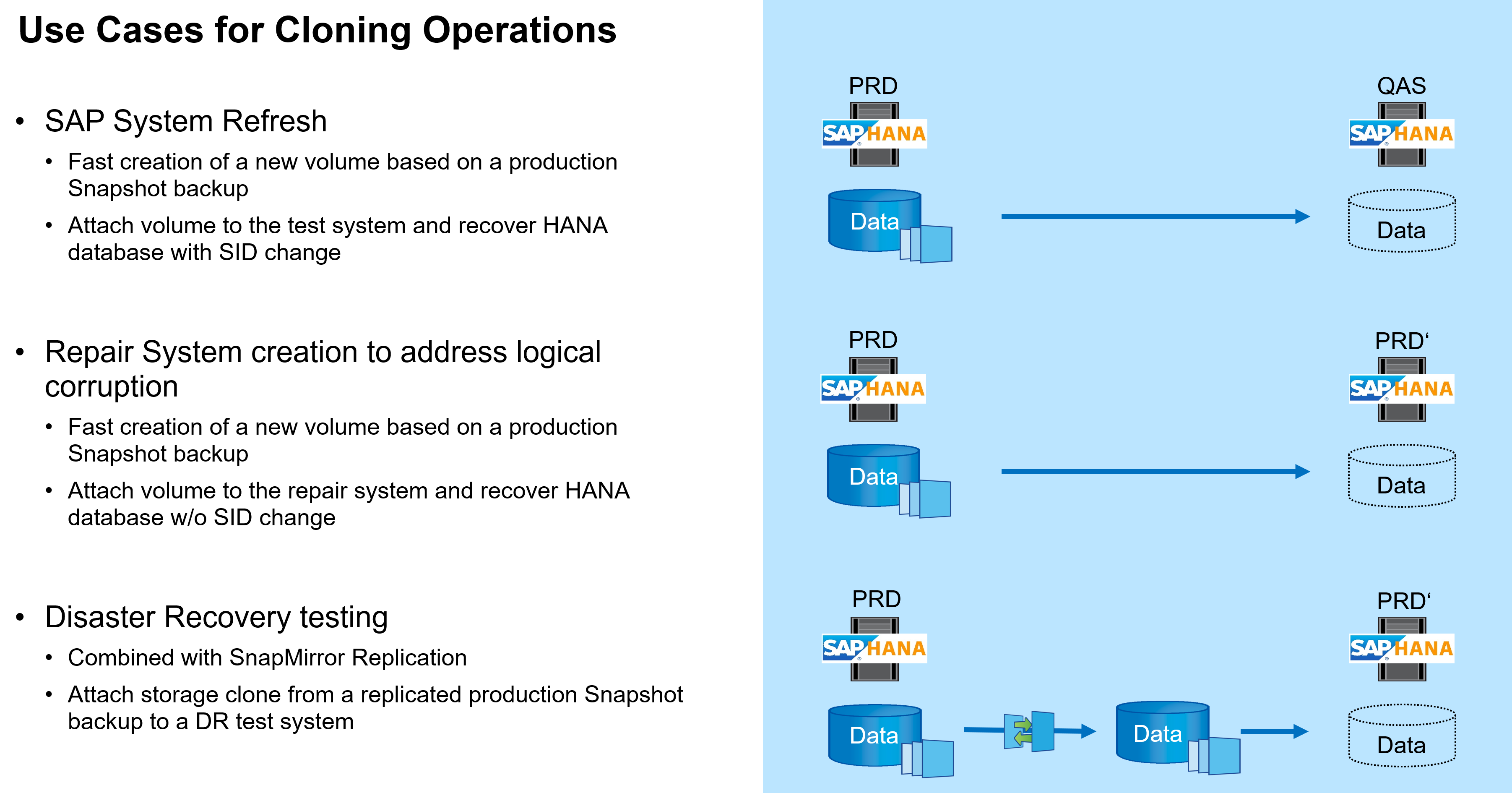
When Snapshot backups have been implemented, they can be used to address multiple other use cases, which require copies of a HANA database. You can create a new volume based on the content of any available Snapshot backup. The runtime of this operation is a few seconds, independent of the size of the volume.
The most popular use case is the SAP System Refresh, where data from the production system needs to be copied to the test or QA system. By leveraging the ONTAP or ANF cloning feature, you can provision the volume for the test system from any Snapshot copy of the production system in a matter of seconds. The new volume then must be attached to the test system and the HANA database must be recovered.
The second use case is the creation of a repair system, which is used to address logical corruption in the production system. In this case, an older Snapshot backup of the production system is used to start a repair system, which is an identical clone of the production system with the data before the corruption occurred. The repair system is then used to analyze the problem and export the required data before it got corrupted.
The last use case is the ability to run a disaster recover failover test without stopping the replication and therefore without influencing RTO and recovery point objective (RPO) of the disaster recovery setup. When ONTAP SnapMirror replication or ANF cross region replication is used to replicate the data to the disaster recovery site, the production Snapshot backups are available at the disaster recovery site as well and can then be used to create a new volume for disaster recover testing.