


Learn about SnapCenter backup and recovery for SAP HANA

 Suggest changes

 PDFs
PDFs
SnapCenter provides comprehensive backup and recovery capabilities for SAP HANA databases using storage-based Snapshot copies, automated retention management, and integration with NetApp ONTAP, Azure NetApp Files, and FSx for NetApp ONTAP. The solution supports application-consistent database backups, non-data volume protection, block integrity checks, and replication to secondary storage using SnapVault or ANF backup.
The SnapCenter backup solution for SAP HANA covers the following areas:
-
Backup operations, scheduling, and retention management
-
SAP HANA data backup with storage-based Snapshot copies
-
Non-data volume backup with storage-based Snapshot copies (for example, /hana/shared)
-
Database block integrity check operations
-
using a file-based backup
-
using the SAP HANA hdbpersdiag tool
-
-
Snapshot backup replication to a secondary backup location
-
using SnapVault/SnapMirror
-
using Azure NetApp Files ANF backup
-
-
Housekeeping of the SAP HANA backup catalog
-
for HANA data backups (Snapshot and file-based)
-
for HANA log backups
-
-
Restore and recovery operations
-
Automated restore and recovery
-
Single tenant restore operations
-
Database data backups are executed by SnapCenter in combination with the SnapCenter plug-in for SAP HANA. The plug-in triggers an SAP HANA internal database snapshot so that the snapshots, which are created on the storage system, are based on an application consistent image of the SAP HANA database.
SnapCenter enables the replication of consistent database images to a secondary backup or disaster recovery location by using SnapVault or the SnapMirror. feature. Typically, different retention policies are defined for backups at primary and at secondary storage. SnapCenter handles the retention at primary storage, and ONTAP handles the retention at the secondary backup storage.
To allow a complete backup of all SAP HANA-related resources, SnapCenter also enables you to back up all non-data volumes by using the SAP HANA plug-in with storage-based Snapshot copies. You can schedule non-data volumes independently from the database data backup to enable individual retention and protection policies.
SAP recommends combining storage-based Snapshot backups with a weekly consistency check of the persistence layer. You can execute the block consistency check from within SnapCenter either by running a file-based backup or by executing the SAP hdbpersdiag tool.
Based on your configured retention policies, SnapCenter manages the housekeeping of data file backups at the primary storage, log file backups, and the SAP HANA backup catalog.
SnapCenter handles the retention at primary storage, while ONTAP manages secondary backup retention.
The following figure shows an overview of the SnapCenter backup and retention management operations.
When executing a storage-based Snapshot backup of the SAP HANA database, SnapCenter performs the following tasks:
-
Backup operation:
-
Triggers an internal HANA database snapshot to get an application consistent image on the persistence layer
-
Creates a storage-based Snapshot backup of the data volume
-
Closes the internal HANA database snapshot, confirms or abandons the backup operation. This step registers the backup in the HANA backup catalog.
-
-
Retention management:
-
Deletes storage Snapshot backups based on the defined retention
-
Deletes Snapshots on storage layer
-
Deletes SAP HANA backup catalog entries
-
Deletes all log backups that are older than the oldest data backup. Log backups are deleted on the file system and in the SAP HANA backup catalog
-
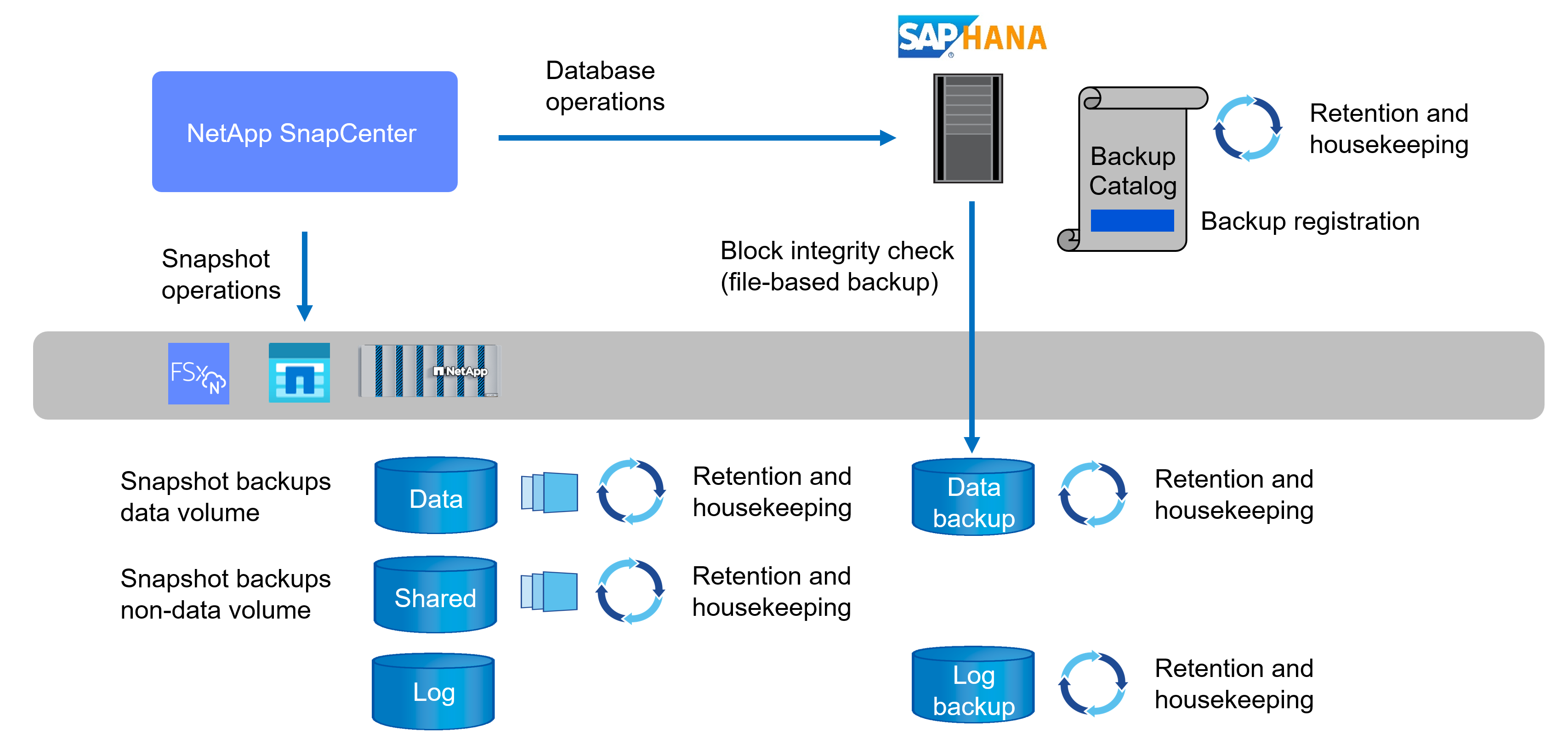
If a secondary backup is configured, either with SnapVault/SnapMirror or with ANF backup, the Snapshot created at the primary volume is replicated to the secondary backup storage. SnapCenter manages HANA backup catalog as well as log backup retention according to availability of secondary backups.
