


SAP HANA data protection with SnapCenter using VMware VMFS and SnapMirror active sync on NetApp ASA R2

 Suggest changes

 PDFs
PDFs
This document outlines the best practices for data protection using SnapCenter for HANA systems running on VMware with datastores using VMFS and LUNs stored on NetApp ASAr2 systems using SnapMirror active sync in a symmetric active/active configuration. The document provides an overview of the solution architecture, the required software versions, and the intended audience. It also describes the integration of SnapCenter with SAP HANA and ONTAP for application-consistent backup and recovery operations.
Introduction
SAP HANA is a business-critical platform that requires highly available, resilient, and application-consistent data protection. For productive SAP HANA environments, storage availability and restore/recovery capabilities must be designed to minimize downtime, protect against failures, and support fast recovery from logical or operational issues.
This document describes the implementation of SAP HANA data protection using NetApp SnapCenter, NetApp SnapMirror active sync, and NetApp ASA storage systems in a VMware vSphere environment. The solution is based on a symmetric active/active architecture, where SAP HANA storage is synchronously replicated between two ONTAP storage clusters using SnapMirror active sync. This configuration enables continuous host access to replicated storage from both sites and supports automated failover for high-availability scenarios.
The document focuses on the configuration of SAP HANA storage volumes presented as LUNs to VMware ESXi hosts, the creation of VMFS datastores for the SAP HANA system, and the integration of the SAP HANA database into SnapCenter for application-consistent backup and recovery operations.
Intended Audience
This document is intended for storage administrators, VMware administrators, SAP Basis administrators, and infrastructure architects who are responsible for designing, deploying, and protecting SAP HANA environments on NetApp storage.
Readers should have a basic understanding of:
-
SAP HANA administration.
-
VMware vSphere and VMFS datastore management.
-
ONTAP System Manager.
-
SAN concepts such as LUNs, initiators, WWPNs, and host mapping.
-
NetApp SnapMirror, SnapVault, and consistency groups.
-
NetApp SnapCenter backup and recovery concepts.
Solution Overview
The solution combines the following NetApp and VMware technologies:
-
NetApp ASA storage systems for SAN-based block storage access.
-
ONTAP consistency groups to manage SAP HANA-related storage units as a single protected entity.
-
SnapMirror active sync in AutomatedFailOverDuplex mode to provide symmetric active/active synchronous replication.
-
Setup and configuration of ONTAP Mediator
-
VMware vSphere and VMFS datastores for hosting the SAP HANA virtual machine and its data, log, shared, and operating system disks.
-
NetApp SnapCenter Server, SnapCenter Agent and Plug-in for SAP HANA and VMware vSphere to create application-consistent Snapshot backups.
-
SnapMirror and SnapVault replication for additional asynchronous backup replication to a secondary system.
In this architecture, dedicated LUNs are created for the SAP HANA data, log, shared, and operating system volumes. These LUNs are mapped to VMware ESXi hosts and used to create VMFS datastores. The SAP HANA virtual machine then uses separate virtual disks located on the corresponding datastores.
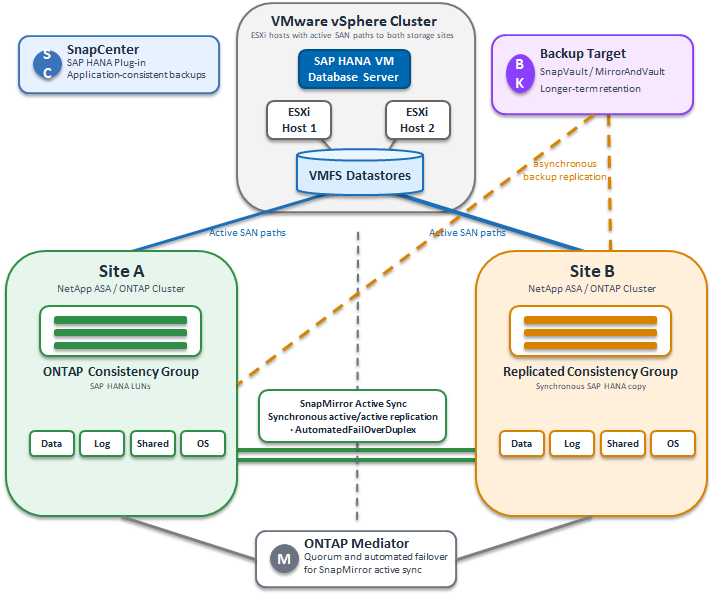
The SAP HANA data, log, and shared storage units are grouped into an ONTAP consistency group and protected with SnapMirror active sync. This ensures that the SAP HANA storage layout is replicated consistently across the participating ONTAP clusters. Optionally, the operating system datastore can also be protected using the same approach.
SnapMirror Active Sync for SAP HANA
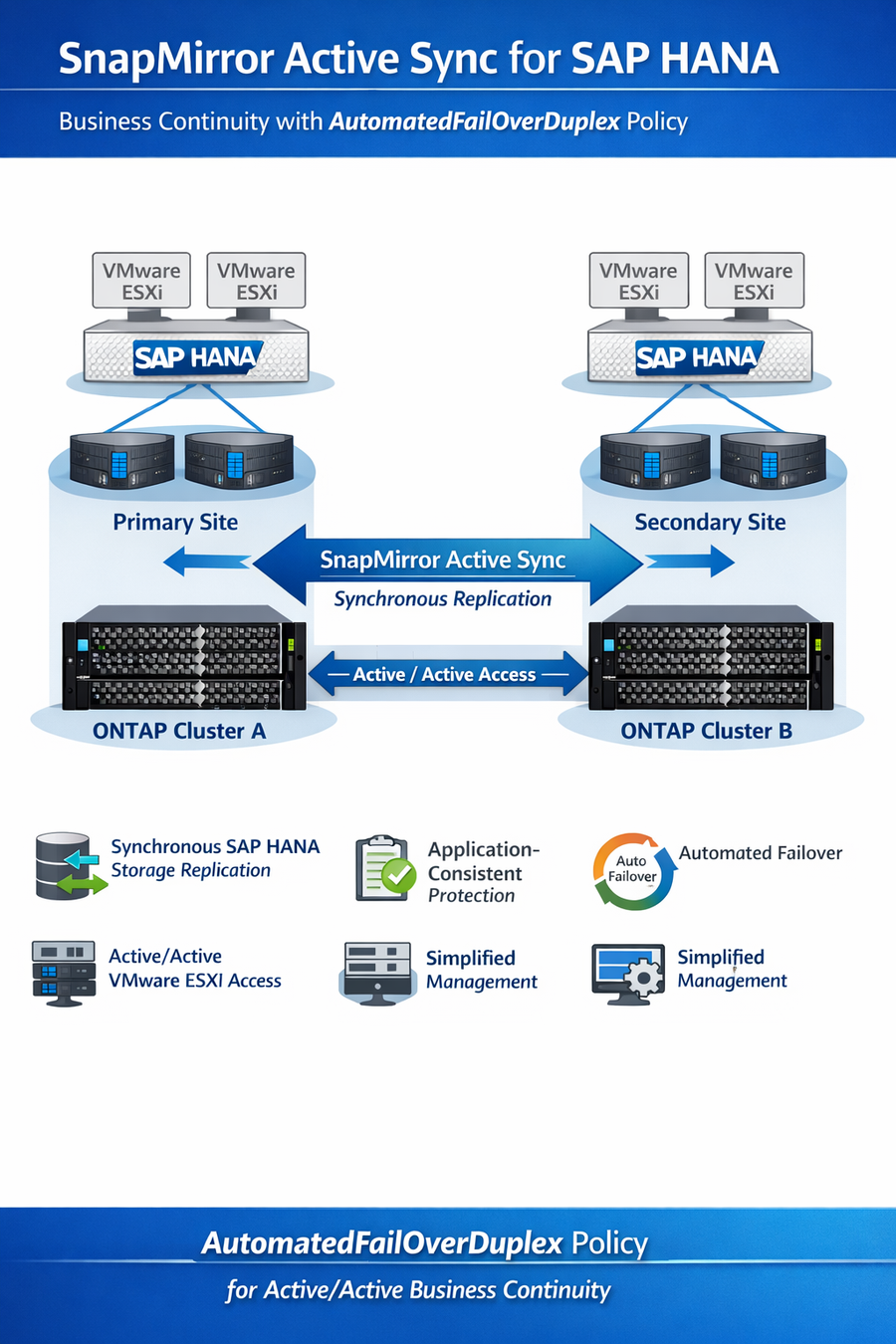
SnapMirror active sync (SMas) enables business continuity by synchronously replicating data between two ONTAP clusters. In a symmetric active/active configuration, both storage sites can provide active access to replicated LUNs. This allows the VMware and SAP HANA environment to continue operating even if one storage system or site becomes unavailable.
For SAP HANA workloads, this provides the following benefits:
-
Synchronous replication of SAP HANA storage.
-
Application-consistent protection using ONTAP consistency groups.
-
Automated failover using SnapMirror active sync.
-
Active/active access paths for SAN-connected VMware ESXi hosts.
-
Reduced recovery time in the event of storage or site failure.
-
Simplified management using ONTAP System Manager and SnapCenter.
The configuration in this document uses the AutomatedFailOverDuplex policy to enable SnapMirror active sync active/active behavior.
SnapCenter Integration
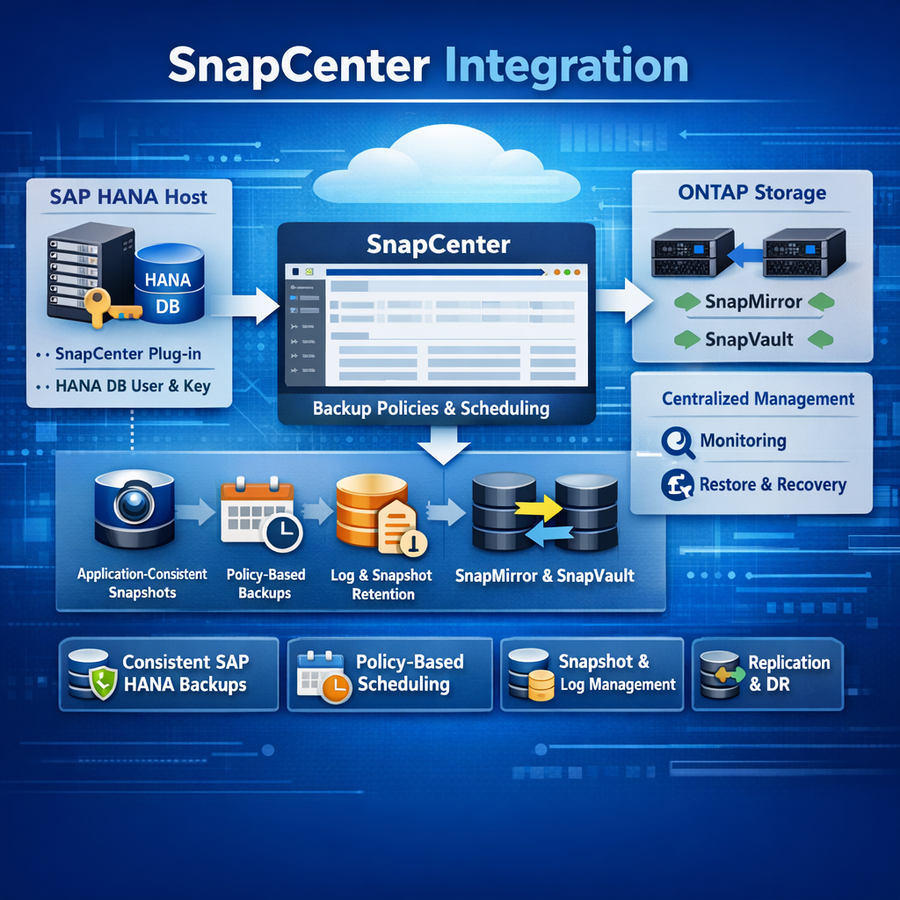
SnapCenter is used to manage SAP HANA application-consistent backups. After the SAP HANA system is deployed, the SnapCenter Plug-in for SAP HANA is installed on the SAP HANA host. A dedicated SAP HANA database user and secure user store key are created to allow SnapCenter to communicate with the SAP HANA database.
SnapCenter backup policies are then configured for different protection requirements. For example, an hourly policy can be used for frequent local Snapshot copies and SnapMirror active sync awareness, while a daily policy can be used to update an asynchronous SnapVault or MirrorAndVault destination for longer-term backup retention.
By integrating SnapCenter with SAP HANA and ONTAP, the solution provides:
-
Application-consistent SAP HANA Snapshot backups.
-
Policy-based backup scheduling.
-
Snapshot and log backup retention management.
-
SnapMirror and SnapVault update orchestration.
-
Centralized backup monitoring and management.
-
Simplified restore and recovery workflows.
Document Scope
This document provides a step-by-step configuration example for the following tasks:
-
Creating LUNs on NetApp ASA storage.
-
Configuring host access for VMware ESXi hosts.
-
Creating ONTAP consistency groups.
-
Enabling SnapMirror active sync in active/active mode.
-
Installation and configuring of ONTAP Mediator
-
Configuring additional asynchronous replication for backup purposes.
-
Creating VMware VMFS datastores.
-
Deploying an SAP HANA virtual machine.
-
Installing the operating system and SAP HANA.
-
Adding ONTAP storage systems to SnapCenter.
-
Creating SnapCenter backup policies.
-
Creating an SAP HANA database user for SnapCenter.
-
Configuring the SAP HANA secure user store key.
-
Registering the SAP HANA system in SnapCenter.
-
Scheduling and running SAP HANA backups.
The procedures are intended as an implementation guide and should be adapted to match the specific customer environment, naming standards, network design, storage layout, and SAP sizing requirements.
Architecture Summary
At a high level, the solution consists of two NetApp ONTAP clusters using ASA storage, connected to VMware ESXi hosts through SAN. SAP HANA runs inside a VMware virtual machine. Separate datastores are used for the SAP HANA operating system, data volume, log volume, and shared volume.
The SAP HANA-related storage units are protected by SnapMirror active sync through ONTAP consistency groups. This ensures that the data, log, and shared volumes are replicated together and remain write-order consistent. SnapCenter is then used to create SAP HANA-aware backups and to trigger the required ONTAP Snapshot and replication operations.
This combination delivers a highly available and operationally efficient data protection solution for SAP HANA workloads running on VMware with NetApp ASA storage.