


Omnissa with NetApp Architecture

 Suggest changes

 PDFs
PDFs
This section provides an overview of the architecture of Omnissa with NetApp, including the components and technologies involved in the solution. It also highlights the benefits of using NetApp storage in an EUC environment and how it can help organizations optimize their virtual desktop and application deployments.
Architecture overview
The architecture of Omnissa with NetApp is designed to provide a scalable and flexible solution for EUC environments. The solution consists of several components, including the Omnissa management platform, NetApp storage arrays, and the virtual desktop and application infrastructure. The Omnissa management platform provides a centralized interface for managing the virtual desktop and application infrastructure, while the NetApp storage arrays provide high-performance and reliable storage for the virtual desktops and applications. The architecture is designed to support a wide range of EUC use cases, including virtual desktop infrastructure (VDI), application virtualization, and file shares for user data.
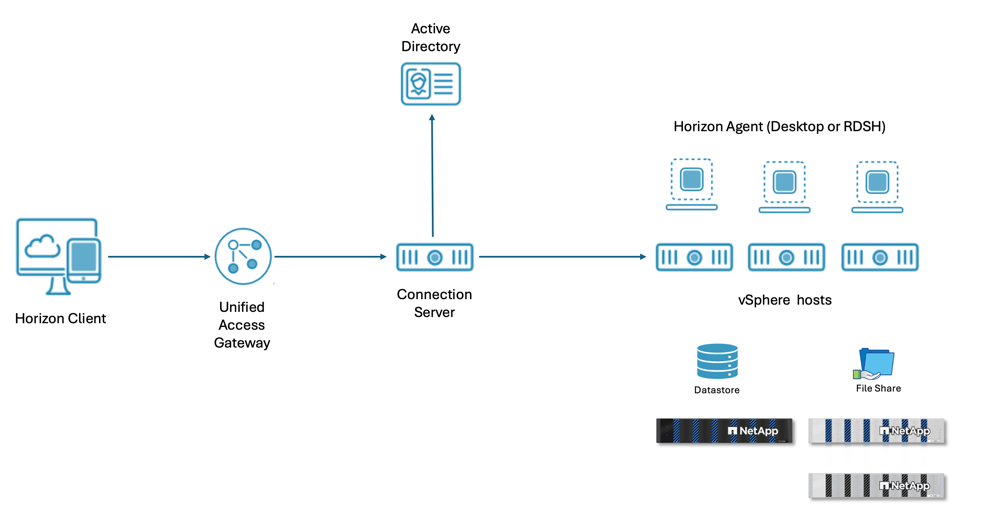
Omnissa Horizon can be deployed on-premises, in the cloud, or in a hybrid environment, providing organizations with the flexibility to choose the deployment model that best suits their needs. The architecture is designed to support a wide range of use cases, including VDI, application virtualization, and Remote Desktop Services (RDS).
Omnissa Horizon Client is the end-user interface for accessing virtual desktops and applications. It is available for Windows, macOS, Linux, iOS, and Android devices, allowing users to connect to their virtual desktops and applications from a wide range of devices. A web browser can be used as an HTML client for devices on which installing client software is not possible.
Thin clients and zero clients can also be used to access the virtual desktops and applications, providing a cost-effective solution for organizations that want to deploy virtual desktops and applications to a large number of users.
Omnissa Horizon allows you to create and broker connections to Windows virtual desktops, Linux virtual desktops, Remote Desktop Server (RDS) – hosted applications and desktops, Linux-hosted applications, and Windows physical machines.
The Horizon Connection server authenticates users through Active Directory and directs the request to the appropriate and entitled resource.
Omnissa Horizon Agents are installed on the physical machines, virtual desktops, and Remote Desktop Session Hosts (RDSH) to enable communication with the Horizon Connection server and provide a seamless user experience. The agents also provide features such as session management, printing, and USB redirection.
Unified Access Gateway (UAG) is a secure gateway that provides remote access to virtual desktops and applications. It is typically deployed in the DMZ and provides secure access to the Horizon Connection server from outside the corporate network.
External database instance is used to store the Horizon Connection server events and other information. The database can be hosted on Microsoft SQL Server, PostgreSQL, or Oracle Database, providing organizations with the flexibility to choose the database platform that best suits their needs.
When Horizon SaaS is used, Horizon Edge Gateway appliance is deployed to create connections to the Horizon SaaS service. The Edge Gateway provides secure access to the Horizon SaaS service and enables organizations to leverage the benefits of a cloud-based solution while maintaining control over their virtual desktop and application infrastructure.
For more details, refer Horizon 8 Architecture.
NetApp storage arrays are used to provide high-performance and reliable storage for hosting virtual desktops and applications as well as for the user data. NetApp storage arrays provide flexible deployment options and ability to scale as the needs of the organization grow. They also offer features such as data deduplication, compression, and thin provisioning, which can help organizations optimize their storage resources and reduce costs.
Pod and Block architecture
Omnissa Horizon uses a pod and block architecture to provide a scalable and repeatable solution for EUC environments. A pod is a group of interconnected Horizon Connection servers that can serve sessions up to 20,000 virtual desktops and applications. A pod can contain up to 7 Horizon Connection servers which must be located on the same datacenter and cannot span locations. Multiple pods can be interconnected using Cloud Pod Architecture (CPA) to provide a scalable solution for larger environments. With CPA, the number of sessions can be scaled up to 250,000. For higher session counts, additional CPAs can be added to the architecture.
A block is a collection of compute clusters that are used to host virtual desktops and RDSH sessions. Each block has its own hypervisor manager which is vCenter for VMware environments. In VCF environments, each Workload Domain makes a block. A block can coexist on same datacenter as the pod or can be located in a different datacenter. For remote agents, the max recommended sessions is 1000 per block. The number of VMs per block varies based on Horizon VM configuration.
Virtual Desktop and Windows Servers for RDSH sessions are hosted on the compute clusters in the blocks. In vSphere environments, the virtual machines are hosted on Datastores that are connected to the compute clusters. ONTAP tools for VMware vSphere provides vCenter integration that allows administrators to manage NetApp storage directly from the vCenter interface. ONTAP supports both the block protocols (iSCSI, NVMeoF and Fibre Channel), and file protocols (NFS) for Datastore connectivity.
vSphere API for Array Integration (VAAI) is a set of APIs that allows vSphere to offload certain storage operations to the storage array, improving performance and efficiency. NetApp storage arrays support VAAI, allowing for features such as hardware-assisted locking, block zeroing, and full copy operations. For NFS Datastores, VAAI component needs to be installed on the vSphere hosts to enable VAAI support. With VAAI, the virtual desktop provisioning time can be significatly reduced.
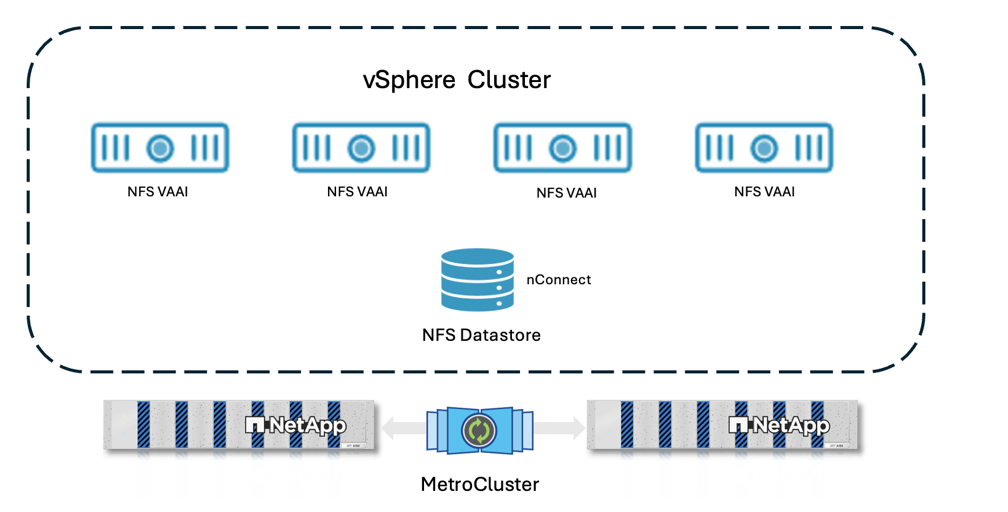
NetApp storage arrays also provide features such as data deduplication, compression, and thin provisioning, which can help organizations optimize their storage resources and reduce costs. These features can be particularly beneficial in an EUC environment where there may be a large number of virtual desktops and applications that require storage resources.
For high availability of vSphere Datastore hosting virtual desktops and RDSH sessions, the datastores can be protected using NetApp SnapMirror active sync replication to a secondary NetApp storage array. In the event of a failure of the primary storage array, the secondary storage array can take over and provide access to the virtual desktops and applications without any downtime using Uniform access mode. In case of NFS Datastores, it can be protected using NetApp MetroCluster configuration.
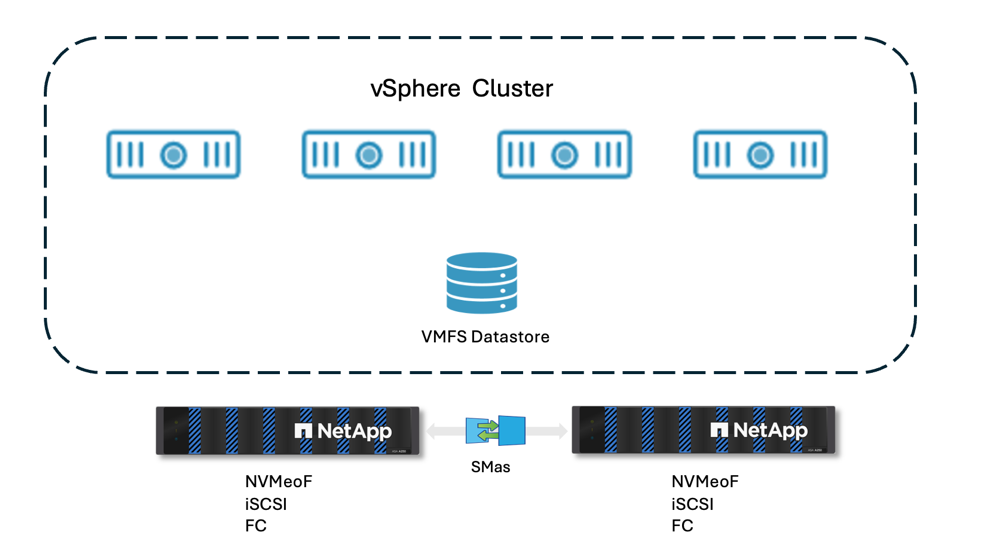

|
Stretched cluster configurations across the sites are not supported for the Horizon Connection servers in a pod. Use it in use cases where high availability is required for the virtual desktops and applications within a datacenter. File shares for the user data hosted on MetroCluster can provide active-active access to the user data from multiple datacenters. Each datacenter can have its file server (SVM) hosting the file shares for the user data. The SVM is protected using MetroCluster configuration, providing high availability and disaster recovery capabilities for the user data. |
Application virtualization
A common challenge with VDI environments is sprawl of VDI templates because of preinstalled applications. With Omnissa Horizon, App Volumes can be used to stream applications to virtual desktops and published application hosts. User-writable volumes allow users to install applications. This reduces the need for persistent desktops. With App Volumes, applications are packaged and delivered to virtual desktops and RDSH sessions in real-time. Based on Machine Manager, the packaged applications are stored on VMDK files on Datastores or VHD files on SMB file shares which are handled by the App Volumes Agent for mounting and unmounting on the virtual desktops and RDSH servers.
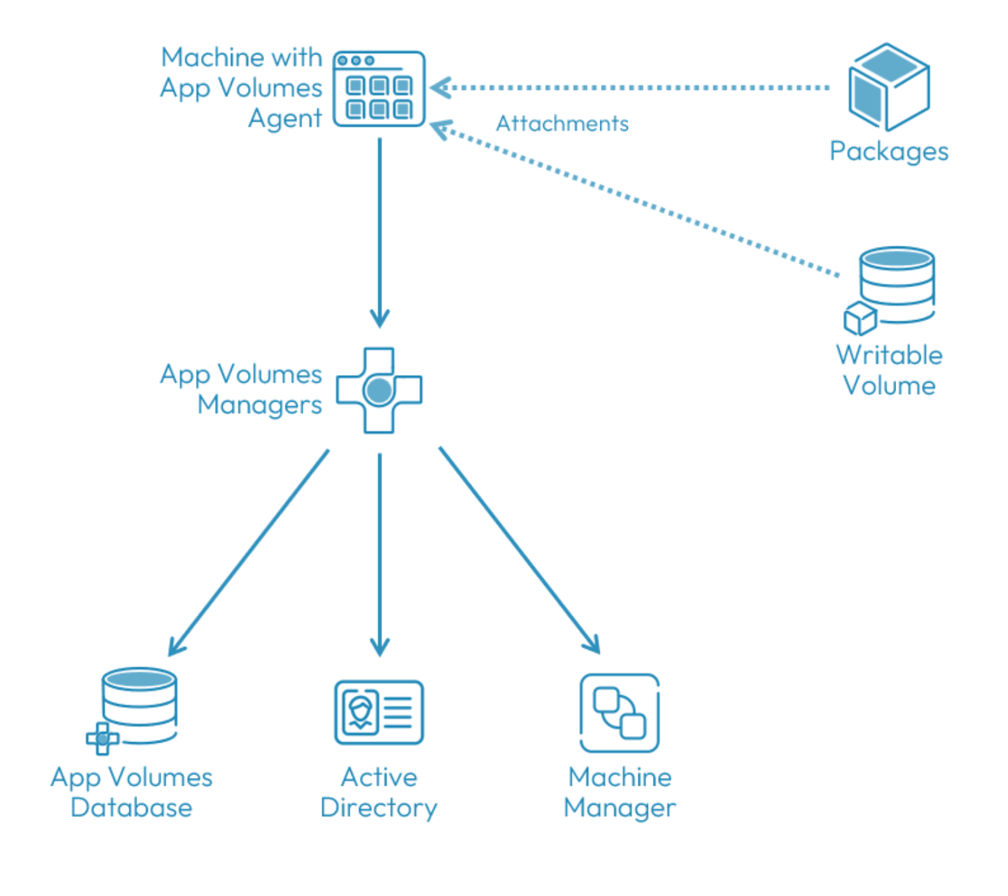
Microsoft SQL Server or SQL Server Express can be used as the database for App Volumes Manager. vSphere Datastores can be VMFS or NFS. The Datastores can be provisioned using ONTAP tools for VMware vSphere which provides vCenter integration for managing NetApp storage directly from the vCenter interface.
Omnissa App Volumes supports Citrix Virtual Apps and Desktops and Microsoft Remote Desktop Services (RDS) in addition to Omnissa Horizon. This allows organizations to use App Volumes for application delivery across multiple EUC platforms, providing a consistent user experience and simplifying application management.
For more details, refer App Volumes Architecture.
User profile management
User profile management is a critical component of any EUC environment, as it ensures that users have a consistent experience across different virtual desktops and applications. Omnissa Horizon supports several user profile management solutions, including Microsoft FSLogix and Omnissa Dynamic Environment Manager (DEM) or combination of both. FSLogix provides a containerized user profile solution that allows for fast logins and a consistent user experience across different virtual desktops and applications. DEM provides a more granular approach to user profile management, allowing administrators to manage user settings and configurations based on specific conditions and criteria. To learn more about DEM, refer Dynamic Environment Manager Architecture.
By containerizing user profiles with FSLogix, the user can be assigned to any virtual desktop or RDSH session and still have access to their personalized settings and data. The user data can be redirected to a SMB file share to reduce the container size and ease of management. Both DEM and FSLogix requires a file share to store the user profile container and settings. ONTAP supports Global Namespace (GNS) which allows to create a single namespace for the file shares hosting the user profiles across multiple datacenters or can integrate with Microsoft Distributed File System (DFS) to provide a unified namespace for the user profile storage. This allows for high availability and disaster recovery capabilities for the user profiles, as well as providing a seamless experience for users regardless of their location or the virtual desktop they are accessing.
ONTAP FlexGroup provides a scalable and high-performance solution for hosting user profiles in an EUC environment. FlexGroups are designed to provide high throughput and low latency, making them ideal for hosting user profiles that require fast access to data.
ONTAP FlexCache used along with Microsoft DFS can provide a distributed caching solution for user profiles, allowing for faster access to user data and improved performance in an EUC environment. With FlexCache, frequently accessed user profile data can be cached locally reducing latency and improving the user experience.