


Configure NetApp Datastore with iSCSI for OpenNebula

 Suggest changes

 PDFs
PDFs
Configure OpenNebula Datastores using iSCSI protocol with NetApp ONTAP running on AFF or FAS systems. This configuration enables block-level storage access over standard Ethernet networks with multipath support. This datastore setup utilizes native ONTAP features, including snapshots and cloning, to enhance storage efficiency and data protection.
Initial virtualization administrator tasks
Complete these initial tasks to prepare OpenNebula hosts for iSCSI connectivity and collect the necessary information for the storage administrator.
-
Verify two Linux VLAN interfaces are available.
-
Ensure multipath-tools and iSCSI initiator utilities are installed on all OpenNebula hosts and starts on boot.
Debian/Ubuntuapt list | grep multipath-tools # If need to install, execute the following line. apt-get install multipath-tools open-iscsi # If /etc/multipath.conf is not present, first make sure the multipathd service is started. systemctl enable --now multipathd systemctl enable --now open-iscsiRHEL/AlmaLinuxdnf list installed | grep device-mapper-multipath # If need to install, execute the following line. dnf install device-mapper-multipath iscsi-initiator-utils # If /etc/multipath.conf is not present, first make sure the multipathd service is started. systemctl enable --now multipathd systemctl enable --now iscsid -
Collect the iSCSI host IQN for all OpenNebula hosts and provide it to the storage administrator.
cat /etc/iscsi/initiator.name
Storage administrator tasks
If you are new to ONTAP, use System Manager for a better experience.
-
Ensure the SVM is available with iSCSI protocol enabled. Follow ONTAP 9 documentation.
-
Create two LIFs per controller dedicated for iSCSI. Two LIFs per controller are recommended for redundancy and multipath performance. Ensure the LIFs are created on the VLAN interfaces configured on OpenNebula hosts. Jumbo frames (MTU 9000) are recommended for better performance.
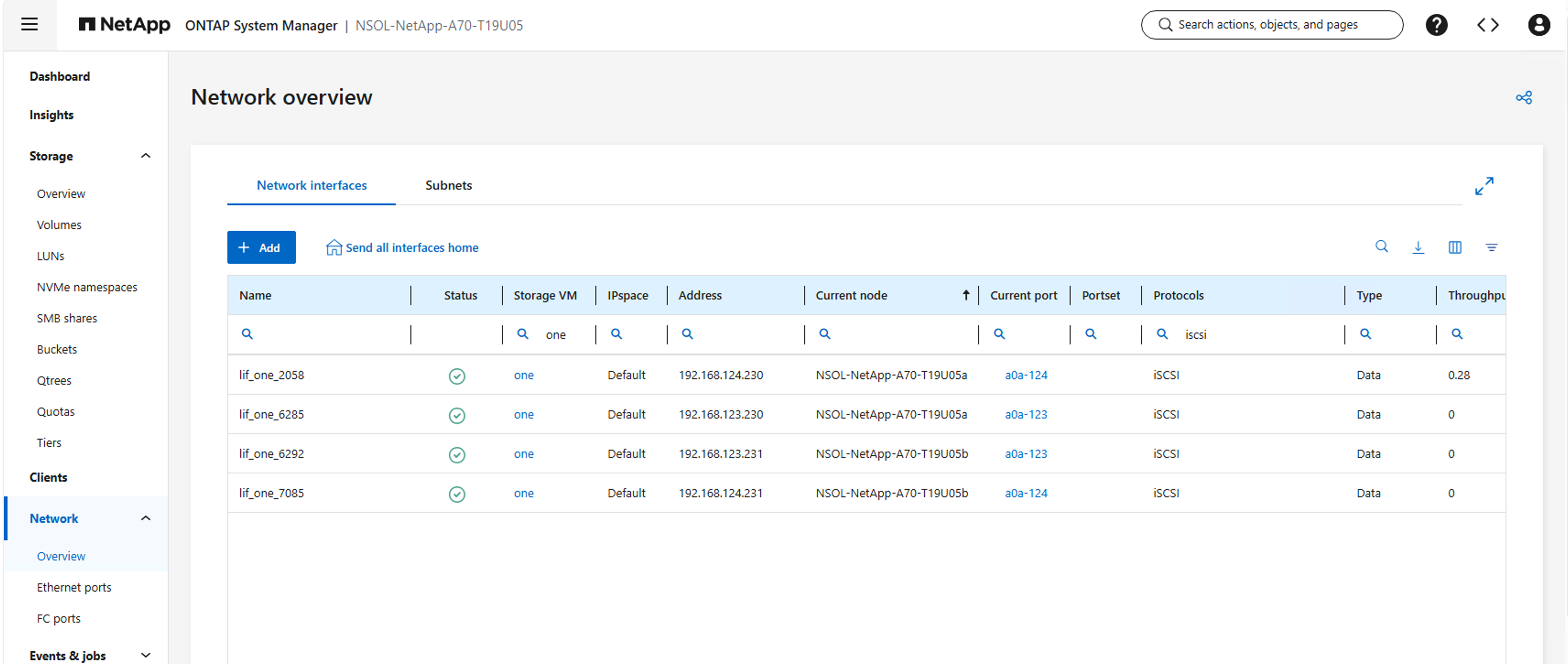
-
Create an igroup and populate the host iSCSI initiators. Typically one igroup is created for one OpenNebula cluster. Include frontend servers and hypervisor hosts in the same igroup to support both Image and System datastores.
-
Create an ONTAP role and user account with ONTAP REST API access scoped to the target SVM. This user will be used by the NetApp driver in OpenNebula. See Work with users and roles ONTAP documentation for more information. Keep note of the Username and Password, to be used in the Virtualization Configuration Tasks.
-
Gather the SVM iSCSI Target IQN and UUIDs for the following resources for use in the Virtualization Configuration Tasks:
-
The SVM
-
The Aggregate(s) / Tier(s) to be used
-
The igroup with the OpenNebula hosts
-
The iSCSI Target IQN (typically same as SVM IQN). Virtualization admin can retrieve this information using
iscsiadm -m sessioncommand after logging into one of the OpenNebula hosts and discovering the iSCSI target.
+
-
NETAPP_SVM="85c23687-d5d9-11f0-86c4-d039eac4d4b3"
NETAPP_AGGREGATES="6e8f9995-42dd-400a-a440-646639dc5d0b"
NETAPP_IGROUP="5ad9faf3-d62c-11f0-86c4-d039eac4d4b3"
NETAPP_TARGET="iqn.1992-08.com.netapp:sn.85c23687d5d911f086c4d039eac4d4b3:vs.6"
TIP: System Manager displays the UUID in the URL when viewing the resource details.
Final virtualization administrator tasks
Complete these tasks to configure the iSCSI Datastore on OpenNebula.
-
SSH to one of the frontend server and discover all iSCSI Lif portals by providing one of the iSCSI data lif addresses.
iscsiadm -m discovery -t sendtargets -p <iscsi data lif address> iscsiadm -m node iscsiadm -m node -l -
Create a configuration file based on desired Datastore type. For complete attribute list, refer OpenNebula NetApp SAN documentation. Sample files are shown below:
Image$cat netapp-image.conf NAME = "Image-NetApp-iSCSI" TYPE = "IMAGE_DS" DS_MAD = "netapp" TM_MAD = "netapp" DISK_TYPE = "BLOCK" NETAPP_HOST = "<ontap_cluster_ip>" NETAPP_USER = "<ontap_api_user>" NETAPP_PASS = "<ontap_api_password>" NETAPP_SVM = "<ontap_svm_uuid>" NETAPP_AGGREGATES = "<ontap_aggregate_uuid>" NETAPP_IGROUP = "<ontap_igroup_uuid>" NETAPP_TARGET = "<ontap_iscsi_target_iqn>" # Optional suffix to share SVM across multiple tenants NETAPP_SUFFIX = "t1"System$cat netapp-system.conf NAME = "System-NetApp-iSCSI" TYPE = "SYSTEM_DS" TM_MAD = "netapp" DISK_TYPE = "BLOCK" NETAPP_HOST = "<ontap_cluster_ip>" NETAPP_USER = "<ontap_api_user>" NETAPP_PASS = "<ontap_api_password>" NETAPP_SVM = "<ontap_svm_uuid>" NETAPP_AGGREGATES = "<ontap_aggregate_uuid>" NETAPP_IGROUP = "<ontap_igroup_uuid>" NETAPP_TARGET = "<ontap_iscsi_target_iqn>" # Optional suffix to share SVM across multiple tenants NETAPP_SUFFIX = "t1" -
Execute
onedatastore create <configuration file>. Note the datastore ID returned after creation.onedatastore create netapp-system.conf
ID: 105 -
Verify the datastore is created successfully by executing
onedatastore show <datastore_id>. -
Download Apps on Image datastore and create VM using Templates to provision on System datastore.
-
Check the LUNs created on ONTAP for the image and virtual machine disks. The naming convention used is as follows:
-
Image datastore: one_<datastore_id>_<image_id>_<suffix> (volume), one_<datastore_id>_<image_id>_<suffix>_lun (LUN)
-
System datastore: one_<vm_id>_disk_<disk_id>_<suffix> (volume), one_<datastore_id>_<vm_id>_disk_<disk_id>_<suffix>_lun (LUN)
Show example
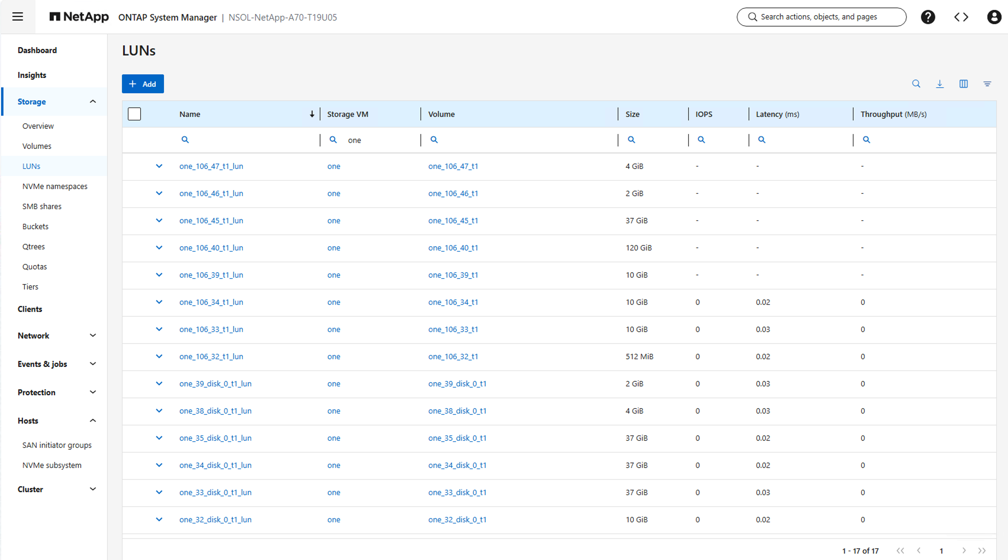
-