


Configure SMB/CIFS Datastore storage for OpenNebula

 Suggest changes

 PDFs
PDFs
Configure SMB/CIFS Datastore storage for OpenNebula using NetApp ONTAP. SMB multichannel provides fault tolerance and boosts performance with multiple network connections to the storage system.
SMB/CIFS file shares require configuration tasks by both storage and virtualization administrators. For more details, refer to TR4740 - SMB 3.0 Multichannel.

|
Passwords are saved in clear text files and are accessible only to the root user. Ensure proper security measures are in place to protect sensitive information. |
Storage administrator tasks
If you are new to ONTAP, use System Manager Interface to complete these tasks.
-
Enable the SVM for SMB. Follow ONTAP 9 documentation for more information.
-
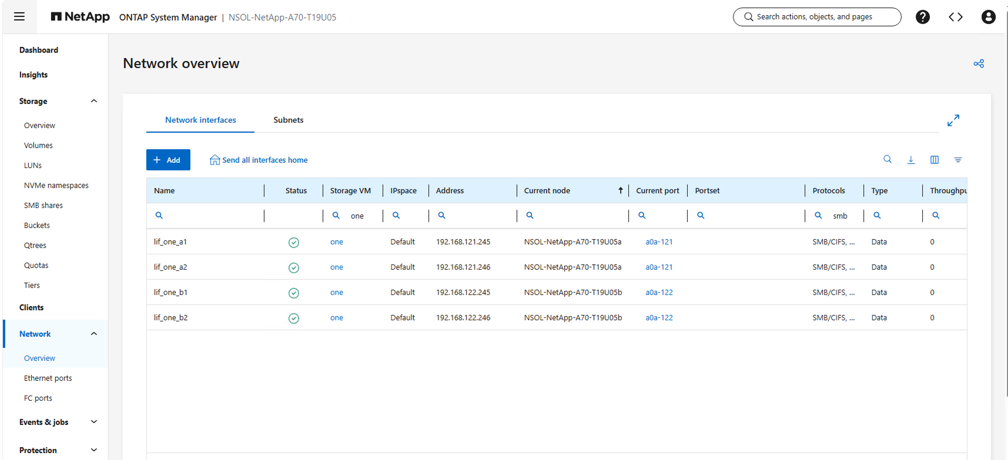
Create at least two LIFs per controller. Follow the steps from the documentation. For reference, here is a screenshot of LIFs used in this solution.
Show example
-
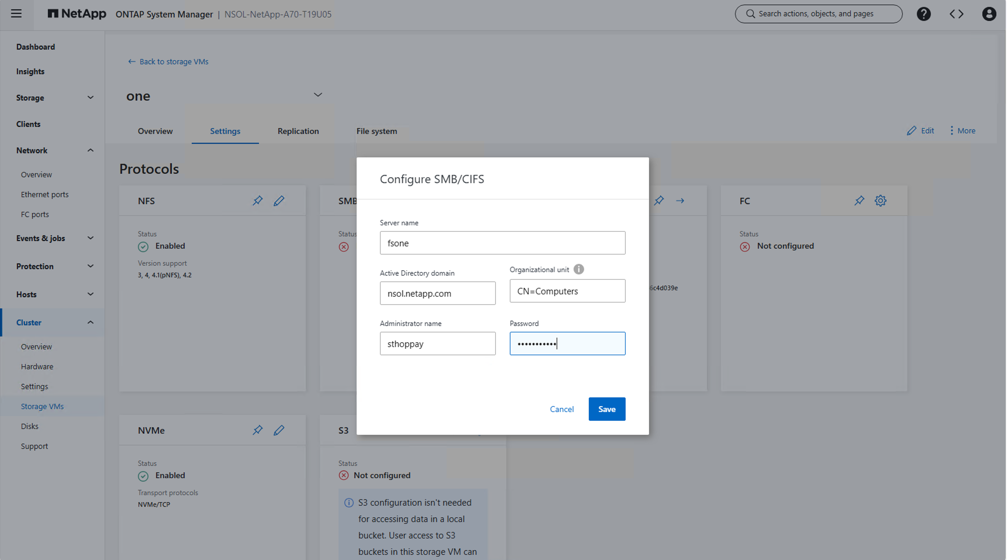
Configure Active Directory or workgroup-based authentication. Follow the steps from the documentation.
Show example
-
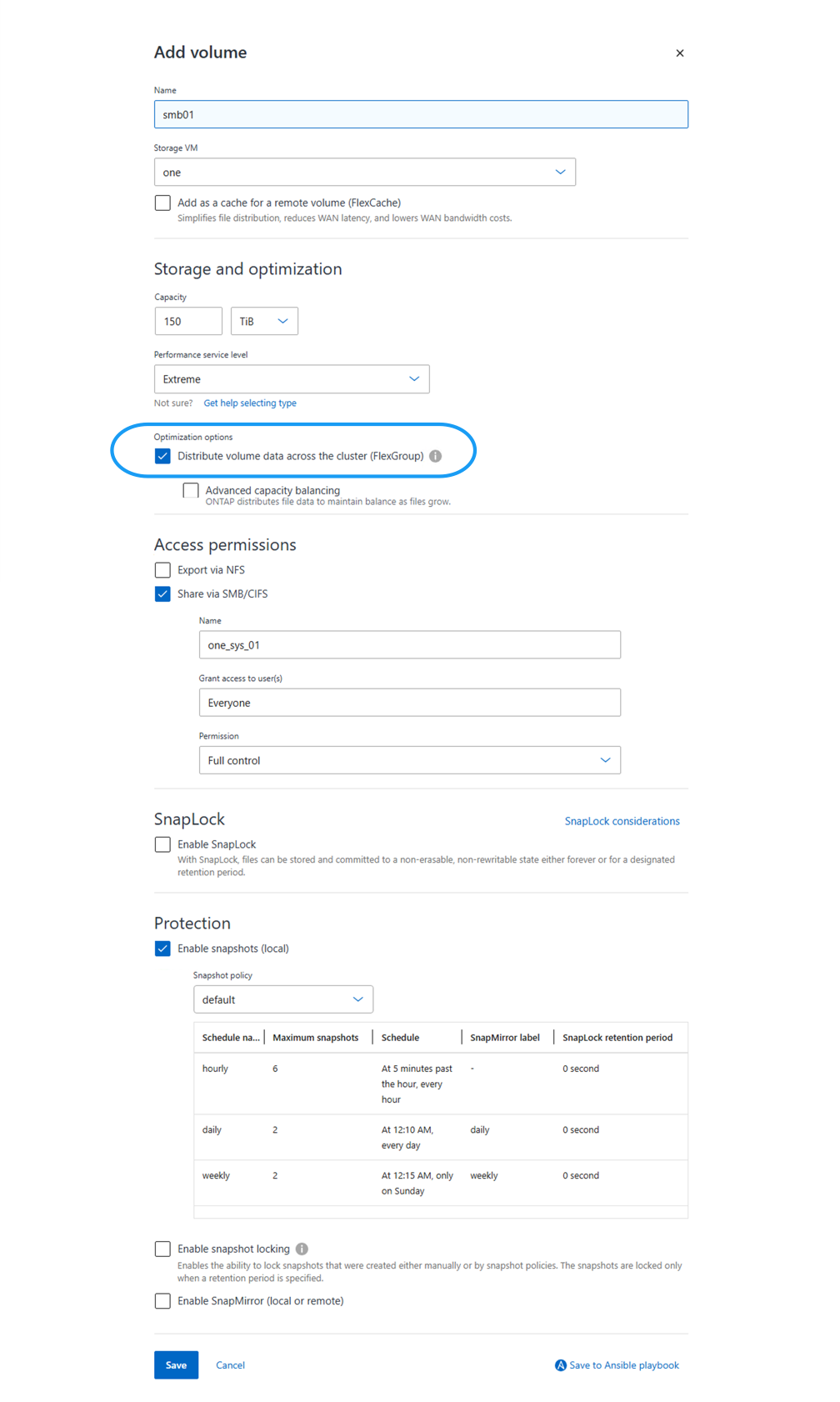
Create a volume. Check the option to distribute data across the cluster to use FlexGroup. Ensure Anti-Ransomware protection is enabled on the volume.
Show example
-
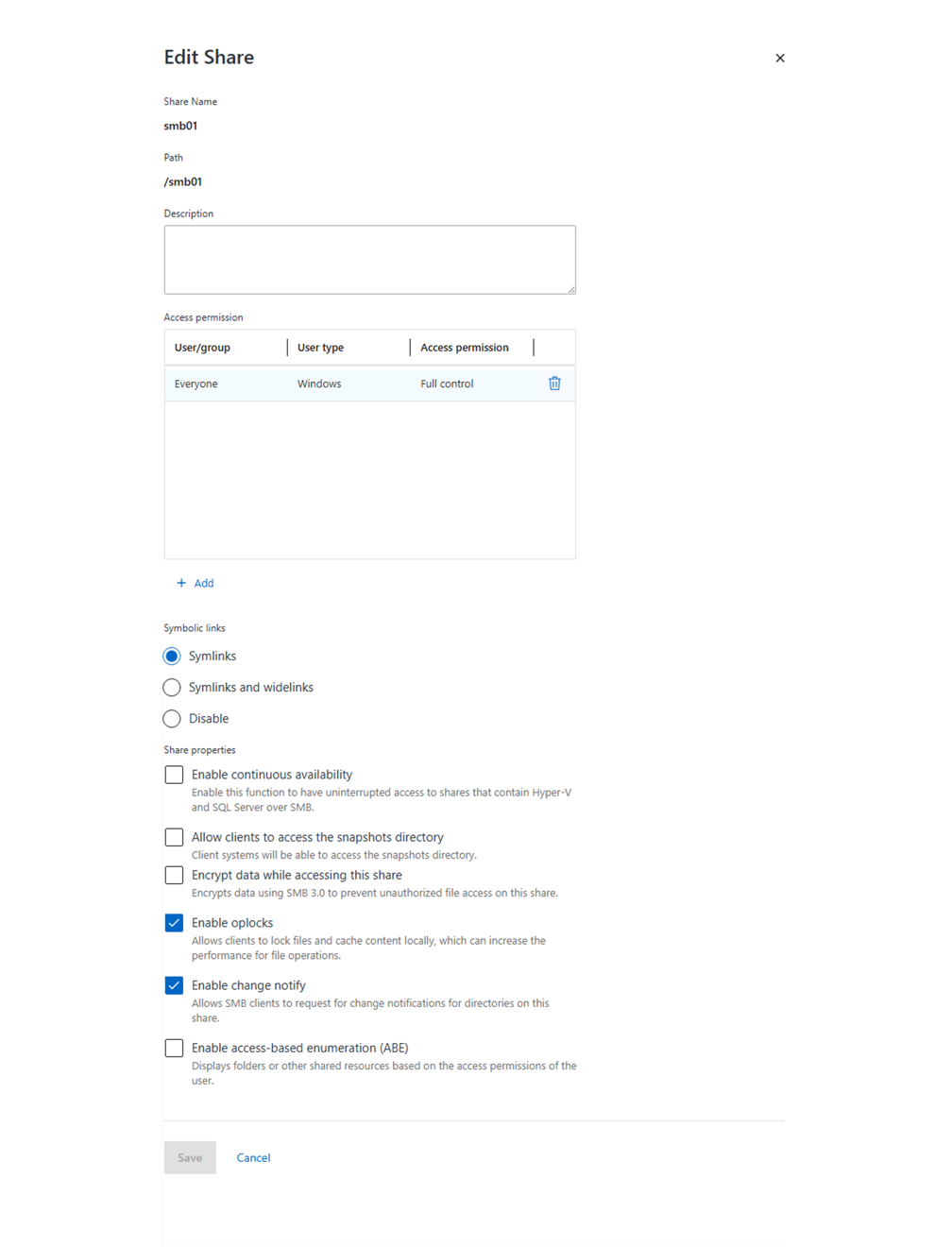
Create an SMB share and adjust permissions. Follow ONTAP 9 documentation for more information.
Show example
-
Provide the SMB server, share name, and credentials to the virtualization administrator.
Virtualization administrator tasks
Complete these tasks to add the SMB share as Datastore in OpenNebula and enable multichannel for improved performance and fault tolerance.
-
Collect the SMB server, share name, and credentials for share authentication.
-
Ensure following packages are installed on Fedora sssd realmd adcli oddjob oddjob-mkhomedir samba-common-tools krb5-workstation cifs-utils for Active Directory integration and SMB mount support. Debian packages are realmd sssd sssd-tools libnss-sss libpam-sss adcli samba-common-bin packagekit krb5-user cifs-utils.
-
Ensure at least two interfaces are configured in different VLANs for fault tolerance. Verify the NIC supports RSS.
-
SSH to one of the frontend server and create a configuration file based on desired Datastore type. Sample files are shown below:
Backup-
For Restic,
$cat smb-restic.conf
NAME = "Backup-Restic-SMB"
TYPE = "BACKUP_DS"

DS_MAD = "restic"
TM_MAD = "-"

RESTIC_PASSWORD = "<restic_password>"
RESTIC_SFTP_SERVER = "<backup server>"
-
For Rsync,
$cat smb-rsync.conf
NAME = "Backup-Rsync-SMB"
TYPE = "BACKUP_DS"

DS_MAD = "rsync"
TM_MAD = "-"

RSYNC_USER = "<rsync_user>"
RSYNC_HOST = "<backup server>"
File$cat smb-kernel.conf NAME = "File-Kernel-SMB" TYPE = "FILE_DS" DS_MAD = "fs" TM_MAD = "local" SAFE_DIRS = "/var/tmp/files"Image$cat smb-image.conf NAME = "Image-SMB" TYPE = "IMAGE_DS" DS_MAD = "fs" TM_MAD = "shared"System$cat smb-system.conf NAME = "System-SMB" TYPE = "SYSTEM_DS" TM_MAD = "shared" -
-
Execute
onedatastore create <configuration file>. Note the datastore ID returned after creation.onedatastore create smb-system.conf
ID: 100 -
Create a smb credential file in /etc/. This step is not required if using kerberos authentication (KVM host joined to <domain>).
$cat /etc/smb-credentials-<datastore_id>.cfg username=<smb_username> password=<smb_password> domain=<smb_domain> -
Set proper permissions (640) on the credential file. Change ownership to oneadmin user and group if required.
-
Gather the uid and gid of oneadmin user using
id oneadmincommand. -
Update /etc/fstab or automount configuration to enable multichannel. Assuming the default datastore location as /var/lib/one/datastores. If not check the DATASTORE_LOCATION parameter in /etc/one/oned.conf. Ensure the <datastore_id> folder exists under the datastores location. Sample entries are shown below:
Using /etc/fstab# credentials mapping to file option is not required when using kerberos authentication //<smb_server>/<smb_share> /var/lib/one/datastores/<datastore_id> cifs credentials=/etc/smb-credentials-<datastore_id>.cfg,_netdev,noauto,x-systemd.automount,vers=3.0,multichannel,max_channels=16,nofail,uid=<oneadmin uid>,gid=<oneadmin gid> 0 0Using automount# credentials mapping to file option is not required when using kerberos authentication /var/lib/one/datastores/<datastore_id> -fstype=cifs,credentials=/etc/smb-credentials-<datastore_id>.cfg,vers=3.0,multichannel,max_channels=16,uid=<oneadmin uid>,gid=<oneadmin gid> ://<smb_server>/<smb_share> -
Mount the datastore using
mount -aorsystemctl reload autofscommand. -
Verify the datastore is mounted with mount command and verify the datastore capacity with
onedatastore show <datastore_id>command. -
Ensure oneadmin user and group own the datastore folder. Adjust permissions using
chown -R oneadmin:oneadmin /var/lib/one/datastores/<datastore_id>command.