Epic cloning


 Suggest changes

 PDFs
PDFs
Epic recognizes that the storage node-based NetApp Snapshot technology has no performance effect on production workloads compared to traditional file-based backups. When Snapshot backups are used as a recovery source for the production database, the backup method must be implemented with database consistency in mind.
A snapshot is a point-in-time, read-only backup copy of a volume. NetApp FlexClone® takes a snapshot and makes it instantly read and writable. FlexClone volumes provide great value, taking read-only, application-consistent snapshots and creating writable FlexClone volumes from production data. This native capability has a significant impact on storage savings, operations time, and automation capabilities.
For the refresh process, FlexClone volumes are used.
Data management
As part of the solution, NetApp delivers a fully automated backup and test refresh solution by using native ONTAP tools. This solution was designed to simplify Epic data management specifically for the large community of Epic database administrators (DBAs):
-
Epic Mirror is used to replicate data to disaster recovery and Report (indicated with green).
-
Daily data dumps from Report to Clarity.
-
NetApp automated backups (indicated with yellow).
-
NetApp automated test refresh of SUP, REP, and other (indicated with blue).
-
The test environments are for full-copy environments, not smaller squash copies.
For more information, reach out to NetApp Services for Epic applications.
Applications with storage spread across more than one volume with one or more LUNs of appropriate quantities for the workload need the contents to be backed up together ensuring consistent data protection require CGs.
Consistency Groups (CGs for short) provide this capability and more. They can be used nightly to create on-demand or scheduled consistent snapshots using a policy. You can use this to restore, clone and even replicate data.
For additional information on CGs please refer to NetApp documentation on consistency groups
Configuring Consistency Groups for Epic
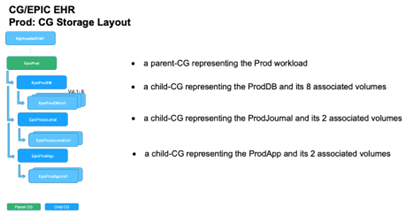
Once the volumes and LUNs are provisioned as detailed in the previous sections of this document, they can then be configured into a set of CGs. The recommended best practice is to set them up as depicted in the picture below:
Consistency Group snapshots
A nightly CG snapshot schedule should be set on each of the child-CGs associated with the volumes providing storage for the production database. This will result in a fresh set of consistent backups of these CGs every night. These can then be used for cloning the production database for use in non-production environments such as development and test. NetApp has developed proprietary CG based automated Ansible workflows for Epic to automate the backup of production databases, the refresh and test environments too.
CG snapshots can be used to support the restore operations of Epic's production database.
For SAN volumes, disable the default snapshot policy on each volume being used for CGs. These snapshots are typically managed by the backup application being used or NetApp's Epic Ansible automation service.
For SAN volumes, disable the default snapshot policy on each volume. These snapshots are typically managed by a backup application or by Epic Ansible automation.[NS2]
WebBLOB and VMare datasets should be configured as just volumes, not associated with CGs. You can use SnapMirror or SnapVault technology to maintain their Snapshot copies on storage systems separate from production.
When complete, the configuration would look as follows: