


Oracle database DR via log shipping

 Suggest changes

 PDFs
PDFs
The replication procedures for an Oracle database are essentially the same as the backup procedures. The primary requirement is that the snapshots that constitute a recoverable backup must be replicated to the remote storage system.
As discussed previously in the documentation on local data protection, a recoverable backup can be created with the hot backup process or by leveraging snapshot-optimized backups.
The most important requirement is isolation of the datafiles into one or more dedicated containers. This can be done in several ways, including placing all datafiles on a single LUN/namespace, within a single AFF NFS volume, or placed in a multi-volume or multi-LUN/namespace ONTAP consistency group. The key is datafiles must be uncontaminated by any other file type. The reason is to make sure that datafile replication is wholly independent of replication of other data types such as archive logs. For additional information on file layouts and for important details on ensuring the storage layout is snapshot friendly, see Data Layout.
Assuming the datafiles are encapsulated into dedicated volumes, the next question is how to manage the redo logs, archive logs, and controlfiles. The simplest approach is to place all those data types into a single volume. The benefit of this is that replicated redo logs, archive logs, and controlfiles are perfectly synchronized. There is no requirement for incomplete recovery or using a backup controlfile, although it might be desirable to also script creation of backup controlfiles for other potential recovery scenarios.
Two-volume layout
The simplest layout is shown in the following figure.
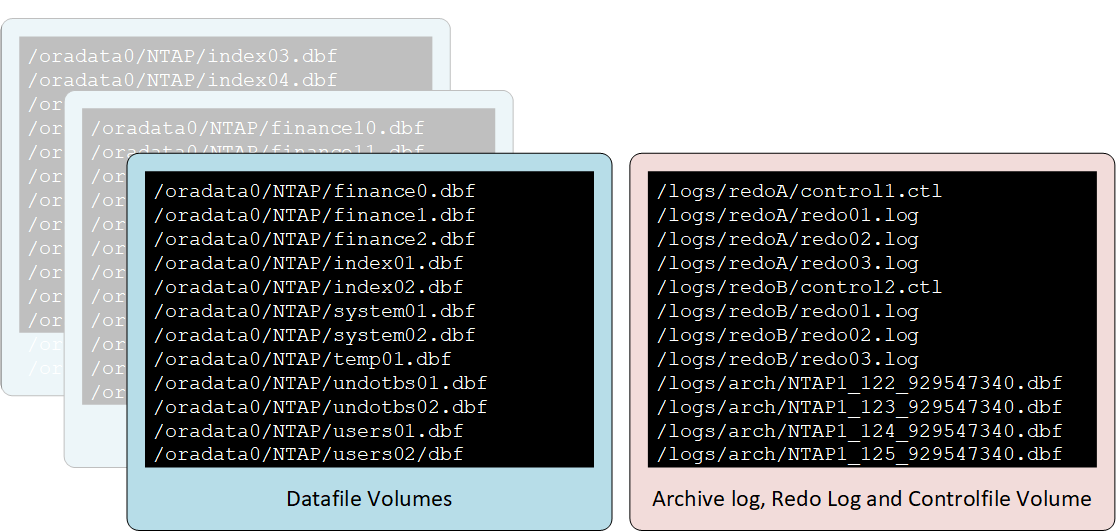
This is the most common approach. From a DBA perspective, it might seem unusual to colocate all copies of the redo logs and archive logs on the same volume. However, separation does not offer much extra protection when the files and LUNs are all still located on the same underlying set of drives.
Three-volume layout
Sometimes separation of redo logs is required because of data protection concerns or a need to distribute redo log I/O across controllers. If so, then the three-volume layout depicted in the figure below be used for replication while still avoiding any requirement to perform incomplete recovery or rely on backup controlfiles.
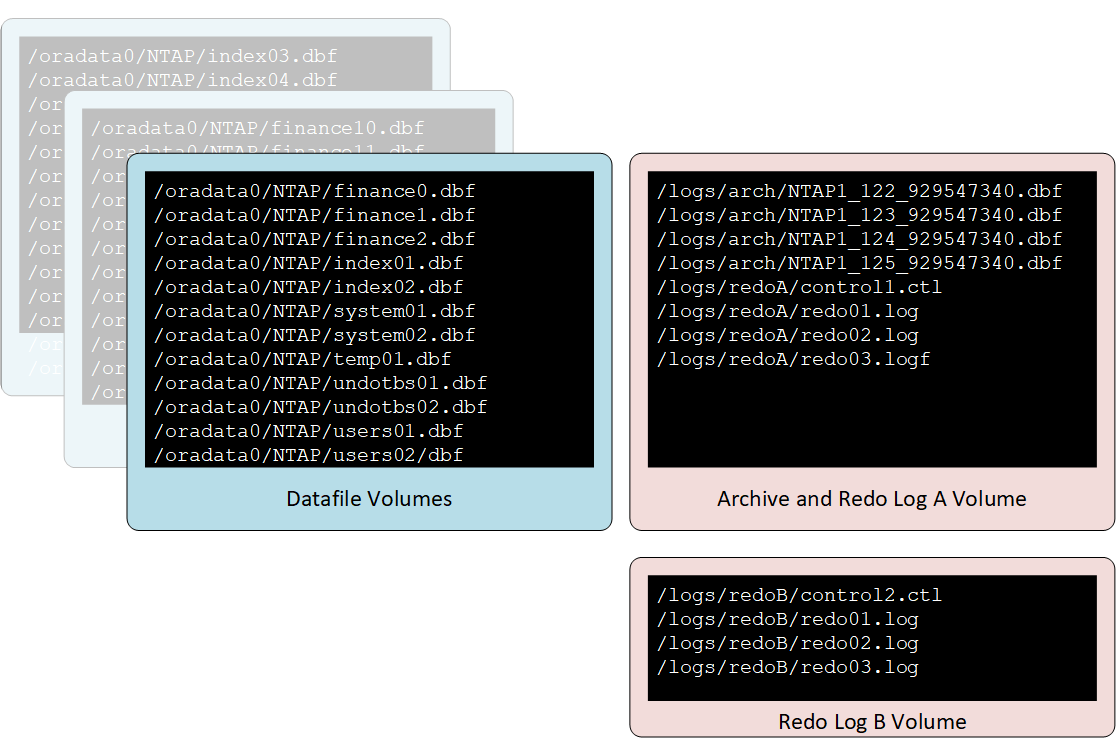
This permits striping of the redo logs and controlfiles across independent sets of spindles and controllers on the source. However, the archive logs and one set of controlfiles and redo logs can still be replicated in a synchronized state with the archive logs.
In this model, the Redo Log B volume is not replicated.
Disaster recovery procedure—hot backups
To perform disaster recovery by using hot backups, use the following basic procedure:
Prerequisites
-
Oracle binaries are installed on the disaster recovery server.
-
Database instances are listed in
/etc/oratab. -
The
passwdandpfileorspfilefor the instance must be in the$ORACLE_HOME/dbsdirectory. .
Disaster recovery
-
Break the mirrors for the datafiles and common log volume.
-
Restore the datafile volume(s) to the most recent hot backup snapshot of the datafiles.
-
If SAN is used, activate volume groups and/or mount file systems.
-
Replay archive logs to the desired point.
-
Replay current redo logs if complete recovery is desired.
Using NFS simplifies the procedure dramatically because the NFS file systems for the datafiles and log files can be mounted on the disaster recovery server at any time. It becomes read/write when the mirrors are broken.
Disaster recovery procedure—snapshot-optimized backups
Recovering from snapshot-optimized backups is almost identical to the hot backup recovery procedure with the following changes:
-
Break the mirrors for the datafiles and common log volume.
-
Restore the datafile volume(s) to a snapshot created prior to the current log volume replica.
-
If SAN is used, activate volume groups and/or mount file systems.
-
Replay archive logs to the desired point.
-
Replay current redo logs if complete recovery is desired.
These differences simplify the overall recovery procedure because there is no requirement for making sure that a snapshot was properly created on the source while the database was in hot backup mode. The disaster recovery procedure is based on the timestamps of the snapshots on the disaster recovery site. The state of the database when the snapshots were created is not important.
Disaster recovery with hot backup snapshots
This is an example of a disaster recovery strategy based on the replication of hot backup snapshots. It also serves as an example of a simple and scalable local backup strategy.
The example database is located on a basic two-volume architecture. /oradata contains datafiles and /oralogs is used for combined redo logs, archive logs, and controlfiles.
[root@host1 ~]# ls /ora*
/oradata:
dbf
/oralogs:
arch  ctrl  redo
Two schedules are required, one for the nightly datafile backups and one for the log file backups. These are called midnight and 15minutes, respectively.
Cluster01::> job schedule cron show -name midnight|15minutes
Name                Description
----------------    -----------------------------------------------------
15minutes           @:00,:15,:30,:45
midnight            @0:00
2 entries were displayed.
These schedules are then used inside the snapshot policies NTAP-datafile-backups and NTAP-log-backups, as shown below:
Cluster01::> snapshot policy show -vserver vserver1 -policy NTAP-* -fields schedules,counts
vserver   policy                schedules                    counts
--------- --------------------- ---------------------------- ------
vserver1  NTAP-datafile-backups midnight                     60
vserver1  NTAP-log-backups      15minutes                    72
2 entries were displayed.
Finally, these snapshot policies are applied to the volumes.
Cluster01::> volume show -vserver vserver1 -volume vol_oracle* -fields snapshot-policy
vserver   volume                 snapshot-policy
--------- ---------------------- ---------------------
vserver1  vol_oracle_datafiles   NTAP-datafile-backups
vserver1  vol_oracle_logs        NTAP-log-backups
This defines the backup schedule of the volumes. Datafile snapshots are created at midnight and retained for 60 days. The log volume contains 72 snapshots created at 15-minute intervals, which adds up to 18 hours of coverage.
Then, make sure that the database is in hot backup mode when a datafile snapshot is created. This is done with a small script that accepts some basic arguments that start and stop backup mode on the specified SID.
58 * * * * /snapomatic/current/smatic.db.ctrl --sid NTAP --startbackup
02 * * * * /snapomatic/current/smatic.db.ctrl --sid NTAP --stopbackup
This step makes sure that the database is in hot backup mode during a four-minute window surrounding the midnight snapshot.
The replication to the disaster recovery site is configured as follows:
Cluster01::> snapmirror show -destination-path drvserver1:dr_oracle* -fields source-path,destination-path,schedule
source-path                      destination-path                   schedule
-------------------------------- ---------------------------------- --------
vserver1:vol_oracle_datafiles    drvserver1:dr_oracle_datafiles     6hours
vserver1:vol_oracle_logs         drvserver1:dr_oracle_logs          15minutes
2 entries were displayed.
The log volume destination is updated every 15 minutes. This delivers an RPO of approximately 15 minutes. The precise update interval varies a little depending on the total volume of data that must be transferred during the update.
The datafile volume destination is updated every six hours. This does not affect the RPO or RTO. If disaster recovery is required, one of the first steps is to restore the datafile volume back to a hot backup snapshot. The purpose of the more frequent update interval is to smooth the transfer rate of this volume. If the update is scheduled for once per day, all changes that accumulated during the day must be transferred at once. With more frequent updates, the changes are replicated more gradually across the day.
If a disaster occurs, the first step is to break the mirrors for both volumes:
Cluster01::> snapmirror break -destination-path drvserver1:dr_oracle_datafiles -force
Operation succeeded: snapmirror break for destination "drvserver1:dr_oracle_datafiles".
Cluster01::> snapmirror break -destination-path drvserver1:dr_oracle_logs -force
Operation succeeded: snapmirror break for destination "drvserver1:dr_oracle_logs".
Cluster01::>
The replicas are now read-write. The next step is to verify the timestamp of the log volume.
Cluster01::> snapmirror show -destination-path drvserver1:dr_oracle_logs -field newest-snapshot-timestamp
source-path                destination-path             newest-snapshot-timestamp
-------------------------- ---------------------------- -------------------------
vserver1:vol_oracle_logs   drvserver1:dr_oracle_logs    03/14 13:30:00
The most recent copy of the log volume is March 14th at 13:30:00.
Next, identify the hot backup snapshot created immediately prior to the state of the log volume. This is required because the log replay process requires all archive logs created during hot backup mode. The log volume replica therefore must be older than the hot backup images or it would not contain the required logs.
Cluster01::> snapshot list -vserver drvserver1 -volume dr_oracle_datafiles -fields create-time -snapshot midnight*
vserver   volume                    snapshot                   create-time
--------- ------------------------  -------------------------- ------------------------
drvserver1 dr_oracle_datafiles      midnight.2017-01-14_0000   Sat Jan 14 00:00:00 2017
drvserver1 dr_oracle_datafiles      midnight.2017-01-15_0000   Sun Jan 15 00:00:00 2017
...

drvserver1 dr_oracle_datafiles      midnight.2017-03-12_0000   Sun Mar 12 00:00:00 2017
drvserver1 dr_oracle_datafiles      midnight.2017-03-13_0000   Mon Mar 13 00:00:00 2017
drvserver1 dr_oracle_datafiles      midnight.2017-03-14_0000   Tue Mar 14 00:00:00 2017
60 entries were displayed.
Cluster01::>
The most recently created snapshot is midnight.2017-03-14_0000. This is the most recent hot backup image of the datafiles, and it is then restored as follows:
Cluster01::> snapshot restore -vserver drvserver1 -volume dr_oracle_datafiles -snapshot midnight.2017-03-14_0000
Cluster01::>
At this stage, the database is now ready to be recovered. If this was a SAN environment, the next step would include activating volume groups and mounting file systems, an easily automated process. Because this example uses NFS, the file systems are already mounted and became read-write with no further need for mounting or activation the moment the mirrors were broken.
The database can now be recovered to the desired point in time, or it can be fully recovered with respect to the copy of the redo logs that was replicated. This example illustrates the value of the combined archive log, controlfile, and redo log volume. The recovery process is dramatically simpler because there is no requirement to rely on backup controlfiles or reset log files.
[oracle@drhost1 ~]$ sqlplus / as sysdba
Connected to an idle instance.
SQL> startup mount;
ORACLE instance started.
Total System Global Area 1610612736 bytes
Fixed Size                  2924928 bytes
Variable Size            1090522752 bytes
Database Buffers          503316480 bytes
Redo Buffers               13848576 bytes
Database mounted.
SQL> recover database until cancel;
ORA-00279: change 1291884 generated at 03/14/2017 12:58:01 needed for thread 1
ORA-00289: suggestion : /oralogs_nfs/arch/1_34_938169986.dbf
ORA-00280: change 1291884 for thread 1 is in sequence #34
Specify log: {<RET>=suggested | filename | AUTO | CANCEL}
auto
ORA-00279: change 1296077 generated at 03/14/2017 15:00:44 needed for thread 1
ORA-00289: suggestion : /oralogs_nfs/arch/1_35_938169986.dbf
ORA-00280: change 1296077 for thread 1 is in sequence #35
ORA-00278: log file '/oralogs_nfs/arch/1_34_938169986.dbf' no longer needed for
this recovery
...
ORA-00279: change 1301407 generated at 03/14/2017 15:01:04 needed for thread 1
ORA-00289: suggestion : /oralogs_nfs/arch/1_40_938169986.dbf
ORA-00280: change 1301407 for thread 1 is in sequence #40
ORA-00278: log file '/oralogs_nfs/arch/1_39_938169986.dbf' no longer needed for
this recovery
ORA-00279: change 1301418 generated at 03/14/2017 15:01:19 needed for thread 1
ORA-00289: suggestion : /oralogs_nfs/arch/1_41_938169986.dbf
ORA-00280: change 1301418 for thread 1 is in sequence #41
ORA-00278: log file '/oralogs_nfs/arch/1_40_938169986.dbf' no longer needed for
this recovery
ORA-00308: cannot open archived log '/oralogs_nfs/arch/1_41_938169986.dbf'
ORA-17503: ksfdopn:4 Failed to open file /oralogs_nfs/arch/1_41_938169986.dbf
ORA-17500: ODM err:File does not exist
SQL> recover database;
Media recovery complete.
SQL> alter database open;
Database altered.
SQL>
Disaster recovery with snapshot-optimized backups
The disaster recovery procedure using snapshot-optimized backups is nearly identical to the hot backup disaster recovery procedure. As with the hot backup snapshot procedure, it is also essentially an extension of a local backup architecture in which the backups are replicated for use in disaster recovery. The following example shows the detailed configuration and recovery procedure. This example also calls out the key differences between hot backups and snapshot-optimized backups.
The example database is located on a basic two-volume architecture. /oradata contains datafiles, and /oralogs is used for combined redo logs, archive logs, and controlfiles.
 [root@host2 ~]# ls /ora*
/oradata:
dbf
/oralogs:
arch  ctrl  redo
Two schedules are required: one for the nightly datafile backups and one for the log file backups. These are called midnight and 15minutes, respectively.
Cluster01::> job schedule cron show -name midnight|15minutes
Name                Description
----------------    -----------------------------------------------------
15minutes           @:00,:15,:30,:45
midnight            @0:00
2 entries were displayed.
These schedules are then used inside the snapshot policies NTAP-datafile-backups and NTAP-log-backups, as shown below:
Cluster01::> snapshot policy show -vserver vserver2  -policy NTAP-* -fields schedules,counts
vserver   policy                schedules                    counts
--------- --------------------- ---------------------------- ------
vserver2  NTAP-datafile-backups midnight                     60
vserver2  NTAP-log-backups      15minutes                    72
2 entries were displayed.
Finally, these snapshot policies are applied to the volumes.
Cluster01::> volume show -vserver vserver2  -volume vol_oracle* -fields snapshot-policy
vserver   volume                 snapshot-policy
--------- ---------------------- ---------------------
vserver2  vol_oracle_datafiles   NTAP-datafile-backups
vserver2  vol_oracle_logs        NTAP-log-backups
This controls the ultimate backup schedule of the volumes. Snapshots are created at midnight and retained for 60 days. The log volume contains 72 snapshots created at 15-minute intervals which adds up to 18 hours of coverage.
The replication to the disaster recovery site is configured as follows:
Cluster01::> snapmirror show -destination-path drvserver2:dr_oracle* -fields source-path,destination-path,schedule
source-path                      destination-path                   schedule
-------------------------------- ---------------------------------- --------
vserver2:vol_oracle_datafiles    drvserver2:dr_oracle_datafiles     6hours
vserver2:vol_oracle_logs         drvserver2:dr_oracle_logs          15minutes
2 entries were displayed.
The log volume destination is updated every 15 minutes. This delivers an RPO of approximately 15 minutes, with the precise update interval varying a little depending on the total volume of data that must be transferred during the update.
The datafile volume destination is updated every 6 hours. This does not affect the RPO or RTO. If disaster recovery is required, you must first restore the datafile volume back to a hot backup snapshot. The purpose of the more frequent update interval is to smooth the transfer rate of this volume. If the update was scheduled once per day, all changes that accumulated during the day must be transferred at once. With more frequent updates, the changes are replicated more gradually across the day.
If a disaster occurs, first step is to break the mirrors for all the volumes:
Cluster01::> snapmirror break -destination-path drvserver2:dr_oracle_datafiles -force
Operation succeeded: snapmirror break for destination "drvserver2:dr_oracle_datafiles".
Cluster01::> snapmirror break -destination-path drvserver2:dr_oracle_logs -force
Operation succeeded: snapmirror break for destination "drvserver2:dr_oracle_logs".
Cluster01::>
The replicas are now read-write. The next step is to verify the timestamp of the log volume.
Cluster01::> snapmirror show -destination-path drvserver2:dr_oracle_logs -field newest-snapshot-timestamp
source-path                destination-path             newest-snapshot-timestamp
-------------------------- ---------------------------- -------------------------
vserver2:vol_oracle_logs   drvserver2:dr_oracle_logs    03/14 13:30:00
The most recent copy of the log volume is March 14th at 13:30. Next, identify the datafile snapshot created immediately prior to the state of the log volume. This is required because the log replay process requires all archive logs from just prior to the snapshot to the desired recovery point.
Cluster01::> snapshot list -vserver drvserver2 -volume dr_oracle_datafiles -fields create-time -snapshot midnight*
vserver   volume                    snapshot                   create-time
--------- ------------------------  -------------------------- ------------------------
drvserver2 dr_oracle_datafiles      midnight.2017-01-14_0000   Sat Jan 14 00:00:00 2017
drvserver2 dr_oracle_datafiles      midnight.2017-01-15_0000   Sun Jan 15 00:00:00 2017
...

drvserver2 dr_oracle_datafiles      midnight.2017-03-12_0000   Sun Mar 12 00:00:00 2017
drvserver2 dr_oracle_datafiles      midnight.2017-03-13_0000   Mon Mar 13 00:00:00 2017
drvserver2 dr_oracle_datafiles      midnight.2017-03-14_0000   Tue Mar 14 00:00:00 2017
60 entries were displayed.
Cluster01::>
The most recently created snapshot is midnight.2017-03-14_0000. Restore this snapshot.
Cluster01::> snapshot restore -vserver drvserver2 -volume dr_oracle_datafiles -snapshot midnight.2017-03-14_0000
Cluster01::>
The database is now ready to be recovered. If this was a SAN environment, you would then activate volume groups and mount file systems, an easily automated process. However, this example is using NFS, so the file systems are already mounted and became read-write with no further need for mounting or activation the moment the mirrors were broken.
The database can now be recovered to the desired point in time, or it can be fully recovered with respect to the copy of the redo logs that was replicated. This example illustrates the value of the combined archive log, controlfile, and redo log volume. The recover process is dramatically simpler because there is no requirement to rely on backup controlfiles or reset log files.
[oracle@drhost2 ~]$ sqlplus / as sysdba
SQL*Plus: Release 12.1.0.2.0 Production on Wed Mar 15 12:26:51 2017
Copyright (c) 1982, 2014, Oracle.  All rights reserved.
Connected to an idle instance.
SQL> startup mount;
ORACLE instance started.
Total System Global Area 1610612736 bytes
Fixed Size                  2924928 bytes
Variable Size            1073745536 bytes
Database Buffers          520093696 bytes
Redo Buffers               13848576 bytes
Database mounted.
SQL> recover automatic;
Media recovery complete.
SQL> alter database open;
Database altered.
SQL>