


FabricPool for VMware datastores

 Suggest changes

 PDFs
PDFs
Virtual machine storage flows from guest OS and hypervisor layers down into ONTAP, where FabricPool tiering and WAFL deliver performance, efficiency, and cost optimization.
From the ONTAP 9.6 release onward, FabricPool has supported virtualized workloads, including VMware datastores. You can now tier cold blocks from FlexVol volumes backing VMware datastores (VM templates, powered‑off VMs, snapshots, backups, etc.) to object storage while keeping hot data local.
That said, there are some nuances you need to be aware of.
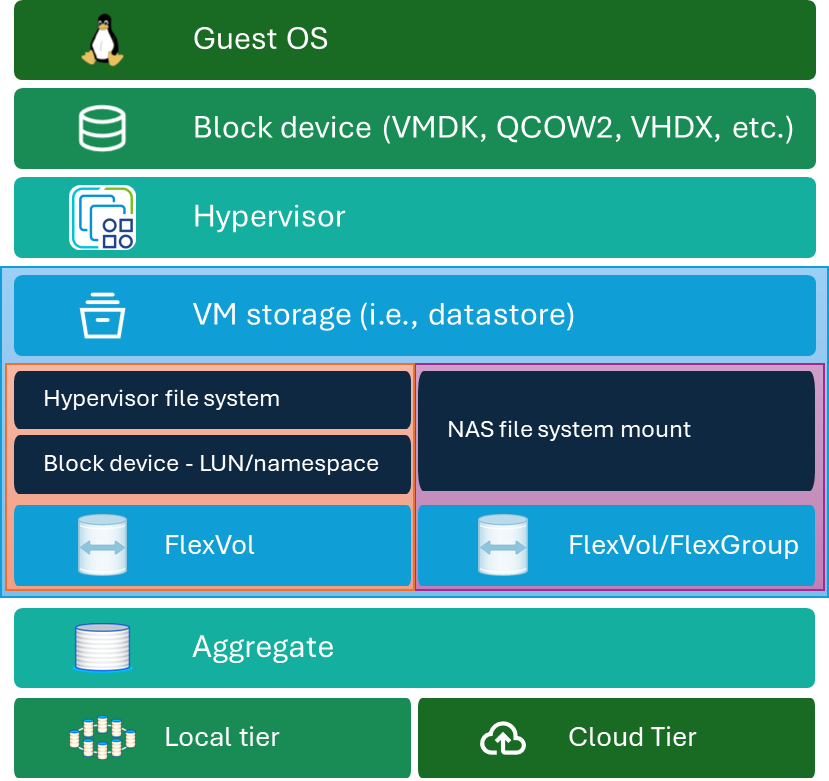
Compute and virtual disk layers
The guest operating system runs on virtual disk formats like VMDK, QCOW2, or VHDX, which create the compute and block device layers accessible to applications and users.
It is important to note that the guest operating system views virtual disks as block devices; therefore, in-guest block device timeouts must be considered when planning for fault tolerance during nondisruptive upgrades, hardware failures, or other unplanned events.

|
Following the FabricPool best practices, you should treat FlexVol volumes hosting virtual machine datastores as SAN storage, even when using NAS protocols, due to the block nature of the virtual disk files as they relate to guest OSes. Therefore, NetApp recommends using the snapshot-only tiering policy. The auto policy can be used for non-critical data, but be warned that a disconnection from the cloud tier can result in machines crashing or going into a read-only state. |
Hypervisor role
The hypervisor mediates between its running virtual machines and physical resources like CPU, memory, and storage. In the NAS use case, the hypervisor mounts the NAS share and presents the virtual disk files to the virtual machines as block devices.
The hypervisor file system path involves VM storage via iSCSI/FCP-connected LUNs or NVMe namespaces formatted by hypervisor-specific filesystems like VMFS, NTFS, EXT4, etc.
The NAS file system path provides direct file-level access using NFS or SMB protocols to ONTAP volumes for virtual machine storage.
Both paths converge at ONTAP’s WAFL layer, enabling consistent data services like snapshots and metadata management.
FabricPool Tiering Integration
FabricPool intelligently manages data placement between high-performance local storage and lower-cost cloud object tiers.
FabricPool tiers data automatically between local high-performance storage and scalable cloud object storage based on the FabricPool tiering policy applied to the dataset.
ONTAP's FabricPool integration enables efficient data placement across hybrid cloud environments without sacrificing performance for local reads.
Storage efficiency and management
It is important to understand the way FabricPool works before enabling it. Proper configuration helps you improve performance, reduce risk, and optimize TCO by storing the right data in the right tier.
Both SAN/NVMe and NAS file protocol paths converge at the WAFL layer. The WAFL file system ensures metadata consistency, supports snapshots, cloning, and optimizes writes for SSD, HDD, and object storage media.