


Set up iSCSI backend connectivity for ONTAP FLI


 Suggest changes

 PDFs
PDFs
ONTAP iSCSI FLI uses an ONTAP software iSCSI initiator that is integrated with the FLI stack and binds outbound iSCSI sessions to intercluster LIFs where the backend connectivity is driven by Intercluster LIF networking, not host data LIFs.
Because sessions are intercluster LIF based, plan intercluster LIF placement, reachability, and redundancy, which is typically on the LUN-owning node and its HA partner, with resilient placement across ports to avoid single points of failure. Before creating sessions, validate end to end routing with VLAN reachability between the intercluster LIF IPs and the foreign array target portal Ips, including allowing TCP port 3260, since successful networking is a prerequisite for LUN discovery.
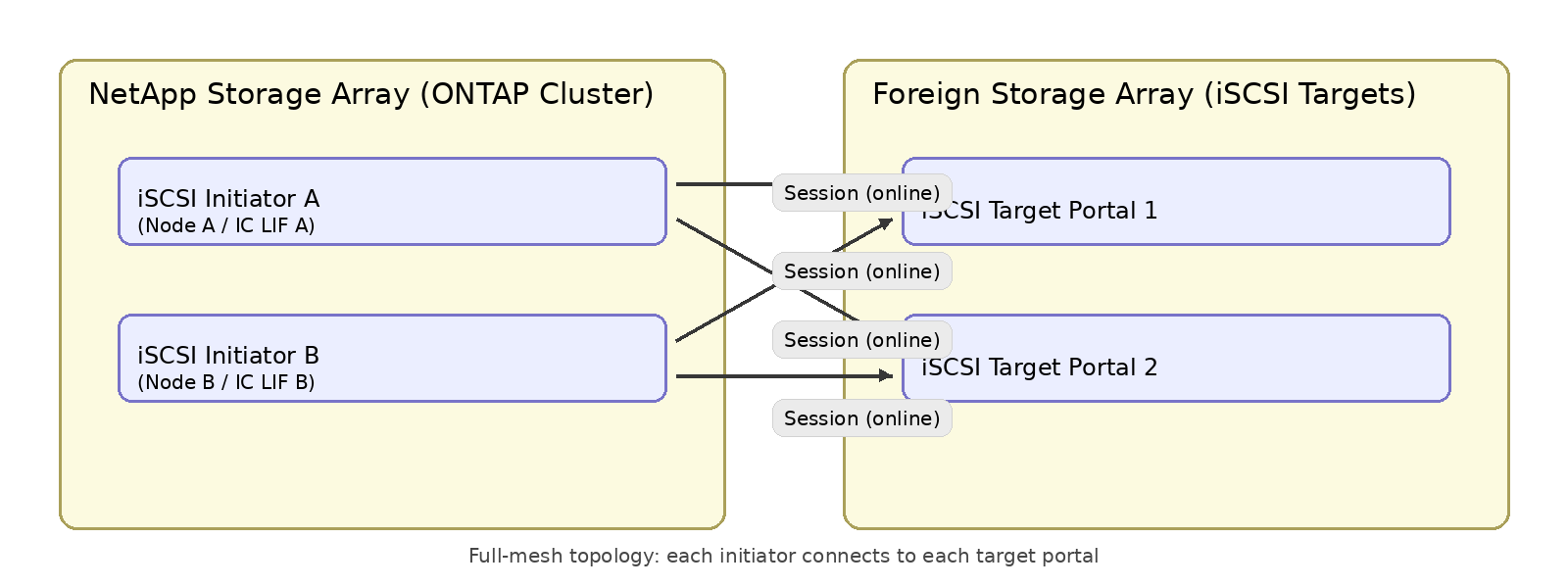
Sessions must be created explicitly using both the target portal IP and target IQN. iSCSI discovery sessions are not used. The intended resiliency model is full mesh connectivity, where each participating ONTAP node establishes sessions to each foreign target portal, so the foreign LUN is visible through all available paths before starting import.
The backend transport (iSCSI or FC) is independent of the front end protocol you use to present the destination ONTAP LUN to hosts. You can import using an iSCSI backend and present using FC or iSCSI. Choose between offline or online migration based on whether the host I/O must stop for the full import or can resume after a short cutover while the copy continues in the background.
Irrespective of the backend being FC or iSCSI, the frontend transport the SAN transport protocol can be SCSI FC or iSCSI.
-
Use the
versioncommand to confirm the ONTAP release and that the cluster is on the intended release for iSCSI FLI.
ONTAP FLI iSCSI backend connectivity setup includes the intercluster LIF, the iSCSI initiator, and sessions. You should do the following to set up and validate iSCSI backend connectivity before starting the import:
-
Confirm intercluster LIFs exist on both HA nodes you will use for import (the owning node and the HA partner) and that they are up and reachable.
-
Create ONTAP software iSCSI initiators bound to intercluster LIFs (one initiator per LIF).
-
Create iSCSI sessions from both nodes to the foreign array target portals and IQN.
-
Confirm sessions are healthy and the foreign LUN is discovered.
-
Validate intercluster LIFs:
network interface show -service-policy default-intercluster -fields vserver,home-node,home-port,curr-node,curr-port,address,ipspace,status-admin,status-operExample output
vserver         lif             address        home-node home-port curr-node  curr-port status-oper status-admin ipspace

C1_vsim_cluster iSCSI_FLI_IC_1  172.21.180.220 vsim       e0d      vsim        e0d       up          up          Default
C1_vsim2_cluster iSCSI_FLI_IC_2 172.21.180.228 vsim2      e0d      vsim2       e0d       up          up          Default
2 entries were displayed.
-
Validate the network ports are up and in the correct IPSpace:
network port show -port e0d -fields port ,ipspace ,broadcast-domain ,link ,mtu,speed-admin ,speed-oper ,health-statusExample output
node  port link mtu  speed-admin speed-oper ipspace broadcast-domain health-status
----- ---- ---- ---- ----------- ---------- ------- ---------------- -------------
vsim  e0d  up   1500 auto        1000       Default Default          healthy
vsim2 e0d  up   1500 auto        1000       Default Default          healthy
2 entries were displayed.
-
Validate reachability to each foreign target portal from ONTAP (repeat per target portal):
network ping -lif <IC_LIF_NAME> -destination <FOREIGN_TARGET_IP>Example output
C1_vsim_cluster::*>  network ping -node vsim -destination 172.21.180.238
172.21.180.238 is alive
C1_vsim_cluster::*> network ping -node vsim -destination 172.21.180.238
172.21.180.238 is alive
C1_vsim_cluster::*>
-
Check if the iSCSI initiator exists or to create and iSCSI initiator bound to an intercluster LIF (repeat on both HA nodes):
storage iswi initiator create -node <NODE_A> -lif <IC_LIF_A> -initiator-name <INIT_NAME_A>storage iswi initiator create -node <NODE_B> -lif <IC_LIF_B> -initiator-name <INIT_NAME_B> -
Set the privilege level to advanced:
set -privilege advancedExample output
C1_vsim_cluster::> set -privilege advanced Warning: These advanced commands are potentially dangerous; use them only when directed to do so by NetApp personnel. Do you want to continue? {y|n}: y -
View the list of iSCSI initiators:
storage iscsi-initiator showExample output
C1_vsim_cluster::*> storage iscsi-initiator show
This table is currently empty.
-
Create the iSCSI initiators:
storage iscsi-initiator create -node <node_name> -initiator-name <initiator_name> -lif <lif_name>Example
C1_vsim_cluster::*>  storage iscsi-initiator create -node vsim  -initiator-name init207m  -lif iSCSI_FLI_IC_1
C1_vsim2_cluster::*> storage iscsi-initiator create -node vsim2 -initiator-name init207n  -lif iSCSI_FLI_IC_2
-
Verify the initiators were created:
storage iscsi-initiator showExample output
C1_sti84-vsim-ucs207m_cluster::*> storage iswi initiator show Initiator Logical Source Node Name Interface Name ISID State ----- --------- ----------- --------------------- ---------------- ------------- vsim init207m iSCSI_FLI_IC_1 iqn.1992-08.com.netapp:sn.4086639599:vs.1 80:0a:75:00:00:00 online vsim2 init207n iSCSI_FLI_IC_2 iqn.1992-08.com.netapp:sn.4086639600:vs.1 80:1f:61:00:00:00 online 2 entries were displayed. -
Create iSCSI sessions to the foreign target from both nodes for each <TARGET_IP>/<TARGET_IQN> pair, ensuring the sessions form a full mesh topology where each node establishes a session to every target portal:
storage iswi initiator session create -node <NODE_A> -initiator-name <INIT_NAME_A> -target-ip <TARGET_IP> -target-name <TARGET_IQN> -target-port 3260storage iswi initiator session create -node <NODE_B> -initiator-name <INIT_NAME_B> -target-ip <TARGET_IP> -target-name <TARGET_IQN> -target-port 3260Example
C1_vsim_cluster::*> storage iswi initiator session create -node vsim -initiator-name init207m -target-name iqn.1992-08.com.netapp:sn.054a3ea61f7c11f1bc73005056acc5b1:vs.3 -target-ip 172.21.180.238
C1_vsim_cluster::*> storage iswi initiator session create -node vsim2 -initiator-name init207n -target-name iqn.1992-08.com.netapp:sn.054a3ea61f7c11f1bc73005056acc5b1:vs.3 -target-ip 172.21.180.238

C1_vsim_cluster::*> storage iswi initiator session create -node vsim2 -initiator-name init207n -target-name iqn.1992-08.com.netapp:sn.054a3ea61f7c11f1bc73005056acc5b1:vs.3 -target-ip 172.21.180.230
C1_vsim_cluster::*> storage iswi initiator session create -node vsim -initiator-name init207m -target-name iqn.1992-08.com.netapp:sn.054a3ea61f7c11f1bc73005056acc5b1:vs.3 -target-ip 172.21.180.230
-
Verify the sessions:
storage iswi initiator session show -node <NODE_A> -initiator-name <INIT_NAME_A>storage iswi initiator session show -node <NODE_B> -initiator-name <INIT_NAME_B>Example
C1_sti84-vsim-ucs207m_cluster::*> storage iswi initiator session show Initiator Target Target-ip Target Tpgroup-tag TSIH State Node Name Name Port ----- --------- ---------------------------------------- -------------- ------ ------ ---- ------ vsim init207m iqn.1992-08.com.netapp:sn.054a3eab1:vs.3 172.21.180.230 3260 1026 2 online vsim init207m iqn.1992-08.com.netapp:sn.054a3eab1:vs.3 172.21.180.238 3260 1032 1 online vsim2 init207n iqn.1992-08.com.netapp:sn.054a3eab1:vs.3 172.21.180.230 3260 1026 1 online vsim2 init207n iqn.1992-08.com.netapp:sn.054a3eab1:vs.3 172.21.180.238 3260 1032 2 online 4 entries were displayed. -
Start the Statistics
This Statistics data will help to triage any failure during the iSCSI FLI.
statistics start -object <pbject> -sample-id <sample_id>Example
C1_sti84-vsim-ucs207m::*> statistics start -object iswi_session -sample-id iswi_fli_import
Statistics collection is being started for sample-id: iswi_fli_import
-
Check the session statistics:
statistics show -sample-id <sample_id>Example
C1_sti84-vsim-ucs207m_cluster::*> statistics show -sample-id iswi_fli_import Object: iswi_session Instance: (init207m)-(172.21.180.230) Start-time: 4/5/2026 08:37:15 End-time: 4/5/2026 08:37:34 Elapsed-time: 19s Scope: sti84-vsim-ucs207m Counter Value -------------------------------- -------------------------------- instance_name (init207m)-(172.21.180.230) instance_uuid iqn.1992-08.com.netapp:sn. 054a3ea61f7c11f1bc73005056acc5b1 :vs.3 node_name sti84-vsim-ucs207m process_name - read_data 0 read_ops 0 session_state Online write_data 0 write_ops 0 Object: iswi_session Instance: (init207m)-(172.21.180.238) Start-time: 4/5/2026 08:37:15 End-time: 4/5/2026 08:37:34 Elapsed-time: 19s -
Check the connectivity on the foreign array:
At this stage, the foreign storage array iSCSI target must be able to detect and confirm an active login and session from the NetApp iSCSI initiator. Use the vendor-recommended commands on the foreign array to verify that the initiator is connected and the sessions are healthy.
Example
pureport list --initiator --raw --filter "initiator.iqn='<HOST_IQN>'"
pureport list -initiator
purehost list --all
Discovery checkpoint: When sessions are established, ONTAP should add storage paths and discover the foreign LUNs in the storage stack, which is the prerequisite to mark the disk as foreign and proceed with the import workflow.