


Review cabling and configuration requirements for the Broadcom BES-53248 cluster switch


 Suggest changes

 PDFs
PDFs
Understand the cabling and configuration constraints for the Broadcom BES-53248 cluster switch before deployment. Key considerations include cluster port assignments, port group speed constraints, and forward error correction (FEC) settings for 25G copper and fiber connections.
Cluster port switch assignments
You can use the Broadcom-supported BES-53248 cluster switch port assignments table as a guide to configure your cluster.
Switch ports |
Ports usage |
|---|---|
0-16 |
10/25GbE cluster port nodes, base configuration |
17-48 |
10/25GbE cluster port nodes, with licenses |
49-54 |
40/100GbE cluster port nodes, with licenses, added right to left |
55-56 |
100GbE cluster Inter-Switch Link (ISL) ports, base configuration |
Refer to the Hardware Universe for more information on switch ports. Refer to What additional information do I need to install my equipment that is not in HWU? for more information about switch installation requirements.
Port group speed constraint
-
On BES-53248 cluster switches, the 48 10/25GbE (SFP28/SFP+) ports are combined into 12 x 4-port groups as follows: Ports 1-4, 5-8, 9-12, 13-16, 17-20, 21-24, 25-28, 29-32, 33-36, 37-40, 41-44, and 45-48.
-
The SFP28/SFP+ port speed must be the same (10GbE or 25GbE) across all ports in the 4-port group.
-
If speeds in a 4-port group are different, the switch ports will not operate correctly.
FEC requirements
-
For 25G ports with copper cables, see the following table for details.
If the Controller side is
auto, the switch side is set to FEC 25G.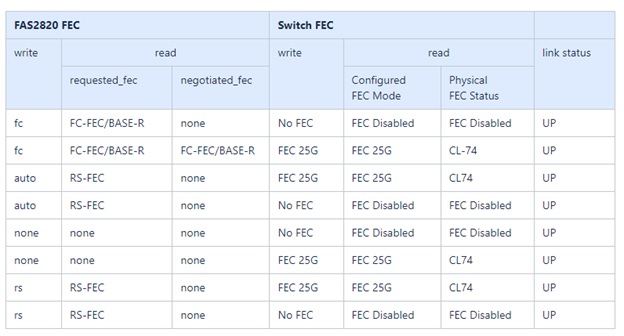
-
For 25G ports with Fiber/Optical cables, see the following table for details:
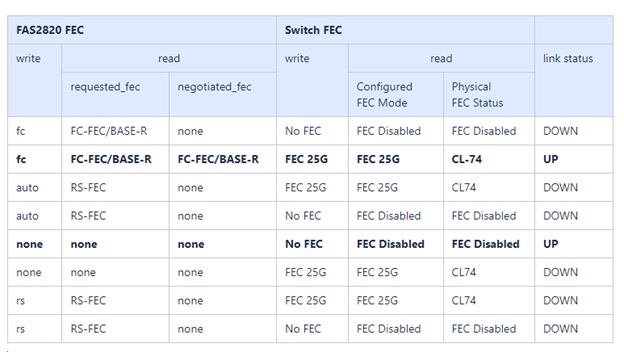
Bootarg implementation
Use the following command to set the 25G port FEC to either auto or fc, as required:
systemshell -node <node> -command sudo sysctl dev.ice.<X>.requested_fec=<auto/fc>
-
When set to
auto:-
The
autosetting propagates the setting to hardware immediately and no reboot is required. -
If
bootarg.cpk_fec_fc_eXx already exists, it is deleted from the bootarg storage. -
After a reboot, the
autosetting remains in place sinceautois the default FEC setting.
-
-
When set to
fc:-
The
FC-FECsetting propagates the setting to the hardware immediately and no reboot is required. -
A new
bootarg.cpk_fec_fc_eXxis created with the value set to "true". -
After a reboot,
FC-FECsetting remains in place for the driver code to use.
-
After you meet the cabling and configuration requirements, you install the install the EFOS software on the switch.