


Learn about adding and replacing I/O modules in an AFX 2K system


 Suggest changes

 PDFs
PDFs
The AFX 2K storage system offers flexibility in expanding or replacing I/O modules to enhance network connectivity and performance. Adding or replacing an I/O module is essential when upgrading network capabilities or addressing a failed module.
You can replace a failed I/O module in your AFX 2K storage system with the same type of I/O module, or with a different kind of I/O module. You can also add an I/O module into a system with empty slots.
-
Adding additional modules can improve redundancy, helping to ensure that the system remains operational even if one module fails.
-
Replacing a failing I/O module can restore the system to its optimal operating state.
The I/O slots on the AFX 2K controller are numbered 1 through 11, as shown in the following illustration.
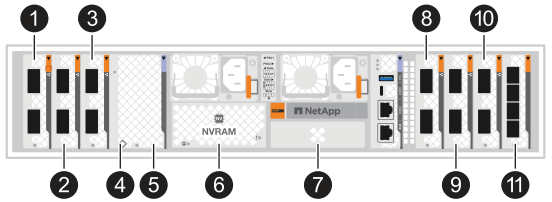
| Slot Number | I/O Slot | Slot Number | I/O Slot | Slot Number | I/O Slot |
|---|---|---|---|---|---|

|
HA |


|
NVRAM12 |

|
Network |

|
Cluster |


|
NVRAM12-EX |

|
Storage |

|
Network |

|
Storage |

|
(Optional) Four-port 25GbE SFP28 for additional management connectivity |