


Cable an NS224 shelf to an AFF A70, AFF A90, or AFF C80 system

 Suggest changes

 PDFs
PDFs
Cable your NS224 shelf to your AFF A70, AFF A90, or AFF C80 system so that each shelf has two connections to each controller in the HA pair.
-
This procedure assumes that your HA pair has only internal storage (no external shelves) and that you are hot-adding up to two additional shelves and two RoCE-capable I/O modules in each controller.
-
This procedure addresses the following hot-add scenarios:
-
Hot-adding the first shelf to an HA pair with one RoCE-capable I/O module in each controller.
-
Hot-adding the first shelf to an HA pair with two RoCE-capable I/O modules in each controller.
-
Hot- adding the second shelf to an HA pair with two RoCE-capable I/O modules in each controller.
-
-
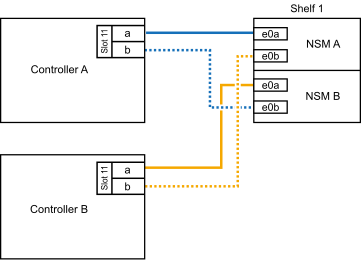
If you are hot-adding one shelf using one set of RoCE-capable ports (one RoCE-capable I/O module) in each controller module, and this is the only NS224 shelf in your HA pair, complete the following substeps.
Otherwise, go to the next step.

This step assumes you installed the RoCE-capable I/O module in slot 11. -
Cable shelf NSM A port e0a to controller A slot 11 port a (e11a).
-
Cable shelf NSM A port e0b to controller B slot 11 port b (e11b).
-
Cable shelf NSM B port e0a to controller B slot 11 port a (e11a).
-
Cable shelf NSM B port e0b to controller A slot 11 port b (e11b).
The following illustration shows cabling for one hot-added shelf using one RoCE-capable I/O module in each controller module:
-
-
If you are hot-adding one or two shelves using two sets of RoCE-capable ports (two RoCE-capable I/O modules) in each controller module, complete the applicable substeps.
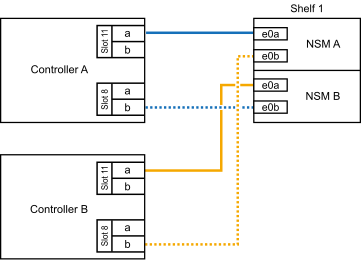
This step assumes you installed the RoCE-capable I/O modules in slots 11 and 8. Shelves Cabling Shelf 1
-
Cable NSM A port e0a to controller A slot 11 port a (e11a).
-
Cable NSM A port e0b to controller B slot 8 port b (e8b).
-
Cable NSM B port e0a to controller B slot 11 port a (e11a).
-
Cable NSM B port e0b to controller A slot 8 port b (e8b).
-
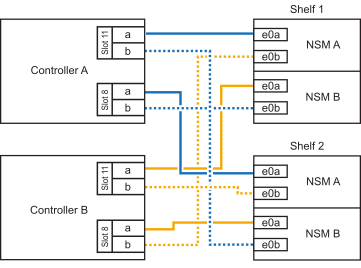
If you are hot-adding a second shelf, complete the “Shelf 2” substeps; otherwise, go to the next step.
The following illustration shows cabling for one hot-added shelf using two RoCE-capable I/O modules in each controller module:
Shelf 2
-
Cable NSM A port e0a to controller A slot 8 port a (e8a).
-
Cable NSM A port e0b to controller B slot 11 port b (e11b).
-
Cable NSM B port e0a to controller B slot 8 port a (e8a).
-
Cable NSM B port e0b to controller A slot 11 port b (e11b).
-
Go to the next step.
The following illustration shows cabling for two hot-added shelf using two RoCE-capable I/O modules in each controller module:
-
-
Verify that the hot-added shelf is cabled correctly using Active IQ Config Advisor.
If any cabling errors are generated, follow the corrective actions provided.
If you disabled automatic drive assignment as part of the preparation for this procedure, you need to manually assign drive ownership and then reenable automatic drive assignment, if needed. Go to Complete the hot-add.
Otherwise, you are done with the hot-add shelf procedure.