


How NetApp AFX architecture differs from unified ONTAP


 Suggest changes

 PDFs
PDFs
NetApp AFX introduces significant architectural differences from unified ONTAP in how storage is presented, how nodes interact with disks, and how capacity is managed.
Previously, we showed a general picture of how unified ONTAP architecture delivers file, object, and block data storage via directly connected HA pairs that own their own sets of disks and present physical capacity via aggregates of disks. In this section, we'll discuss some of the major differences between unified ONTAP and NetApp AFX architectures in further detail.
How to tell if a system is running NetApp AFX
The main way to see if your system is running NetApp AFX is to run the following command:
AFX::> node show -fields personality
node             personality
---------------- -----------
afx-01           AFX
afx-02           AFX
Another clue is the new Storage Availability Zone, but that is also a concept available to NetApp All-SAN Arrays (ASA). You can see your capacity via that command.
AFX::> storage availability-zone show
                     Availability Zone Name: storage_availability_zone_0
                     Availability Zone UUID: 545cb59f-32e9-11f1-a2f5-d039eabdd925
                                 Total Size: 69.59TB
                              Physical Used: 837.1GB
                      Physical Used Percent: 1%
                                  Available: 68.77TB
                              Metadata Used: 837.1GB
                  Log and Recovery Metadata: 834.6GB
                              Delayed Frees: 2.50GB
 Physical User Data Without Snapshot Copies: 17.24MB
  Logical User Data Without Snapshot Copies: 17.24MB
   Efficiency Ratio Without Snapshot Copies: 1.00:1
               Space Full Threshold Percent: 98%
        Space Nearly Full Threshold Percent: 95%
Node-to-disk relationships
In the unified ONTAP architecture, reads and writes get directed to a specific subset of disks. So even if you have 24 shelves of disks in a 24-node cluster (one shelf per node), at any given time each node can only directly access one shelf of disks, which limits the capacity and performance available in the cluster.

In addition, because NVRAM is directly connected between HA pairs, nodes must physically reside next to one another and are more tightly coupled as failover targets. For instance, when one node fails over to its partner node, the only disks it physically has access to are the disks in the HA pair domain.
Unified ONTAP cluster during HA failover

In NetApp AFX, there are some major shifts in how disks are presented to compute nodes.
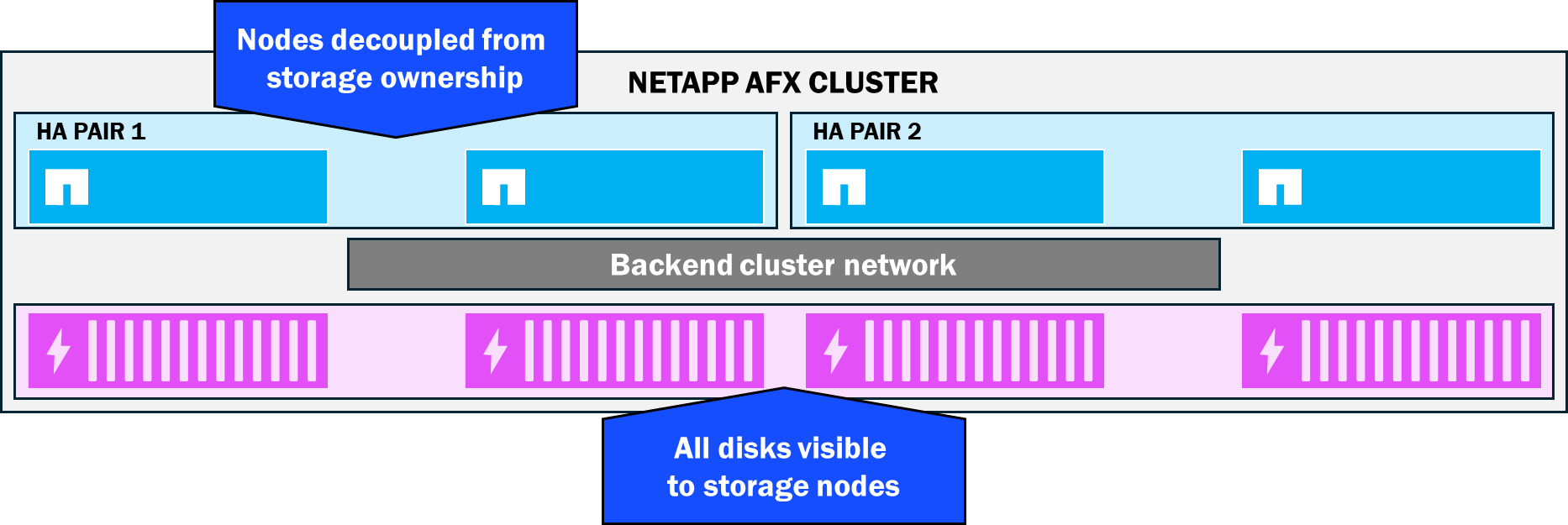
All disks are visible to all storage nodes—no disk ownership
In NetApp AFX, nodes and shelves are all connected to the same backend switch, which makes it possible for ONTAP to extend the overall visibility domain for disks to the entire stack. As a result, no nodes own any specific disks. Rather, all disks participate in a single capacity pool called a Storage Availability Zone, which provides simpler capacity management and increased performance potential (more available disks means more available performance).
NetApp AFX Storage Availability Zone
No more physical aggregates
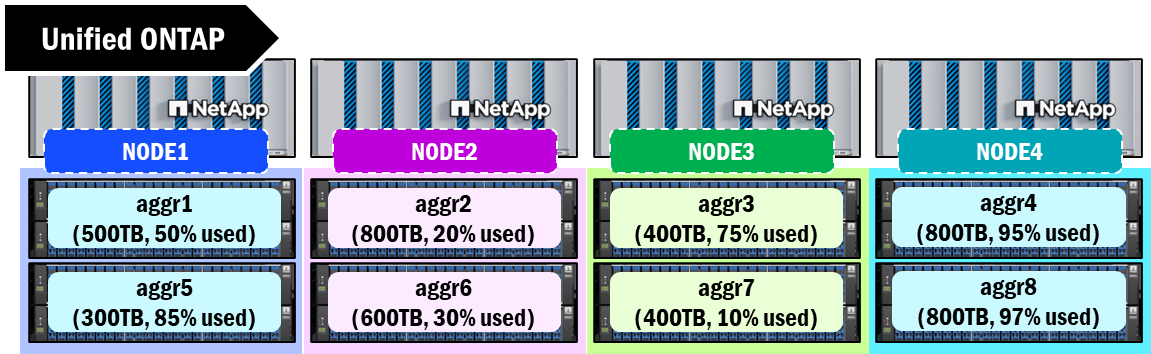
Unified ONTAP collects disks into RAID groups and then combines them into a capacity construct known as an aggregate. This aggregate is how physical capacity is presented to the storage and is the boundary of space available for creating volumes to serve data to end users. Every node must have at least one aggregate assigned to it and these aggregates have a current limit of 800TB. Once that limit is reached, there is no more space available for additional writes.
Physical aggregates can also present some capacity management challenges, as storage admins will sometimes need to manually shuffle volumes around to keep a balance of capacity across cluster nodes. These challenges can also become magnified when leveraging a scale-out volume architecture (such as a FlexGroup volume). Aggregates can also vary in size, disk counts, disk types, etc., which can also creates some performance differences as you traverse nodes.
Aggregates in unified ONTAP
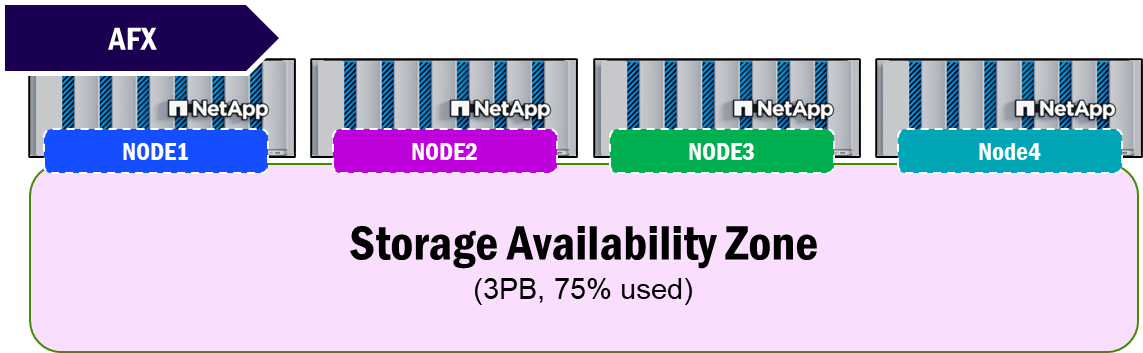
NetApp AFX takes the concept of a physical aggregate and virtualizes it, makes it ONTAP-managed, and then moves physical capacity management from a per-node methodology to per-cluster via the new Storage Availability Zone. This single pool of capacity provides a "what you see is what you get" approach to space management.
NetApp AFX Storage Availability Zone
NVRAM moved from direct connection to switched replication
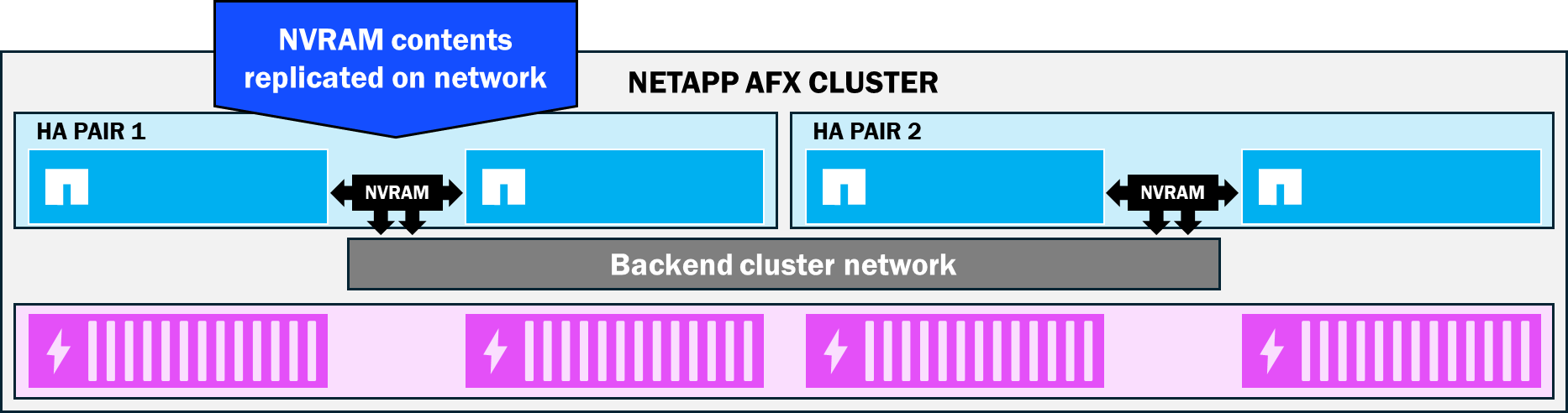
ONTAP uses NVRAM as a staging to protect incoming writes to a cluster. Each node in an ONTAP cluster has a battery-backed NVRAM card. When a write is sent to a volume from a client, it is stored in NVRAM first. NVRAM contents are then flushed to disk when the NVRAM is filled or when a 10s timer expires (whichever comes first). This is known as a consistency point.
The NVRAM contents are also constantly replicating between HA pairs, which further helps protect data consistency, because in the event of a node failure, the NVRAM contents will be preserved on the surviving node and be committed to disk.
In unified ONTAP clusters, the NVRAM cards between HA pairs are connected directly to one another. NetApp AFX moves NVRAM replication to the backend cluster network. As a result, HA partner nodes don't have such a strict distance requirement for nodes. Instead, HA pairs can be separated up to the maximum distance of ethernet.
NetApp AFX NVRAM replication
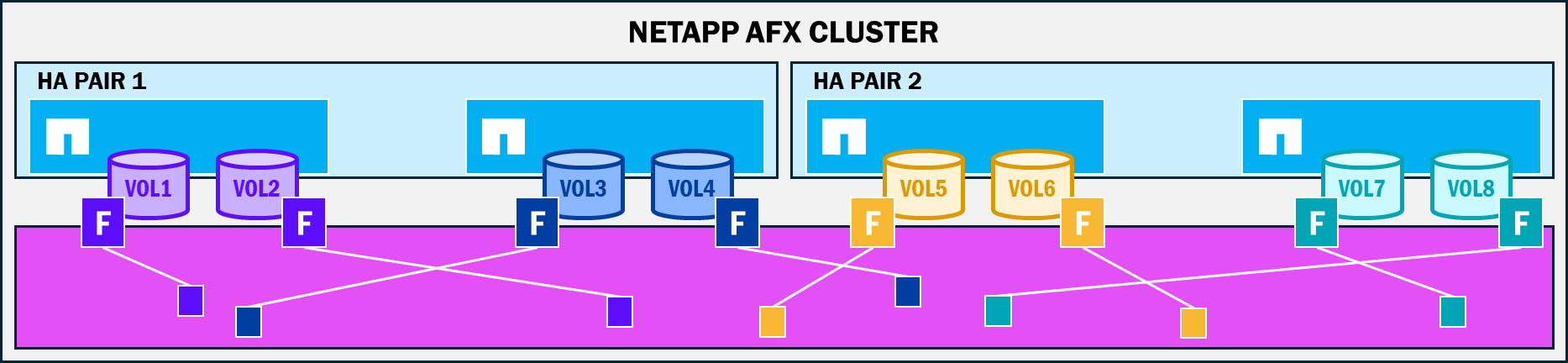
Data written to any (and all) disks in the availability zone
NetApp AFX removes the concept of disk ownership and moves the physical aggregate construct to a virtualized approach managed by ONTAP, where the capacity purchased for the cluster is all available to the nodes attached to the cluster. With AFX, all nodes have the ability to write to any and all disks in the Storage Availability Zone, regardless of what the node:volume ownership is. Nodes still have a concept of volume ownership since writes still have a path through the NVRAM, but that data can land anywhere in the available capacity. This means that a higher number of disks can participate in a single workload, which provides performance benefits.
How data lands in a Storage Availability Zone
Independent scale of capacity and compute nodes
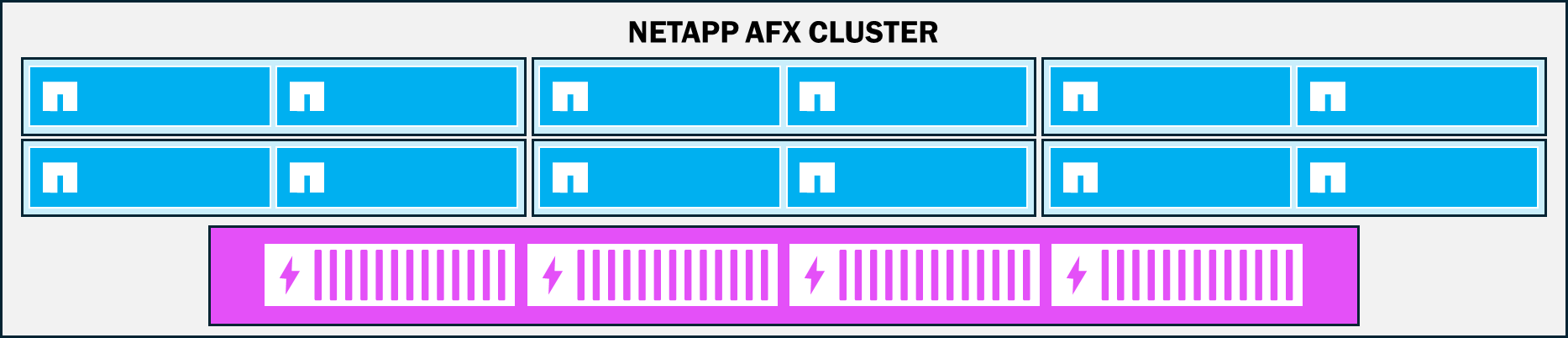
With hardware resources decoupled in the NetApp AFX architecture, nodes no longer require associated disks to be added alongside one another. When a cluster is running low on performance-related resources such as RAM, CPU, or network throughput, only storage nodes need to be added to the cluster and can leverage the existing Storage Availability Zone. Conversely, if the requirement is capacity, only shelves would need to be added to the mix. This flexibility ensures that you only buy the resources you will need, thus avoiding overprovisioning.
NetApp AFX – Independent scale
Linear scaling of node performance
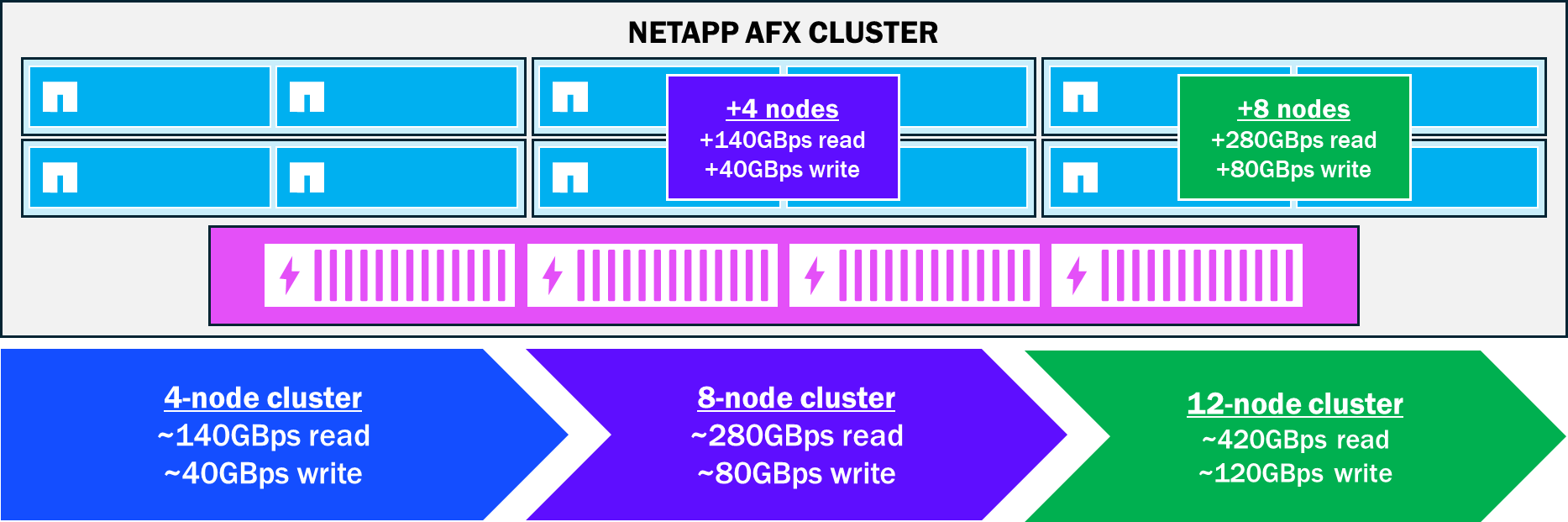
As nodes are added to an AFX cluster, more CPU, RAM, and network resources are introduced into the workload. As these resources are incorporated into the environment, performance increases are linear in nature. The graphic below shows how that performance would increase as nodes are added.
Linear performance increases with NetApp AFX node additions
Larger RAID groups, fewer parity drives
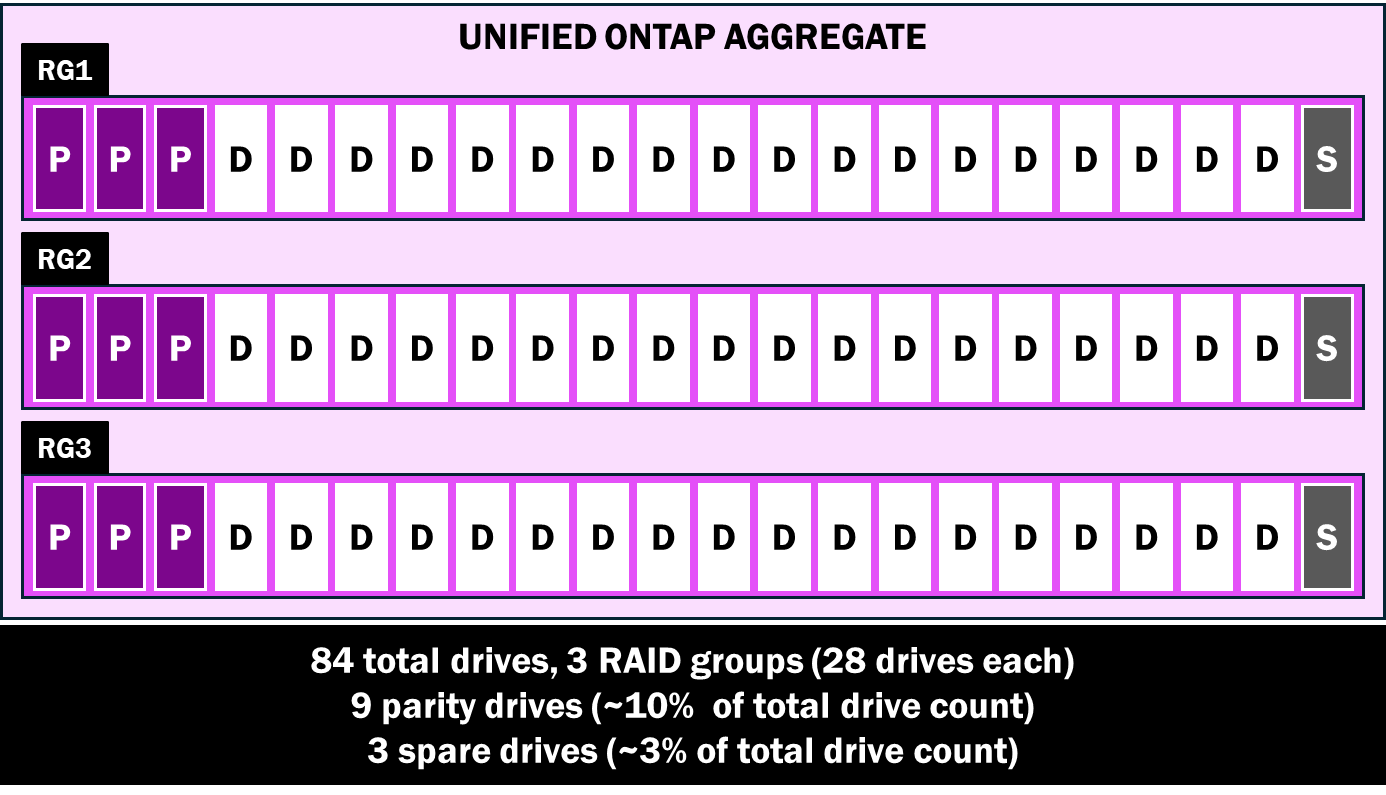
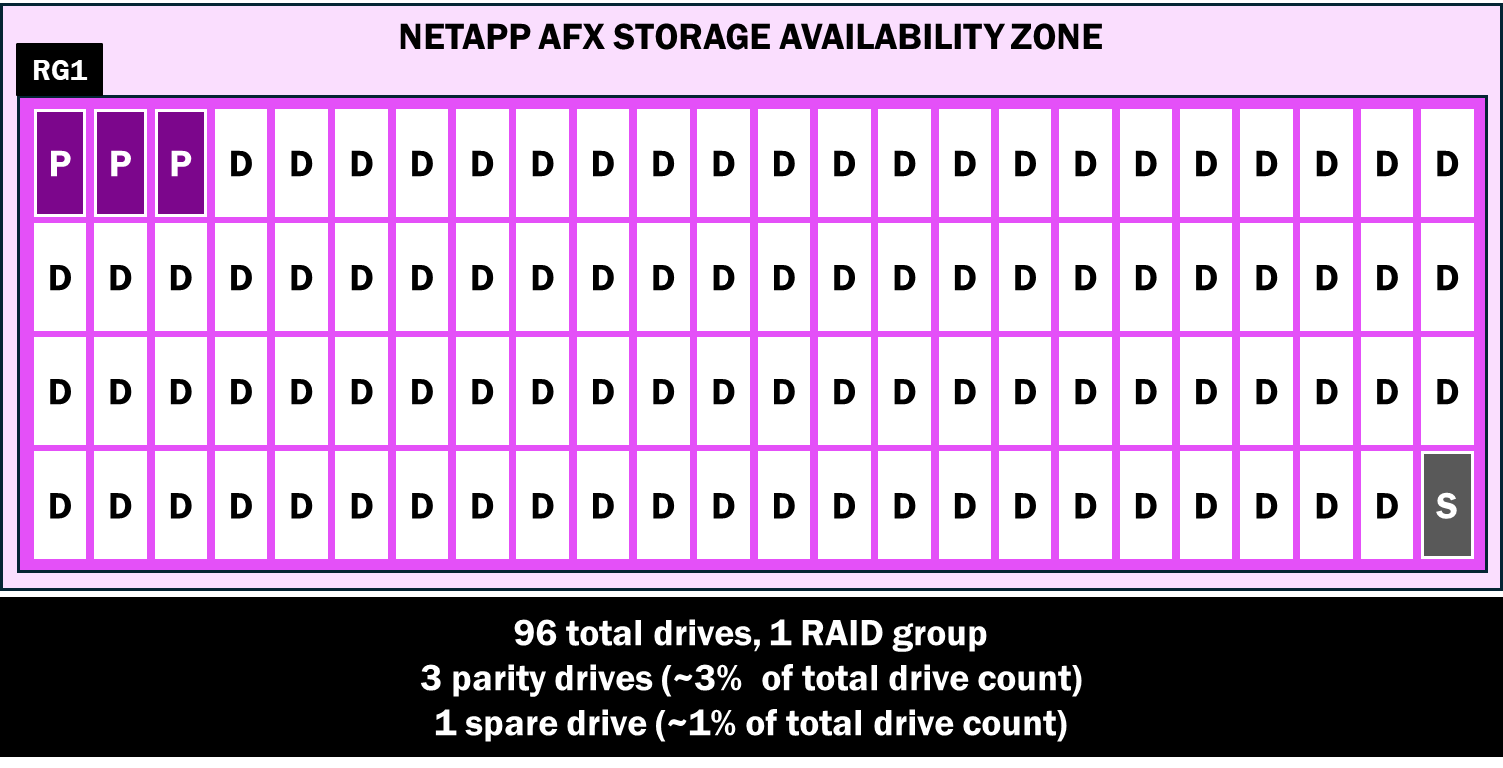
ONTAP provides a blend of data protection and performance for disks via RAID groups – specifically RAID-TEC, which offers triple parity protection in the event of disk failures. RAID-TEC can survive up to three simultaneous drive failures in a RAID group. In unified ONTAP, RAID groups have a maximum disk count of 28, where 3 drives are spent on parity and 1 drive is reserved as a spare. As a result, 24 of the 28 drives are used for data operations/RAID stripes.
Unified ONTAP RAID groups
NetApp AFX still leverages RAID-TEC, but increases the RAID group size to 96 drives while only requiring 3 parity drives and 1 spare. Larger RAID groups deliver greater overall performance, while drive failure exposure is minimized by a combination of low failure rates for SSD, more evenly distributed operations across a larger set of drives, as well as improvements to rebuilds of data drives from parity in NetApp AFX.
NetApp AFX Storage Availability Zone RAID group
The following table approximates the amount of usable raw capacity for 84 disks in unified ONTAP and NetApp AFX with varying drive sizes.
Approximate raw capacity comparison, 84 drives – Unified ONTAP and NetApp AFX
| Drive size | Approximate raw capacity (Unified) | Approximate raw capacity (AFX) |
|---|---|---|
7.6TB |
~547.2TB |
~608TB (+60.8TB) |
15.3TB |
~1101.6TB |
~1224TB (+122.4TB) |
30.6TB |
~2203.2TB |
~2448TB (+244.7TB) |
60.1TB |
~4327.2TB |
~4808TB (+480.8TB) |
Faster disk failure rebuild times
In unified ONTAP, each node owns a subset of disks in the storage stack. This means that that node only writes to those disks, but also that disk rebuilds are only handled by a single node in the event of a disk failure.
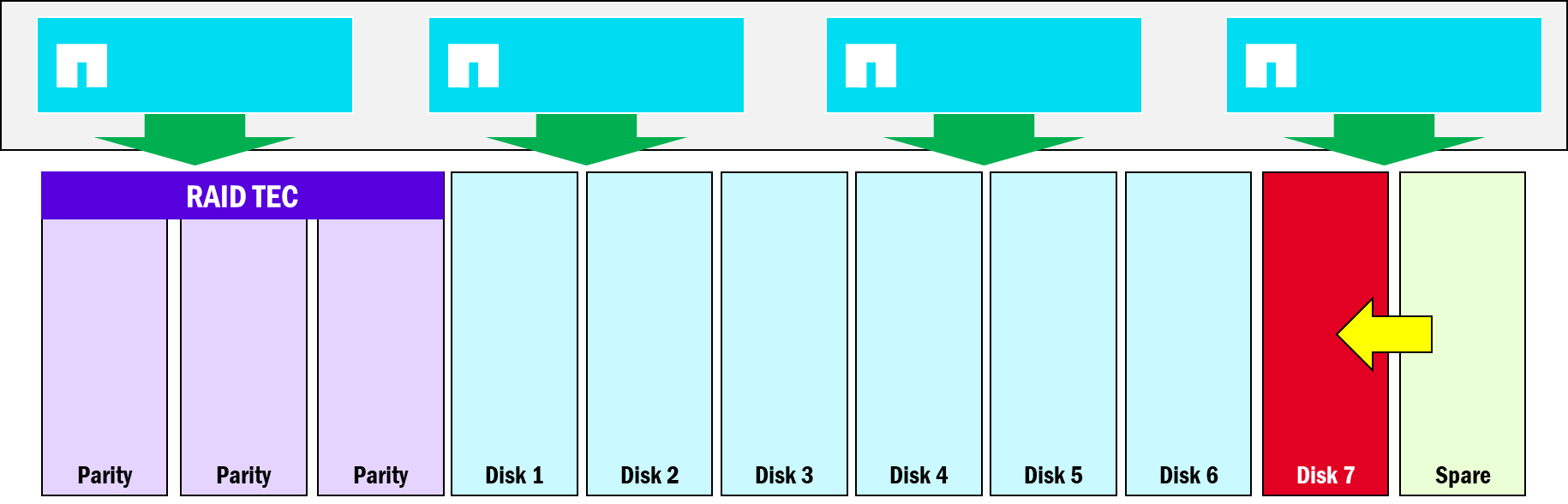
NetApp AFX eschews the need for disk ownership. As a result, all drives can be written to from a single node if needed. That also means that when a drive needs to be rebuilt from parity, all nodes in the cluster participate, so drive rebuilds can occur more quickly than if a single node had to do it alone.
Disk rebuilds in NetApp AFX
Deduplication domains
Deduplication allows a storage system to find duplicate blocks in its file system and then create pointers to a single block to reduce the total amount of used capacity. In unified ONTAP, deduplication follows a specific boundary for what blocks can be reduced. Those boundaries depend on the type of deduplication in use. In general:
-
Volume-based deduplication → Volume boundary
-
Cross-volume deduplication → Aggregate boundary
Unified ONTAP deduplication domains

The table below shows the capacity behaviors for duplicated data in different scenarios in unified ONTAP. As file copies span nodes and aggregates (and thus, deduplication domains), space savings get reduced.
Deduplication behaviors in different scenarios for identical 10GB files – unified ONTAP
| Scenario | Space used |
|---|---|
Four copies of same 10GB file, same volume (volume deduplication) |
10GB |
Four copies of same 10GB file, different volumes, same aggregate (cross-volume deduplication enabled) |
10GB |
Four copies of same 10GB file, 4 different volumes, 4 different aggregates (cross-volume deduplication enabled) |
40GB |
Because NetApp AFX removes physical aggregates and moves capacity management to the new Storage Availability Zone, the deduplication domain boundaries also change. In AFX, the deduplication domain is at the volume-level (like unified ONTAP) and the node (rather than the aggregate) prior to 9.19.1.
Starting in ONTAP 9.19.1, AFX supports a global deduplication domain at the Storage Availability Zone level, so all duplicated blocks in the cluster storage pool are treated the same.
NetApp AFX – Global deduplication domain (ONTAP 9.19.1)
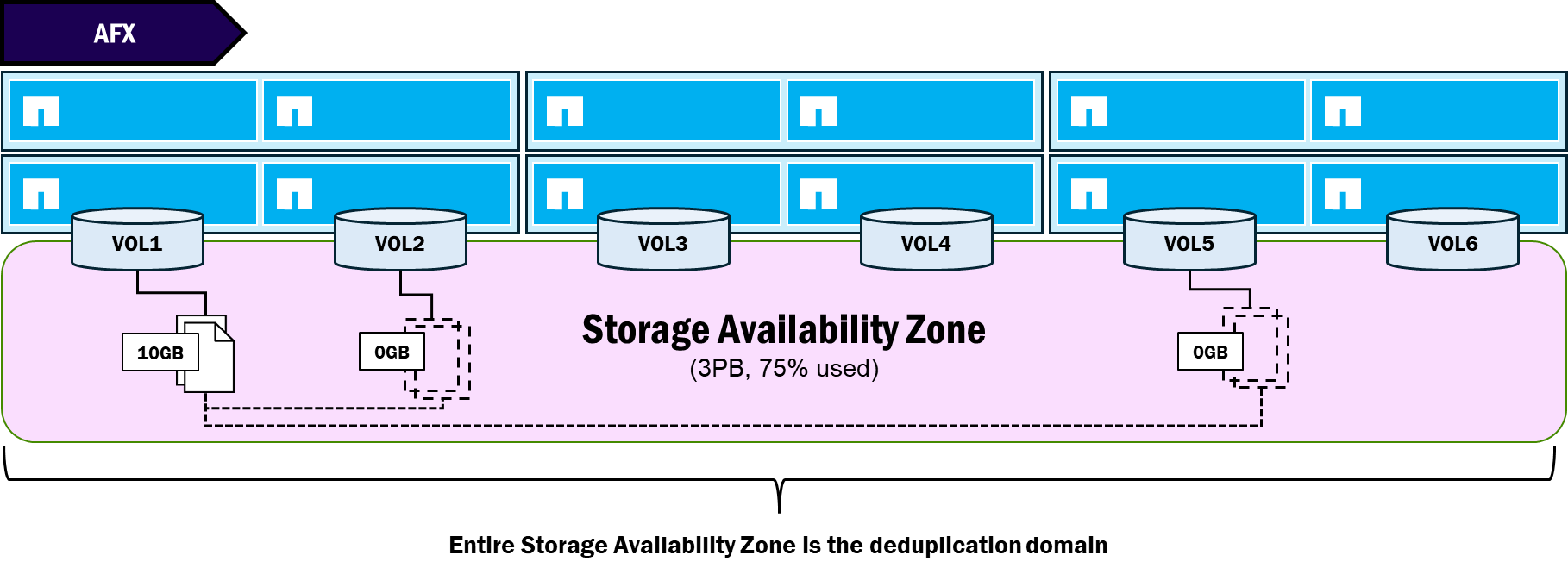
The table below shows the capacity behaviors for duplicated data in different scenarios in NetApp AFX.
Deduplication behaviors in different scenarios for identical 10GB files – NetApp AFX
| Scenario | Space used |
|---|---|
Four copies of same 10GB file, same volume (volume deduplication) |
10GB (9.18.1) 10GB (9.19.1) |
Four copies of same 10GB file, different volumes, same node (cross-volume deduplication enabled) |
10GB (9.18.1) 10GB (9.19.1) |
Four copies of same 10GB file, 4 different volumes, 4 different nodes (cross-volume deduplication enabled) |
40GB (9.18.1) 10GB (9.19.1) |
Features that have been removed/are unsupported
NetApp AFX is designed for high-performance NAS and object workloads – particularly (but not exclusive to) those in the AI training and inference space. With the design of NetApp AFX, some decisions were made to disable some of the features in ONTAP.
-
Because of the focus on high-performance NAS and object, block workloads have been removed from the NetApp AFX solution. There is no support for FCP, iSCSI or NVMe data protocols and there are no plans to add block protocols.
-
Disaggregated is synonymous to de-aggregated, which means that aggregates (at least as a physical storage administration concept) have been removed. Removal of the physical aggregate not only simplifies the management of capacity in ONTAP, but it also provides the mechanism to allow for a single pool of capacity.
-
Aggregates being removed means that aggregate-specific features are also removed. Metrocluster, for instance, leverages aggregate-level mirroring for its site failover capabilities. As such, Metrocluster is also removed from NetApp AFX. Site failover functionality will instead be provided by the new SnapMirror Active-Sync for NAS feature offered in ONTAP 9.19.1GA.
-
The cold data tiering feature called FabricPool is also currently unavailable to NetApp AFX since it is also aggregate-specific.
-
Copy-based volume moves are also no longer necessary in NetApp AFX, due to the new capacity architecture. For more information, see Zero-copy volume moves.
-
Feature removal also means some CLI/GUI/REST API changes, so any commands or API calls for features no longer supported will also be removed.
-
ZAPI is currently unavailable to NetApp AFX.
-
NFS copy offload for virtualization (FlexGroup volumes with Granular Data Distribution only)
ONTAP management changes
In general, NetApp AFX management doesn't change the mechanisms used to manage a cluster. Admins can still leverage the CLI, GUI, and REST APIs to log into and configure a cluster. But NetApp AFX did present an opportunity to improve upon some of how storage management operations are conducted.
Simpler capacity management
The NetApp AFX Storage Availability Zone reduces the management endpoints from a node and aggregate-based approach to a single pool of capacity available to the entire cluster. As volumes grow and shrink, ONTAP automatically borrows and returns capacity to and from the Storage Availability Zone.
Because of this, storage administrators no longer need to worry about locating and managing available free space across up to 24 nodes and potentially hundreds of aggregates. Instead, there is only one place where capacity is managed and viewed.
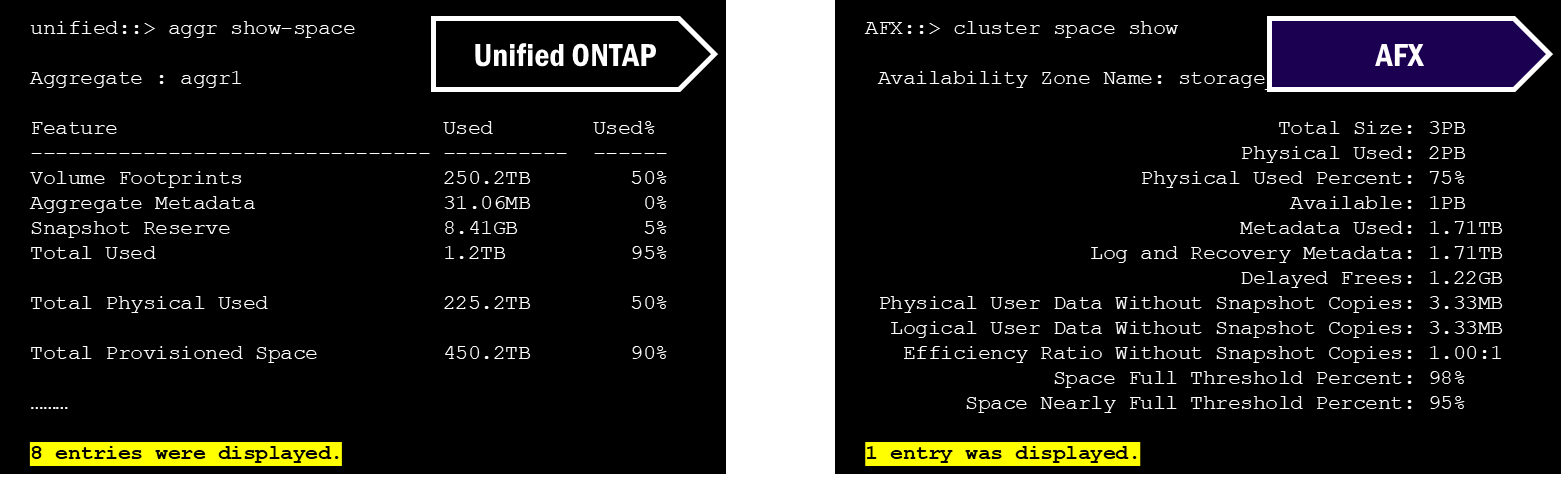
For instance, in the CLI of unified ONTAP, if you wanted to see total physical capacity information for a cluster, you would use "`aggregate show-space`," which would then print out every aggregate entry. In NetApp AFX, you have "`cluster space show`," which will show only the single Storage Availability Zone.
Side by side comparison of capacity CLI commands in unified ONTAP and NetApp AFX
In the Unified ONTAP System Manager GUI, tiers are used to show capacity. In fact, the GUI does attempt to show holistic capacity for the cluster by adding up totals, but it still will show the overall usage on a per-aggregate basis.
System Manager capacity views – Unified ONTAP
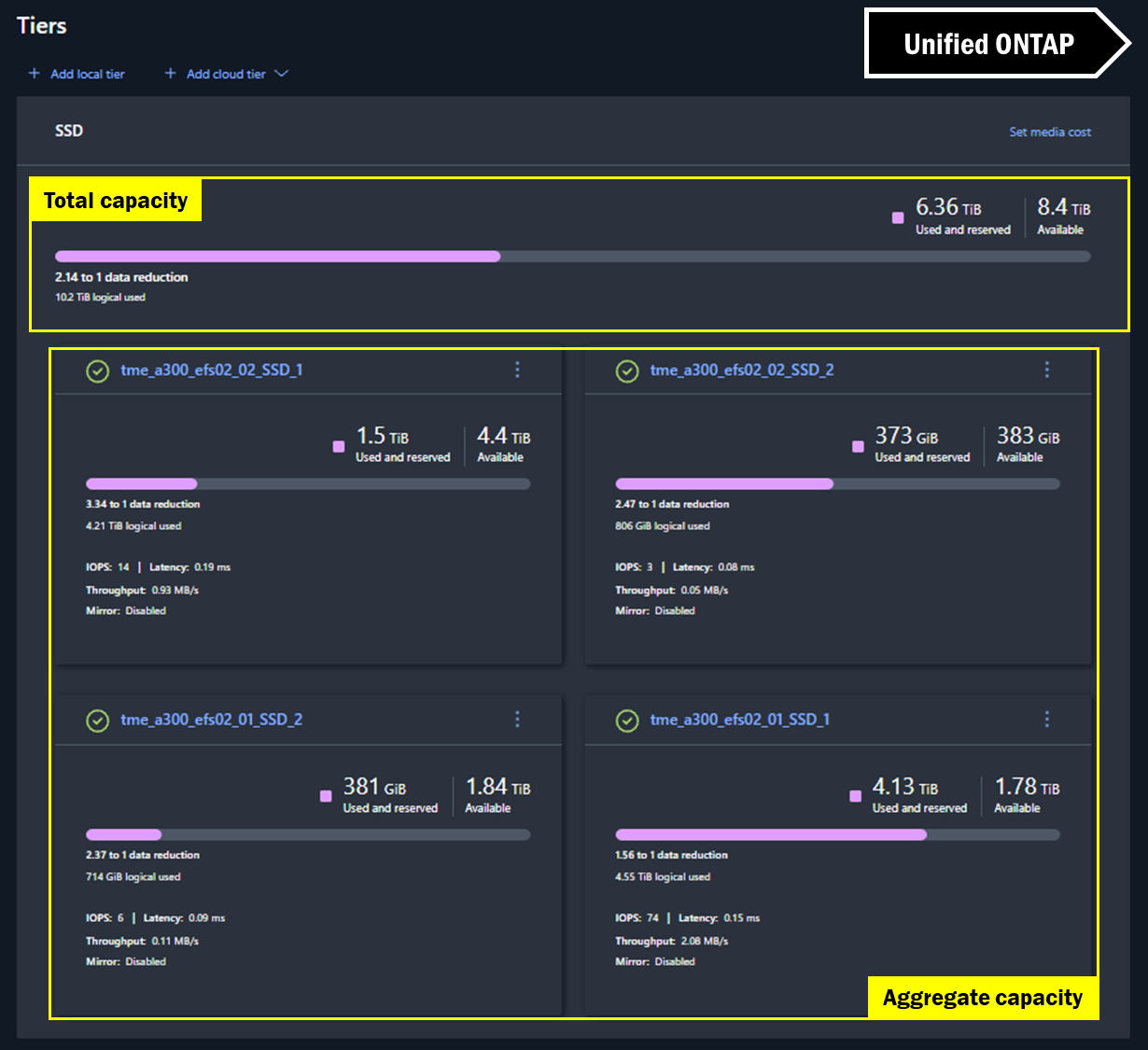
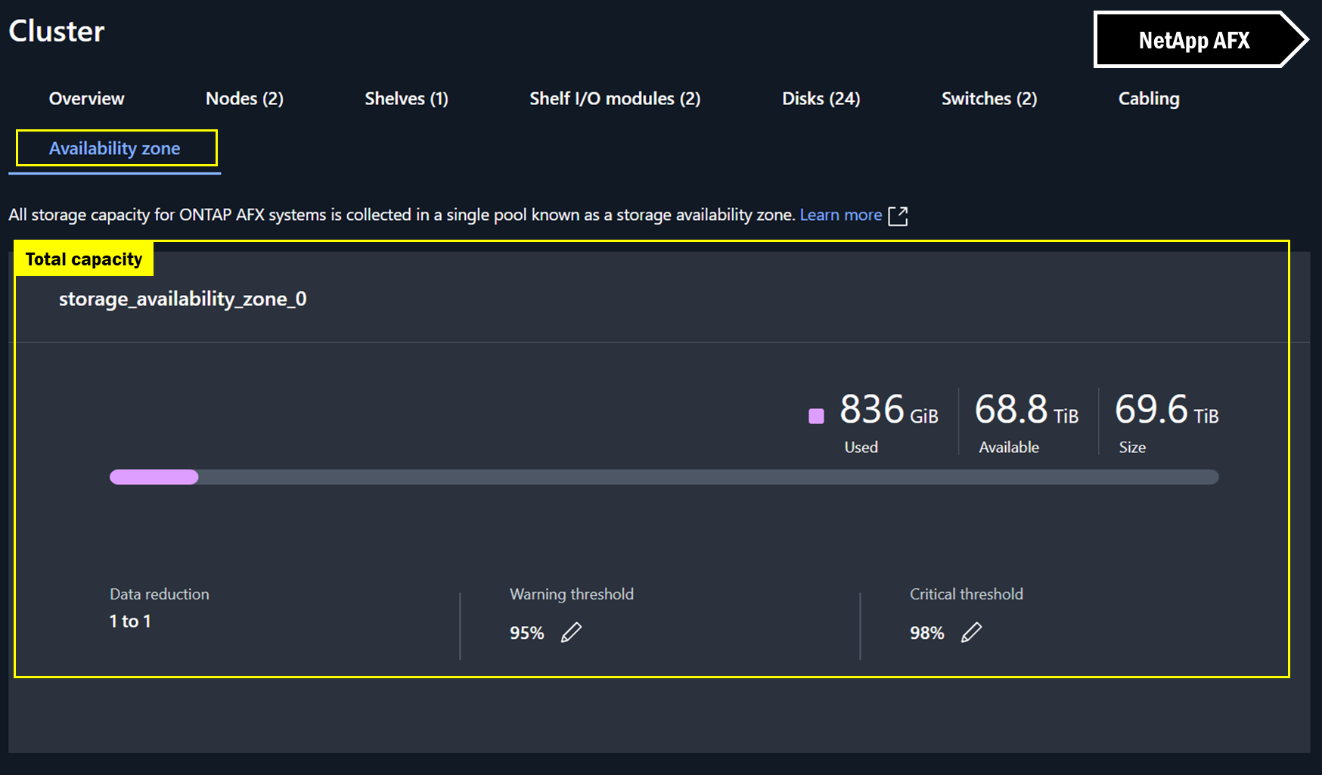
In NetApp AFX System Manager, the view is virtually the same for cluster space, but because there are no aggregates, there's no extra math to be done. The capacity you see is the capacity you get.
System Manager capacity views – NetApp AFX
FlexGroup volume management improvements
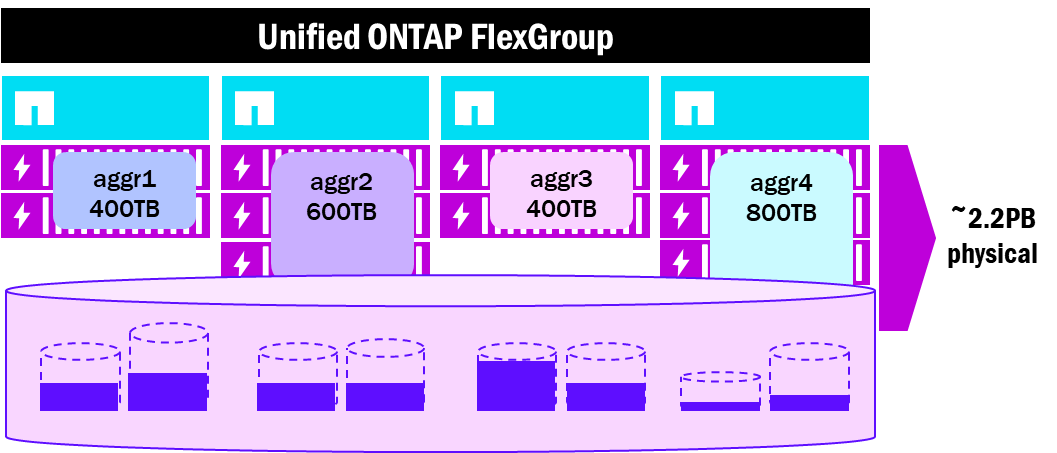
A FlexGroup volume consists of multiple underlying FlexVol constituent volumes created across multiple nodes and aggregates in the cluster and presented as a single large namespace to NAS clients. FlexGroup volumes provide performance, scale, load balancing, and file count benefits to high performance workloads. However, because they coordinate across nodes and aggregates, they occasionally run into some physical limitations when capacity starts to fill, as the independent file systems provided by aggregates also have independent capacity usage and limits. For instance, if an aggregate with FlexGroup volume constituents starts to fill up before other aggregates in the cluster, then the entire FlexGroup itself could be subject to capacity or performance issues.
As a result, storage administrators may find themselves worrying too much about underlying FlexGroup infrastructure and become less focused on maintaining other aspects of the environment.
FlexGroup volume layout - Unified ONTAP aggregates
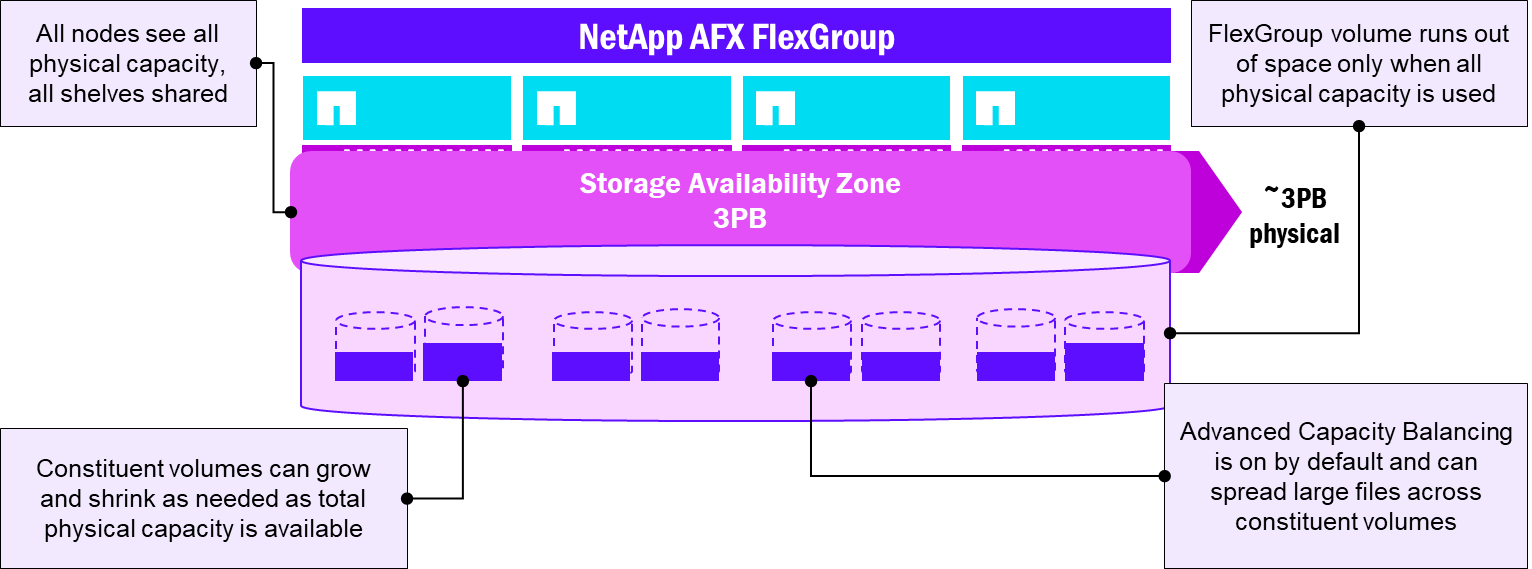
NetApp AFX presents capacity in a single Storage Availability Zone, which more closely mirrors the way FlexGroup volumes are intended to work. Instead of multiple constituent volumes across multiple disparate aggregates of potentially varying sizes, all volumes reside in the same pool of capacity, which greatly simplifies the overall management overhead of using a FlexGroup volume.
In addition, AFX enables Advanced Capacity Balancing by default for FlexGroup volumes, which helps better distribute larger files in the volume. Now, FlexGroup volume constituents become less of a management concept and instead do their work quietly in the background.
FlexGroup volume layout - NetApp AFX
Automated storage administration tasks
With the Storage Availability Zone in NetApp AFX, all capacity is shared across all nodes. While nodes still own volumes, ONTAP manages the capacity usage of each node automatically by borrowing and releasing capacity based on what each node needs at any given time. That means storage administrators no longer need to be concerned with how best to balance usable space.
Additionally, RAID group management is automated by ONTAP, where newly added disks will be added to existing or new RAID groups without admin intervention. ONTAP also manages volume moves across nodes without needing to copy data.
Zero-copy volume moves
Unified ONTAP provides a way to nondisruptively move volumes across nodes or aggregates as a way to manage performance and capacity usage across the cluster.
When a volume move is started, the following happens:
-
A new empty volume is created on the specified destination aggregate
-
Volume metadata (such as storage efficiency information, file handles, etc.) are replicated to the new destination volume
-
Volume data is replicated to the destination volume over the backend cluster network via SnapMirror technology—destination aggregate needs to have available free space for the move, or the move job will fail
-
Volume replication happens again to ensure both volumes are consistent with any data changes
-
A cutover process is initiated to bring the origin volume offline and promote the destination volume as the new origin volume for clients
-
Client IO experiences a brief pause during cutover, but no remounts are required
In NetApp AFX, the Storage Availability Zone presents all capacity to all nodes, and all nodes can write to any disk in that pool. Once the data is placed, it stays where it lands – even if the volume is moved. That means no data copy is required. The volume move process is identical to unified ONTAP, minus the need to replicate data via SnapMirror. No extra capacity required.
Zero copy volume moves in NetApp AFX
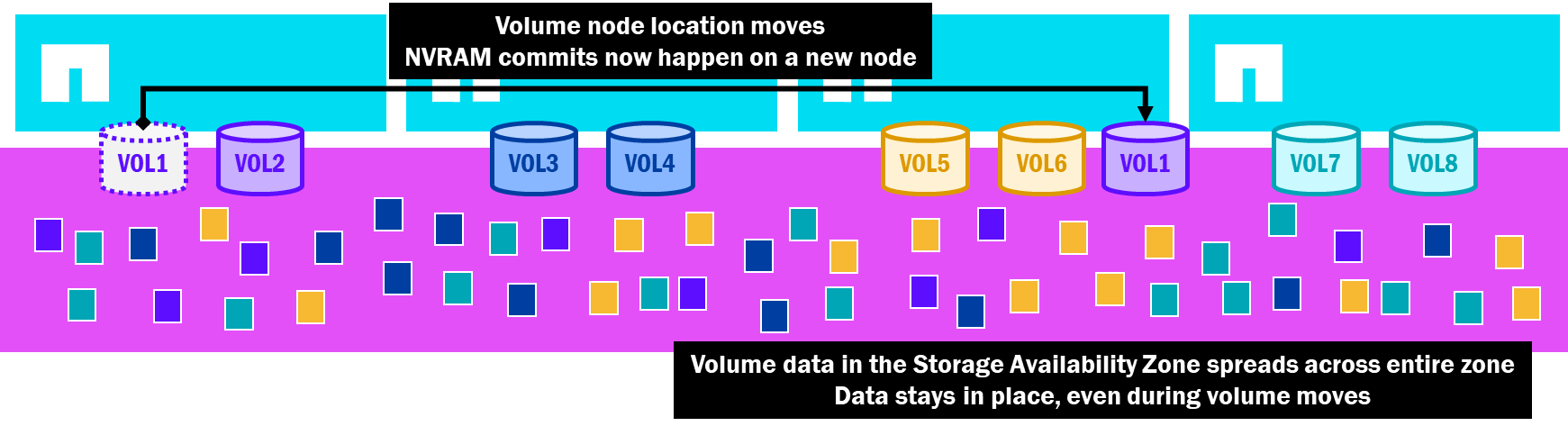
Having lightweight volume mobility allows AFX to automate away many of the administration tasks without the performance or capacity constraints, and these volume moves are used in a few new features provided by NetApp AFX, as described in topics seen below.
HA failover behavior
In unified ONTAP, nodes own disks and aggregates, where data is served via volumes. Writes are performed using a local node's NVRAM to flush to the disks the node owns. When a node is rebooted or fails, ONTAP will trigger a takeover of the failed node's resources, where disk and aggregate ownership is transferred to the partner node. Network interfaces are also failed over to ports in the IP space, and since NVRAM contents are constantly replicating across the HA pair, the node will flush the NVRAM contents to commit the failed node's writes to disks. After that, the surviving node will own the failed node's aggregates and volumes until giveback of the node occurs. That means that all traffic to those volumes – as well as the volumes already owned by the surviving node – will be processed on a single node until the failover issue is resolved.
As part of the initial unified ONTAP cluster deployment, it is recommended to plan ahead for failovers to help avoid a single node overloading its partner. That in itself presents a challenge, as it is difficult to predict what volumes might be performance bullies, but features such as nondisruptive volume move and volume quality of service policies can aid in mitigation.
The images below show how unified ONTAP clusters can incur uneven performance balance across nodes, as well as how a failover can create performance degradation in some cases.
Unified ONTAP – potential imbalances in node utilization
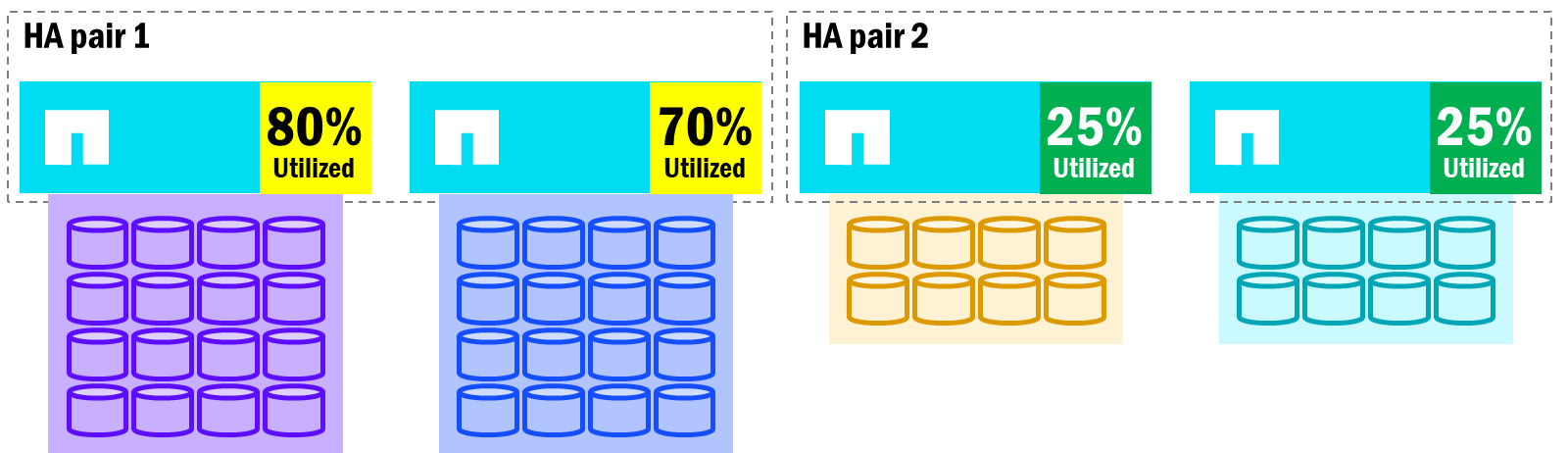
When an HA pair's nodes become imbalanced with volume count and performance utilization, node failovers will impact overall performance, since the surviving node will now own all of the failed node's volumes. Meanwhile, other nodes in the cluster may have room to take on additional work.
Unified ONTAP – Failover impact on node utilization
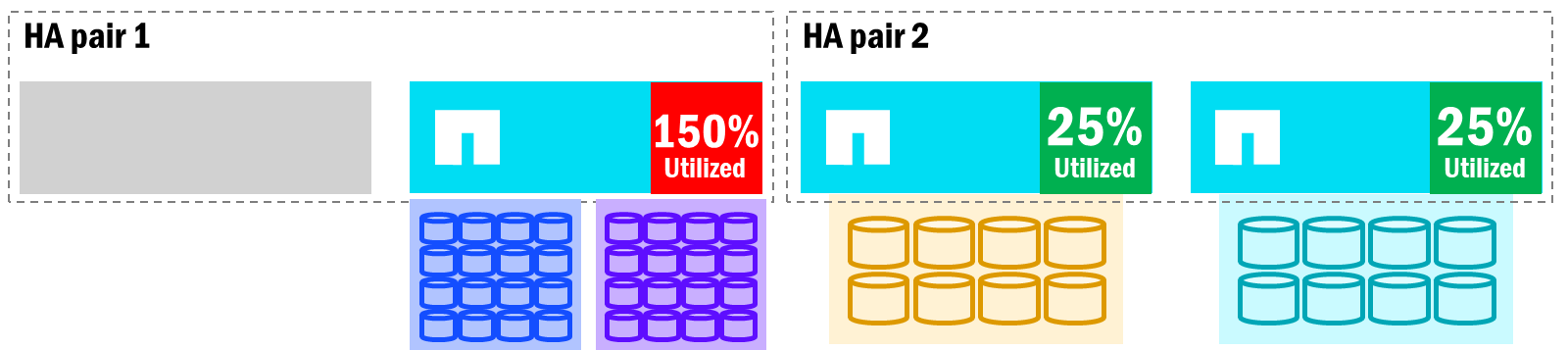
In the above, when an HA partner has to take on additional work, it can potentially become overloaded and impact performance for all volumes on that node. Volume moves can help alleviate the situation, but those require copies across nodes (which requires available free space), and the time that takes may exceed the time it takes for the nodes to fail back. Additionally, if you relocate a volume, it will not fail back to the original node. Instead, it will remain on the node you moved it to.
With NetApp AFX, node failovers take on some different behaviors.
-
Since nodes don't own disks and there are no physical aggregates, a node failover won't require transfer of those resources. Instead, only the network interfaces and volume ownership transfer to other nodes.
-
NVRAM commits still happen, but over the HA network instead of a direct connection.
-
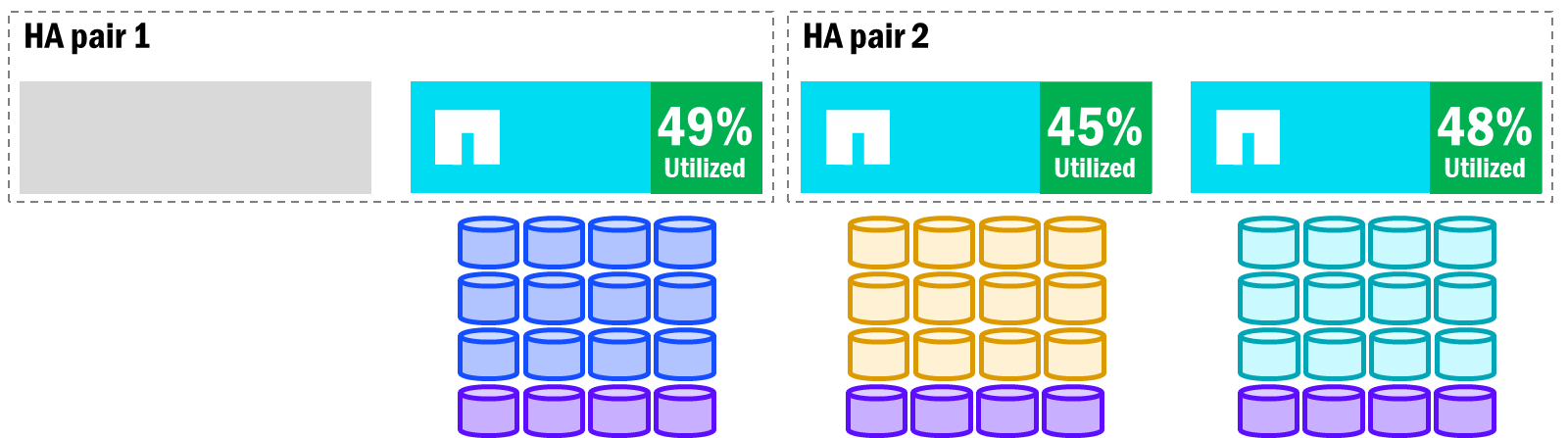
Once volumes conduct the initial failover to the partner node, AFX will re-distribute the volumes across other surviving nodes in the cluster. This is made possible by zero-copy volumes moves.
-
When the node is recovered, the volumes will move back to the original node.
NetApp AFX already maintains performance balance across nodes in the cluster to keep a relatively even utilization, so when a failover happens and volumes are rebalanced, the node utilization should be roughly the same across the cluster.
NetApp AFX - Volume rebalance after failover
Node additions and removals
Both unified ONTAP and NetApp AFX allow for nodes to be added and removed from the cluster. However, due to some of the architectural differences, the process for node additions and removals differ a bit.
Node addition/removal in unified ONTAP
We've already learned that unified ONTAP has a direct node to disk ownership and that all nodes must have some disks and at least one aggregate attached to them. With that in mind, the following holds true for additions and removals.
-
Node additions in unified ONTAP don't require any extra steps, but to provide balanced performance across all nodes (including the new nodes), volumes would need to be moved to the new nodes. This requires upfront analysis of the existing volumes and their workloads, decisions about which volumes to move, and then the actual volume moves taking place, which, again, would require a copy of that data across the backend cluster network.
-
Node removals in unified ONTAP would require a manual evacuation of existing volumes on the node, which means you must identify which nodes can host which volumes to maintain even performance, and you must have enough free capacity to provide a place for those volumes to move. If free capacity is a challenge, additional volume moves may be needed to shuffle workloads around a bit in the cluster. Node removals also HA pair removals, so the work involved is doubled. Because nodes own disks, an entire disk reinitialization would also be required for those nodes. Each of these things add time and effort to what should be a relatively simple task.
Node addition/removal in NetApp AFX
We've also learned that NetApp AFX doesn't leverage the standard node to disk ownership and does not use physical aggregates to present capacity to the cluster. Because of that, node additions and removals behave a bit differently.
-
Node additions in NetApp AFX will not require the same up-front volume analysis, nor will it require administrative intervention to ensure that each node has an even balance of volumes. Instead, ONTAP automatically balances volume counts across newly added nodes to maintain relatively even performance profiles. ONTAP automatically will move volumes across nodes without copying anything, reducing the time, capacity, and effort required for adding nodes to a cluster.
-
Node removals in NetApp AFX also don't require much – if any – manual intervention. When a node is tagged for removal, ONTAP automatically moves volumes across nodes (again, without copying) to evacuate the nodes being removed. And because there are no disks owned by the nodes, there is no need to reinitialize disks after removing nodes. This makes nodes in AFX modular in nature and easy to scale up or down.
Performance-driven volume moves
NetApp AFX's zero-copy volume move functionality means that it can rebalance volumes as needed without copying data, which allows it to perform quickly and without needing added capacity. This means that volume moves can become a greater part of the automated load balancing available to ONTAP clusters. Now that it costs relatively nothing to move a volume, ONTAP can leverage this valuable tool to incorporate features like performance-driven load balancing of volumes.
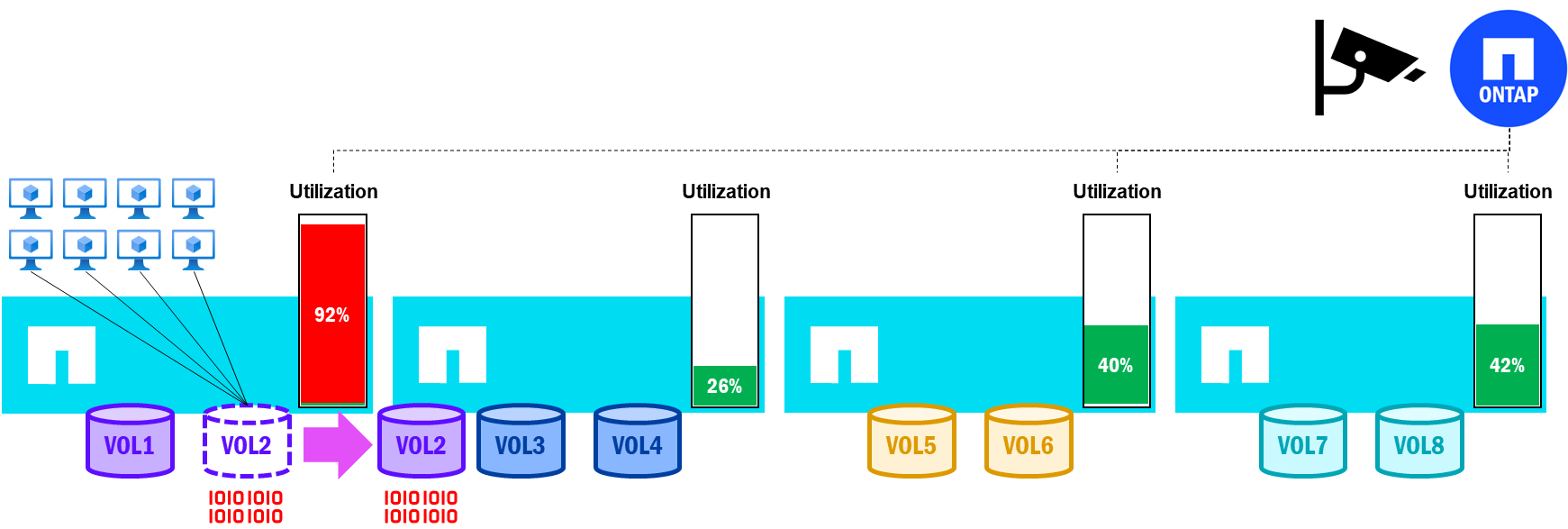
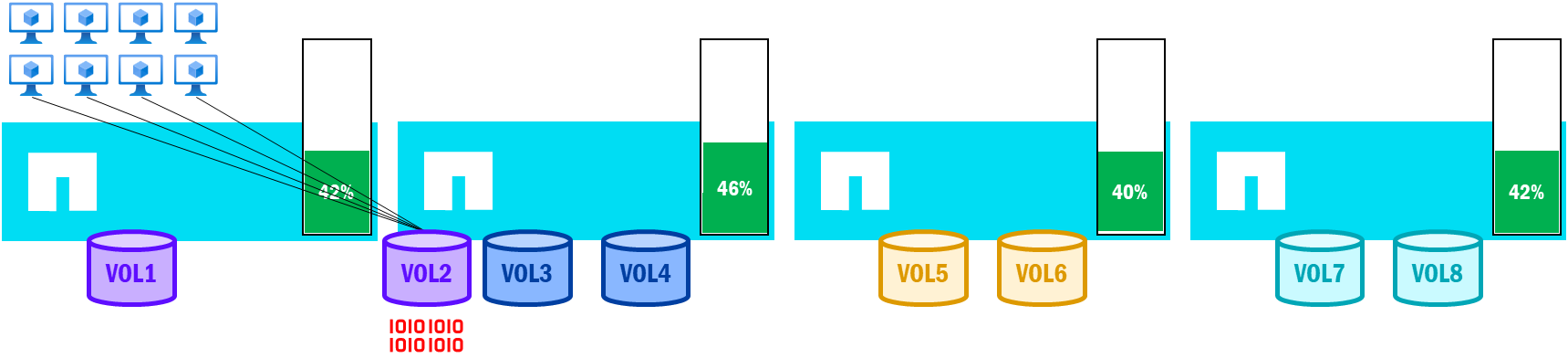
In NetApp AFX running ONTAP 9.18.1 and later, node, HA pair, and volume utilization is being constantly monitored, while performance data is collected and analyzed. If a node's utilization falls outside of the defined thresholds, then ONTAP will automatically select a volume to move to a less utilized node in an effort to keep balanced performance across the cluster.
Performance-driven volume moves in NetApp AFX – high utilization triggers a volume move
Performance-driven volume moves in NetApp AFX – Balanced node utilization after volume move
Cluster scale and expansion
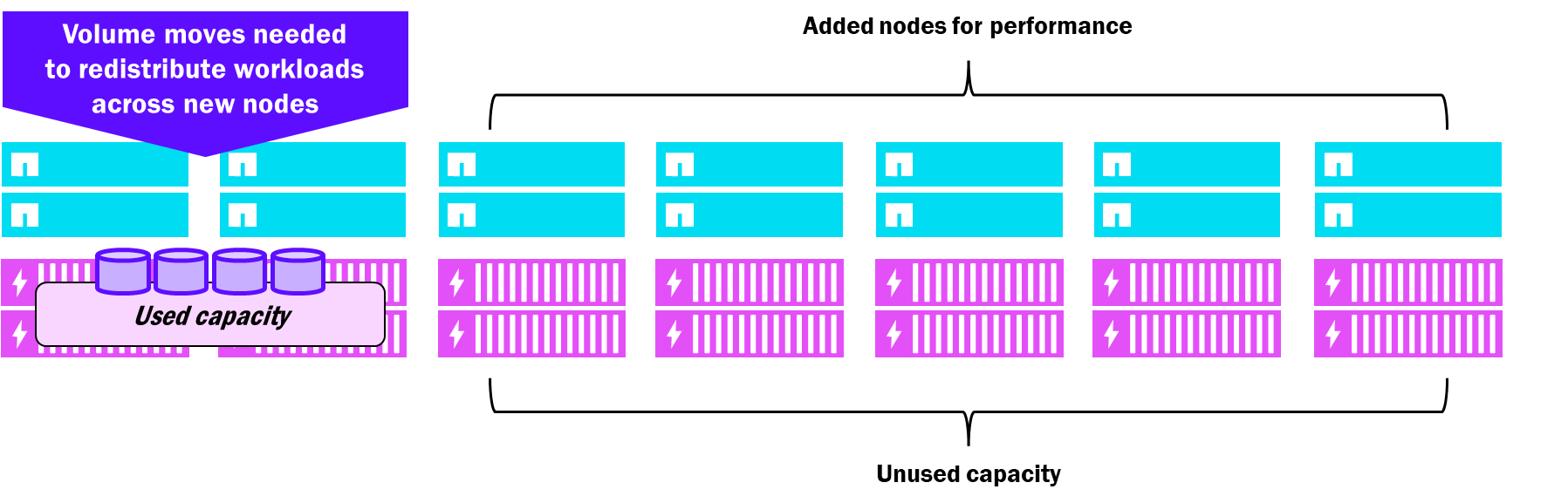
Unified ONTAP clusters support up to 24 nodes and each node that is added must also be added with disks (both for system functionality and data services). Disk shelves can be added to the cluster, but they are always connected to a single HA pair and owned only by a single node, even if the cluster is 24 nodes in size. This means that capacity is added to a cluster even when only performance is required, and that performance increase is mostly relegated to a specific set of disks owned by the new nodes. As a result, you may end up with extra capacity that you don't necessarily need.
Unified ONTAP – added scale considerations
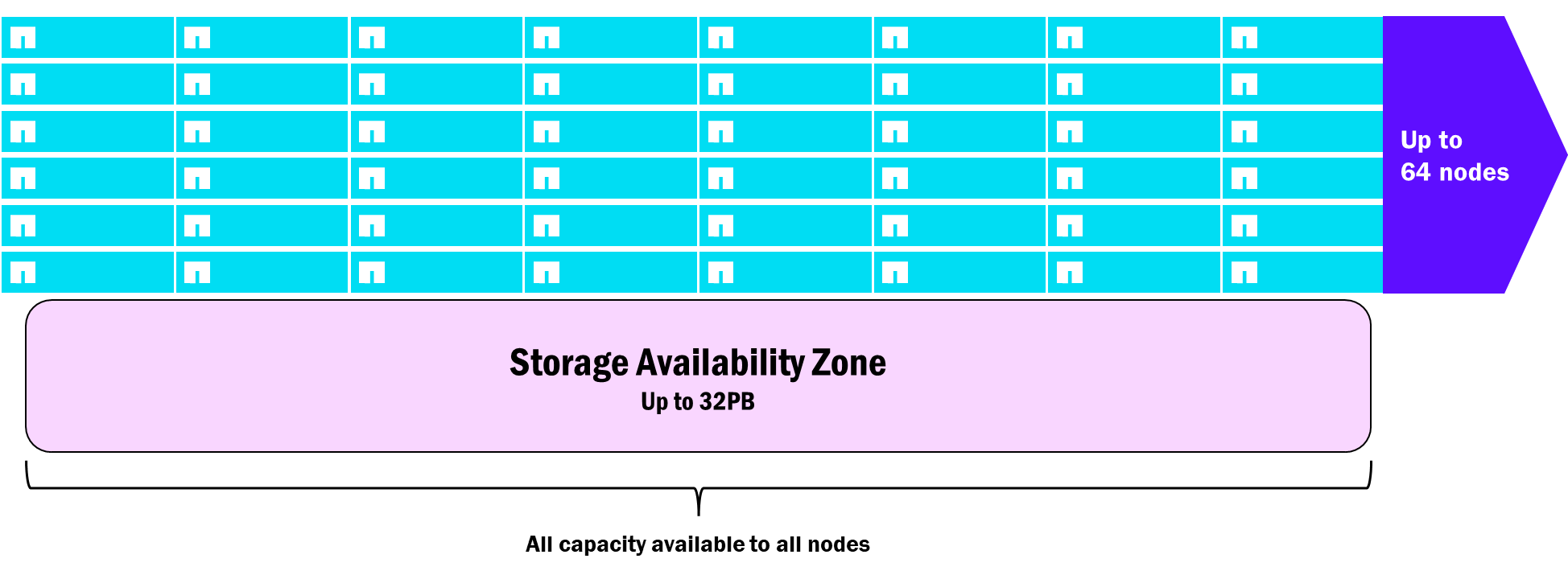
NetApp AFX supports larger scale for clusters. Starting in 9.19.1, AFX clusters can reach 32 nodes in a single cluster. And because all nodes can see and access all disks, they can all share the performance and capacity (up to 32PB as of ONTAP 9.19.1) of those drives so that there is never any stranded resource. Volume moves don't require copies, so ONTAP is able to automatically move volumes to newly added nodes to ensure evenly distributed node utilization, while capacity is evenly distributed via the Storage Availability Zone.
NetApp AFX – added scale considerations
Root volume changes
In NetApp ONTAP, each node is assigned a root volume, which is used for system-specific files and functions, such as log files, boot images, core files, cluster databases, and more.
In unified ONTAP, those root volumes lived on physical root aggregates. To reduce the amount of capacity the root aggregates used, they were created across data drive partitions via Advanced Disk Partitioning (ADP).
NetApp AFX removes physical aggregates from the equation, and as a result, removes the need for root aggregates and ADP to be used. Root volumes are still a concept, but they now live in virtualized areas of the capacity pool and do not require extra configuration. Additionally, root volume functionality changes. Boot images and replicated cluster databases are moved off the storage stack and into an on-board boot media found on each AFX node. Now, if access to the storage stack is lost, nodes can still boot and maintain cluster eligibility, which eases the complexity of troubleshooting.
Onboard boot media
NetApp AFX nodes leverage on-board boot media, which is an NVMe attached M.2 device roughly 3.8TB in size. These boot devices contain boot image files and replicated databases that are separate from the storage enclosures, which provides extra redundancy in the case of disk access issues. If the boot media fails, the node will be taken over by its HA partner and the boot media can be replaced. Once replaced, a new ONTAP image would be loaded to the device by a storage administrator and ONTAP will automatically rebuild the cluster database to restore full functionality.