


Management tools

 Suggest changes

 PDFs
PDFs
While there are some fairly large architectural differences in how storage is presented in NetApp AFX, the feature set and the way ONTAP is managed is virtually unchanged. This is entirely by design. ONTAP is ONTAP and there should be little to no learning curve when possible. And in this case, NetApp AFX is still running ONTAP.
Management – CLI
In NetApp AFX, the CLI is nearly identical to what unified ONTAP's CLI offers. Commands are still run at the cluster level for the most part, while there are still node-level commands that can be issued. There are still top-level command directories and sub-commands, as well as tab completion of commands. In addition, all of the same CLI shortcuts work (for example, filtering content using -fields).
The only real differences in the NetApp AFX CLI have to do with what was added and what was removed (as covered in the "" section of this document). If a feature (such as aggregates or Metrocluster) have been removed, then the corresponding CLI command will no longer be available.
In addition, where new features and functionality have been added to NetApp AFX, new commands will also be available. For instance, the new NetApp AI Data Engine (AIDE) add-on interacts directly with a NetApp AFX cluster over the backend cluster network. As a result, the dcn and data-engine command directories are added to the NetApp AFX CLI.
The following shows the top-level command directories available at admin privilege in a NetApp AFX cluster. Newly added commands in bold.
AFX::>
    cluster       data-engine   dcn           event         exit
    history       job           man           metrocluster  network
    qos           redo          rows          run           security
    set           snaplock      snapmirror    statistics    statistics-v1
    storage       system        top           up            volume
    vserver
Management – GUI
System Manager is still the GUI interface to interact with NetApp AFX clusters for management of resources, and when you first log in to it, you likely won't be able to tell at first glance that you aren't still logged into a unified ONTAP system.
Side-by-side look at unified ONTAP and NetApp AFX System Manager landing pages
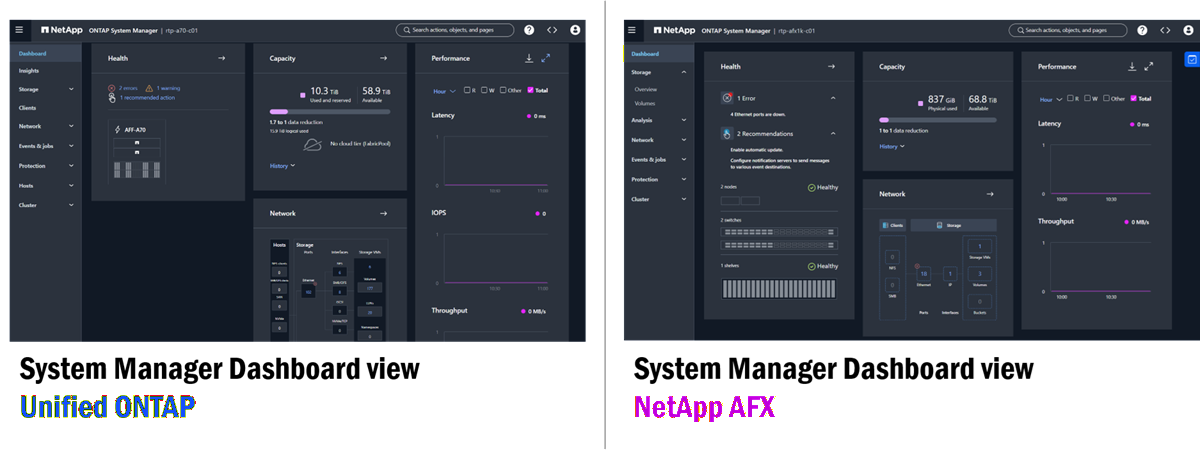
As you can see from the above, there aren't many obvious differences in System Manager for unified ONTAP and NetApp AFX. There are a few tells, however.
How NetApp AFX differs in System Manager
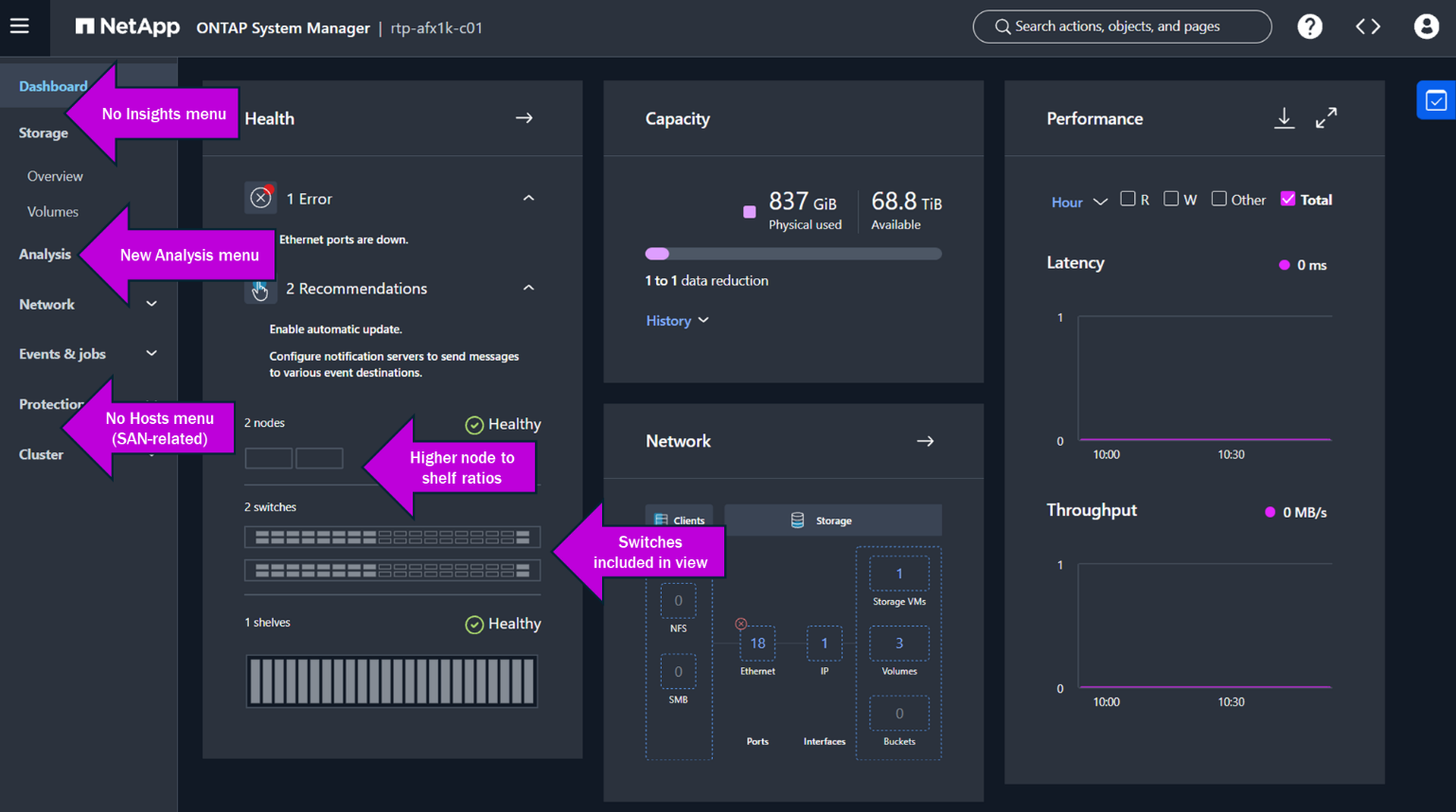
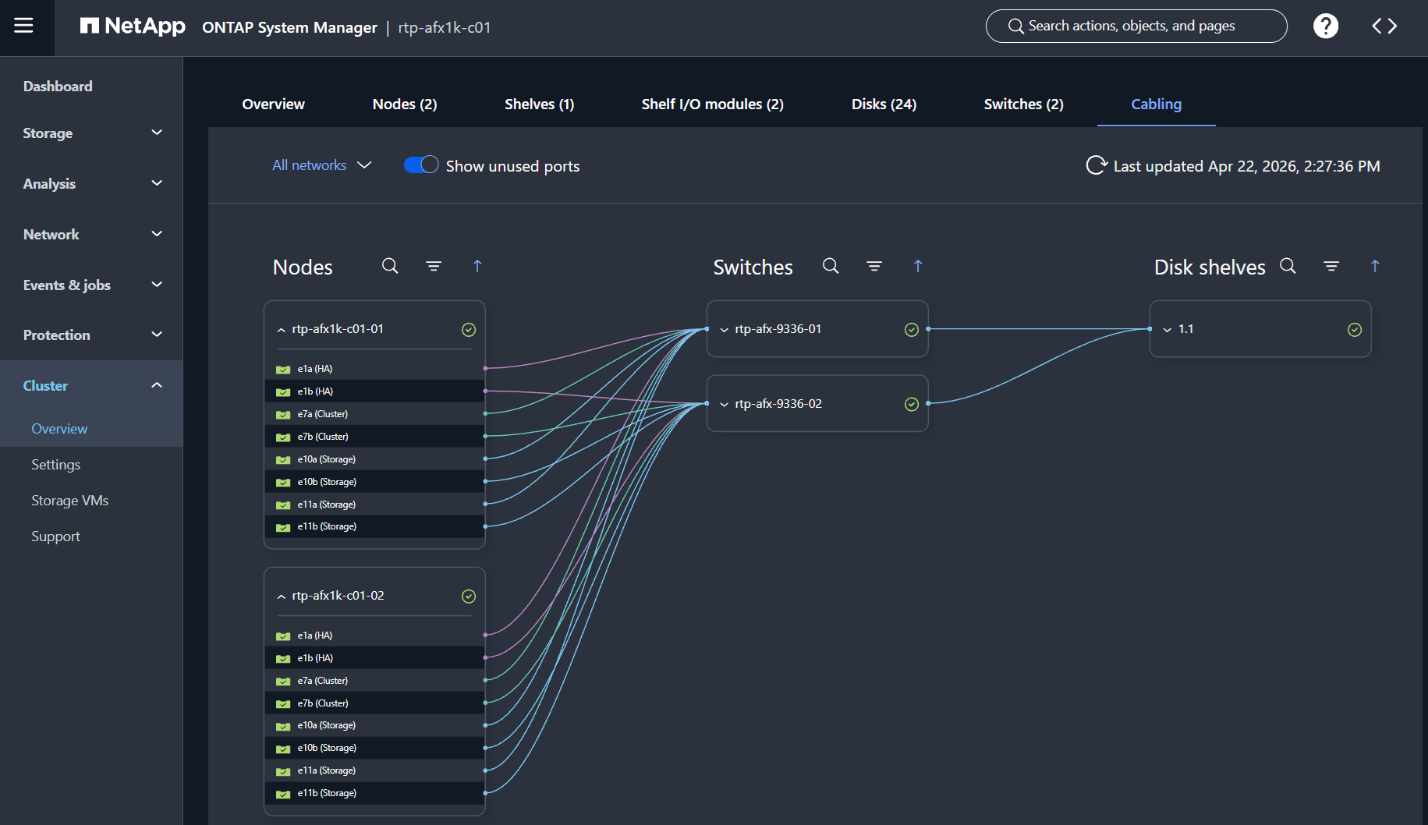
As you drill down into menus and dashboards, most everything remains the same. Volumes still show used and total capacity. Network interfaces still show ports and IP addresses. You can still configure protection policies for SnapMirror. Hardware views are still available. But NetApp AFX also enhances the views a bit by offering a new cabling view, where you can drill down and see where all the cables are connected throughout the storage stack.
NetApp AFX cabling view
Capacity management
The NetApp AFX Storage Availability Zone reduces the management endpoints from a node and aggregate-based approach to a single pool of capacity available to the entire cluster. As volumes grow and shrink, ONTAP automatically borrows and returns capacity to and from the Storage Availability Zone.
Because of this, storage administrators no longer need to worry about locating and managing available free space across up to 24 nodes and potentially hundreds of aggregates. Instead, there is only one place where capacity is managed and viewed.
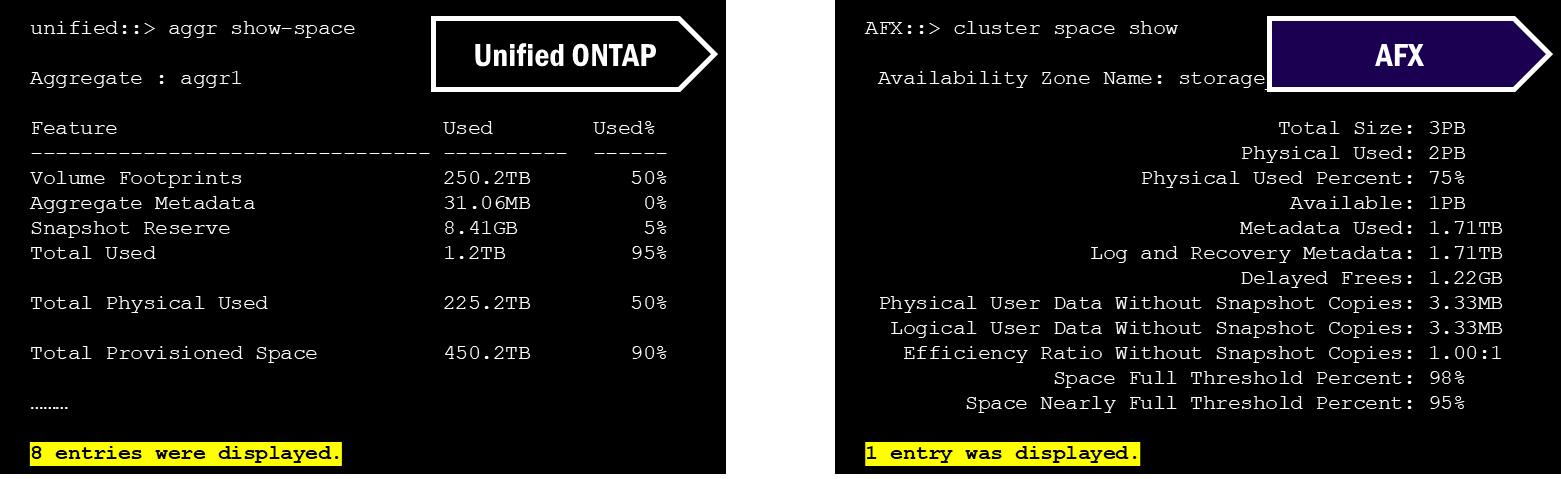
For instance, in the CLI of unified ONTAP, if you wanted to see total physical capacity information for a cluster, you would use "`aggregate show-space`," which would then print out every aggregate entry. In NetApp AFX, you have "`cluster space show`," which will show only the single Storage Availability Zone.
Side by side comparison of capacity CLI commands in unified ONTAP and NetApp AFX
In the Unified ONTAP System Manager GUI, tiers are used to show capacity. In fact, the GUI does attempt to show holistic capacity for the cluster by adding up totals, but it still will show the overall usage on a per-aggregate basis.
System Manager capacity views – Unified ONTAP
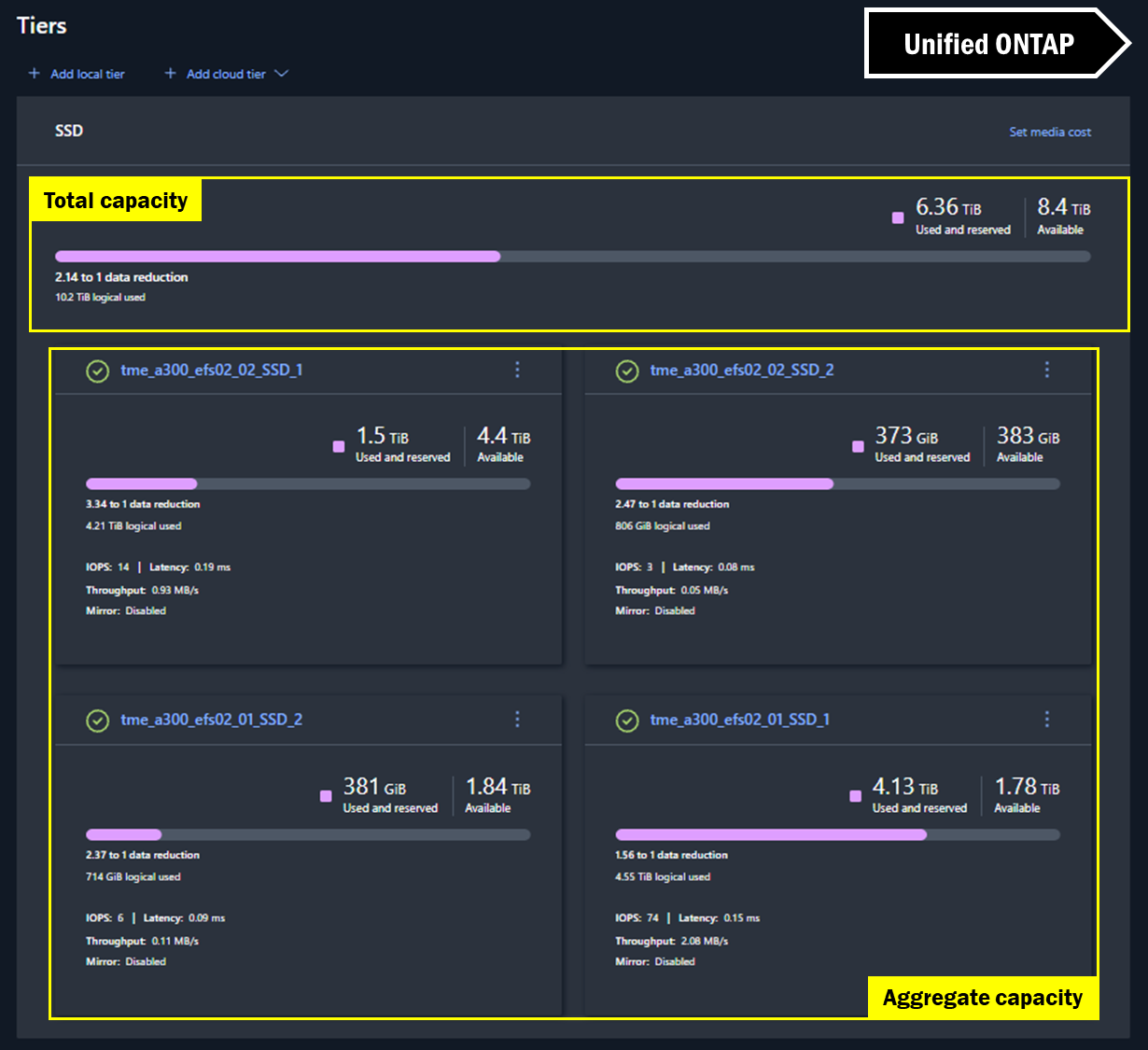
In NetApp AFX System Manager, the view is virtually the same for cluster space, but because there are no aggregates, there's no extra math to be done. The capacity you see is the capacity you get.
System Manager capacity views – NetApp AFX
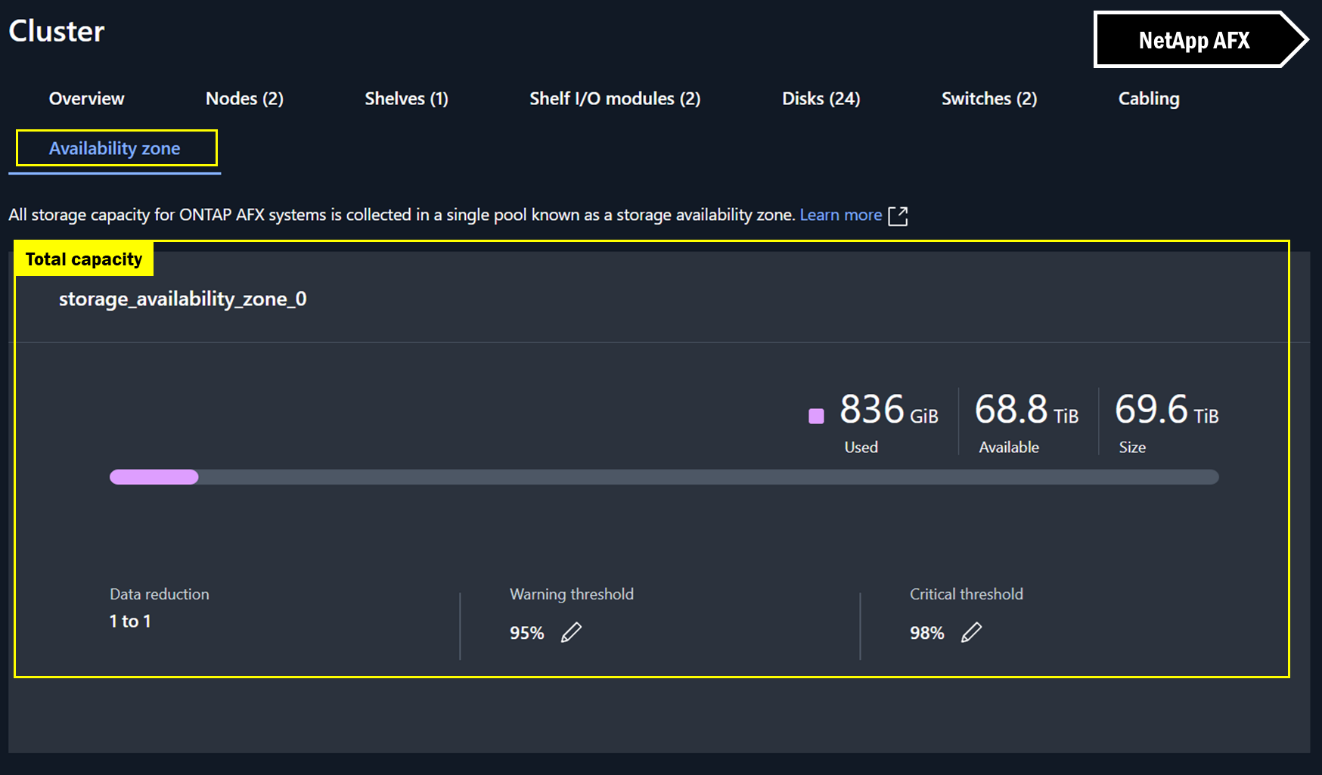
REST APIs
NetApp AFX also makes a concerted effort to retain a majority of the ONTAP REST API calls, which means if you've created a suite of automation tools based on REST API, they should still be able to be used in most cases. The main exceptions include aggregates, Metrocluster, SAN, and some performance counters. Complete REST API documentation can be found within the NetApp AFX cluster's System Manager by navigating to https://clus_mgmt_ip/docs/api.
Off-box ONTAP management tools
NetApp AFX provides some support for off-box ONTAP management tools, such as:
-
NetApp System Manager
-
NetApp Console
-
Grafana Harvest (25.11.0 and later)
-
NetApp Trident (25.10 and later)
NetApp AFX does not currently support:
-
NetApp ActiveIQ Unified Manager