


Learn about ONTAP capacity reporting and measurements


 Suggest changes

 PDFs
PDFs
Your ONTAP storage capacity can be measured as either physical space and logical space. How these measurements are reported varies depending upon your ONTAP version and if you are using System Manager or the Command Line Interface (CLI). Understanding various terms related to capacity, the differences between physical and logical capacity and how capacity types are reported is important when you are monitoring your storage usage.
-
Physical capacity: Physical space refers to the physical blocks of storage used in the volume or local tier. The value for physical used capacity is typically smaller than the value for logical used capacity due to the reduction of data from storage efficiency features (such as deduplication and compression).
-
Logical capacity: Logical space refers to the usable space (the logical blocks) in a volume or local tier. Logical space refers to how theoretical space can be used, without accounting for results of deduplication or compression. The value for logical space used is derived from the amount of physical space used plus the savings from storage efficiency features (such as deduplication and compression) that have been configured. This measurement often appears larger than the physical used capacity because it includes snapshots, clones, and other components, and it does not reflect the data compression and other reductions in the physical space. Thus, the total logical capacity could be higher than the provisioned space.
Capacity reporting in the CLI
Physical used space is reported differently in the ONTAP CLI depending on your version of ONTAP. In ONTAP 9.13.1 and earlier, the physical used parameter displayed in the volume show command output includes all storage efficiency savings applied to the volume. Beginning with ONTAP 9.14.1, the physical used parameter does not include aggregate-level storage efficiency savings such as temperature-sensitive storage (TSSE), inline compression, compaction, and cross-volume deduplication, so does not accurately reflect the volume's physical used space. In ONTAP 9.14.1 and later you should use the vol show-footprint command with the effective_total_footprint parameter to view the accurate physical used space of a volume.
| ONTAP Version | Command | Parameter | Description |
|---|---|---|---|
9.14.1 and later |
|
|
Reflects the actual disk space used, including savings from the aggregate. |
|
|
Reflects volume-level storage efficiency savings, including savings from the aggregate. |
|
|
|
Does not include aggregate-level storage efficiency savings, so does not accurately reflect the volume's physical used space for TSSE enabled platforms. |
|
9.13.1 and earlier |
|
|
Reflects the actual disk space used, including savings from the aggregate. |
|
|
Reflects only volume-level storage efficiency savings. |
|
|
|
Reflects only volume-level storage efficiency savings. |
-
Learn more about the change in physical used space reporting for 9.14.1 and later.
-
Learn more about commands for displaying space usage information.
Capacity reporting in System Manager
Measurements of used capacity are displayed differently in System Manager depending on the version of ONTAP. Beginning with ONTAP 9.7, System Manager provides measurements of both physical and logical capacity.

|
In System Manager, capacity representations do not account for root storage tier (aggregate) capacities. |
Version of System Manager |
Term used for capacity |
Type of capacity referred to |
|---|---|---|
9.9.1 and later |
Logical Used |
Logical space used |
9.7 and 9.8 |
Used |
Logical space used |
9.5 and 9.6 |
Used |
Physical space used |
Capacity measurement terms
The following terms are used when describing capacity:
-
Allocated capacity: The amount of space that has been allocated for volumes in a storage VM.
-
Available: The amount of physical space available to store data or to provision volumes in a storage VM or on a local tier.
-
Capacity across volumes: The sum of the used storage and available storage of all the volumes on a storage VM.
-
Client data: The amount of space used by client data (either physical or logical).
-
Beginning with ONTAP 9.13.1, the capacity used by client data is referred to as Logical Used, and the capacity used by snapshots is displayed separately.
-
In ONTAP 9.12.1 and earlier, the capacity used by client data added to the capacity used by snapshots is referred to as Logical Used.
-
-
Committed: The amount of committed capacity for a local tier.
-
Data reduction: The ratio of the size of data ingested to the size of data stored.
-
Beginning with ONTAP 9.13.1, data reduction considers the results of most storage efficiency features, such as deduplication and compression; however, snapshots and thin provisioning are not counted as part of the data reduction ratio.
-
In ONTAP 9.12.1 and earlier, data reduction ratios are displayed as follows:
-
The data reduction value displayed on the Capacity panel is the overall ratio of all logical used space compared to physical used space, and it includes the benefits derived from using snapshots and other storage efficiency features.
-
When you display the details panel, you see both the Overall ratio that was displayed on the overview panel and ratio of logical used space used only by client data compared to physical used space used only by client data, referred to as Without snapshots and clones.
-
-
-
Logical used:
-
Beginning with ONTAP 9.13.1, the capacity used by client data is referred to as Logical Used, and the capacity used by snapshots is displayed separately.
-
In ONTAP 9.12.1 and earlier, the capacity used by client data added to capacity used by snapshots is referred to as Logical Used.
-
-
Logical used %: The percentage of the current logical used capacity compared to the provisioned size, excluding snapshot reserves. This value can be greater than 100%, because it includes efficiency savings in the volume.
-
Maximum capacity: The maximum amount of space allocated for volumes on a storage VM.
-
Physical used: The amount of capacity used in the physical blocks of a volume or local tier.
-
Physical used %: The percentage of capacity used in the physical blocks of a volume compared to the provisioned size.
-
Provisioned capacity: A file system (volume) that has been allocated from a Cloud Volumes ONTAP system and is ready to store user or application data.
-
Reserved: The amount of space reserved for already provisioned volumes in a local tier.
-
Used: The amount of space that contains data.
-
Used and reserved: The sum of physical used and reserved space.
Capacity of a storage VM
The maximum capacity of a storage VM is determined by the total allocated space for volumes plus the remaining unallocated space.
-
The allocated space for volumes is the sum of the used capacity and the sum of available capacity of FlexVol volumes, FlexGroup volumes, and FlexCache volumes.
-
The capacity of volumes is included in the sums, even when they are restricted, offline, or in the recovery queue after deletion.
-
If volumes are configured with auto-grow, the maximum autosize value of the volume is used in the sums. Without auto-grow, the actual capacity of the volume is used in the sums.
The following chart explains how the measurement of the capacity across volumes relates to the maximum capacity limit.
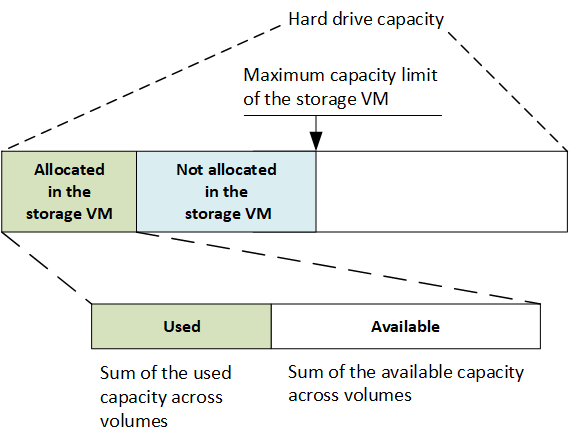
Beginning with ONTAP 9.13.1, cluster administrators can enable a maximum capacity limit for a storage VM. However, storage limits cannot be set for a storage VM that contains volumes that are for data protection, in a SnapMirror relationship, or in a MetroCluster configuration. Also, quotas cannot be configured to exceed the maximum capacity of a storage VM.
After the maximum capacity limit is set, it cannot be changed to a size that is less than the currently allocated capacity.
When a storage VM reaches its maximum capacity limit, certain operations cannot be performed. System Manager provides suggestions for next steps in Insights .
Capacity measurement units in System Manager
System Manager calculates storage capacity based on binary units of 1024 (210) bytes.
-
Beginning with ONTAP 9.10.1, storage capacity units are displayed in System Manager as KiB, MiB, GiB, TiB, and PiB.
-
In ONTAP 9.10.0 and earlier, these units are displayed in System Manager as KB, MB, GB, TB, and PB.
|
|
The units used in System Manager for throughput continue to be KB/s, MB/s, GB/s, TB/s, and PB/s for all releases of ONTAP. |
Capacity unit displayed in System Manager for ONTAP 9.10.0 and earlier |
Capacity unit displayed in System Manager for ONTAP 9.10.1 and later |
Calculation |
Value in bytes |
|---|---|---|---|
KB |
KiB |
1024 |
1024 bytes |
MB |
MiB |
1024 * 1024 |
1,048,576 bytes |
GB |
GiB |
1024 * 1024 * 1024 |
1,073,741,824 bytes |
TB |
TiB |
1024 * 1024 * 1024 * 1024 |
1,099,511,627,776 bytes |
PB |
PiB |
1024 * 1024 * 1024 * 1024 * 1024 |
1,125,899,906,842,624 bytes |