


StorageGRID SG120 and SG1200 appliances


 Suggest changes

 PDFs
PDFs
The StorageGRID SG120 services appliance and the SG1200 services appliance can operate as a Gateway Node and as an Admin Node to provide high availability load balancing services in a StorageGRID system. Both appliances can operate as Gateway Nodes and Admin Nodes (primary or non-primary) at the same time.
Appliance features
The SG120 and SG1200 appliances provide the following features:
-
Gateway Node or Admin Node functions for a StorageGRID system.
-
The StorageGRID Appliance Installer to simplify node deployment and configuration.
-
When deployed, can access StorageGRID software from an existing Admin Node or from software downloaded to a local drive. To further simplify the deployment process, a recent version of the software is preloaded onto the appliance during manufacturing.
-
One AMD 3.65 GHz processor providing 16 cores (32 threads)
-
A baseboard management controller (BMC) for monitoring and diagnosing some of the appliance hardware.
-
The ability to connect to all three StorageGRID networks, including the Grid Network, the Admin Network, and the Client Network:
-
The SG120 supports up to four 10- or 25-GbE connections to the Grid Network and Client Network.
-
The SG1200 supports up to four 10-, 25-, 40-, 100-GbE connections to the Grid Network and Client Network (or up to four 200GbE connections with optional 200GbE NIC).
-
SG120 and SG1200 diagrams
This figure shows the front of the SG120 and the SG1200 with the bezel removed. From the front, the two appliances are identical except for the product name on the bezel.

The two solid-state drives (SSDs), indicated by the orange outline, are used for storing the StorageGRID operating system and are mirrored using RAID 1 for redundancy. When the SG120 or SG1200 services appliance is configured as an Admin Node, these drives might be used to store audit logs, metrics, and database tables. The remaining drive slots are blank.
This figure shows the location of the power supply and identify LEDs on the rear of the SG120 and the SG1200. Additional status and activity LEDs are on the appliance ports. These LEDs might vary by appliance model.

| Callout | LED | State |
|---|---|---|
1 |
Power supply LED |
|
2 |
Identify LED |
|
SG120 connectors
This figure shows the back of the SG120, including the ports, fans, and power supplies.
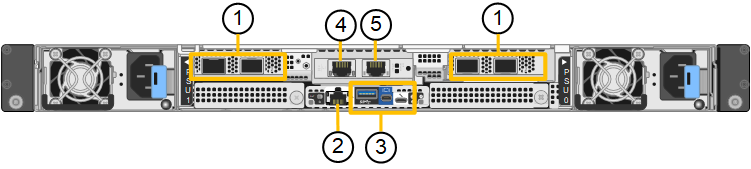
| Callout | Port | Type | Use |
|---|---|---|---|
1 |
Network ports 1-4 |
10/25-GbE, based on cable or SFP transceiver type (SFP28 and SFP+ modules are supported), switch speed, and configured link speed |
Connect to the Grid Network and the Client Network for StorageGRID. |
2 |
BMC management port |
1-GbE (RJ-45) |
Connect to the appliance baseboard management controller. |
3 |
Diagnostic and support ports |
|
Reserved for technical support use. |
4 |
Admin Network port 1 |
1/10-GbE (RJ-45) |
Connect the appliance to the Admin Network for StorageGRID. |
5 |
Admin Network port 2 |
1/10-GbE (RJ-45) |
Options:
|
SG1200 connectors
This figure shows the connectors on the back of the SG1200.
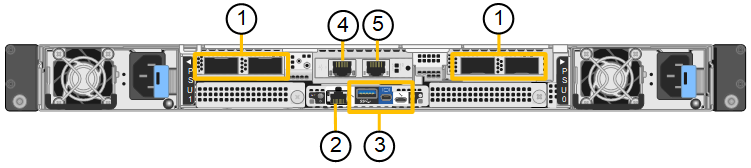
| Callout | Port | Type | Use |
|---|---|---|---|
1 |
Network ports 1-4 |
10/25/40/100/200-GbE, based on cable or transceiver type, switch speed, and configured link speed. QSFP56 (max 200GbE/port), QSFP28 (max 100GbE/port), and QSFP+ (40GbE) are supported natively (200GbE speeds require 200GbE NIC option). Optional SFP+ (10GbE) or SFP28 (25GbE) transceivers can be used with a QSA (sold separately). |
Connect to the Grid Network and the Client Network for StorageGRID. |
2 |
BMC management port |
1-GbE (RJ-45) |
Connect to the appliance baseboard management controller. |
3 |
Diagnostic and support ports |
|
Reserved for technical support use. |
4 |
Admin Network port 1 |
1/10-GbE (RJ-45) |
Connect the appliance to the Admin Network for StorageGRID. |
5 |
Admin Network port 2 |
1/10-GbE (RJ-45) |
Options:
|
SG120 and SG1200 applications
You can configure the StorageGRID services appliances in the following ways to provide gateway services as well as redundancy of some grid administration services.
-
Add to a new or existing grid as a Gateway Node
-
Add to a new grid as a primary or non-primary Admin Node, or to an existing grid as a non-primary Admin Node
-
Operate as a Gateway Node and Admin Node (primary or non-primary) at the same time
The appliance facilitates the use of high availability (HA) groups and intelligent load balancing for S3 or Swift data path connections.
The following examples describe how you can maximize the capabilities of the appliance:
-
Use two SG120 or two SG1200 appliances to provide gateway services by configuring them as Gateway Nodes.

Mixing services appliances with different levels of performance in the same site, such as an SG110 or SG120 with an SG1100 or SG1200, can cause unpredictable and inconsistent results when using multiple nodes in a high-availability group or when balancing client load across multiple services appliances -
Use two SG120 or two SG1200 appliances to provide redundancy of some grid administration services. Do this by configuring each appliance as Admin Nodes.
-
Use two SG120 or two SG1200 appliances to provide highly available load balancing and traffic shaping services accessed through one or more virtual IP addresses. Do this by configuring the appliances as any combination of Admin Nodes or Gateway Nodes and adding both nodes to the same HA group.
If you use an Admin Node-only port and Gateway Nodes in the same HA group, Admin Node-only port will not fail over. See the instructions for configuring HA groups.
When used with StorageGRID storage appliances, both the SG120 and the SG1200 services appliances enable deployment of appliance-only grids with no dependencies on external hypervisors or compute hardware.