


StorageGRID SG6200 appliances


 Suggest changes

 PDFs
PDFs
The StorageGRID SG6200 series appliances operate as Storage Nodes in a StorageGRID system. Like all StorageGRID appliances, they can be freely intermixed with other appliance models and software-only nodes in a single deployment.
The StorageGRID SG6260 appliance includes a compute controller with a pair of NVMe SSDs functioning as a read cache, and a storage controller shelf that contains two storage controllers and 60 NL-SAS hard drives. It can be expanded to up to 180 NL-SAS hard drives through the addition of up to two optional expansion shelves. The StorageGRID SGF6212 appliance is an all-flash appliance with a compact 1U form factor populated with 12 NVMe SSDs.
Appliance features
General features
The SGF6212 and SG6260 appliances provide the following features:
-
Integrates the storage and computing elements for a StorageGRID Storage Node.
-
Includes the StorageGRID Appliance Installer to simplify Storage Node deployment and configuration.
-
Includes a baseboard management controller (BMC) for monitoring and diagnosing the hardware in the compute controller.
Data protection features
The SGF6212 provides the following data protection features:
-
Ability to function after the failure of a single SSD with no impact on object availability.
-
Ability to function after multiple SSD failures with a minimum necessary reduction in object availability (based on the design of the underlying RAID scheme).

Depending on your configured ILM policy, requests for locally unavailable objects can be serviced by other nodes, so there will usually be no reduction in availability. -
Fully recoverable, while in service, from SSD failures that don't result in extreme damage to the RAID housing the node's root volume (the StorageGRID operating system).
-
Object data can be restored automatically from copies or erasure coded chunks on other nodes if multiple SSD failures result in local data loss.
-
Ability to operate as a Gateway Node with caching.
The SG6260 provides the following data protection features:
-
Ability to function after the failure of any two hard drives (HDDs) with no impact on object availability.
-
Rapid evacuation and rebuild of HDDs during failure and replacement events (when configured for DDP or DDP16 during installation), improving data durability relative to standard RAID6.
-
Fully recoverable, while in service, from the failure of any two HDDs.
-
Object data can be restored automatically from copies or erasure coded chunks on other nodes if multiple HDD failures result in local data loss.
SG6200 hardware components
SGF6212 appliance
The SGF6212 appliance includes the following components:
- Compute and storage platform
-
A one-rack unit (1U) server that includes:
-
One AMD 3.55 GHz processor providing 32 cores (64 threads)
-
256 GB RAM
-
256 GB Internal Boot drive (includes StorageGRID software)
-
2 × 1/10 GBase-T ports
-
4 × 10/25/40/100GbE Ethernet ports for Grid/Client network traffic (or 4 x 200GbE with optional 200 GbE NIC)
-
12 NVMe SSDs for data storage
-
Baseboard management controller (BMC) that simplifies hardware management
-
Redundant power supplies and fans
-
SG6260 appliance
The SG6260 appliance includes the following components:
- Compute controller
-
The SG6200-CN controller is a one-rack unit (1U) server that includes:
-
One AMD 3.55 GHz processor providing 32 cores (64 threads)
-
256 GB RAM
-
256 GB Internal Boot drive (includes StorageGRID software)
-
2 × 1/10 GBase-T ports
-
4 × 10/25/40/100GbE Ethernet ports for Grid/Client network traffic (or 4 x 200GbE with optional 200 GbE NIC)
-
1 x 100 GbE storage interconnect port
-
Two NVMe SSDs for read cache
-
Baseboard management controller (BMC) that simplifies hardware management
-
Redundant power supplies and fans
-
- Storage controller shelf
-
The E-Series E4000 controller shelf (storage array) is a 4U shelf that includes:
-
Two E4000 series controllers (duplex configuration) to provide storage controller failover support
-
Five-drawer drive shelf that holds sixty 3.5-inch, NL-SAS drives
-
Redundant power supplies and fans
-
- Optional: Storage expansion shelves
-
Each SG6260 appliance can have one or two expansion shelves for a total of 180 drives. Expansion shelves can be installed during initial deployment or added later.
The E-Series DE460C enclosure is a 4U shelf that includes:
-
Two input/output modules (IOMs)
-
Five drawers, each holding 12 NL-SAS drives, for a total of 60 drives
-
Redundant power supplies and fans
-
SGF6212 and SG6260 diagrams
SGF6212 front view
This figure shows the front of the SGF6212 without the bezel. The appliance includes a 1U compute and storage platform that contains 12 SSD drives.

SGF6212 rear view
This figure shows the back of the SGF6212, including the ports, fans, and power supplies.
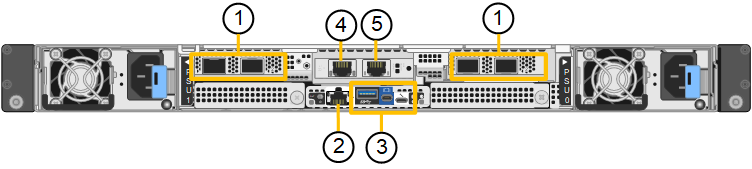
| Callout | Port | Type | Use |
|---|---|---|---|
1 |
Network ports 1-4 |
10/25/40/100/200-GbE, based on cable or transceiver type, switch speed, and configured link speed. QSFP56 (max 200GbE/port), QSFP28 (max 100GbE/port), and QSFP+ (40GbE) are supported natively (200GbE speeds require 200GbE NIC option). Optional SFP+ (10GbE) or SFP28 (25GbE) transceivers can be used with a QSA (sold separately). |
Connect to the Grid Network and the Client Network for StorageGRID. |
2 |
BMC management port |
1-GbE (RJ-45) |
Connect to the appliance baseboard management controller. |
3 |
Diagnostic and support ports |
|
Reserved for technical support use. |
4 |
Admin Network port 1 |
1/10-GbE (RJ-45) |
Connect the appliance to the Admin Network for StorageGRID. |
5 |
Admin Network port 2 |
1/10-GbE (RJ-45) |
Options:
|
This figure shows the location of the power supply and identify LEDs on the rear of the SGF6212. Additional status and activity LEDs are on the appliance ports. These LEDs might vary by appliance model.

| Callout | LED | State |
|---|---|---|
1 |
Power supply LED |
|
2 |
Identify LED |
|
SG6260 front view
This figure shows the front of the SG6260, which includes a 1U compute controller and a 4U shelf containing two storage controllers and 60 drives in five drive drawers.
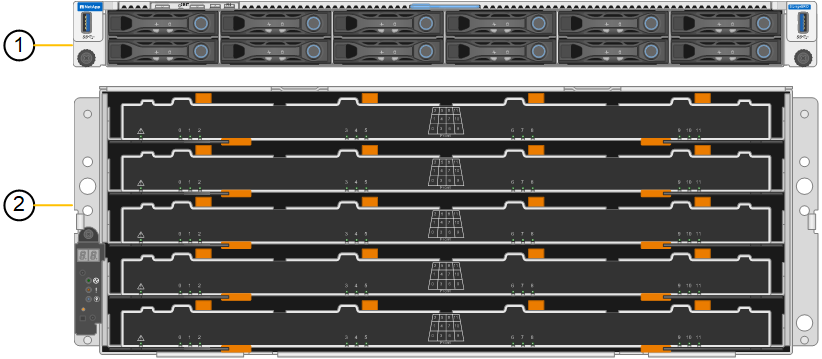
| Callout | Description |
|---|---|
1 |
SG6200-CN compute controller with front bezel removed |
2 |
E4000 controller shelf with front bezel removed (optional expansion shelf appears identical) |
SG6260 rear view
This figure shows the back of the SG6260, including the compute and storage controllers, fans, and power supplies.
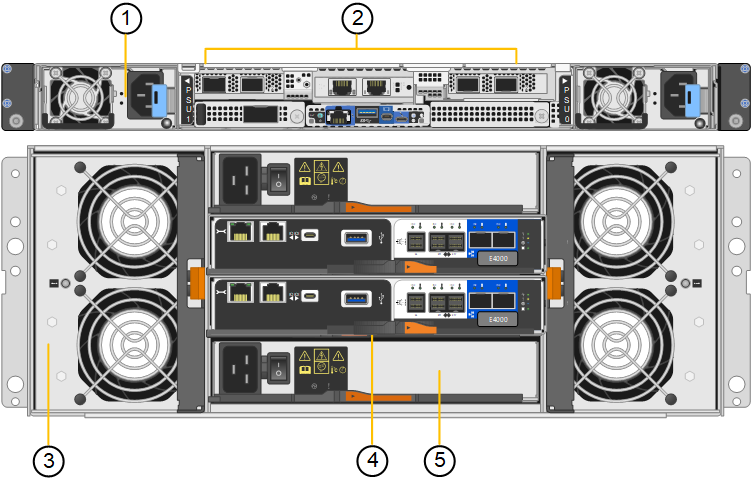
| Callout | Description |
|---|---|
1 |
Power supply (1 of 2) for SG6200-CN compute controller |
2 |
Connectors for SG6200-CN compute controller |
3 |
Fan (1 of 2) for E4000 controller shelf |
4 |
E-Series E4000 storage controller (1 of 2) and connectors |
5 |
Power supply (1 of 2) for E4000 controller shelf |
SG6200 controllers
SG6200-CN compute controller
-
Provides compute resources for the appliance.
-
Includes the StorageGRID Appliance Installer.
StorageGRID software is not preinstalled on the appliance. This software is retrieved from the Admin Node when you deploy the appliance. -
Can connect to all three StorageGRID networks, including the Grid Network, the Admin Network, and the Client Network.
-
Connects to the E-Series storage controllers and operates as the initiator.
This figure shows ports on the back of the SG6200-CN compute controller.
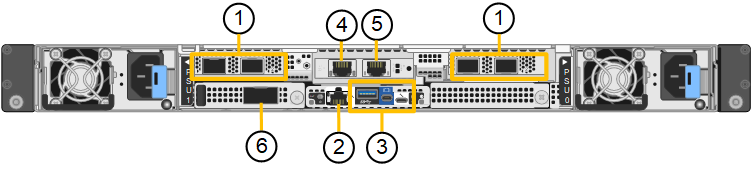
| Callout | Port | Type | Use |
|---|---|---|---|
1 |
Network ports 1-4 |
10/25/40/100/200-GbE, based on cable or transceiver type, switch speed, and configured link speed. QSFP56 (max 200GbE/port), QSFP28 (max 100GbE/port), and QSFP+ (40GbE) are supported natively (200GbE speeds require 200GbE NIC option). Optional SFP+ (10GbE) or SFP28 (25GbE) transceivers can be used with a QSA (sold separately). |
Connect to the Grid Network and the Client Network for StorageGRID. |
2 |
BMC management port |
1-GbE (RJ-45) |
Connect to the SG6200-CN baseboard management controller. |
3 |
Diagnostic and support ports |
|
Reserved for technical support use. |
4 |
Admin Network port 1 |
1/10-GbE (RJ-45) |
Connect the SG6200-CN to the Admin Network for StorageGRID. |
5 |
Admin Network port 2 |
1/10-GbE (RJ-45) |
Options:
|
6 |
Interconnect port |
100-GbE |
Connect the SG6200-CN controller to the E4000 controllers. |
This figure shows the location of the power supply and identify LEDs on the rear of the SG6200-CN compute controller. Additional status and activity LEDs are on the appliance ports. These LEDs might vary by appliance model.
| Callout | LED | State |
|---|---|---|
1 |
Power supply LED |
|
2 |
Identify LED |
|
SG6260: E4000 storage controller
-
Two controllers for failover support.
-
Manage the storage of data on the drives.
-
Function as standard E-Series controllers in a duplex configuration.
-
Include SANtricity OS Software (controller firmware).
-
Include SANtricity System Manager for monitoring storage hardware and for managing alerts, the AutoSupport feature, and the Drive Security feature.
-
Connect to the SG6200-CN controller and provide access to the storage.
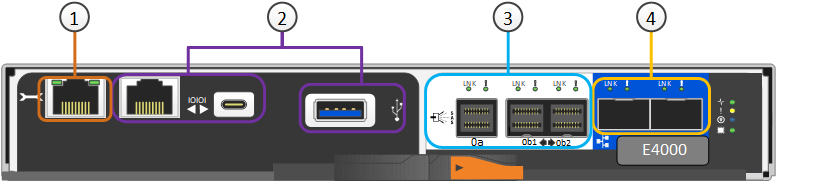
| Callout | Port | Type | Use |
|---|---|---|---|
1 |
Management port 1 |
1-Gb (RJ-45) Ethernet |
Note: Some optional SANtricity functionality, such as NTP sync for accurate log timestamps, is not available when you choose to leave Port 1 unwired. |
2 |
Diagnostic and support ports |
|
Reserved for technical support use. |
3 |
Drive expansion ports 1 and 2 |
12Gb/s SAS |
Connect the ports to the drive expansion ports on the IOMs in the expansion shelf. |
4 |
Interconnect ports 1 and 2 |
25GbE iSCSI |
Connect each of the E4000 controllers to the SG6200-CN controller. There are four connections to the SG6200-CN controller (two from each E4000). |
SG6260: IOMs for optional expansion shelves
The expansion shelf contains two input/output modules (IOMs) that connect to the storage controllers or to other expansion shelves.
IOM connectors
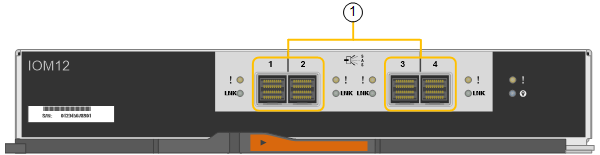
| Callout | Port | Type | Use |
|---|---|---|---|
1 |
Drive expansion ports 1-4 |
12Gb/s SAS |
Connect each port to the storage controllers or additional expansion shelf (if any). |