


Replace the CMOS battery in the SG5800 controller

 Suggest changes

 PDFs
PDFs
You might need to replace the CMOS battery in the SG5800 controller so your system's services and applications have accurate time synchronization and continue to function normally.
You will not be able to access the appliance Storage Node when you replace the CMOS battery. To prevent service interruptions, confirm that all other Storage Nodes are connected to the grid before starting the CMOS battery replacement or replace the battery during a scheduled maintenance window when periods of service disruption are acceptable.
Step 1: Shut down the SG5800 controller
-
Log in to the grid node:
-
Enter the following command:
ssh admin@grid_node_IP -
Enter the password listed in the
Passwords.txtfile. -
Enter the following command to switch to root:
su - -
Enter the password listed in the
Passwords.txtfile.When you are logged in as root, the prompt changes from
$to#.
-
-
Shut down the SG5800 controller:
shutdown -h now
Step 2: Remove the controller from the appliance
-
Put on an ESD wristband or take other antistatic precautions.
-
Label the cables and then disconnect the cables and SFPs.

To prevent degraded performance, don’t twist, fold, pinch, or step on the cables. -
Release the controller from the appliance by squeezing the latch on the cam handle until it releases, and then open the cam handle to the right.
-
Using two hands and the cam handle, slide the controller out of the appliance.
Always use two hands to support the weight of the controller. -
Turn the controller module over and place it on a flat, stable surface.
-
Open the cover by pressing the blue buttons on the sides of the controller module, and then rotate the cover up and off the controller module.
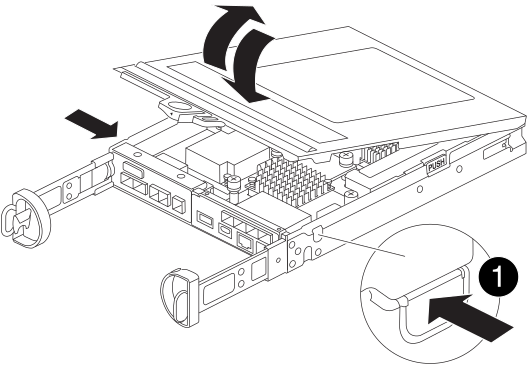
Step 3: Replace the CMOS battery
-
Locate the CMOS battery.
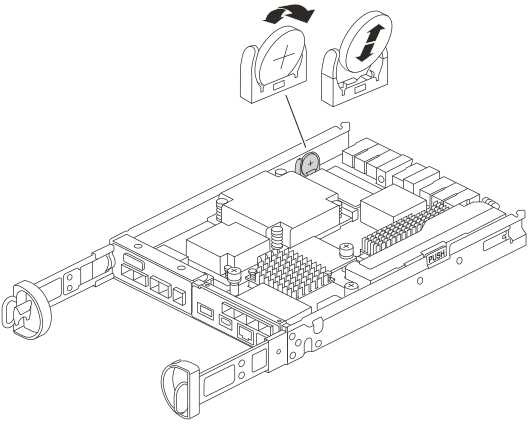
Your controller might look different from the one shown in the illustration. However, the CMOS battery location is the same. -
Gently push and rotate the battery away from the holder, and then lift it out of the appliance.
Note the polarity of the battery as you remove it from the holder. The battery is marked with a plus sign and must be positioned in the holder correctly. A plus sign near the holder tells you how the battery should be positioned. -
Remove the replacement battery from the antistatic shipping bag.
-
Locate the empty battery holder in the controller module.
-
Note the polarity of the CMOS battery, and then insert it into the holder by tilting the battery at an angle and pushing down.
-
Visually inspect the battery to make sure that it is completely installed into the holder and that the polarity is correct.
-
Reinstall the controller cover.
Step 4: Reinstall the controller into the appliance
-
Install the controller into the appliance:
-
Turn the controller over so that the removable cover faces down.
-
With the cam handle in the open position, slide the controller all the way into the appliance.
-
Move the cam handle to the left to lock the controller in place.
-
Reconnect the cables.
-
-
After the controller reboots and the appliance rejoins the grid, confirm that the appliance Storage Node appears in the Grid Manager and that no alarms appear.
After replacing the part, return the failed part to NetApp, as described in the RMA instructions shipped with the kit. See the Part Return & Replacements page for further information.