


Turn SGF6212 appliance or SG6200-CN controller identify LED on and off
Contributors

 Suggest changes

 PDFs
PDFs
The blue identify LED on the front and rear of the appliance can be turned on to help locate the appliance in a data center.
Before you begin
You have the BMC IP address of the appliance you want to identify.
Steps
-
Select Server Identify.
The current status of the identify LED is selected.
-
Select ON, OFF, or BLINK, and then select Perform Action.
When you select ON, the blue identify LEDs light on the front and rear of the appliance.
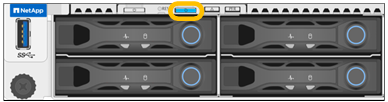

If a bezel is installed on the controller, it might be difficult to see the front identify LED. The rear identify LED is at the center of the appliance next to the Micro-SD slot.
-
Turn the identify LEDs on and off as needed.
Related information