


Connectivity and trust paths for NetApp Workload Factory

 Suggest changes

 PDFs
PDFs
NetApp Workload Factory communicates with AWS APIs, customer AWS account resources, AWS Lambda link, and Amazon Bedrock, each with its own protocols, ports, and authentication methods. These connections are organized into groups that separate the AWS management plane, the ONTAP data plane, and Lambda link traffic so you can evaluate trust boundaries independently.
Connectivity paths
Workload Factory establishes several distinct connectivity paths, each serving a specific purpose in discovering, provisioning, and managing your AWS and ONTAP resources. Some paths originate from Workload Factory itself using assumed AWS credentials, while others run through Lambda link, which operates inside your VPC to reach ONTAP management endpoints without exposing them publicly. An optional path to Amazon Bedrock supports AI-assisted diagnostics and is active only when your organization enables that feature.
The following sections describe each path, including the AWS or ONTAP APIs involved, the credentials or authentication used, and any conditions that determine whether the path is active. Understanding these paths helps you evaluate what network access and permissions Workload Factory requires, and where data crosses account or VPC boundaries.
Workload Factory to AWS APIs
Workload Factory uses DescribeFileSystems, DescribeVolumes, CreateVolume, UpdateVolume, DeleteVolume,
CreateFileSystem, CreateBackup, DescribeBackups, and EC2/VPC APIs for subnet and security group discovery.
-
Collector service scans about every five hours.
-
CRUD operations run on demand.
-
All calls use STS-assumed temporary credentials with an external ID.
Workload Factory to customer AWS account resources (orchestration and automation)
Workload Factory interacts with AWS to communicate and create resources. Orchestration and automation occurs in several ways.
-
AWS CloudFormation templates: Workload Factory uses AWS CloudFormation templates to create resources like roles and file systems. For example, when you create a file system in the user interface, Workload Factory calls CloudFormation directly and redirects you to your AWS account.
-
AWS API calls: Workload Factory uses AWS API calls (STS
AssumeRole) to send API commands for FSx for ONTAP-related activities. -
AWS Lambda: Workload Factory uses CloudFormation to deploy an AWS Lambda function for the link that communicates with ONTAP.
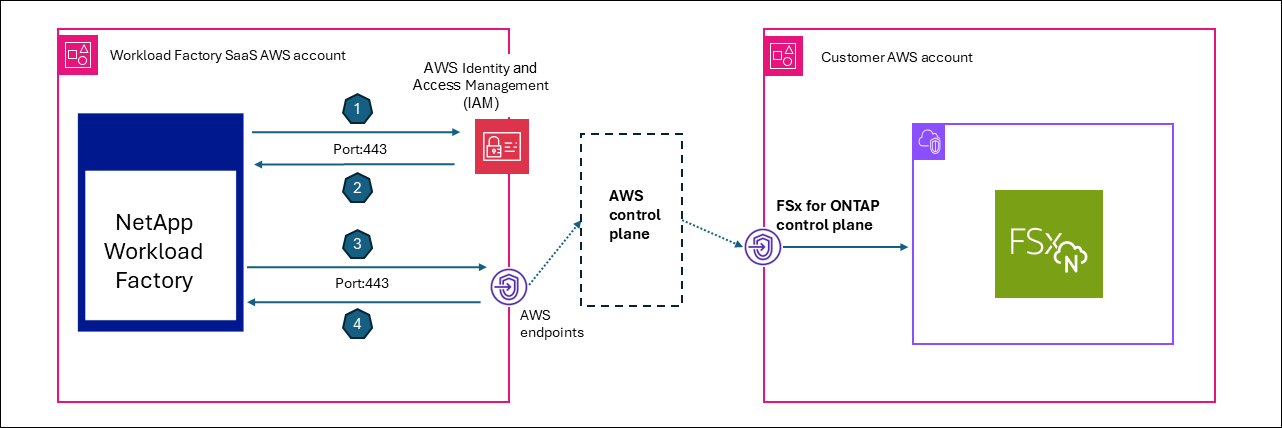
The following diagram shows how Workload Factory uses a trust relationship between a NetApp AWS account and customer AWS accounts with FSx for ONTAP file systems.
-
Workload Factory requests AWS STS
AssumeRole, using customer-specific external ID from the AWS IAM service. -
AWS IAM service retrieves a role and creates a session.
-
Workload Factory issues an AWS API request with session permissions.
-
Workload Factory receives an AWS API response from the FSx for ONTAP control plane.
Lambda link to ONTAP management endpoint
Lambda links run inside the customer VPC for private subnet access without exposing ONTAP publicly. All connectivity from the link to the ONTAP management endpoint is outbound only, so no inbound connectivity or exposed endpoints are required. The link is used only for ONTAP-native operations that the Amazon FSx for NetApp ONTAP API doesn't expose.
Workload Factory uses the following protocols for volume, storage VM, and cluster operations, and for read-only diagnostics and performance data:
-
HTTPS/443 (REST)
-
SSH/22 (CLI)
Lambda link to AWS Secrets Manager (ONTAP credential retrieval)
Used only when ONTAP admin credentials are stored in AWS Secrets Manager (alternative: credentials encrypted in Workload Factory using envelope encryption).
-
The proxy-forwarder passes
x-aws-secret-arn(Base64-encoded) in headers. -
Lambda link calls
GetSecretValueat execution time to retrieve the password.
This keeps the password within your account boundary and prevents transmission from Workload Factory.
Workload Factory and customer components to Amazon Bedrock (AI diagnostics)
This path is used only when AI diagnostics are enabled.
-
Event Analyzer uses this path for EMS analysis and latency diagnostics.
-
Bedrock runs with your assumed credentials and inference profile ARN, so data does not flow to NetApp’s account.
Data sent to Bedrock can include EMS event JSON, QoS statistics, volume configuration, aggregate data, and node information.
The path is active only when an inference profile is configured per organization (ai_analyzer_config table).
Connection groups (protocols, ports, and auth)
Group A — AWS management plane trust path (assumed credentials)
| Connection | Protocol | Port | Direction | Auth | Justification |
|---|---|---|---|---|---|
STS AssumeRole |
HTTPS |
443 |
WF → AWS STS (customer account) |
IAM credentials + ExternalId |
Obtain temporary cross-account credentials |
FSx API (Describe/Create/Update/Delete) |
HTTPS |
443 |
WF → AWS FSx endpoint (customer region) |
STS temporary credentials |
File system and volume lifecycle management |
EC2/VPC API |
HTTPS |
443 |
WF → AWS EC2 endpoint |
STS temporary credentials |
Security group, subnet, and VPC discovery |
CloudFormation API |
HTTPS |
443 |
WF → AWS CFN endpoint |
STS temporary credentials |
Stack deployment for IAM roles and FSx provisioning |
Secrets Manager GetSecretValue |
HTTPS |
443 |
WF → AWS Secrets Manager endpoint (customer account) |
STS temporary credentials |
Retrieve ONTAP admin password (when Secrets Manager-stored) |
KMS Encrypt/Decrypt |
HTTPS |
443 |
WF → AWS KMS endpoint |
STS temporary credentials |
Volume encryption key operations |
All AWS API calls use the customer's regional endpoint and can be routed through VPC endpoints if configured.
Group B — ONTAP data plane
The ONTAP data plane is always proxied through Lambda link; Workload Factory services never connect directly to ONTAP.
| Connection | Protocol | Port | Direction | Auth | Justification |
|---|---|---|---|---|---|
ONTAP REST API |
HTTPS |
443 |
Link (customer VPC) → ONTAP management LIF |
Basic auth (username/password) or Secrets Manager ARN |
Cluster, volume, and storage VM configuration; QoS; EMS events; ARP status |
ONTAP SSH CLI |
SSH |
22 |
Link (customer VPC) → ONTAP management LIF |
Password auth |
Diagnostic commands (QoS stats, df, event logs, efficiency) |
Routing strategy (priority order) for the proxy-forwarder:
-
Explicit
x-link-idheader: look up Lambda ARN from the database -
Target ID (FSx file system ID): find the associated link
-
Console agent ID: route through the message broker to the Console agent
Group C — AWS Lambda link (deployed in your VPC)
| Connection | Protocol | Port | Direction | Auth | Justification |
|---|---|---|---|---|---|
Lambda Invoke |
HTTPS (AWS SDK) |
443 |
WF → AWS Lambda API (customer account) |
IAM ( |
Execute ONTAP REST/SSH commands from within customer VPC |
Lambda → ONTAP |
HTTPS + SSH |
443, 22 |
Lambda (customer VPC) → ONTAP management LIF |
Basic auth / password |
Private subnet access to ONTAP without public exposure |
Group D — NetApp Console Agent (EC2 in your VPC, outbound-only)
| Connection | Protocol | Port | Direction | Auth | Justification |
|---|---|---|---|---|---|
Agent polling |
HTTPS |
443 |
Console agent (customer VPC) → WF message broker |
Bearer token (occm-access scope) |
Long-poll for pending ONTAP commands (7-second timeout; reconnects) |
Agent response |
HTTPS |
443 |
Console agent (customer VPC) → WF message broker |
Bearer token |
Return ONTAP command results (optionally zlib-compressed) |
Console agent → ONTAP |
HTTPS + SSH |
443, 22 |
Console agent (customer VPC) → ONTAP management LIF |
Basic auth / password |
Execute proxied ONTAP operations |
Key design: Workload Factory never initiates inbound connections to the Console agent.
Work is queued in Redis streams; the Console agent polls GET /messagebroker/v1/requests and responds with POST /messagebroker/v1/responses.
Group E — CloudFormation custom resource callbacks
| Connection | Protocol | Port | Direction | Auth | Justification |
|---|---|---|---|---|---|
CloudFormation → WF Lambda |
HTTPS |
443 |
CloudFormation (customer) → WF Lambda (NetApp) |
JWT token + reference token |
Report IAM role creation status and pass back role ARN |
ONTAP CloudFormation Resource Provider → Link |
HTTPS |
443 |
CloudFormation resource Lambda (customer) → Link Lambda (customer) |
IAM |
Create/update/delete ONTAP resources during stack operations |
Summary: network requirements for your VPC
| Component | Inbound | Outbound |
|---|---|---|
FSx for ONTAP |
Port 443 and 22 from Link Lambda or Console agent security group |
N/A |
Link Lambda |
None |
Port 443 (ONTAP, AWS APIs) and port 22 (ONTAP SSH) |
Console agent EC2 |
None |
Port 443 (WF endpoints, ONTAP, AWS APIs) and port 22 (ONTAP SSH) |
VPC endpoints (optional) |
N/A |
STS, FSx, S3, Secrets Manager, Lambda, CloudFormation |
No inbound internet access is required for any component in the customer VPC. All connections are either outbound-initiated (Console agent polling) or invoked through AWS service APIs (Lambda Invoke).