


从旧 Cisco 交换机迁移到 Cisco Nexus 9336C-FX2 和 9336C-FX2-T 集群交换机


 建议更改
建议更改

 PDF
PDF
将旧的 Cisco 集群交换机迁移到 Cisco Nexus 9336C-FX2 和 9336C-FX2-T 集群交换机,而不会中断集群操作。
审查要求
确保:
-
您已核实交换机序列号,以确保迁移的是正确的交换机。
-
Nexus 9336C-FX2 交换机上的一些端口配置为以 10GbE 或 40GbE 运行。
-
节点到 Nexus 9336C-FX2 集群交换机的 10GbE 和 40GbE 连接已经过规划、迁移和记录。
-
集群运行正常(日志中不应有任何错误或类似问题)。
-
Cisco Nexus 9336C-FX2 交换机的初始定制工作已完成,具体如下:
-
9336C-FX2 交换机运行的是最新推荐版本的软件。
-
在将 LIF 迁移到新交换机之前,请确认参考配置文件 (RCF) 已完全应用到所有新交换机。
-
在转移网络流量之前,请检查两台交换机的运行配置和启动配置。
-
任何站点定制,如 DNS、NTP、SMTP、SNMP 和 SSH,都在新交换机上进行配置。
-
-
您可以通过以下方式访问交换机兼容性表: "Cisco以太网交换机"支持的ONTAP、NX-OS 和 RCF 版本页面。
-
您已查阅Cisco网站上提供的有关Cisco交换机升级和降级步骤的相应软件和升级指南。 "Cisco Nexus 9000 系列交换机支持"页。

|
如果您更改AFF A800或AFF C800系统上 e0a 和 e1a 集群端口的端口速度,您可能会观察到速度转换后接收到格式错误的包。看 "漏洞编号 1570339"以及知识库文章 "将 40GbE 转换为 100GbE 后,T6 端口出现 CRC 错误"供参考。 |
迁移交换机
本流程中的示例使用了两个节点。这些节点使用两个 10GbE 集群互连端口 e0a 和 e0b。参见 "Hardware Universe"验证平台上的集群端口是否正确。看 "安装HWU中没有的设备还需要哪些额外信息?" 有关交换机安装要求的更多信息。
|
|
命令输出可能因ONTAP版本不同而有所差异。 |
本流程中的示例使用以下开关和节点命名规则:
-
现有的两台Cisco交换机的名称分别为 cs1 和 cs2。
-
新的 Nexus 9336C-FX2 集群交换机是 cs1-new 和 cs2-new。
-
节点名称分别为 node1 和 node2。
-
节点 1 的集群 LIF 名称为 node1_clus1 和 node1_clus2,节点 2 的集群 LIF 名称为 node2_clus1 和 node2_clus2。
-
cluster1::>* 提示符指示集群的名称。
在此过程中,请参考以下示例:
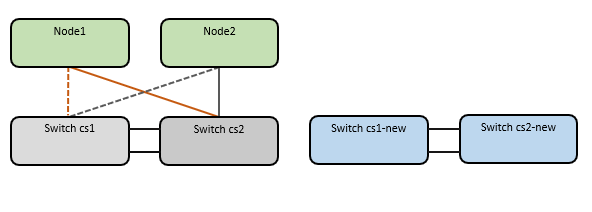
该过程需要同时使用ONTAP命令和 "Nexus 9000系列交换机"命令;除非另有说明,否则使用ONTAP命令。
本流程涵盖以下情况:
-
首先将交换机 cs2 替换为交换机 cs2-new。
-
关闭集群节点的端口。为避免集群不稳定,所有端口必须同时关闭。
-
所有集群 LIF 故障转移到新交换机 cs2-new。
-
-
然后断开节点与 cs2 之间的电缆与 cs2 的连接,并重新连接到 cs2-new。
-
-
交换机 cs1 被交换机 cs1-new 替换。
-
关闭集群节点的端口。为避免集群不稳定,所有端口必须同时关闭。
-
所有集群 LIF 故障转移到新交换机 cs1-new。
-
-
然后断开节点与 cs1 之间的电缆,并将其重新连接到 cs1-new。
-
|
|
在此过程中不需要任何可操作的交换机间链路 (ISL)。这是设计使然,因为 RCF 版本的更改可能会暂时影响 ISL 连接。为确保集群运行不中断,以下步骤会在目标交换机上执行步骤的同时,将所有集群 LIF 故障转移到运行伙伴交换机。 |
步骤 1:准备迁移
-
如果此集群上启用了AutoSupport ,则通过调用AutoSupport消息来抑制自动创建案例:
system node autosupport invoke -node * -type all -message MAINT=xh其中 x 为维护窗口的持续时间(小时)。
AutoSupport消息会通知技术支持此维护任务,以便在维护窗口期间抑制自动创建案例。 -
将权限级别更改为高级,并在提示继续时输入 y:
set -privilege advanced出现高级提示符(*>)。
步骤二:配置端口和线缆
-
在新交换机上,确认交换机 cs1-new 和 cs2-new 之间的 ISL 线缆连接正常:
show port-channel summary显示示例
cs1-new# show port-channel summary Flags: D - Down P - Up in port-channel (members) I - Individual H - Hot-standby (LACP only) s - Suspended r - Module-removed b - BFD Session Wait S - Switched R - Routed U - Up (port-channel) p - Up in delay-lacp mode (member) M - Not in use. Min-links not met -------------------------------------------------------------------------------- Group Port- Type Protocol Member Ports Channel -------------------------------------------------------------------------------- 1 Po1(SU) Eth LACP Eth1/35(P) Eth1/36(P) cs2-new# show port-channel summary Flags: D - Down P - Up in port-channel (members) I - Individual H - Hot-standby (LACP only) s - Suspended r - Module-removed b - BFD Session Wait S - Switched R - Routed U - Up (port-channel) p - Up in delay-lacp mode (member) M - Not in use. Min-links not met -------------------------------------------------------------------------------- Group Port- Type Protocol Member Ports Channel -------------------------------------------------------------------------------- 1 Po1(SU) Eth LACP Eth1/35(P) Eth1/36(P) -
显示每个节点上连接到现有集群交换机的集群端口:
network device-discovery show显示示例
cluster1::*> network device-discovery show -protocol cdp Node/ Local Discovered Protocol Port Device (LLDP: ChassisID) Interface Platform ----------- ------ ------------------------- ---------------- ---------------- node1 /cdp e0a cs1 Ethernet1/1 N5K-C5596UP e0b cs2 Ethernet1/2 N5K-C5596UP node2 /cdp e0a cs1 Ethernet1/1 N5K-C5596UP e0b cs2 Ethernet1/2 N5K-C5596UP -
确定每个集群端口的管理或运行状态。
-
确认集群所有端口均已启动且状态正常:
network port show -ipspace Cluster显示示例
cluster1::*> network port show -ipspace Cluster Node: node1 Ignore Speed(Mbps) Health Health Port IPspace Broadcast Domain Link MTU Admin/Oper Status Status --------- ------------ ---------------- ---- ---- ----------- -------- ------ e0a Cluster Cluster up 9000 auto/10000 healthy false e0b Cluster Cluster up 9000 auto/10000 healthy false Node: node2 Ignore Speed(Mbps) Health Health Port IPspace Broadcast Domain Link MTU Admin/Oper Status Status --------- ------------ ---------------- ---- ---- ----------- -------- ------ e0a Cluster Cluster up 9000 auto/10000 healthy false e0b Cluster Cluster up 9000 auto/10000 healthy false -
确认所有集群接口(LIF)都已连接到其所属端口:
network interface show -vserver Cluster显示示例
cluster1::*> network interface show -vserver Cluster Logical Status Network Current Current Is Vserver Interface Admin/Oper Address/Mask Node Port Home ----------- ----------- ---------- ------------------ ----------- ------- ---- Cluster node1_clus1 up/up 169.254.209.69/16 node1 e0a true node1_clus2 up/up 169.254.49.125/16 node1 e0b true node2_clus1 up/up 169.254.47.194/16 node2 e0a true node2_clus2 up/up 169.254.19.183/16 node2 e0b true -
确认集群显示两个集群交换机的信息:
system cluster-switch show -is-monitoring-enabled-operational true
显示示例
cluster1::*> system cluster-switch show -is-monitoring-enabled-operational true Switch Type Address Model --------------------------- ------------------ ---------------- --------------- cs1 cluster-network 10.233.205.92 N5K-C5596UP Serial Number: FOXXXXXXXGS Is Monitored: true Reason: None Software Version: Cisco Nexus Operating System (NX-OS) Software, Version 9.3(4) Version Source: CDP cs2 cluster-network 10.233.205.93 N5K-C5596UP Serial Number: FOXXXXXXXGD Is Monitored: true Reason: None Software Version: Cisco Nexus Operating System (NX-OS) Software, Version 9.3(4) Version Source: CDP -
-
禁用此过程的自动恢复功能后,集群 LIF 将不会自动移回其主端口。只要该港口继续正常运营,他们就会继续使用该港口。
network interface modify -vserver Cluster -lif * -auto-revert false
禁用自动恢复功能可确保ONTAP仅在交换机端口稍后关闭时才发生故障转移集群 LIF。 -
在集群交换机 cs2 上,关闭连接到*所有*节点集群端口的端口,以便进行集群 LIF 的故障转移:
cs2# configure
cs2(config)# interface eth1/1-1/2
cs2(config-if-range)# shutdown
cs2(config-if-range)# exit
cs2(config)# exit
cs2#
-
验证集群 LIF 是否已故障转移到集群交换机 cs1 上托管的端口。这可能需要几秒钟。
network interface show -vserver Cluster显示示例
cluster1::*> network interface show -vserver Cluster Logical Status Network Current Current Is Vserver Interface Admin/Oper Address/Mask Node Port Home ----------- ------------- ---------- ------------------ ---------- ------- ---- Cluster node1_clus1 up/up 169.254.3.4/16 node1 e0a true node1_clus2 up/up 169.254.3.5/16 node1 e0a false node2_clus1 up/up 169.254.3.8/16 node2 e0a true node2_clus2 up/up 169.254.3.9/16 node2 e0a false -
验证集群是否运行正常:
cluster show显示示例
cluster1::*> cluster show
Node       Health  Eligibility   Epsilon
---------- ------- ------------- -------
node1      true    true          false
node2      true    true          false
-
如果集群 LIF 已故障转移到交换机 cs1 且集群运行状况良好,请转到步。10。如果某些集群 LIF 不正常或集群不正常,您可以按如下方式回滚与交换机 cs2 的连接:
-
启动连接到*所有*节点集群端口的端口:
cs2# configure
cs2(config)# interface eth1/1-1/2
cs2(config-if-range)# no shutdown
cs2(config-if-range)# exit
cs2(config)# exit
cs2#
-
验证集群 LIF 是否已故障转移到集群交换机 cs1 上托管的端口。这可能需要几秒钟。
network interface show -vserver Cluster显示示例
cluster1::*> network interface show -vserver Cluster Logical Status Network Current Current Is Vserver Interface Admin/Oper Address/Mask Node Port Home ----------- ------------- ---------- ------------------ ---------- ------- ---- Cluster node1_clus1 up/up 169.254.3.4/16 node1 e0a true node1_clus2 up/up 169.254.3.5/16 node1 e0a false node2_clus1 up/up 169.254.3.8/16 node2 e0a true node2_clus2 up/up 169.254.3.9/16 node2 e0a false -
验证集群是否运行正常:
cluster show
显示示例
cluster1::*> cluster show
Node       Health  Eligibility   Epsilon
---------- ------- ------------- -------
node1      true    true          false
node2      true    true          false
-
-
恢复 LIF 和集群健康状况后,重新启动该过程。步。4 。
-
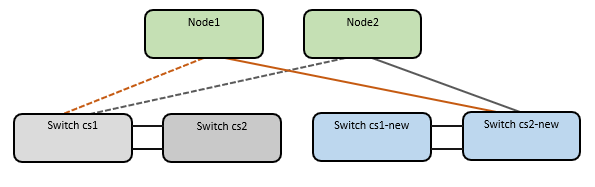
将所有集群节点连接电缆从旧的 cs2 交换机移至新的 cs2-new 交换机。
集群节点连接线缆已移至cs2-new交换机
-
确认迁移到 cs2-new 的网络连接是否正常:
network port show -ipspace Cluster显示示例
cluster1::*> network port show -ipspace Cluster

Node: node1
                                                                       Ignore
                                                  Speed(Mbps) Health   Health
Port      IPspace      Broadcast Domain Link MTU  Admin/Oper  Status   Status
--------- ------------ ---------------- ---- ---- ----------- -------- ------
e0a       Cluster      Cluster          up   9000  auto/10000 healthy  false
e0b       Cluster      Cluster          up   9000  auto/10000 healthy  false

Node: node2
                                                                       Ignore
                                                  Speed(Mbps) Health   Health
Port      IPspace      Broadcast Domain Link MTU  Admin/Oper  Status   Status
--------- ------------ ---------------- ---- ---- ----------- -------- ------
e0a       Cluster      Cluster          up   9000  auto/10000 healthy  false
e0b       Cluster      Cluster          up   9000  auto/10000 healthy  false
所有已迁移的集群端口都应该已启用。
-
检查集群端口的邻居信息:
network device-discovery show -protocol cdp显示示例
cluster1::*> network device-discovery show -protocol cdp

Node/       Local  Discovered
Protocol    Port   Device (LLDP: ChassisID)  Interface      Platform
----------- ------ ------------------------- -------------  --------------
node1      /cdp
            e0a    cs1                       Ethernet1/1    N5K-C5596UP
            e0b    cs2-new                   Ethernet1/1/1  N9K-C9336C-FX2

node2      /cdp
            e0a    cs1                       Ethernet1/2    N5K-C5596UP
            e0b    cs2-new                   Ethernet1/1/2  N9K-C9336C-FX2
确认迁移后的集群端口是否将 cs2-new 交换机视为邻居。
-
从交换机 cs2-new 的角度确认交换机端口连接:
cs2-new# show interface brief
cs2-new# show cdp neighbors
-
在集群交换机 cs1 上,关闭连接到所有节点集群端口的端口,以便集群 LIF 进行故障转移。
cs1# configure
cs1(config)# interface eth1/1-1/2
cs1(config-if-range)# shutdown
cs1(config-if-range)# exit
cs1(config)# exit
cs1#
所有集群 LIF 故障转移到 cs2-new 交换机。
-
验证集群 LIF 是否已故障转移到交换机 cs2-new 上托管的端口。这可能需要几秒钟:
network interface show -vserver Cluster显示示例
cluster1::*> network interface show -vserver Cluster Logical Status Network Current Current Is Vserver Interfac Admin/Oper Address/Mask Node Port Home ----------- ------------ ---------- ------------------ ----------- ------- ---- Cluster node1_clus1 up/up 169.254.3.4/16 node1 e0b false node1_clus2 up/up 169.254.3.5/16 node1 e0b true node2_clus1 up/up 169.254.3.8/16 node2 e0b false node2_clus2 up/up 169.254.3.9/16 node2 e0b true -
验证集群是否运行正常:
cluster show显示示例
cluster1::*> cluster show
Node       Health  Eligibility   Epsilon
---------- ------- ------------- -------
node1      true    true          false
node2      true    true          false
-
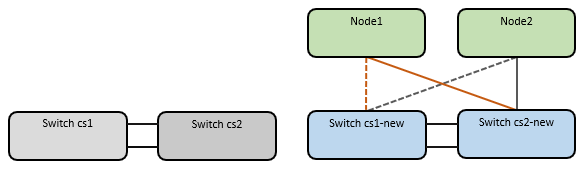
将集群节点连接电缆从 cs1 移至新的 cs1-new 交换机。
集群节点连接线缆已移至 cs1-new 交换机
-
确认迁移到 cs1-new 的网络连接的健康状况:
network port show -ipspace Cluster显示示例
cluster1::*> network port show -ipspace Cluster

Node: node1
                                                                       Ignore
                                                  Speed(Mbps) Health   Health
Port      IPspace      Broadcast Domain Link MTU  Admin/Oper  Status   Status
--------- ------------ ---------------- ---- ---- ----------- -------- ------
e0a       Cluster      Cluster          up   9000  auto/10000 healthy  false
e0b       Cluster      Cluster          up   9000  auto/10000 healthy  false

Node: node2
                                                                       Ignore
                                                  Speed(Mbps) Health   Health
Port      IPspace      Broadcast Domain Link MTU  Admin/Oper  Status   Status
--------- ------------ ---------------- ---- ---- ----------- -------- ------
e0a       Cluster      Cluster          up   9000  auto/10000 healthy  false
e0b       Cluster      Cluster          up   9000  auto/10000 healthy  false
所有已迁移的集群端口都应该已启用。
-
检查集群端口的邻居信息:
network device-discovery show显示示例
cluster1::*> network device-discovery show -protocol cdp
Node/       Local  Discovered
Protocol    Port   Device (LLDP: ChassisID)  Interface       Platform
----------- ------ ------------------------- --------------  --------------
node1      /cdp
            e0a    cs1-new                   Ethernet1/1/1   N9K-C9336C-FX2
            e0b    cs2-new                   Ethernet1/1/2   N9K-C9336C-FX2

node2      /cdp
            e0a    cs1-new                   Ethernet1/1/1   N9K-C9336C-FX2
            e0b    cs2-new                   Ethernet1/1/2   N9K-C9336C-FX2
确认移动后的集群端口是否将 cs1-new 交换机视为邻居。
-
从交换机 cs1-new 的角度确认交换机端口连接:
cs1-new# show interface brief
cs1-new# show cdp neighbors
-
验证 cs1-new 和 cs2-new 之间的 ISL 是否仍然正常运行:
show port-channel summary显示示例
cs1-new# show port-channel summary
Flags:  D - Down        P - Up in port-channel (members)
        I - Individual  H - Hot-standby (LACP only)
        s - Suspended   r - Module-removed
        b - BFD Session Wait
        S - Switched    R - Routed
        U - Up (port-channel)
        p - Up in delay-lacp mode (member)
        M - Not in use. Min-links not met
--------------------------------------------------------------------------------
Group Port-       Type     Protocol  Member Ports
      Channel
--------------------------------------------------------------------------------
1     Po1(SU)     Eth      LACP      Eth1/35(P)   Eth1/36(P)

cs2-new# show port-channel summary
Flags:  D - Down        P - Up in port-channel (members)
        I - Individual  H - Hot-standby (LACP only)
        s - Suspended   r - Module-removed
        b - BFD Session Wait
        S - Switched    R - Routed
        U - Up (port-channel)
        p - Up in delay-lacp mode (member)
        M - Not in use. Min-links not met
--------------------------------------------------------------------------------
Group Port-       Type     Protocol  Member Ports
      Channel
--------------------------------------------------------------------------------
1     Po1(SU)     Eth      LACP      Eth1/35(P)   Eth1/36(P)
步骤 3:验证配置
-
启用集群 LIF 的自动回滚功能。
network interface modify -vserver Cluster -lif * -auto-revert true -
确认集群 LIF 已恢复到其原端口:
network interface show -vserver Cluster显示示例
cluster1::*> network interface show -vserver Cluster
            Logical            Status     Network            Current             Current Is
Vserver     Interface          Admin/Oper Address/Mask       Node                Port    Home
----------- ------------------ ---------- -----------------  ------------------- ------- ----
Cluster
            node1_clus1        up/up      169.254.3.4/23     node1               e0b     true
            node1_clus2        up/up      169.254.3.5/23     node1               e0b     true
            node2_clus1        up/up      169.254.3.8/23     node2               e0b     true
            node2_clus2        up/up      169.254.3.9/23     node2               e0b     true
cluster1::*>
如果集群 LIF 尚未返回其主端口,请从本地节点手动恢复它们:
network interface revert -vserver Cluster -lif <lif_name> -
验证集群是否运行正常:
cluster show -
验证远程集群接口的连接性:
你可以使用 `network interface check cluster-connectivity`执行命令以启动集群连接性检查,然后显示详细信息:
cluster1::*> network interface check cluster-connectivity start -node *
注意: 在运行 `show`命令之前,请等待几秒钟以显示详细信息。请检查与今天日期匹配的条目。
cluster1::*> network interface check cluster-connectivity show
cluster1::*> network interface check cluster-connectivity show
                                  Source          Destination       Packet
Node   Date                       LIF             LIF               Loss
------ -------------------------- --------------- ----------------- -----------
node1
       3/5/2022 19:21:18 -06:00   node1_clus2      node2_clus1      none
       3/5/2022 19:21:20 -06:00   node1_clus2      node2_clus2      none

node2
       3/5/2022 19:21:18 -06:00   node2_clus2      node1_clus1      none
       3/5/2022 19:21:20 -06:00   node2_clus2      node1_clus2      none
对于所有ONTAP版本,您也可以使用 `cluster ping-cluster -node <name>`检查连接性的命令:
cluster ping-cluster -node <name>
cluster1::*> cluster ping-cluster -node node2
Host is node2
Getting addresses from network interface table...
Cluster node1_clus1 169.254.209.69 node1     e0a
Cluster node1_clus2 169.254.49.125 node1     e0b
Cluster node2_clus1 169.254.47.194 node2     e0a
Cluster node2_clus2 169.254.19.183 node2     e0b
Local = 169.254.47.194 169.254.19.183
Remote = 169.254.209.69 169.254.49.125
Cluster Vserver Id = 4294967293
Ping status:

Basic connectivity succeeds on 4 path(s)
Basic connectivity fails on 0 path(s)
................
Detected 9000 byte MTU on 4 path(s):
    Local 169.254.19.183 to Remote 169.254.209.69
    Local 169.254.19.183 to Remote 169.254.49.125
    Local 169.254.47.194 to Remote 169.254.209.69
    Local 169.254.47.194 to Remote 169.254.49.125
Larger than PMTU communication succeeds on 4 path(s)
RPC status:
2 paths up, 0 paths down (tcp check)
2 paths up, 0 paths down (udp check)
交换机迁移完成后,您可以"配置交换机健康监控"。