


Utilizzare l'API StorageGRID se il single sign-on è abilitato (Active Directory)
 Suggerisci modifiche

 PDF
PDF
Se hai "single sign-on (SSO) configurato e abilitato" e usi Active Directory come provider di single sign-on, devi inviare una serie di richieste API per ottenere un token di autenticazione valido per la Grid Management API o la Tenant Management API.
Accedi all'API se il single sign-on è abilitato
Queste istruzioni si applicano se usi Active Directory come provider di identità SSO.
-
Conosci il nome utente e la password SSO di un utente federato che appartiene a un gruppo di utenti StorageGRID.
-
Se vuoi accedere all'API di gestione dei tenant, devi conoscere l'ID account del tenant.
Per ottenere un token di autenticazione, puoi usare uno dei seguenti esempi:
-
Lo
storagegrid-ssoauth.py`script Python, che si trova nella directory dei file di installazione di StorageGRID (./rpms`per RHEL, `./debs`per Ubuntu o Debian, e `./vsphere`per VMware). -
Esempio di workflow di richieste curl.
Il workflow curl potrebbe andare in timeout se lo esegui troppo lentamente. Potresti visualizzare l'errore:
A valid SubjectConfirmation was not found on this Response.
L'esempio di flusso di lavoro con curl non protegge la password dalla visualizzazione da parte di altri utenti.
Se hai un problema di codifica URL, potresti visualizzare l'errore: Unsupported SAML version.
-
Seleziona uno dei seguenti metodi per ottenere un token di autenticazione:
-
Usa lo
storagegrid-ssoauth.pyscript Python. Vai al passaggio 2. -
Usa le richieste curl. Vai al passaggio 3.
-
-
Se vuoi usare lo script
storagegrid-ssoauth.py, passa lo script all'interprete Python ed esegui lo script.Quando richiesto, inserisci i valori per i seguenti argomenti:
-
Il metodo SSO. Inserisci ADFS o adfs.
-
Il nome utente SSO
-
Il dominio in cui è installato StorageGRID
-
L'indirizzo per StorageGRID
-
L'ID account tenant, se vuoi accedere all'API di gestione tenant.
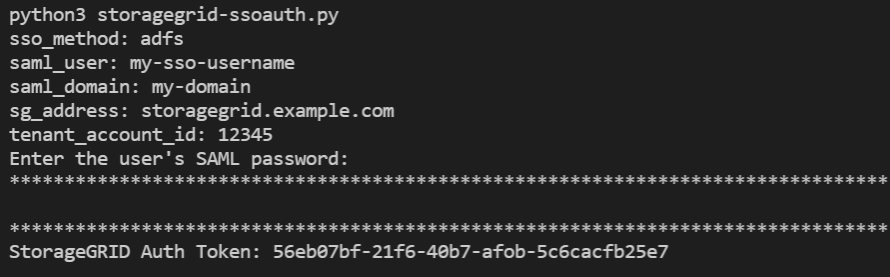
Il token di autorizzazione di StorageGRID viene fornito nell'output. Ora puoi utilizzare il token per altre richieste, in modo simile a come utilizzeresti l'API se l'SSO non fosse utilizzato.
-
-
Se vuoi usare le richieste curl, segui la procedura seguente.
-
Dichiara le variabili necessarie per accedere.
export SAMLUSER='my-sso-username'
export SAMLPASSWORD='my-password'
export SAMLDOMAIN='my-domain'
export TENANTACCOUNTID='12345'
export STORAGEGRID_ADDRESS='storagegrid.example.com'
export AD_FS_ADDRESS='adfs.example.com'
Per accedere alla Grid Management API, usa 0 come TENANTACCOUNTID. -
Per ricevere un URL di autenticazione firmato, invia una richiesta POST a
/api/v3/authorize-samle rimuovi la codifica JSON aggiuntiva dalla risposta.Questo esempio mostra una richiesta POST per un URL di autenticazione firmato per
TENANTACCOUNTID. I risultati verranno passati apython -m json.toolper rimuovere la codifica JSON.curl -X POST "https://$STORAGEGRID_ADDRESS/api/v3/authorize-saml" \ -H "accept: application/json" -H "Content-Type: application/json" \ --data "{\"accountId\": \"$TENANTACCOUNTID\"}" | python -m json.toolLa risposta per questo esempio include un URL firmato codificato in URL, ma non include l'ulteriore livello di codifica JSON.
{ "apiVersion": "3.0", "data": "https://adfs.example.com/adfs/ls/?SAMLRequest=fZHLbsIwEEV%2FJTuv7...sSl%2BfQ33cvfwA%3D&RelayState=12345", "responseTime": "2018-11-06T16:30:23.355Z", "status": "success" } -
Salva
SAMLRequestdalla risposta per utilizzarlo nei comandi successivi.export SAMLREQUEST='fZHLbsIwEEV%2FJTuv7...sSl%2BfQ33cvfwA%3D' -
Ottieni un URL completo che include l'ID della richiesta client da AD FS.
Una possibilità è richiedere il modulo di accesso utilizzando l'URL dalla risposta precedente.
curl "https://$AD_FS_ADDRESS/adfs/ls/?SAMLRequest=$SAMLREQUEST&RelayState=$TENANTACCOUNTID" | grep 'form method="post" id="loginForm"'La risposta include l'ID della richiesta del client:
<form method="post" id="loginForm" autocomplete="off" novalidate="novalidate" onKeyPress="if (event && event.keyCode == 13) Login.submitLoginRequest();" action="/adfs/ls/?
SAMLRequest=fZHRToMwFIZfhb...UJikvo77sXPw%3D%3D&RelayState=12345&client-request-id=00000000-0000-0000-ee02-0080000000de" >
-
Salva l'ID della richiesta del client dalla risposta.
export SAMLREQUESTID='00000000-0000-0000-ee02-0080000000de' -
Invia le tue credenziali all'azione del modulo della risposta precedente.
curl -X POST "https://$AD_FS_ADDRESS/adfs/ls/?SAMLRequest=$SAMLREQUEST&RelayState=$TENANTACCOUNTID&client-request-id=$SAMLREQUESTID" \
--data "UserName=$SAMLUSER@$SAMLDOMAIN&Password=$SAMLPASSWORD&AuthMethod=FormsAuthentication" --include
AD FS restituisce un reindirizzamento 302, con informazioni aggiuntive nelle intestazioni.
Se l'autenticazione a più fattori (MFA) è abilitata per il tuo sistema SSO, il modulo inviato conterrà anche la seconda password o altre credenziali. HTTP/1.1 302 Found Content-Length: 0 Content-Type: text/html; charset=utf-8 Location: https://adfs.example.com/adfs/ls/?SAMLRequest=fZHRToMwFIZfhb...UJikvo77sXPw%3D%3D&RelayState=12345&client-request-id=00000000-0000-0000-ee02-0080000000de Set-Cookie: MSISAuth=AAEAADAvsHpXk6ApV...pmP0aEiNtJvWY=; path=/adfs; HttpOnly; Secure Date: Tue, 06 Nov 2018 16:55:05 GMT
-
Salva il
MSISAuthcookie dalla risposta.export MSISAuth='AAEAADAvsHpXk6ApV...pmP0aEiNtJvWY=' -
Invia una richiesta GET all'indirizzo specificato con i cookie dalla richiesta POST di autenticazione.
curl "https://$AD_FS_ADDRESS/adfs/ls/?SAMLRequest=$SAMLREQUEST&RelayState=$TENANTACCOUNTID&client-request-id=$SAMLREQUESTID" \
--cookie "MSISAuth=$MSISAuth" --include
Le intestazioni della risposta conterranno le informazioni di sessione di AD FS per un utilizzo successivo al logout, e il corpo della risposta conterrà la SAMLResponse in un campo modulo nascosto.
HTTP/1.1 200 OK
Cache-Control: no-cache,no-store
Pragma: no-cache
Content-Length: 5665
Content-Type: text/html; charset=utf-8
Expires: -1
Server: Microsoft-HTTPAPI/2.0
P3P: ADFS doesn't have P3P policy, please contact your site's admin for more details
Set-Cookie: SamlSession=a3dpbnRlcnMtUHJpbWFyeS1BZG1pbi0xNzgmRmFsc2Umcng4NnJDZmFKVXFxVWx3bkl1MnFuUSUzZCUzZCYmJiYmXzE3MjAyZTA5LThmMDgtNDRkZC04Yzg5LTQ3NDUxYzA3ZjkzYw==; path=/adfs; HttpOnly; Secure
Set-Cookie: MSISAuthenticated=MTEvNy8yMDE4IDQ6MzI6NTkgUE0=; path=/adfs; HttpOnly; Secure
Set-Cookie: MSISLoopDetectionCookie=MjAxOC0xMS0wNzoxNjozMjo1OVpcMQ==; path=/adfs; HttpOnly; Secure
Date: Wed, 07 Nov 2018 16:32:59 GMT

<form method="POST" name="hiddenform" action="https://storagegrid.example.com:443/api/saml-response">
  <input type="hidden" name="SAMLResponse" value="PHNhbWxwOlJlc3BvbnN...1scDpSZXNwb25zZT4=" /><input type="hidden" name="RelayState" value="12345" />
-
Salva il
SAMLResponsedal campo nascosto:export SAMLResponse='PHNhbWxwOlJlc3BvbnN...1scDpSZXNwb25zZT4=' -
Utilizzando le informazioni salvate
SAMLResponse, effettua una richiesta StorageGRID/api/saml-responseper generare un token di autenticazione StorageGRID.Per
RelayState, usa l'ID account tenant oppure usa 0 se vuoi accedere alla Grid Management API.curl -X POST "https://$STORAGEGRID_ADDRESS:443/api/saml-response" \ -H "accept: application/json" \ --data-urlencode "SAMLResponse=$SAMLResponse" \ --data-urlencode "RelayState=$TENANTACCOUNTID" \ | python -m json.toolLa risposta include il token di autenticazione.
{ "apiVersion": "3.0", "data": "56eb07bf-21f6-40b7-af0b-5c6cacfb25e7", "responseTime": "2018-11-07T21:32:53.486Z", "status": "success" }-
Salva il token di autenticazione nella risposta come
MYTOKEN.export MYTOKEN="56eb07bf-21f6-40b7-af0b-5c6cacfb25e7"Ora puoi usare
MYTOKENper altre richieste, proprio come faresti con l'API se non stessi usando il single sign-on.
-
Disconnettiti dall'API se il single sign-on è abilitato
Se il single sign-on (SSO) è stato abilitato, devi inviare una serie di richieste API per disconnetterti dall'API di gestione della Grid o dall'API di gestione del tenant. Queste istruzioni si applicano se usi Active Directory come provider di identità SSO.
Se necessario, puoi disconnetterti dall'API di StorageGRID effettuando il logout dalla pagina di single logout della tua organizzazione. Oppure puoi attivare il single logout (SLO) da StorageGRID, che richiede un bearer token di StorageGRID valido.
-
Per generare una richiesta di logout firmata, passa il cookie "sso=true" all'API SLO:
curl -k -X DELETE "https://$STORAGEGRID_ADDRESS/api/v3/authorize" \
-H "accept: application/json" \
-H "Authorization: Bearer $MYTOKEN" \
--cookie "sso=true" \
| python -m json.tool
Viene restituito un URL di disconnessione:
{ "apiVersion": "3.0", "data": "https://adfs.example.com/adfs/ls/?SAMLRequest=fZDNboMwEIRfhZ...HcQ%3D%3D", "responseTime": "2018-11-20T22:20:30.839Z", "status": "success" } -
Salva l'URL di disconnessione.
export LOGOUT_REQUEST='https://adfs.example.com/adfs/ls/?SAMLRequest=fZDNboMwEIRfhZ...HcQ%3D%3D' -
Invia una richiesta all'URL di logout per attivare SLO e per reindirizzare a StorageGRID.
curl --include "$LOGOUT_REQUEST"Viene restituita la risposta 302. L'indirizzo di reindirizzamento non è applicabile al logout tramite API.
HTTP/1.1 302 Found
Location: https://$STORAGEGRID_ADDRESS:443/api/saml-logout?SAMLResponse=fVLLasMwEPwVo7ss%...%23rsa-sha256
Set-Cookie: MSISSignoutProtocol=U2FtbA==; expires=Tue, 20 Nov 2018 22:35:03 GMT; path=/adfs; HttpOnly; Secure
-
Elimina il token bearer di StorageGRID.
L'eliminazione del token bearer di StorageGRID funziona allo stesso modo di quando non è attivo l'SSO. Se non viene specificato il cookie "sso=true", vieni disconnesso da StorageGRID senza che ciò influisca sullo stato dell'SSO.
curl -X DELETE "https://$STORAGEGRID_ADDRESS/api/v3/authorize" \
-H "accept: application/json" \
-H "Authorization: Bearer $MYTOKEN" \
--include
Una `204 No Content`risposta indica che ora sei disconnesso.
HTTP/1.1 204 No Content