


Cable your third-party servers for AI Data Engine


 Suggest changes

 PDFs
PDFs
Connect your third-party servers to the host network and cluster network switches to enable AI workload processing and integration with your AFX 1K storage system. This procedure uses connections for both host network access and cluster communication, allowing the nodes to leverage the existing cluster infrastructure without powering down the AFX system.
These procedures show common configurations. The specific cabling depends on the components compatible with your storage system. For comprehensive configuration details, refer to your third-party server documentation.
-
You have an existing AFX 1K storage system installed. For information on installing the AFX 1K storage system, refer to AFX 1K storage system installation documentation.
-
You have the required network switches installed and configured. Contact your network administrator for information about connecting the system to your network switches.
-
You have reviewed the cabling requirements for your third-party servers. For information about the cabling configuration, refer to your third-party server documentation.

|
Three third-party servers are required for AI Data Engine software deployments. |
Step 1: Connect the third-party servers to the host network
For third-party servers, connect to your host network.
-
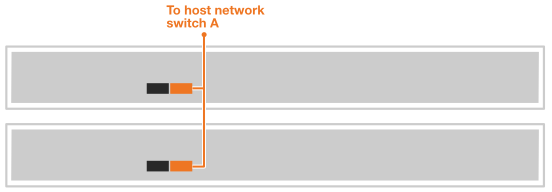
Connect the 'b' 100GbE network ports on the third-party servers to Ethernet data network switch A using the appropriate cables based on your server's network interface cards (NICs) and switch port types.
For example:
-
Third-party server 1, port 'e4b'
-
Third-party server 2, port 'e4b'
100GbE cables

-
-
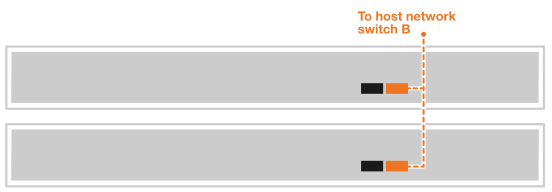
Connect the 'b' 100GbE network ports on the third-party servers to Ethernet data network switch B using the appropriate cables based on your server's network interface cards (NICs) and switch port types. For example:
-
Third-party server 1, port 'e5b'
-
Third-party server 2, port 'e5b'
100GbE cables
-
|
|
Refer to your third-party server documentation for specific port configurations and cable types. |
Step 2: Cable the cluster connections
For third-party servers, cable the cluster connections.
-
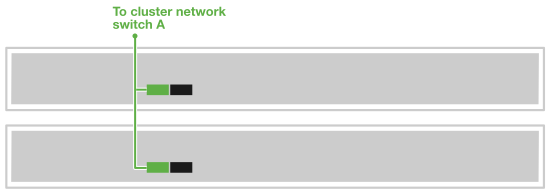
Connect the 'a' 100GbE cluster network ports on the third-party servers to cluster network switch A using the appropriate cables based on your third-party server's network interface cards (NICs) and switch port types.
For example:
-
Third-party server 1, port 'e4a'
-
Third-party server 2, port 'e4a'
100GbE cables
-
-
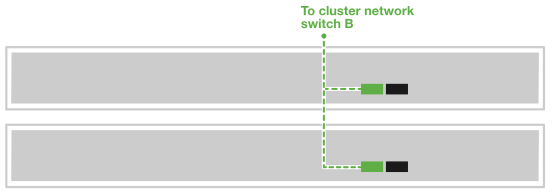
Connect the 'a' 100GbE cluster network ports on the third-party servers to cluster network switch B using the appropriate cables based on your server's network interface cards (NICs) and switch port types.
For example:
-
Third-party server 1, port 'e5a'
-
Third-party server 2, port 'e5a'
100GbE cables
-
|
|
Refer to your third-party server documentation for specific port configurations and cable types. |
After you've cabled the hardware, power on your third-party servers.