


Configure SAS host ports and settings for VMware in E-Series


 Suggest changes

 PDFs
PDFs
For the SAS protocol, you determine host port addresses and make the recommended settings.
Step 1: Record your configuration
You can generate and print a PDF of this page, and then use the following worksheet to record your protocol-specific storage configuration information. You need this information as you perform provisioning tasks.
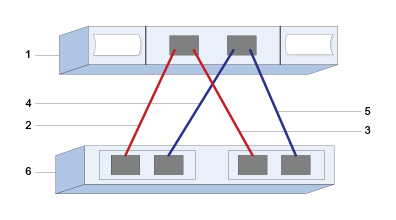
The illustration shows a host directly connected to an E-Series storage array with redundant connections (assuming a 4 port SAS HBA). First redundant connection indicated by the red lines; the second redundant connection is indicated by the blue lines. Number of ports depends on the number of host ports. You may have only 2 host ports. In this case, at least the first redundant connection is recommended.
Host identifiers
| Callout No. | Host (initiator) port connections | SAS address |
|---|---|---|
1 |
Host |
not applicable |
2 |
Host (initiator) port 1 connected to Controller A, port 1 |
|
3 |
Host (initiator) port 2 connected to Controller B, port 1 |
|
4 |
Host (initiator) port 3 connected to Controller A, port 1 |
|
5 |
Host (initiator) port 4 connected to Controller B, port 1 |
Host Mapping Information
| Mapping host name | |
|---|---|
Host OS type |
Step 2: Determine SAS host identifiers
Find the SAS addresses using esxcli or the HBA utility.
Review the guidelines for HBA utilities:
-
Most HBA vendors offer an HBA utility.
-
Connect to the ESXi host using SSH or the ESXi shell. To enable the ESXi shell, see Using ESXi Shell in ESXi.
-
Run the following command:
esxcli storage core adapter list
-
Record the initiator SAS address identifier (UID in the format - sas.<SAS_Address>). The output will be similar to this example:
HBA Name  Driver       Link State  UID                   Capabilities         Description
--------  ----------   ----------  --------------------  -------------------  -----------
vmhba1    lsi_msgpt35  link-n/a    sas.5b083fe0ca0e7000                       (0000:03:00.0) Avago (LSI Logic) SAS3008 12Gbps SAS HBA external
In the example above, the UID will only show the base SAS address. For the other ports, the first 14 characters remain constant, and only the last two characters vary to represent different ports. Typically, the last digit simply increases by 1 for each port. Having the base SAS address is usually enough to identify the host adapter during host mapping as the E-Series array will automatically detect and list the other port SAS addresses for selection. Using a vendor HBA utility may help to obtain the SAS address for each port.

|
Another command option is esxcli storage san sas list. This will display more details and the base SAS address in hexadecimal format separated by colons.
|