


Install NetApp Trident in a VKS cluster

 Suggest changes

 PDFs
PDFs
Install NetApp Trident as the dynamic storage provisioner in your vSphere Kubernetes Service cluster to integrate NetApp ONTAP storage with your Kubernetes workloads.
-
Ensure your ONTAP cluster is configured and connected to your VMware Kubernetes environment.
-
Ensure your VKS cluster has the iSCSI or NVMe tools installed if your workloads will be using those protocols for storage.
-
Ensure you have
kubectlinstalled on a machine from which you can connect to the VKS cluster using the kubeconfig file.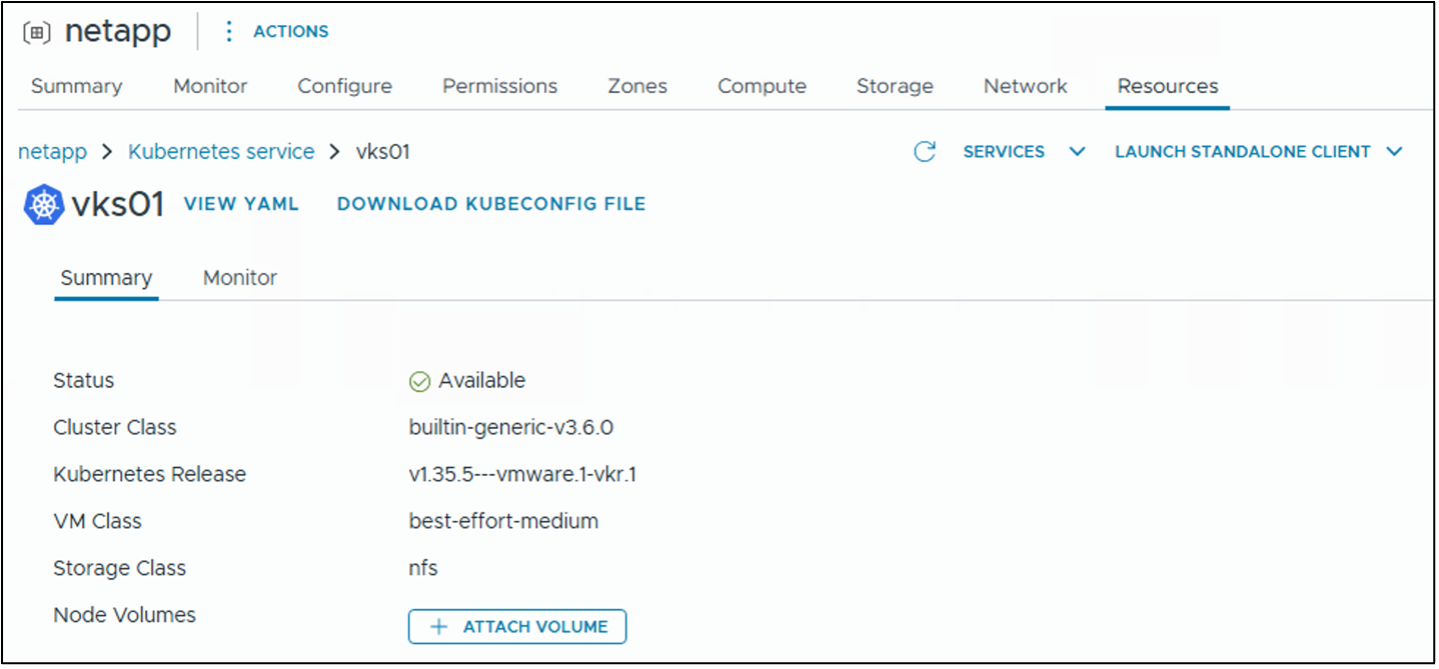
-
Install the Trident Operator using a Helm chart by following the instructions in the Trident documentation:
Before running the Helm install, create and label the
tridentnamespace. Theenforce=privilegedlabel is required because Trident runs privileged workloads. Without it, the Kubernetes pod security admission controller will block Trident pods from starting.kubectl create namespace trident kubectl label namespace trident pod-security.kubernetes.io/enforce=privilegedShow example
helm install trident netapp-trident/trident-operator --version 100.2606.0 --namespace tridentTo enable debug logging, add
--set tridentDebug=true:helm install trident netapp-trident/trident-operator --version 100.2606.0 --namespace trident --set tridentDebug=true
You can also install Trident manually using the Trident Operator. Review the procedures in the Trident documentation: Manually deploy the Trident Operator Ensure that you have labeled the
tridentnamespace with the required pod security labels before installing Trident manually. -
Confirm that all Trident pods are running in the cluster.
Show example
kubectl get pods -n trident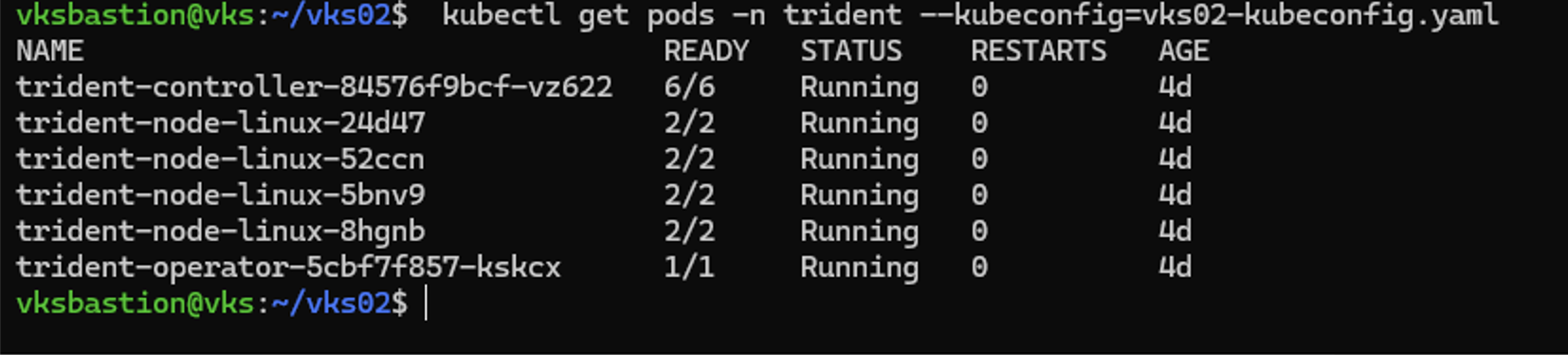
If Trident pods fail to start with a PodSecurityadmission error, the pod security labels may not have been applied to thetridentnamespace before installation. Use--overwriteto reapply them, then verify the pods start.kubectl label namespace trident pod-security.kubernetes.io/enforce=privileged --overwrite
Prepare storage backend and StorageClass configuration files for your environment
-
Configure a Trident backend for ONTAP by defining the necessary connection details and storage parameters.
-
Define storage classes in Kubernetes that map to NetApp storage backends. These classes specify parameters like performance characteristics and replication policies.
Define Trident backends and storage classes for the following protocols as required by your workloads:
-
NAS (ontap-nas driver)
-
NAS Economy (ontap-nas-economy driver)
-
SAN (ontap-san driver) for iSCSI, FC, or NVMe protocols
-
SAN Economy (ontap-san-economy driver) for iSCSI
NASCreate a TridentBackendConfig and StorageClass for ONTAP NAS to enable NFS-based persistent storage provisioning. The backend configuration includes credentials stored in a Kubernetes Secret and references your ONTAP SVM and management LIF.
Sample backend secret and backend configuration file using username and password authentication (save as
tbc-nas.yaml):# tbc-nas.yaml apiVersion: v1 kind: Secret metadata: name: tbc-nas-secret namespace: trident type: Opaque data: username: "<base64-encoded cluster admin username>" password: "<base64-encoded cluster admin password>" --- apiVersion: trident.netapp.io/v1 kind: TridentBackendConfig metadata: name: tbc-nas namespace: trident spec: version: 1 storageDriverName: ontap-nas managementLIF: <ONTAP management LIF> backendName: tbc-nas svm: <your SVM name> storagePrefix: <your prefix for all volume names created using this backend configuration> defaults: nameTemplate: "{{ .config.StoragePrefix }}_{{ .volume.Namespace }}_{{ .volume.RequestName }}" credentials: name: tbc-nas-secretSample backend secret and backend configuration file using client certificate authentication (save as
tbc-nas.yaml):# tbc-nas.yaml apiVersion: v1 kind: Secret metadata: name: ontap-nas-secret namespace: trident type: Opaque stringData: clientPrivateKey: <client private key value> --- apiVersion: trident.netapp.io/v1 kind: TridentBackendConfig metadata: name: tbc-nas namespace: trident spec: version: 1 storageDriverName: ontap-nas managementLIF: <ONTAP management LIF> backendName: tbc-nas svm: <your SVM name> storagePrefix: <your prefix for all volume names created using this backend configuration> credentials: name: ontap-nas-secret clientCertificate: <client certificate>StorageClass definition (save as
sc-nas.yaml):
mountOptionsis an optional parameter that specifies additional mount options for NFS volumes. Thenconnectoption allows multiple parallel TCP connections for a single NFS mount, which can improve performance for high-throughput workloads. The default value is 1, but it can be increased up to the maximum allowed by the ONTAP system.ONTAP supports up to 16 connections for a single NFS mount on an nconnect-capable client. Trident passes the mount options directly to the Kubernetes worker nodes, so choose a value supported by both the worker-node NFS client and ONTAP; the following example uses four connections.
# sc-nas.yaml
apiVersion: storage.k8s.io/v1
kind: StorageClass
metadata:
  name: sc-nas
provisioner: csi.trident.netapp.io
parameters:
  backendType: "ontap-nas"
  media: "ssd"
  provisioningType: "thin"
  snapshots: "true"
allowVolumeExpansion: true
mountOptions:
- nconnect=4
NAS EconomyCreate a TridentBackendConfig and StorageClass for the ONTAP NAS Economy driver to enable NFS-based persistent storage provisioning using qtrees. The backend configuration includes credentials stored in a Kubernetes Secret and references your ONTAP SVM and management LIF.
Sample backend secret and backend configuration file using username and password authentication (save as
tbc-nas-economy.yaml):# tbc-nas-economy.yaml apiVersion: v1 kind: Secret metadata: name: tbc-nas-economy-secret namespace: trident type: Opaque data: username: "<base64-encoded cluster admin username>" password: "<base64-encoded cluster admin password>" --- apiVersion: trident.netapp.io/v1 kind: TridentBackendConfig metadata: name: tbc-nas-economy namespace: trident spec: version: 1 storageDriverName: ontap-nas-economy managementLIF: <ONTAP management LIF> backendName: tbc-nas-eco svm: <your SVM name> storagePrefix: <your prefix for all volume names created using this backend configuration> defaults: nameTemplate: "{{ .config.StoragePrefix }}_{{ .volume.Namespace }}_{{ .volume.RequestName }}" credentials: name: tbc-nas-economy-secretStorageClass definition (save as
sc-nas-economy.yaml):# sc-nas-economy.yaml apiVersion: storage.k8s.io/v1 kind: StorageClass metadata: name: sc-nas-economy provisioner: csi.trident.netapp.io parameters: backendType: "ontap-nas-economy" media: "ssd" provisioningType: "thin" allowVolumeExpansion: true mountOptions: - nconnect=4iSCSI SANCreate a TridentBackendConfig and StorageClass for ONTAP SAN with iSCSI to enable iSCSI-based block storage provisioning. The backend configuration uses the ontap-san driver and includes credentials stored in a Kubernetes Secret. The
sanTypeparameter defaults to the iSCSI protocol if omitted.Backend secret and backend configuration file using username and password authentication (save as
tbc-iscsi.yaml):# tbc-iscsi.yaml apiVersion: v1 kind: Secret metadata: name: backend-tbc-ontap-iscsi-secret namespace: trident type: Opaque data: username: "<base64-encoded cluster admin username>" password: "<base64-encoded cluster admin password>" --- apiVersion: trident.netapp.io/v1 kind: TridentBackendConfig metadata: name: ontap-iscsi namespace: trident spec: version: 1 storageDriverName: ontap-san managementLIF: <ONTAP management LIF> backendName: ontap-iscsi svm: <your SVM name> credentials: name: backend-tbc-ontap-iscsi-secretBackend secret and backend configuration file using client certificate authentication (save as
tbc-iscsi.yaml):# tbc-iscsi.yaml apiVersion: v1 kind: Secret metadata: name: backend-tbc-ontap-iscsi-secret namespace: trident type: Opaque stringData: clientPrivateKey: <client private key> --- apiVersion: trident.netapp.io/v1 kind: TridentBackendConfig metadata: name: ontap-iscsi namespace: trident spec: version: 1 storageDriverName: ontap-san managementLIF: <ONTAP management LIF> backendName: ontap-iscsi svm: <your SVM name> credentials: name: backend-tbc-ontap-iscsi-secret clientCertificate: <client certificate>StorageClass definition (save as
sc-iscsi.yaml):# sc-iscsi.yaml apiVersion: storage.k8s.io/v1 kind: StorageClass metadata: name: sc-iscsi provisioner: csi.trident.netapp.io parameters: backendType: "ontap-san" media: "ssd" provisioningType: "thin" fsType: ext4 snapshots: "true" allowVolumeExpansion: trueNVMe SANCreate a TridentBackendConfig and StorageClass for ONTAP SAN with NVMe to enable NVMe-based block storage provisioning. The backend configuration uses the ontap-san driver and includes credentials stored in a Kubernetes Secret. The
sanTypeparameter must be set tonvme.Backend secret and backend configuration file using username and password authentication (save as
tbc-nvme.yaml):# tbc-nvme.yaml apiVersion: v1 kind: Secret metadata: name: backend-tbc-ontap-nvme-secret namespace: trident type: Opaque data: username: "<base64-encoded cluster admin username>" password: "<base64-encoded cluster admin password>" --- apiVersion: trident.netapp.io/v1 kind: TridentBackendConfig metadata: name: ontap-nvme namespace: trident spec: version: 1 storageDriverName: ontap-san sanType: nvme managementLIF: <ONTAP management LIF> backendName: ontap-nvme svm: <your SVM name> credentials: name: backend-tbc-ontap-nvme-secretBackend secret and backend configuration file using client certificate authentication (save as
tbc-nvme.yaml):# tbc-nvme.yaml apiVersion: v1 kind: Secret metadata: name: backend-tbc-ontap-nvme-secret namespace: trident type: Opaque stringData: clientPrivateKey: <client private key> --- apiVersion: trident.netapp.io/v1 kind: TridentBackendConfig metadata: name: ontap-nvme namespace: trident spec: version: 1 storageDriverName: ontap-san sanType: nvme managementLIF: <ONTAP management LIF> backendName: ontap-nvme svm: <your SVM name> credentials: name: backend-tbc-ontap-nvme-secret clientCertificate: <client certificate>StorageClass definition (save as
sc-nvme.yaml):# sc-nvme.yaml apiVersion: storage.k8s.io/v1 kind: StorageClass metadata: name: sc-nvme provisioner: csi.trident.netapp.io parameters: backendType: "ontap-san" media: "ssd" provisioningType: "thin" fsType: ext4 snapshots: "true" allowVolumeExpansion: true
-
Review the Trident documentation for additional samples of YAML files and information on access modes and volume modes supported by SAN drivers and NAS drivers.
Create a VolumeSnapshotClass configuration file
Create a VolumeSnapshotClass definition. This configuration enables snapshot-based operations for persistent volumes.
VolumeSnapshotClass definition (save as snapshot-class.yaml):
# snapshot-class.yaml
apiVersion: snapshot.storage.k8s.io/v1
kind: VolumeSnapshotClass
metadata:
  name: trident-snapshotclass
driver: csi.trident.netapp.io
deletionPolicy: Retain
Apply the configuration files to your cluster
Apply the configuration files you created in the previous steps to the vSphere Kubernetes Service cluster using kubectl. This creates the necessary secrets, backend configurations, storage classes, and snapshot class in your cluster.
-
Apply the TridentBackendConfig and StorageClass files for each protocol you configured.
kubectl apply -f tbc-nas.yaml -n trident kubectl apply -f sc-nas.yaml kubectl apply -f tbc-nas-economy.yaml -n trident kubectl apply -f sc-nas-economy.yaml kubectl apply -f tbc-iscsi.yaml -n trident kubectl apply -f sc-iscsi.yaml kubectl apply -f tbc-nvme.yaml -n trident kubectl apply -f sc-nvme.yaml kubectl apply -f snapshot-class.yaml -
Verify that the resources were created successfully.
Check TridentBackendConfig objects:
kubectl get tbc -n tridentCheck StorageClass objects:
kubectl get storageclassCheck VolumeSnapshotClass:
kubectl get volumesnapshotclass
Set the default Trident storage and snapshot classes
Set the Trident StorageClass and VolumeSnapshotClass as the defaults in the vSphere Kubernetes Service cluster.
-
Set the default Trident StorageClass.
Set a Trident-backed StorageClass as the cluster default so that PersistentVolumeClaims automatically use it when no storage class is specified.
Ensure that only one StorageClass is set as default. If another StorageClass is already set to default, set its annotation to
false.From the CLI:
kubectl patch storageclass <storage class name> -p '{"metadata": {"annotations":{"storageclass.kubernetes.io/is-default-class":"true"}}}' -
Set the default Trident VolumeSnapshotClass.
Set a Trident-backed VolumeSnapshotClass as the cluster default to enable snapshot-based operations for persistent volumes. This ensures that VolumeSnapshots automatically use the Trident CSI driver when no snapshot class is specified.
Ensure that only one VolumeSnapshotClass is set as default. If another VolumeSnapshotClass is already set to default, set its annotation to
false.From the CLI:
kubectl patch volumesnapshotclass <snapshot class name> --type=merge -p '{"metadata":{"annotations":{"snapshot.storage.kubernetes.io/is-default-class":"true"}}}'
Use Kubernetes Persistent Volume Claims to request storage for workloads
Trident automatically provisions the necessary volumes from the backend NetApp storage. Refer to Deploy workloads with persistent storage for examples of deploying a workload with PVCs in a VKS cluster.