Learn about SQL Server 2025 on NetApp AFF with SMB 3 continuous availability

 Suggest changes

 PDFs

SQL Server 2025 can store databases on SMB 3 continuously available (CA) shares on a NetApp AFF system running ONTAP. Learn about the benefits, solution components, and design principles of this configuration, and how continuous availability keeps databases online during a controller failover.
Microsoft SQL Server has supported placing database files on SMB file shares since SQL Server 2012. With SMB 3 continuously available (CA) shares, a file share is a supported storage option for SQL Server databases and an alternative to block storage (iSCSI or FCP LUNs).
ONTAP on AFF all-flash systems implements SMB 3 natively. Combined with SQL Server 2025 and Windows Server 2025, this provides a fault-tolerant storage architecture that integrates with NetApp data protection.
To deploy this configuration, see Deploy SQL Server 2025 on NetApp AFF using SMB 3 continuously available shares.
Benefits of SQL Server on SMB 3 with NetApp ONTAP
| Benefit | Description |
|---|---|
Simple provisioning |
There are no LUNs, igroups, MPIO, disk initialization or drive letters to manage.
A database file location is just a UNC path such as |
Online capacity management |
You grow (or shrink) a volume online in ONTAP, and SQL Server sees the new capacity immediately. No Windows disk or partition operations are required, and autogrow can do it automatically. |
Nondisruptive operations |
CA shares keep SQL Server running during ONTAP takeover/giveback, nondisruptive upgrades (NDU), LIF migrations and volume moves. |
Performance and resiliency |
SMB multichannel spreads the I/O across several network paths and NICs and survives the loss of a single path. SMB shares also support SQL Server failover cluster instances (FCI). |
Storage efficiency |
Inline deduplication, compression and compaction, together with thin provisioning, reduce the physical capacity used by databases and backups. |
Integrated data protection |
ONTAP snapshots, SnapRestore, FlexClone and SnapMirror, orchestrated by NetApp SnapCenter, provide backups in seconds, restores in minutes and instant database clones. |
Flexibility |
Databases can be moved between hosts by simply attaching them on another server, without remapping storage. The same SVM can also serve home directories, file services or other applications. |
Solution components
The solution consists of the following components:
| Component | Role |
|---|---|
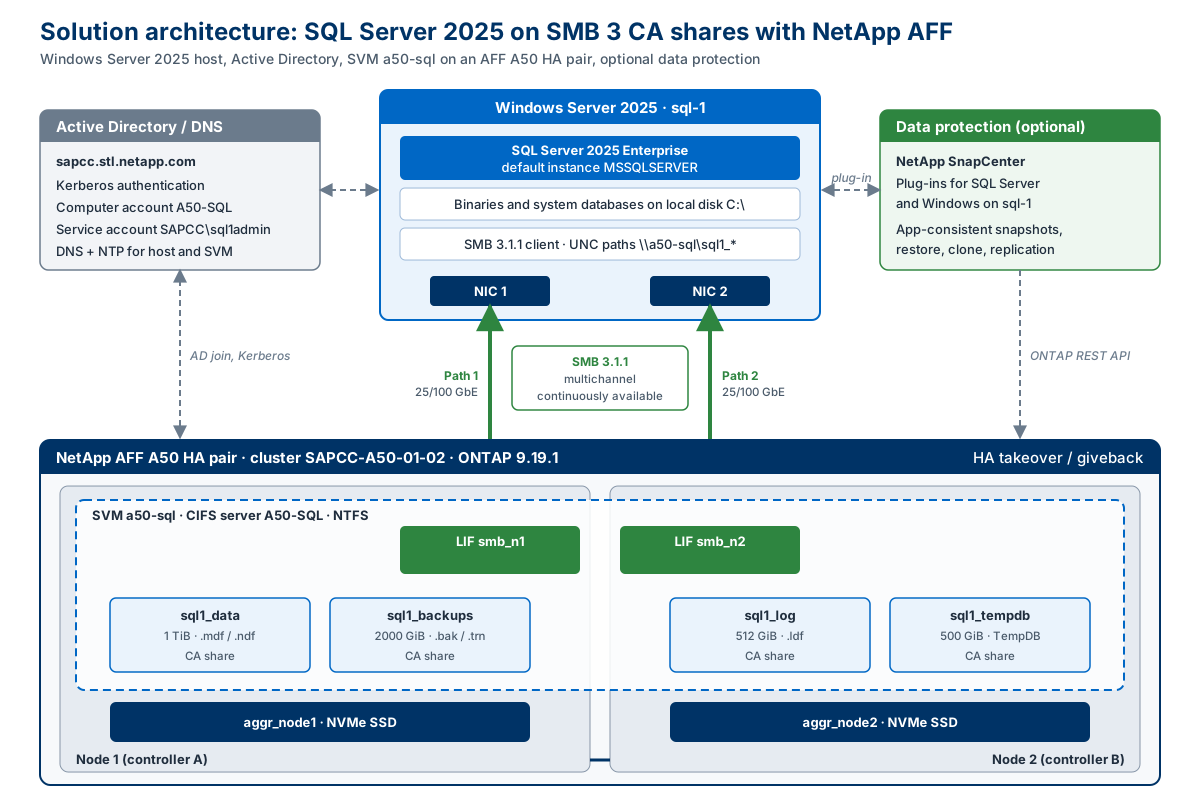
Windows Server 2025 host ( |
Runs SQL Server 2025. The SQL Server binaries and system databases are on the local disk; all user databases, logs, TempDB and backups are accessed over SMB 3. |
SQL Server 2025 |
Database Engine, running under a domain service account ( |
Active Directory and DNS |
Authenticates the SQL Server service account and the CIFS server (Kerberos) and provides name resolution and time synchronization. |
NetApp AFF A50 HA pair |
Two controllers with shared NVMe storage. If one controller fails or is upgraded, the partner takes over its storage and network interfaces. |
SVM |
A dedicated, Active Directory-joined CIFS server with one SMB data LIF per node, hosting four volumes with CA shares. |
Design principles
The design follows the NetApp best practices for SQL Server over SMB:
-
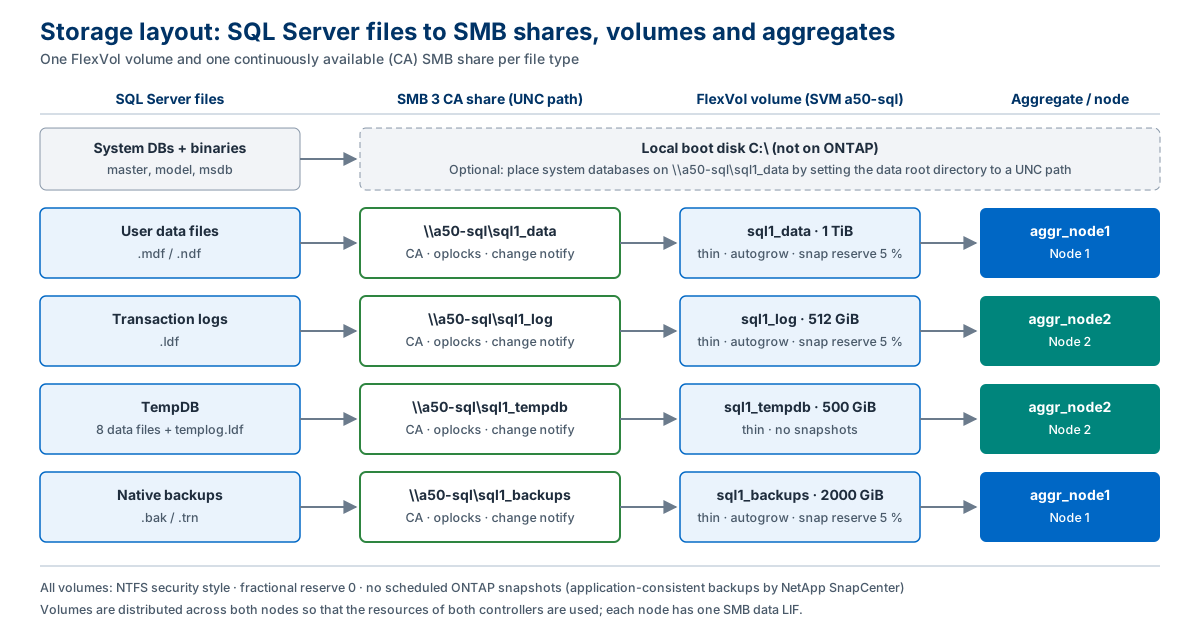
Separate volumes per file type. Data, transaction log, TempDB and backups are placed on separate FlexVol volumes and shares. Each volume can have its own size, QoS, efficiency, snapshot and replication settings. TempDB is excluded from backups.
-
Volumes distributed across both nodes. Data and backup volumes are on node 1, and log and TempDB volumes are on node 2, so that both controllers do useful work.
-
One SMB data LIF per node. The host always has a direct path to the node that owns a volume, and SMB multichannel can use both paths.
-
NTFS security style and CA shares. These are mandatory for SQL Server over SMB on ONTAP.
-
No scheduled ONTAP snapshots on the database volumes. Backups must be application-consistent; they are created by SnapCenter.
How continuous availability works
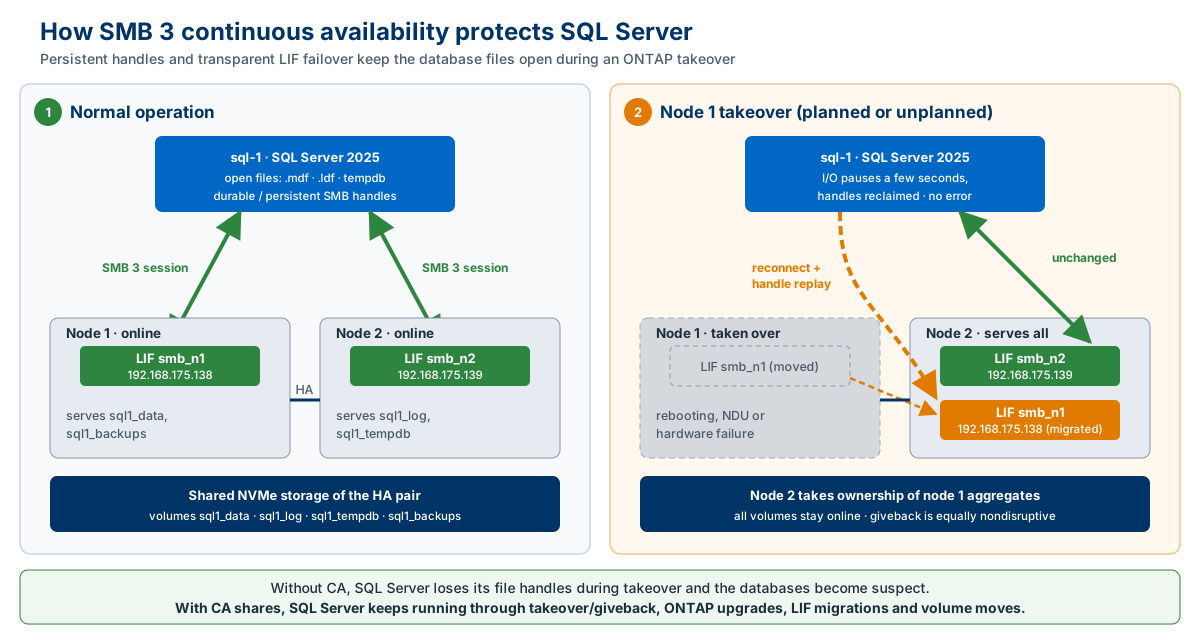
With a standard SMB share, a controller failover closes the open file handles. SQL Server then marks the affected databases as suspect, and they must be recovered manually.
With a CA share, ONTAP keeps the state of the open files (persistent handles) mirrored to the HA partner. During a takeover, the SMB LIF of the failed node migrates to the partner. The SMB 3 client on the SQL Server host reconnects automatically and reclaims its handles. SQL Server only sees a short I/O pause of a few seconds; the databases stay online and no transactions are lost. The same applies to planned events such as ONTAP upgrades, giveback, LIF migrations and volume moves.