


HANA system provisioning and installation

 Suggest changes

 PDFs
PDFs
This chapter describes the specific installation and configuration of the SAP HANA system BM1 used for this solution documentation. The HANA system QM1 has been deployed in the same way.
Additional generic deployment information and best practices can be found SAP HANA on NetApp ASA Systems with Fibre Channel Protocol.
Storage configuration
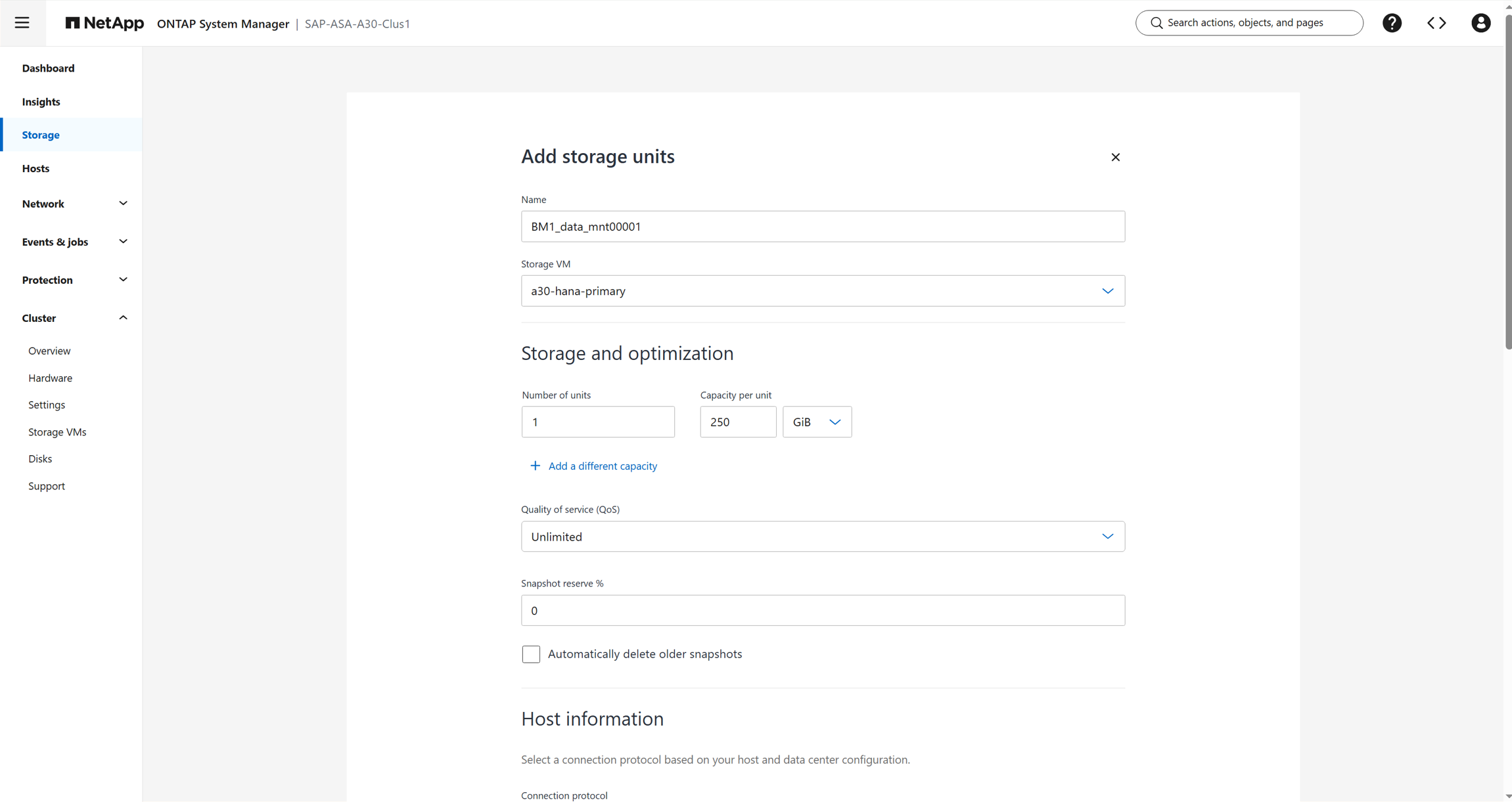
The following screenshots show the creation of the storage unit BM1_data_mnt00001. Storage units for HANA log and shared have been created in the same way.
The WWPN of the HANA host FCP adapters can be listed with the sanlun command which is part of the NetApp host utilities as described in chapter HANA host configuration.
sapcc-hana-tst-02:~ # sanlun fcp show adapter
host20             WWPN:100070b7e40bbadb
host21             WWPN:100070b7e40bbadc
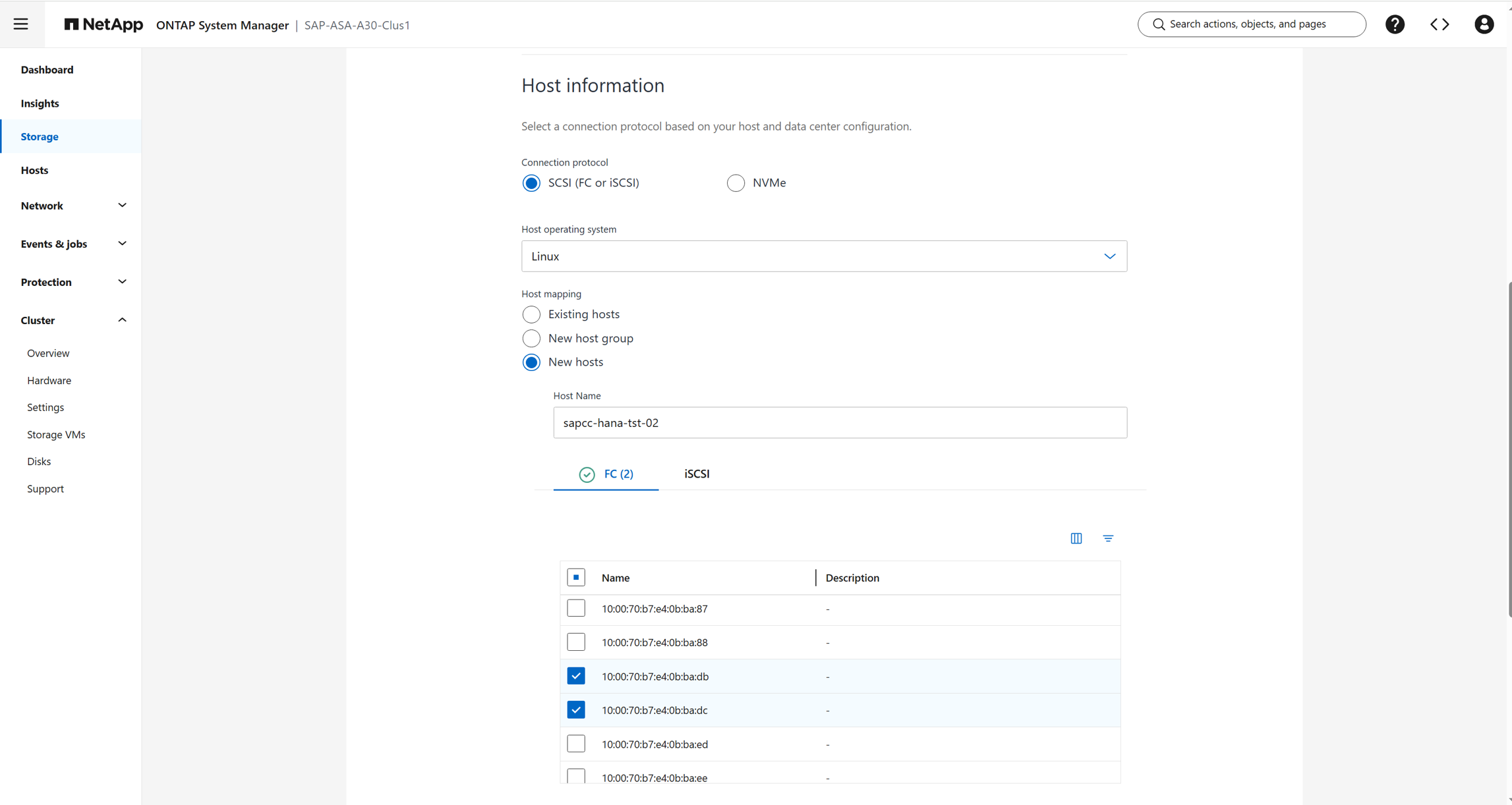
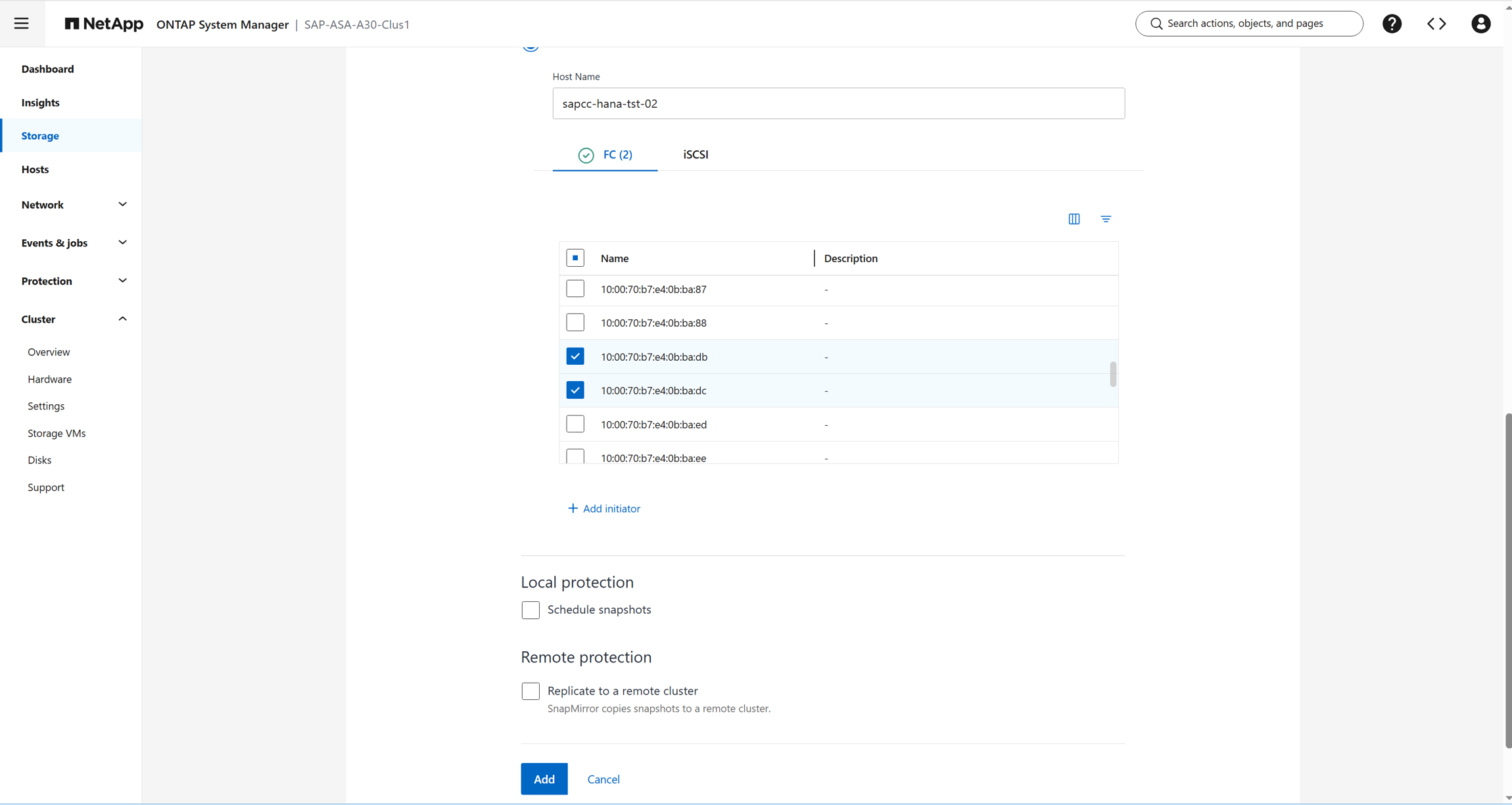
Click add to create the storage unit.
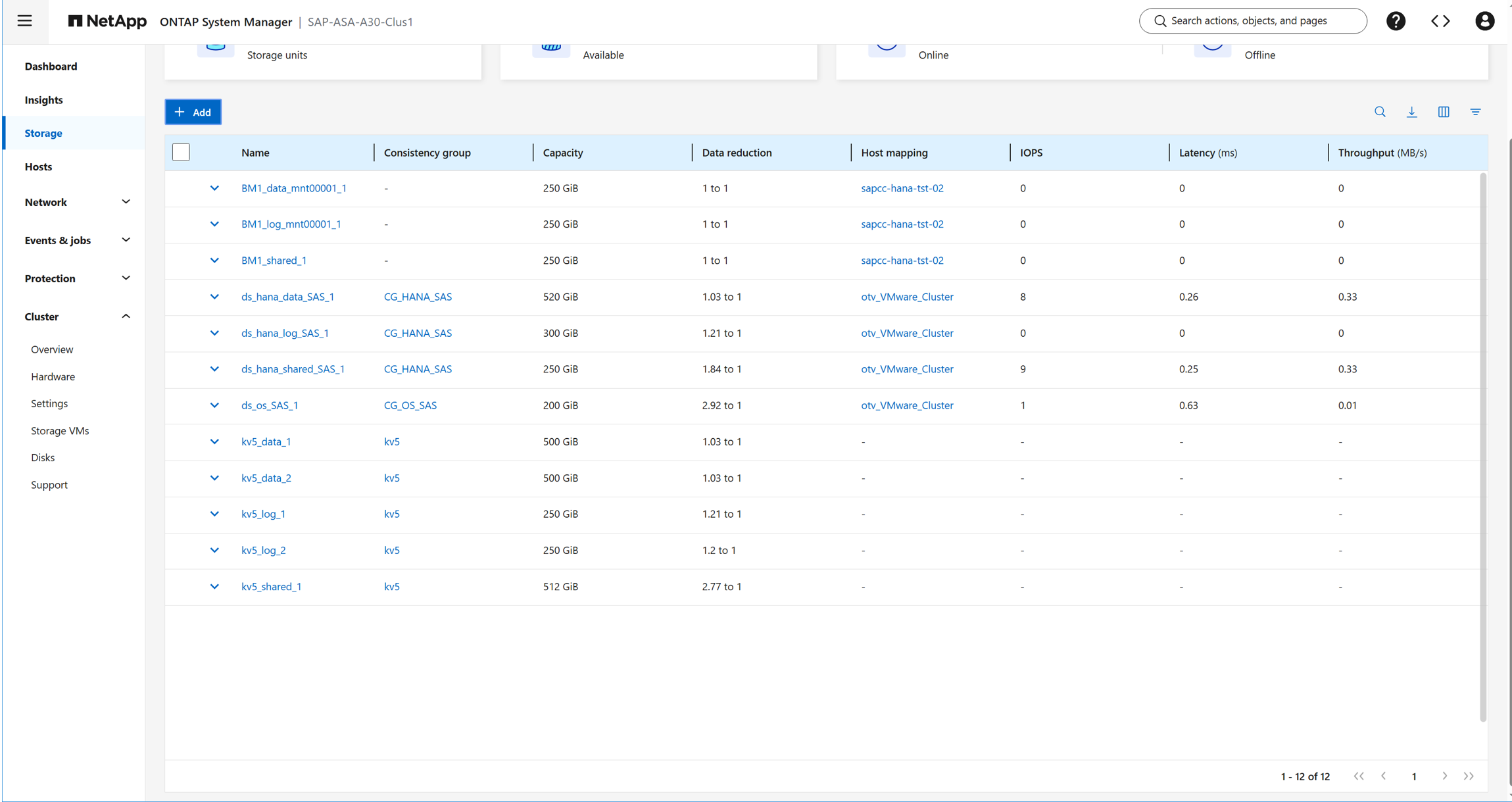
The screenshot shows the three storage units created for the HANA system BM1.
HANA host configuration
Before setting up the host, NetApp SAN host utilities must be downloaded from the NetApp Support site and installed on the HANA servers. The host utility documentation includes information about additional software that must be installed depending on the FCP HBA used.
The NetApp SAN host utilities can also be used to get the WWPN of the host adapters required to configure the host mapping on the storage system.
sapcc-hana-tst-02:~ # sanlun fcp show adapter
host20             WWPN:100070b7e40bbadb
host21             WWPN:100070b7e40bbadc
Multipath configuration
-
Run the Linux rescan-scsi-bus.sh -a command on each server to discover new LUNs.
-
Run the sanlun lun show command and verify that all required LUNs are visible. The output shows the LUNs and the corresponding device files have four FC paths from the host to the storage controllers.
sapcc-hana-tst-02:~ # sanlun lun show | grep BM1
a30-hana-primary              BM1_shared_1                   /dev/sdx        host21     FCP        250g    cDOT
a30-hana-primary              BM1_log_mnt00001_1             /dev/sdw        host21     FCP        250g    cDOT
a30-hana-primary              BM1_data_mnt00001_1            /dev/sdv        host21     FCP        250g    cDOT
a30-hana-primary              BM1_shared_1                   /dev/sdu        host21     FCP        250g    cDOT
a30-hana-primary              BM1_log_mnt00001_1             /dev/sdt        host21     FCP        250g    cDOT
a30-hana-primary              BM1_data_mnt00001_1            /dev/sds        host21     FCP        250g    cDOT
a30-hana-primary              BM1_shared_1                   /dev/sdh        host20     FCP        250g    cDOT
a30-hana-primary              BM1_log_mnt00001_1             /dev/sdg        host20     FCP        250g    cDOT
a30-hana-primary              BM1_shared_1                   /dev/sdk        host20     FCP        250g    cDOT
a30-hana-primary              BM1_data_mnt00001_1            /dev/sdl        host20     FCP        250g    cDOT
a30-hana-primary              BM1_log_mnt00001_1             /dev/sdi        host20     FCP        250g    cDOT
a30-hana-primary              BM1_data_mnt00001_1            /dev/sdj        host20     FCP        250g    cDOT
sapcc-hana-tst-02:~ #
-
Run the multipath -r and multipath -ll command to get the worldwide identifiers (WWIDs) for the device file names.
sapcc-hana-tst-02:~ # multipath -r

sapcc-hana-tst-02:~ # multipath -ll
3600a0980383235324a245a4749384947 dm-3 NETAPP,LUN C-Mode
size=250G features='3 queue_if_no_path pg_init_retries 50' hwhandler='1 alua' wp=rw
`-+- policy='service-time 0' prio=50 status=active
  |- 20:0:10:2 sdk 8:160  active ready running
  |- 20:0:11:2 sdh 8:112  active ready running
  |- 21:0:9:2  sdu 65:64  active ready running
  `- 21:0:11:2 sdx 65:112 active ready running
3600a098038323537342b596e55666737 dm-2 NETAPP,LUN C-Mode
size=250G features='3 queue_if_no_path pg_init_retries 50' hwhandler='1 alua' wp=rw
`-+- policy='service-time 0' prio=50 status=active
  |- 20:0:10:0 sdj 8:144 active ready running
  |- 20:0:11:0 sdl 8:176 active ready running
  |- 21:0:9:0  sds 65:32 active ready running
  `- 21:0:11:0 sdv 65:80 active ready running
3600a098038323537342b596e55666738 dm-5 NETAPP,LUN C-Mode
size=250G features='3 queue_if_no_path pg_init_retries 50' hwhandler='1 alua' wp=rw
`-+- policy='service-time 0' prio=50 status=active
  |- 20:0:10:1 sdi 8:128 active ready running
  |- 20:0:11:1 sdg 8:96  active ready running
  |- 21:0:9:1  sdt 65:48 active ready running
  `- 21:0:11:1 sdw 65:96 active ready running
sapcc-hana-tst-02:~ #
-
Edit the /etc/multipath.conf file and add the WWIDs and alias names.
sapcc-hana-tst-02:~ # cat /etc/multipath.conf
        multipaths {
        multipath {
                wwid    3600a098038323537342b596e55666737
                alias   a30-hana-primary-BM1-data-mnt00001
        }
        multipath {
                wwid    3600a098038323537342b596e55666738
                alias   a30-hana-primary-BM1-log-mnt00001
        }
        multipath {
                wwid    3600a0980383235324a245a4749384947
                alias   a30-hana-primary-BM1-shared
        }
}
-
Run the multipath -r command to reload the device map.
-
Verify the configuration by running the multipath -ll command to list all the LUNs, alias names, and storage paths.
sapcc-hana-tst-02:~ # multipath -r

sapcc-hana-tst-02:~ # multipath -ll
a30-hana-primary-BM1-data-mnt00001 (3600a098038323537342b596e55666737) dm-2 NETAPP,LUN C-Mode
size=250G features='3 queue_if_no_path pg_init_retries 50' hwhandler='1 alua' wp=rw
`-+- policy='service-time 0' prio=50 status=active
  |- 20:0:10:0 sdj 8:144 active ready running
  |- 20:0:11:0 sdl 8:176 active ready running
  |- 21:0:9:0  sds 65:32 active ready running
  `- 21:0:11:0 sdv 65:80 active ready running
a30-hana-primary-BM1-log-mnt00001 (3600a098038323537342b596e55666738) dm-5 NETAPP,LUN C-Mode
size=250G features='3 queue_if_no_path pg_init_retries 50' hwhandler='1 alua' wp=rw
`-+- policy='service-time 0' prio=50 status=active
  |- 20:0:10:1 sdi 8:128 active ready running
  |- 20:0:11:1 sdg 8:96  active ready running
  |- 21:0:9:1  sdt 65:48 active ready running
  `- 21:0:11:1 sdw 65:96 active ready running
a30-hana-primary-BM1-shared (3600a0980383235324a245a4749384947) dm-3 NETAPP,LUN C-Mode
size=250G features='3 queue_if_no_path pg_init_retries 50' hwhandler='1 alua' wp=rw
`-+- policy='service-time 0' prio=50 status=active
  |- 20:0:10:2 sdk 8:160  active ready running
  |- 20:0:11:2 sdh 8:112  active ready running
  |- 21:0:9:2  sdu 65:64  active ready running
  `- 21:0:11:2 sdx 65:112 active ready running
sapcc-hana-tst-02:~ #
Host file system configuration
Create file systems
sapcc-hana-tst-02:~ # ls -al /dev/mapper
total 0
drwxr-xr-x  2 root root     200 Feb  9 10:12 .
drwxr-xr-x 21 root root    5360 Feb  9 08:53 ..
lrwxrwxrwx  1 root root       7 Feb  9 10:12 a30-hana-primary-BM1-data-mnt00001 -> ../dm-2
lrwxrwxrwx  1 root root       7 Feb  9 10:12 a30-hana-primary-BM1-log-mnt00001 -> ../dm-5
lrwxrwxrwx  1 root root       7 Feb  9 10:12 a30-hana-primary-BM1-shared -> ../dm-3
crw-------  1 root root 10, 236 Feb  9 08:53 control
lrwxrwxrwx  1 root root       7 Feb  9 08:53 system-root -> ../dm-0
lrwxrwxrwx  1 root root       7 Feb  9 08:53 system-swap -> ../dm-1
sapcc-hana-tst-02:~ #

sapcc-hana-tst-02:~ # mkfs.xfs /dev/mapper/a30-hana-primary-BM1-data-mnt00001
meta-data=/dev/mapper/a30-hana-primary-BM1-data-mnt00001 isize=512    agcount=4, agsize=16384000 blks
         =                       sectsz=4096  attr=2, projid32bit=1
         =                       crc=1        finobt=1, sparse=1, rmapbt=0
         =                       reflink=0    bigtime=0 inobtcount=0
data     =                       bsize=4096   blocks=65536000, imaxpct=25
         =                       sunit=0      swidth=0 blks
naming   =version 2              bsize=4096   ascii-ci=0, ftype=1
log      =internal log           bsize=4096   blocks=32000, version=2
         =                       sectsz=4096  sunit=1 blks, lazy-count=1
realtime =none                   extsz=4096   blocks=0, rtextents=0
Discarding blocks...Done.
sapcc-hana-tst-02:~ #
sapcc-hana-tst-02:~ #
sapcc-hana-tst-02:~ #
sapcc-hana-tst-02:~ # mkfs.xfs /dev/mapper/a30-hana-primary-BM1-log-mnt00001
meta-data=/dev/mapper/a30-hana-primary-BM1-log-mnt00001 isize=512    agcount=4, agsize=16384000 blks
         =                       sectsz=4096  attr=2, projid32bit=1
         =                       crc=1        finobt=1, sparse=1, rmapbt=0
         =                       reflink=0    bigtime=0 inobtcount=0
data     =                       bsize=4096   blocks=65536000, imaxpct=25
         =                       sunit=0      swidth=0 blks
naming   =version 2              bsize=4096   ascii-ci=0, ftype=1
log      =internal log           bsize=4096   blocks=32000, version=2
         =                       sectsz=4096  sunit=1 blks, lazy-count=1
realtime =none                   extsz=4096   blocks=0, rtextents=0
Discarding blocks...Done.
sapcc-hana-tst-02:~ # mkfs.xfs /dev/mapper/a30-hana-primary-BM1-shared
meta-data=/dev/mapper/a30-hana-primary-BM1-shared isize=512    agcount=4, agsize=16384000 blks
         =                       sectsz=4096  attr=2, projid32bit=1
         =                       crc=1        finobt=1, sparse=1, rmapbt=0
         =                       reflink=0    bigtime=0 inobtcount=0
data     =                       bsize=4096   blocks=65536000, imaxpct=25
         =                       sunit=0      swidth=0 blks
naming   =version 2              bsize=4096   ascii-ci=0, ftype=1
log      =internal log           bsize=4096   blocks=32000, version=2
         =                       sectsz=4096  sunit=1 blks, lazy-count=1
realtime =none                   extsz=4096   blocks=0, rtextents=0
Discarding blocks...Done.
sapcc-hana-tst-02:~ #
Create mount points
sapcc-hana-tst-02:~ # mkdir -p /hana/data/BM1/mnt00001
sapcc-hana-tst-02:~ # mkdir -p /hana/log/BM1/mnt00001
sapcc-hana-tst-02:~ # mkdir -p /hana/shared/BM1
sapcc-hana-tst-02:~ # chmod -R /hana/data
sapcc-hana-tst-02:~ # chmod 777 -R /hana/data
sapcc-hana-tst-02:~ # chmod 777 -R /hana/log
sapcc-hana-tst-02:~ # chmod 777 -R /hana/shared
sapcc-hana-tst-02:~ #
Mount file systems
sapcc-hana-tst-02:~ # cat /etc/fstab
/dev/system/root  /                       btrfs  defaults                      0  0
/dev/system/root  /var                    btrfs  subvol=/@/var                 0  0
/dev/system/root  /usr/local              btrfs  subvol=/@/usr/local           0  0
/dev/system/root  /tmp                    btrfs  subvol=/@/tmp                 0  0
/dev/system/root  /srv                    btrfs  subvol=/@/srv                 0  0
/dev/system/root  /root                   btrfs  subvol=/@/root                0  0
/dev/system/root  /opt                    btrfs  subvol=/@/opt                 0  0
/dev/system/root  /home                   btrfs  subvol=/@/home                0  0
/dev/system/root  /boot/grub2/x86_64-efi  btrfs  subvol=/@/boot/grub2/x86_64-efi  0  0
/dev/system/root  /boot/grub2/i386-pc     btrfs  subvol=/@/boot/grub2/i386-pc  0  0
/dev/system/swap  swap                    swap   defaults                      0  0
/dev/system/root  /.snapshots             btrfs  subvol=/@/.snapshots          0  0
UUID=E88D-60DA    /boot/efi               vfat   utf8                          0  2
192.168.175.86:/sapcc_share/ /mnt/sapcc-share/ nfs rw,vers=3,hard,timeo=600,rsize=1048576,wsize=1048576,intr,noatime,nolock 0 0
/dev/mapper/a30-hana-primary-BM1-shared /hana/shared xfs defaults 0 0
/dev/mapper/a30-hana-primary-BM1-log-mnt00001 /hana/log/BM1/mnt00001 xfs relatime,inode64 0 0
/dev/mapper/a30-hana-primary-BM1-data-mnt00001 /hana/data/BM1/mnt00001 xfs relatime,inode64 0 0
sapcc-hana-tst-02:~ #


sapcc-hana-tst-02:~ # df -h
Filesystem                                      Size  Used Avail Use% Mounted on
devtmpfs                                        4.0M     0  4.0M   0% /dev
tmpfs                                           190G  8.0K  190G   1% /dev/shm
tmpfs                                            51G   11M   51G   1% /run
tmpfs                                           4.0M     0  4.0M   0% /sys/fs/cgroup
/dev/mapper/system-root                          60G   15G   45G  25% /
/dev/mapper/system-root                          60G   15G   45G  25% /.snapshots
/dev/mapper/system-root                          60G   15G   45G  25% /boot/grub2/i386-pc
/dev/mapper/system-root                          60G   15G   45G  25% /boot/grub2/x86_64-efi
/dev/mapper/system-root                          60G   15G   45G  25% /home
/dev/mapper/system-root                          60G   15G   45G  25% /opt
/dev/mapper/system-root                          60G   15G   45G  25% /root
/dev/mapper/system-root                          60G   15G   45G  25% /srv
/dev/mapper/system-root                          60G   15G   45G  25% /tmp
/dev/mapper/system-root                          60G   15G   45G  25% /usr/local
/dev/mapper/system-root                          60G   15G   45G  25% /var
/dev/nvme0n1p1                                  253M  5.1M  247M   3% /boot/efi
192.168.175.86:/sapcc_share/                    1.4T  859G  567G  61% /mnt/sapcc-share
tmpfs                                            26G   44K   26G   1% /run/user/463
tmpfs                                            26G   24K   26G   1% /run/user/0
/dev/mapper/a30-hana-primary-BM1-shared         250G  288M  250G   1% /hana/shared
/dev/mapper/a30-hana-primary-BM1-log-mnt00001   250G  288M  250G   1% /hana/log/BM1/mnt00001
/dev/mapper/a30-hana-primary-BM1-data-mnt00001  250G  288M  250G   1% /hana/data/BM1/mnt00001
sapcc-hana-tst-02:~ #
HANA installation
The HANA installation can now be executed.

|
With the described configuration the /usr/sap/BM1 directory will be stored on the OS disk. If /usr/sap/BM1 should be stored on a separate disk, an additional LUN must be configured on the storage system. |