


Learn about the OpenNebula

 Suggest changes

 PDFs
PDFs
OpenNebula is an open-source cloud management platform for managing heterogeneous distributed data center infrastructures. It provides a simple but modular and feature-rich solution to build cloud and edge computing platforms. OpenNebula supports virtual machines with KVM, linux containers with LXC, and CNCF certified Kubernetes clusters based on SUSE Rancher.
Overview
OpenNebula provides a comprehensive set of features to manage the complete lifecycle of virtual machines and containers, including deployment, monitoring, scaling, and decommissioning. It supports a wide range of storage and networking options, making it flexible for various use cases.
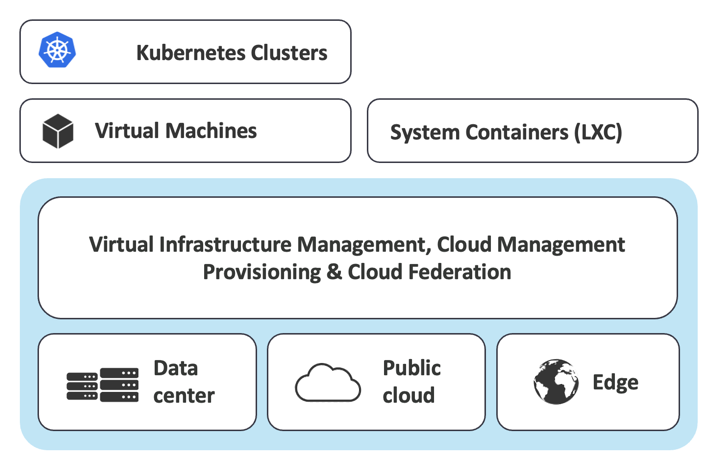
OpenNebula offers a user-friendly web interface and a powerful command-line interface (CLI) for administrators and users to interact with the platform. It also provides a RESTful API for automation and integration with other tools. The platform supports multi-tenancy, allowing multiple users and groups to share the same infrastructure securely.
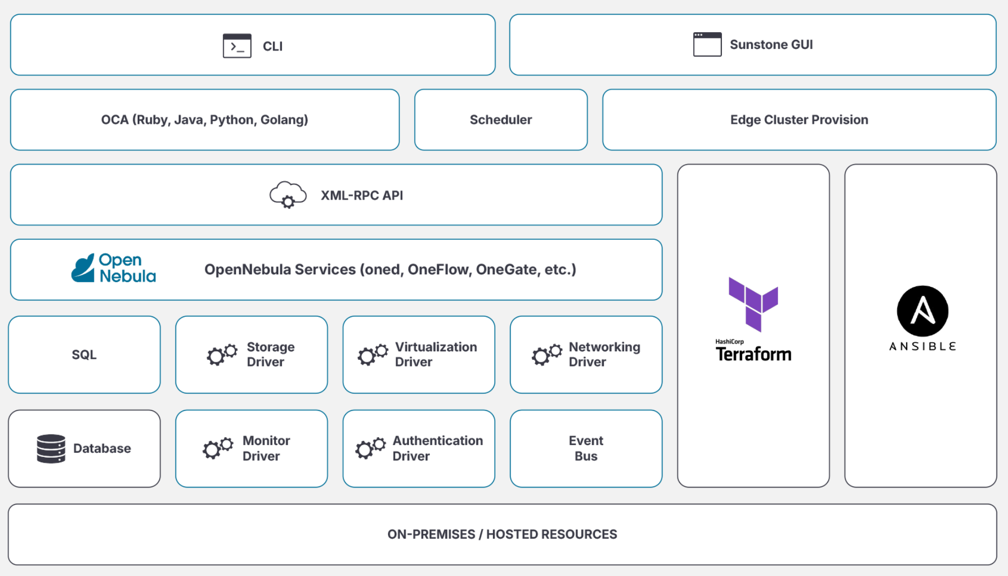
OpenNebula has a modular architecture that allows for easy integration with third-party tools and services. It can be extended with plugins and drivers to easily adapt to specific requirements.
Frontend User Interface
OpenNebula provides a web-based user interface called Sunstone, which allows users to manage their virtual machines and containers easily. The interface is intuitive and user-friendly, making it easy for both administrators and end-users to navigate and perform tasks. By default, it runs on port 2616. Persistent data is stored in a backend database, which can be either SQLite (default for small workloads) or MySQL/MariaDB (for production environments). Multiple instances of frontend servers can be deployed to ensure high availability and load balancing.
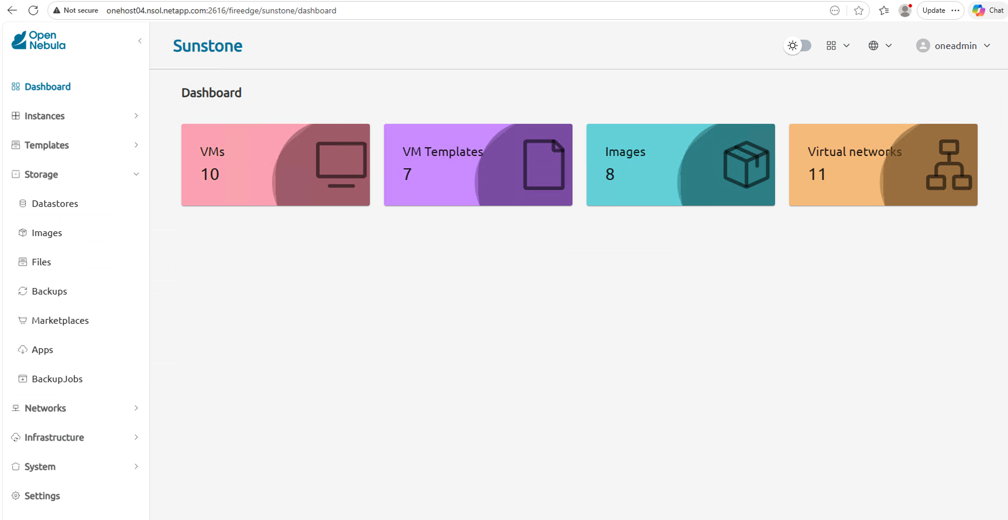
OpenNebula Sunstone provides customizable views and dashboards, allowing users to tailor the interface to their specific needs. It also supports role-based access control (RBAC), enabling administrators to define different levels of access for users and groups.
The console access feature allows users to connect to their virtual machines directly from the web interface, providing a seamless experience for managing and interacting with their instances.It also includes a marketplace where users can browse and deploy pre-configured virtual machine templates and applications. The users can also access the virtual machines via SSH or other remote access methods from the web interface.
Federation capabilities allow multiple OpenNebula instances(Zones) to be connected, enabling resource sharing and workload distribution across different data centers or geographical locations. Access policies are defined federation-wide where users can be restricted to certain Zones, or to specific Clusters inside a Zone.
Compute
OpenNebula supports KVM for virtual machines and LXC for Linux containers. Supported OS includes Ubuntu, Debian, RHEL and AlmaLinux. Virtual machines can be deployed from pre-configured templates or custom images. A set of virtual machines (service) can also be deployed using service templates. OneFlow allows to define and manage multi-tier applications composed of multiple interconnected virtual machines. OneGate enables to communicate with the OpenNebula backend from within the virtual machines, allowing for advanced monitoring and management capabilities.
The Virtual machine customization feature allows to customize the virtual machine settings during deployment, including network configuration, hostname, password and SSH keys. The contextualization feature allows to inject configuration data into the virtual machines at boot time, enabling dynamic configuration based on the deployment environment. More details about VM contextualization can be found in the OpenNebula Operation References.
A set of hypervisors are grouped into clusters for resource management and scheduling. OneDRS (Distributed Resource Scheduler) allows for automatic placement and load balancing of virtual machines across the available hypervisors based on resource utilization and predefined policies. The policy can be pack or balance.
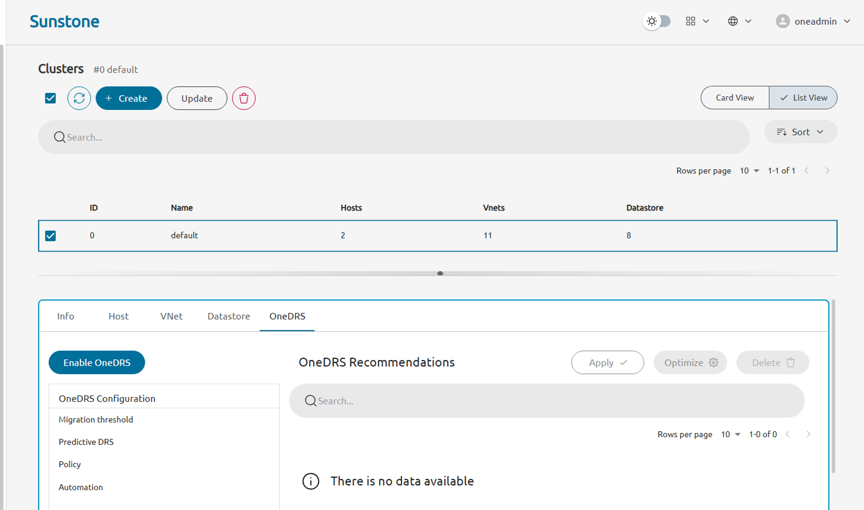
OpenNebula also supports live migration of virtual machines, allowing for seamless workload balancing and maintenance without downtime.
A physical host can be member of one cluster at a time. But can share storage and network resources across clusters. A subset of cluster resources can be assigned to a specific virtual data center (VDC) to provide resource isolation for different user groups.
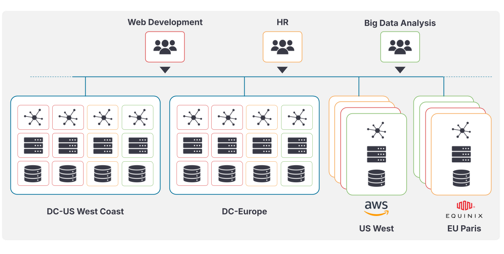
Stretched clusters allows to deploy virtual machines with high availability across multiple physical sites. In case of a site failure, the virtual machines can continue to operate from the other site without interruption.

|
Stretched clusters require shared storage accessible from all sites. Typically synchronous replication is used to ensure data consistency across sites. |
VM to VM affinity/anti-affinity rules can be defined to control the placement of virtual machines on physical hosts. This allows to ensure that certain virtual machines are always deployed together or separated from each other based on application requirements. Similarly, host affinity/anti-affinity rules can be defined to control the placement of virtual machines on specific physical hosts. Roles are defined to group virtual machines with similar affinity/anti-affinity rules.
Kubernetes clusters can be deployed using OneKE service. OneKE allows to create and manage CNCF certified Kubernetes clusters based on SUSE Rancher. The Kubernetes clusters can be deployed on top of the OpenNebula virtual machines, providing a seamless integration between the cloud infrastructure and container orchestration.
OpenNebula supports NVIDIA vGPU and MIG (Multi Instance GPU) for virtual machines to leverage the power of GPUs for high-performance computing, machine learning, and other GPU-intensive workloads.
Storage
OpenNebula provides four types of datastores to manage storage resources: System, Image, File and Backup datastores. System datastores are used to store the virtual machine disks and configuration files. Image datastores are used to store virtual machine images, ISOs and data disks. File datastores are used to store files that can be accessed by virtual machines. Backup datastores are used to store backups of virtual machines and their data.
|
|
Image datastores can be shared across clusters & Front-end servers, while System, File and Backup datastores are assigned to a specific cluster. |
Each System datastore specifies a module to handle transfer management from the Front-end server to the hypervisors. Supported transfer managers include SSH, shared filesystem (e.g., NFS, GlusterFS), and others. The datastores are typically mounted at /var/lib/one/datastores folder or as defined by DATASTORE_LOCATION attribute in /etc/one/oned.conf file. Each system datastore defines the corresponding image datastore. When a virtual machine is deployed, its disks are typically cloned from the image datastore to the system datastore using the defined transfer manager.
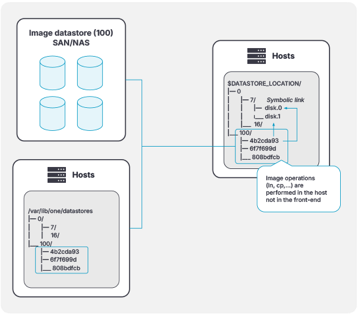
ONTAP FlexCache can be utilized for Image datastores at remote locations within same OpenNebula Zone. This allows to cache frequently accessed images locally, reducing latency and improving performance for virtual machine deployments.
Enterprise edition of OpenNebula includes NetApp driver to create and manage virtual machine disks on NetApp storage systems using ONTAP API. This allows to leverage advanced storage features such as thin provisioning, deduplication, and snapshots for virtual machine disks.
Images can be downloaded from public or private image repositories, such as OpenNebula Marketplace, Linux Container or Private Marketplace hosted on http or S3 storage. Private marketplaces allow organizations to maintain a curated set of images for their users across the federation.
Cloud Images requires the contextualization layer to be used with OpenNebula. Images can be persistent or non-persistent. Persistent images retain changes made during the virtual machine runtime, while non-persistent images will not retain any changes by VM after it is terminated. But, will retain changes in system datastore when it is powered off.
Persistent images are typically used to create customized virtual machine images. Only one VM can be deployed from a persistent image at a time.
VM disk snapshots can be utilized to create images from running virtual machine data. VM disk size can be resized during deployment or runtime (online resize).
Trident CSI driver is utilized to create persistent volume on Kubernetes clusters deployed with OneKE. This allows Kubernetes workloads to leverage ONTAP storage features. Trident Protect allows to define application level disaster recovery policies for Kubernetes workloads.
Network
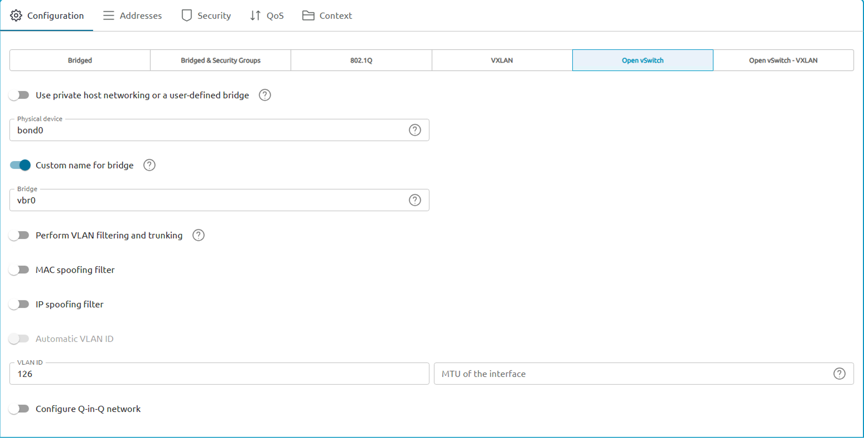
OpenNebula plugs into existing network infrastructure to provide networking capabilities for virtual machines and containers. It supports various network models, including Linux bridge, 802.1Q VLAN, VXLAN, and Open vSwitch networks. For VPC like network, VXLAN with EVPN can be used to isolate tenant networks.
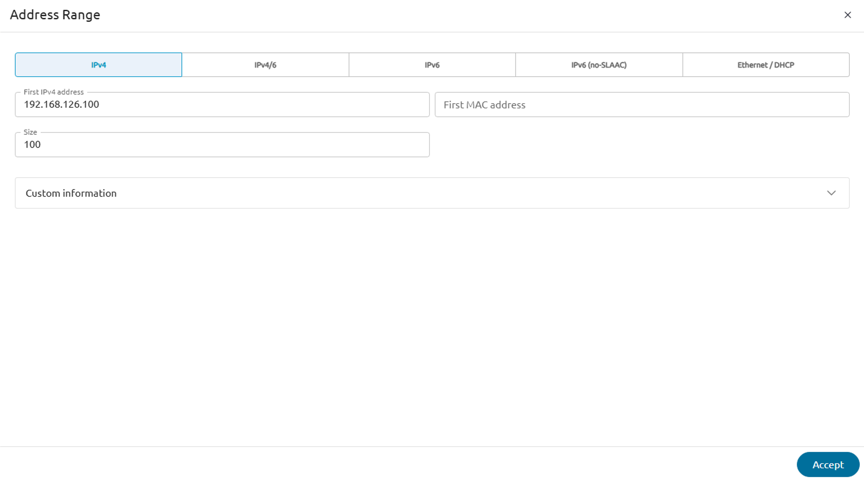
Every virtual network need to have an address range defined. It can be IPv4, IPv6, both or even MAC address range (if using external DHCP server). IPAM (IP Address Management) feature allows to manage and allocate IP addresses from the defined address ranges. It supports automatic and manual IP address allocation, as well as reservation of specific IP addresses for virtual machines.
During virtual machine deployment, the network interfaces are automatically configured based on the defined virtual networks and IP address allocation. Network configuration can be customized using the virtual machine contextualization feature.
Context information can also be updated using Update VM Configuration button in Sunstone interface. Additional network interfaces can be hot-plugged to running virtual machines.
Virtual routers can be deployed to provide routing and NAT services for virtual networks. Virtual networks can be spanned across multiple clusters enabling flexible network topologies.
Monitoring and Operations
OpenNebula includes a comprehensive monitoring system that provides real-time insights into the performance and health of the cloud infrastructure. It collects metrics from hypervisors, virtual machines, storage, and network components, allowing administrators to monitor resource utilization and identify potential issues.
OpenNebula includes Prometheus exporters to collect metrics for Prometheus-based monitoring systems. It also integrates with Grafana to provide customizable dashboards for visualizing the collected metrics.
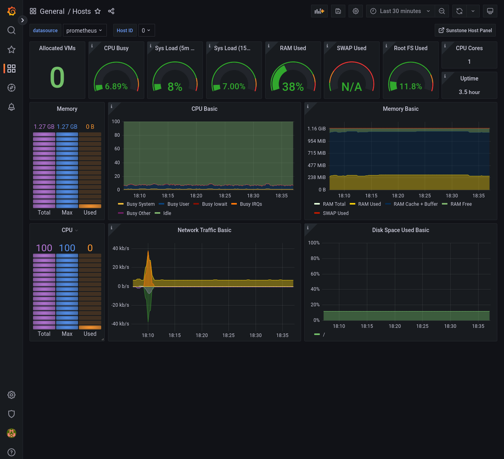
NetApp Data Infrastructure Insights can be used to monitor ONTAP storage systems used with OpenNebula. It provides detailed insights into storage performance, capacity, and health, allowing administrators to optimize storage resources for virtual machines.
OpenNebula CLI is utilized to perform various operations on the cloud infrastructure, including virtual machine management, storage management, and network management. It provides a powerful and flexible way to automate tasks and integrate with other tools. More info on OpenNebula CLI can be found in the OpenNebula CLI Reference. For customized CLI output, refer CLI Configuration Reference.
Custom scripts can also be executed as part of VM lifecycle. Hooks allow to trigger custom actions based on specific events in the OpenNebula platform, such as VM deployment, termination, or migration. This enables administrators to automate workflows and integrate with external systems.
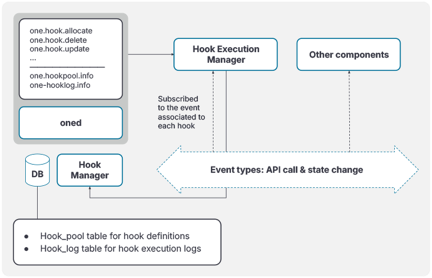
For more information about OpenNebula Hooks, refer OpenNebula Using Hooks.
OneSwap tool allows to migrate virtual machines from vSphere to OpenNebula KVM environment. It creates the images from vSphere VMDK files and generates the corresponding OpenNebula VM templates. NetApp Shift toolkit can convert vSphere VMDK files to QCOW2 format for use with OpenNebula.Using NetApp Shift toolkit API with OneSwap allows to automate the migration process on ONTAP file shares quickly and efficiently. For more information about NetApp shift toolkit, refer Shift Toolkit Conversion.
Data Protection
OpenNebula provides support for backup using rsync, restic and Veeam. Veeam integration is only available with Enterprise edition. Backup datastores are used to store backups of virtual machines and their data. Backup jobs can be scheduled to run at specific intervals, ensuring that virtual machines are regularly backed up.
Backups can be incremental snapshots or full backups, depending on the backup strategy. Incremental snapshots capture only the changes made since the last backup, reducing storage requirements and backup time. Full backups create a complete copy of the virtual machine and its data. qcow2 format allows to use change block tracking for incremental backups.
OpenNebula provides oVirt compatible REST API server to integrate with Veeam Backup & Replication software. For more information, refer OpenNebula Veeam Integration.