


Use an NFS datastore on ONTAP as principal storage for a VCF workload domain


 Suggest changes

 PDFs
PDFs
In this use case we outline the procedure to configure an NFS datastore on ONTAP as the primary storage solution for a VMware Cloud Foundation (VCF) workload domain. This procedure summarizes the required components, configuration steps, and deployment process.
Benefits of NFS
Simplicity and Ease of Use: NFS is straightforward to set up and manage, making it an excellent choice for environments that require quick and easy file sharing.
Scalability: ONTAP's architecture allows NFS to scale efficiently, supporting growing data needs without significant changes to the infrastructure.
Flexibility: NFS supports a wide range of applications and workloads, making it versatile for various use cases, including virtualized environments.
Scenario Overview
This scenario covers the following high level steps:
-
Create a storage virtual machine (SVM) with logical interface (LIFs) for NFS straffic
-
Verify networking for the ONTAP storage virtual machine (SVM) and that a logical interface (LIF) is present to carry NFS traffic.
-
Create an export policy to allow the vSphere hosts access to the NFS volume.
-
Create an NFS volume on the ONTAP storage system.
-
Create a Network Pool for NFS and vMotion traffic in SDDC Manager.
-
Commission hosts in vCenter for use in a VCF Workload Domain.
-
Deploy a VCF Workload Domain in VCF Ops using an NFS datastore as principal storage.
-
Ensure the cluster image includes the NetApp NFS Plug-in for VMware VAAI.

|
This solution is applicable for ONTAP platforms supporting NFS storage including NetApp AFF, AFX and FAS. |
Prerequisites
The following components and configurations are used in this scenario:
-
NetApp AFF, AFX, or FAS storage system with a storage virtual machine (SVM) configured to allow NFS traffic.
-
Logical interface (LIF) has been created on the IP network that is to carry NFS traffic and is associated with the SVM.
-
VCF management domain deployment is complete and the VCF Operations Manager interface is accessible.
-
At least 2 x vSphere hosts configured for communication on the VCF management network.
-
IP addresses reserved for vMotion and NFS storage traffic on the VLAN or network segment established for this purpose.
|
|
When deploying a VCF Workload Domain, VCF validates connectivity to the NFS Server. This is done using the management adapter on the vSphere hosts before any additional vmkernel adapter is added with the NFS IP address. Therefore, it is necessary to ensure that either 1) the management network is routable to the NFS Server, or 2) a LIF for the management network has been added to the SVM hosting the NFS datastore volume, to ensure that the validation can proceed. |
For information on configuring ONTAP storage systems refer to the ONTAP 9 Documentation center.
For information on configuring VCF refer to VMware Cloud Foundation Documentation.
For more information on using NFS with vSphere clusters, refer to the NFS v3 Reference Guide for vSphere 8.
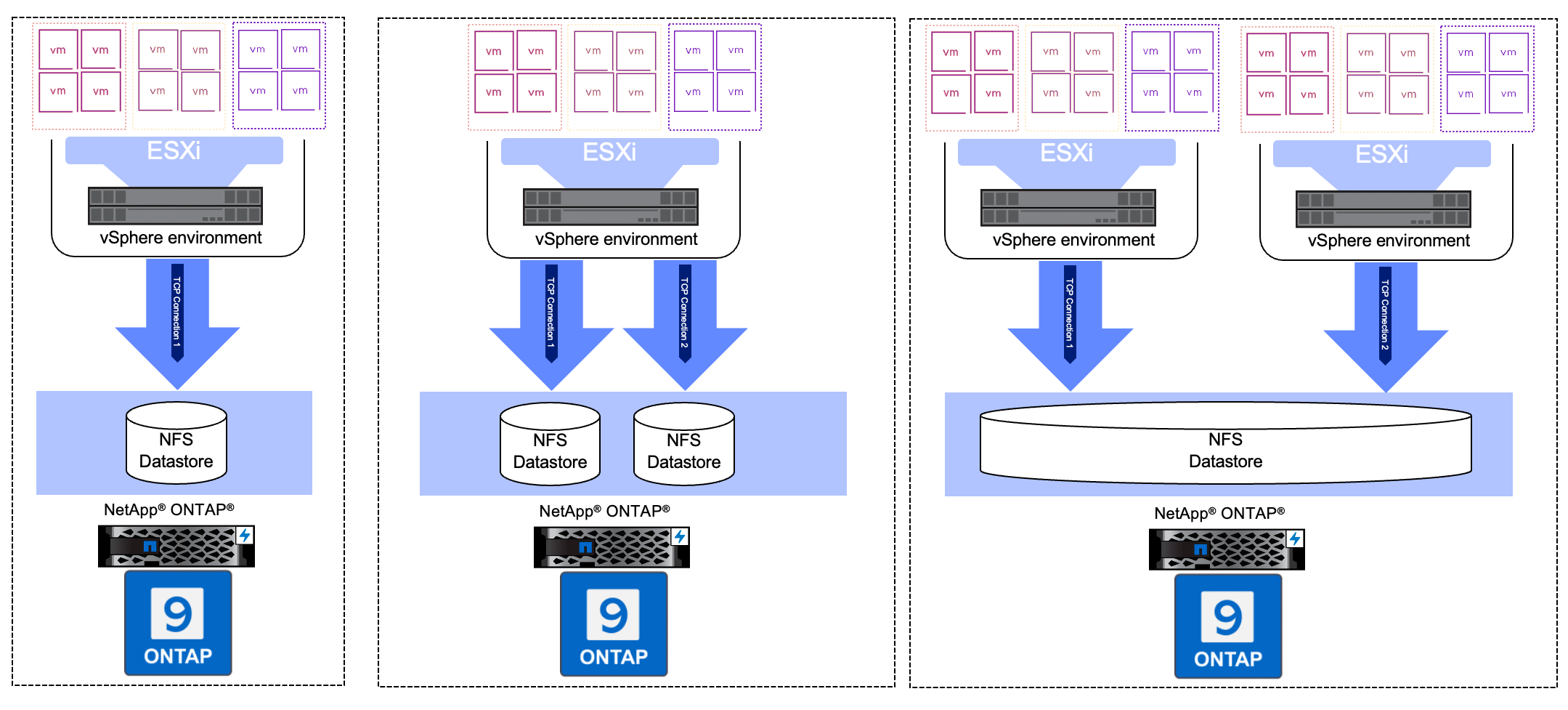
Deployment Steps
To deploy a VCF Workload Domain with an NFSv3 datastore as principal storage, complete the following steps:
Verify networking for ONTAP SVM
Verify that the required logical interfaces have been established for the network that will carry NFS traffic between the ONTAP storage cluster and Workload Domain.
-
From ONTAP System Manager navigate to Storage VMs in the left-hand menu and click on the SVM to be used for NFS traffic. On the Overview tab, under Network interfaces, click on the numeric above the NFS label. In the list verify that the required LIF IP addresses are listed.
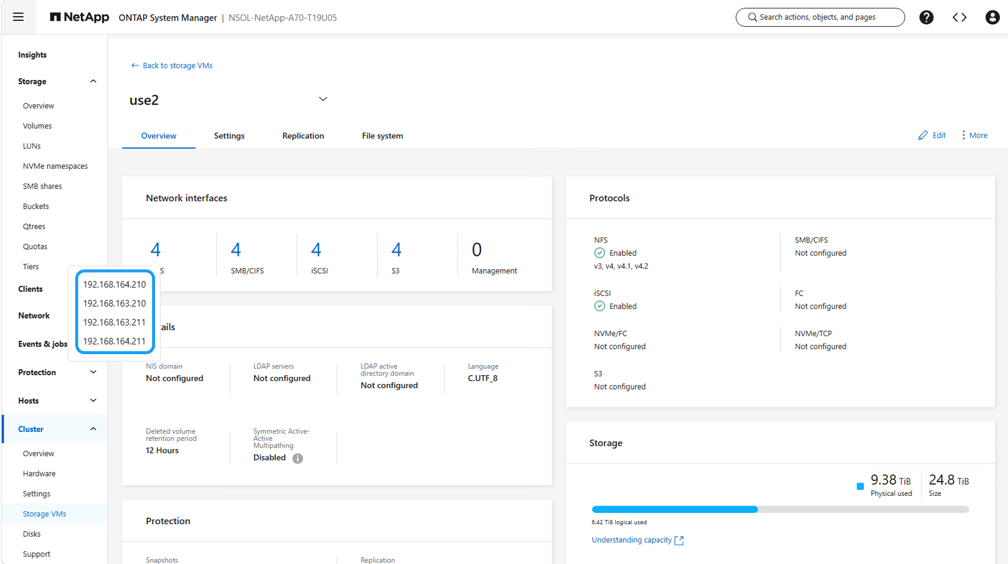
Alternately, verify the LIFs associated with an SVM from the ONTAP CLI with the following command:
network interface show -vserver <SVM_NAME>-
Verify that the vSphere hosts can communicate to the ONTAP NFS Server. Log into the vSphere host via SSH and ping the SVM LIF:
vmkping <IP Address>|
|
When deploying a Workload Domain, VCF validates connectivity to the NFS Server. This is done using the management adapter on the vSphere hosts before any additional vmkernel adapter is added with the NFS IP address. Therefore, it is necessary to ensure that either 1) the management network is routable to the NFS Server, or 2) a LIF for the management network has been added to the SVM hosting the NFS datastore volume, to ensure that the validation can proceed. |
Create Export Policy for sharing NFS volume
Create an export policy in ONTAP System Manager to define access control for NFS volumes.
-
In ONTAP System Manager click on Storage VMs in the left-hand menu and select an SVM from the list.
-
On the Settings tab locate Export Policies and click on the arrow to access.
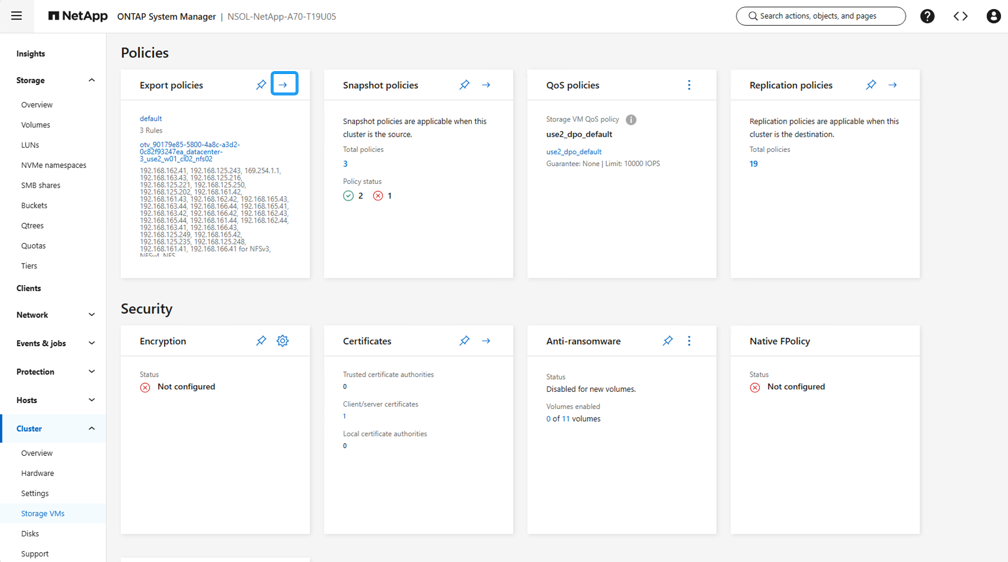
-
After you click on Add, New export policy window will open. Add a name for the policy, click on the Add new rules button and then on the +Add button to begin adding a new rule.
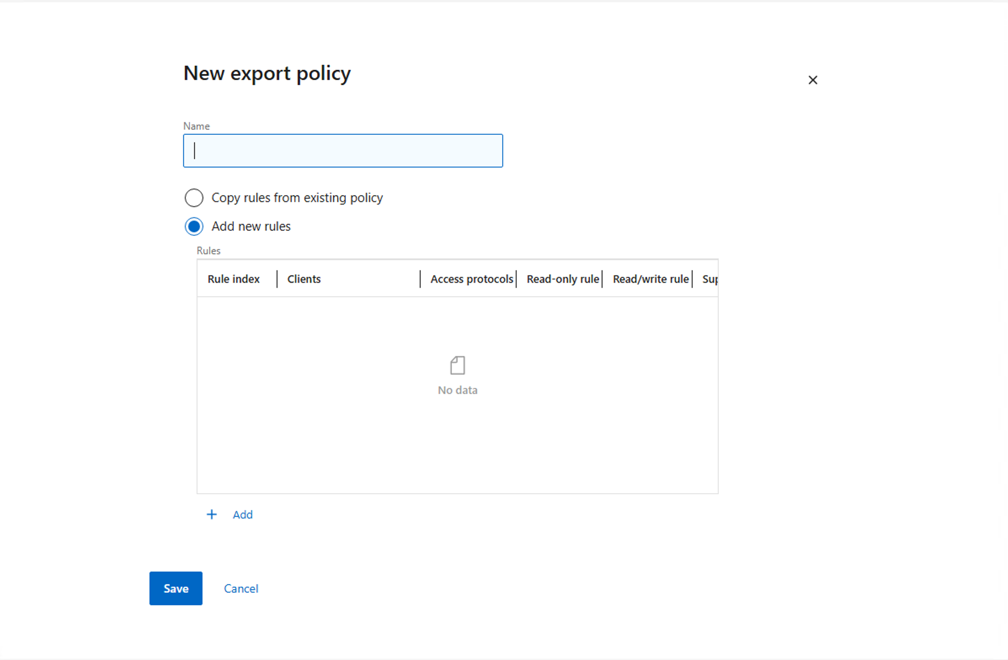
-
Fill in the IP Addresses, IP address range, or network that you wish to include in the rule. Uncheck the SMB/CIFS and FlexCache boxes and make selections for the access details below. Selecting the UNIX boxes is sufficient for vSphere host access.
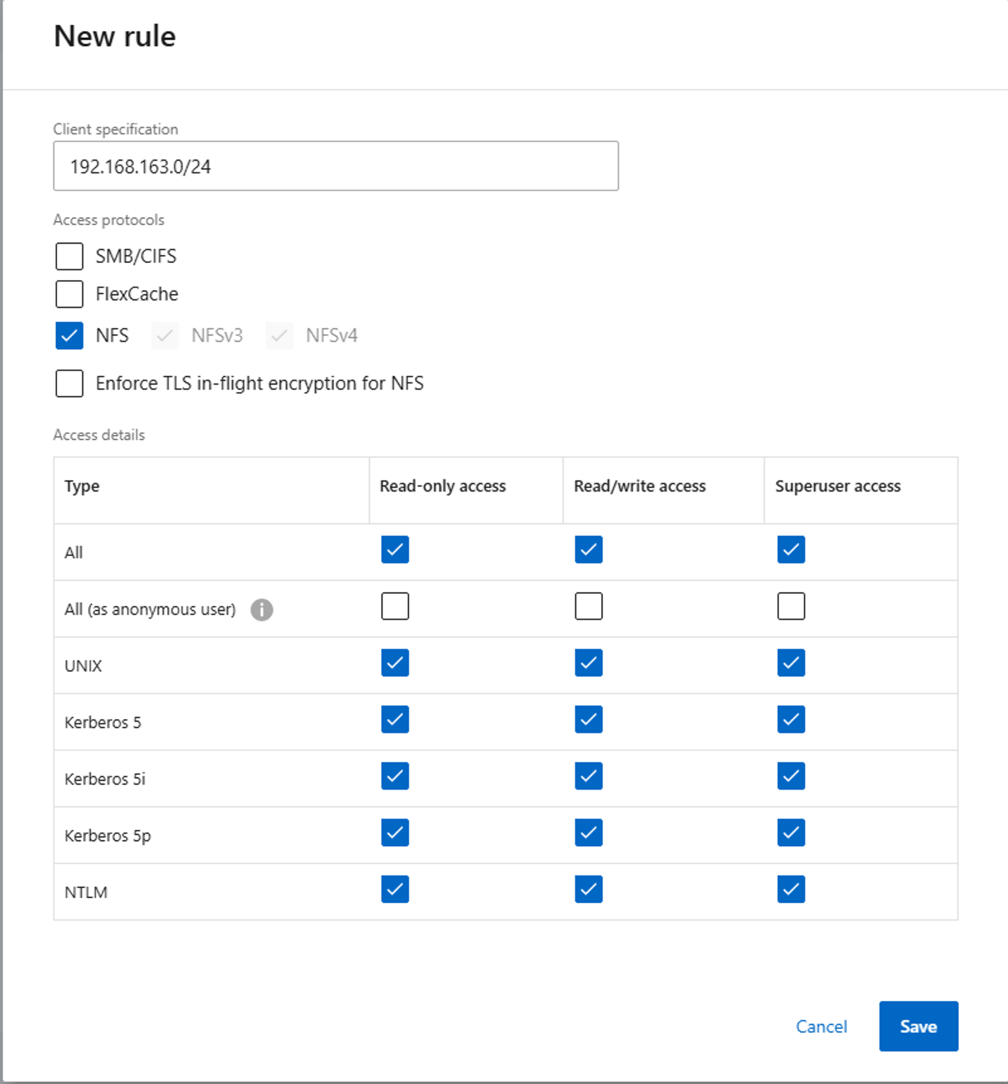
When deploying a Workload Domain, VCF validates connectivity to the NFS Server. This is done using the management adapter on the vSphere hosts before any additional vmkernel adapter is added with the NFS IP address. Therefore, it is necessary to ensure that the export policy includes the VCF management network in order to allow the validation to proceed. -
Once all rules have been entered click on the Save button to save the new Export Policy.
-
Alternately, you can create export policies and rules in the ONTAP CLI. Refer to the steps for creating an export policy and adding rules in the ONTAP documentation.
-
Use the ONTAP CLI to Create an export policy.
-
Use the ONTAP CLI to Add a rule to an export policy.
-
Create NFS volume
Create an NFS volume on the ONTAP storage system to be used as a datastore in the Workload Domain deployment.
-
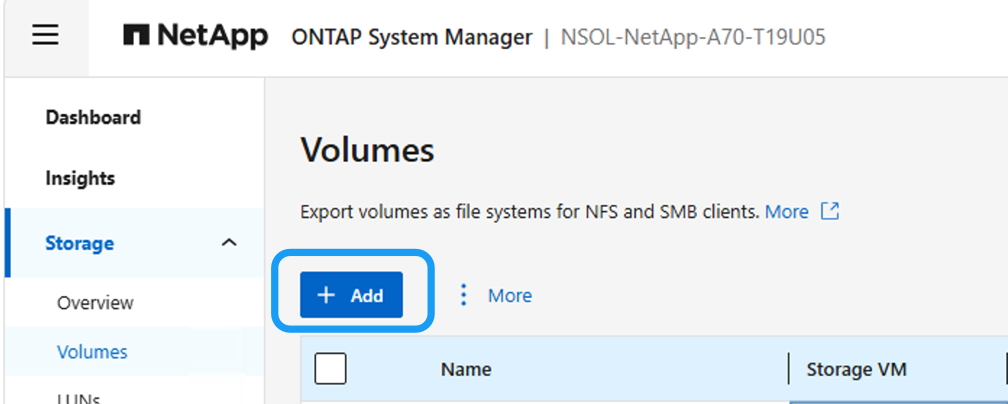
From ONTAP System Manager navigate to Storage > Volumes in the left-hand menu and click on +Add to create a new volume.
-
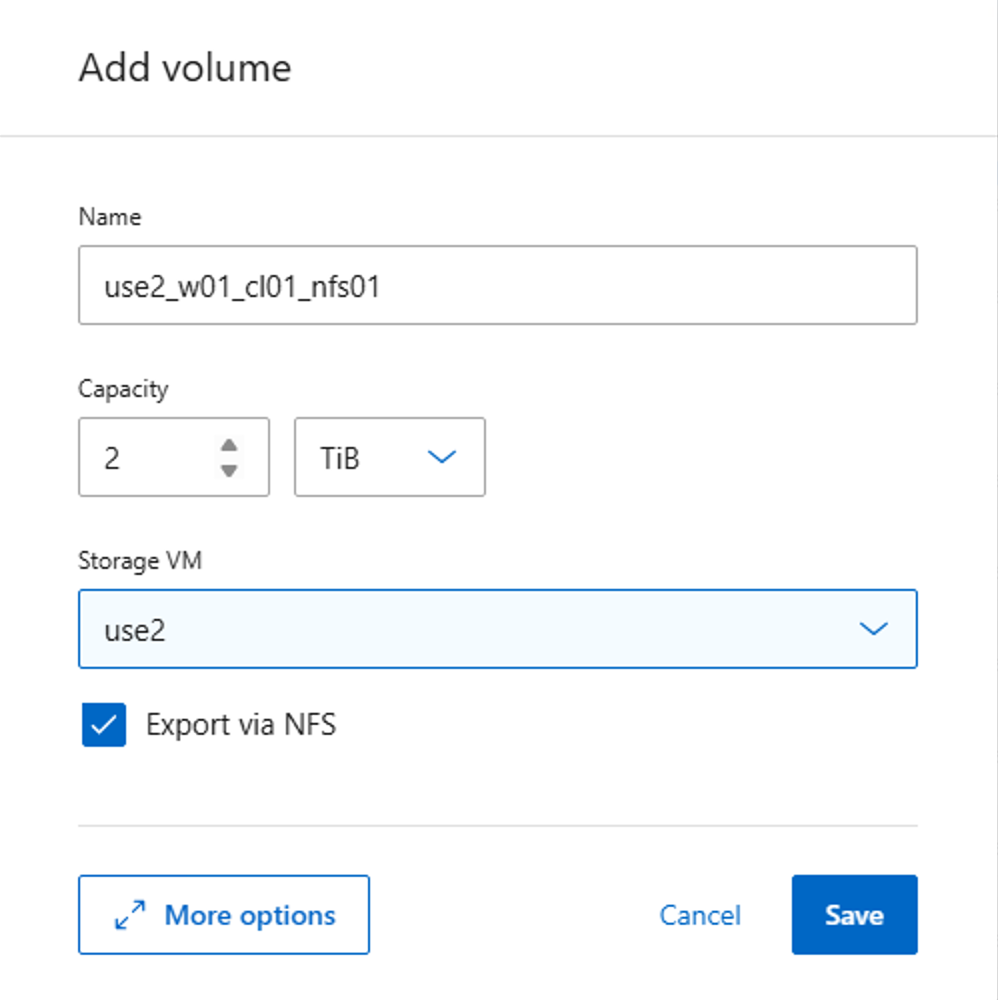
Add a name for the volume, fill out the desired capacity and selection the storage VM that will host the volume. Click on More Options to continue.
-
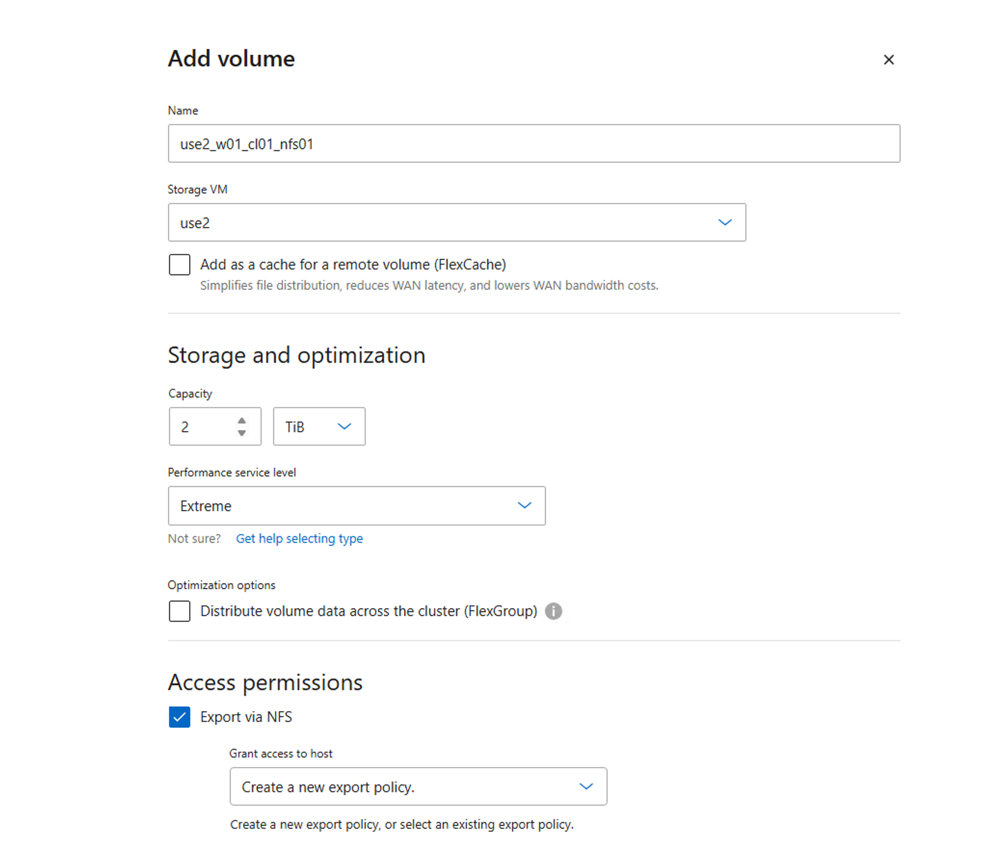
Under Access Permissions, select the Export Policy which includes the VCF management network or IP address and NFS network IP addresses that will be used for both validation of the NFS Server and NFS traffic.
+
When deploying a VCF Workload Domain, VCF validates connectivity to the NFS Server. This is done using the management adapter on the vSphere hosts before any additional vmkernel adapter is added with the NFS IP address. Therefore, it is necessary to ensure that either 1) the management network is routable to the NFS Server, or 2) a LIF for the management network has been added to the SVM hosting the NFS datastore volume, to ensure that the validation can proceed. -
Alternately, NFS volumes can be created in the ONTAP CLI. For more information refer to the volume create command in the ONTAP commands documentation.
VCF Workload Domain - Default Cluster
After the management domain is up and running, VCF Workload domain can be created:
-
Using VCF Ops UI. The vSphere hosts are commissioned in vCenter and network pool is configured. Use System Manager or ONTAP API to export NFS volume to vSphere hosts.
-
Import an existing vSphere environment as new workload domain. ONTAP tools for VMware vSphere or System Manager or ONTAP API can be used to deploy the NFSv3 or NFS4.1 datastore to vSphere cluster.
VCF Workload Domain - Additional Cluster
To Expand the workload domain with an additional cluster, refer to Add an SDDC Cluster to a VCF Domain.
On a high level, the steps to add an additional cluster to the workload domain are as follows:
* Ensure the hosts are commissioned and network pools are configured in vCenter.
* NFS volume is provisioned on the ONTAP storage system and exported to the hosts in the additional cluster.
* NFS volume is mounted on one of the vSphere hosts in the additional cluster.
* Create new SDDC Cluster creation on the Workload Domain on vCenter and follow the wizard to add the additional cluster to the workload domain.
Additional information
For information on configuring ONTAP storage systems refer to the ONTAP 9 Documentation center.
For information on configuring VCF refer to VMware Cloud Foundation Documentation.