


ONTAP inode types

 Suggest changes

 PDFs
PDFs
ONTAP uses public inodes to represent file-system objects present in FlexVol and FlexGroup volumes. Each volume has a defined high-water limit (see Maxfiles and ONTAP inode information), and public inodes count against that limit in the file system.
What is an inode?
In general, an inode is the file-system record for an object. It stores identity and metadata such as type, ownership, timestamps, and permissions, and it points to the object's data. The object's name is stored in a directory, not in the inode itself.
In ONTAP, WAFL stores those records in a hidden, volume-level inode file on each FlexVol or FlexGroup constituent. Public inodes count toward the volume files setting, commonly called maxfiles. Creating a public object increases public inode use; private inodes do not. Capacity and growth of the inode file are described in Capacity impact.
The following figure shows how the public inode file relates to files-used, inodefile-public-capacity, the files ceiling, and the capacity consumed in the volume.
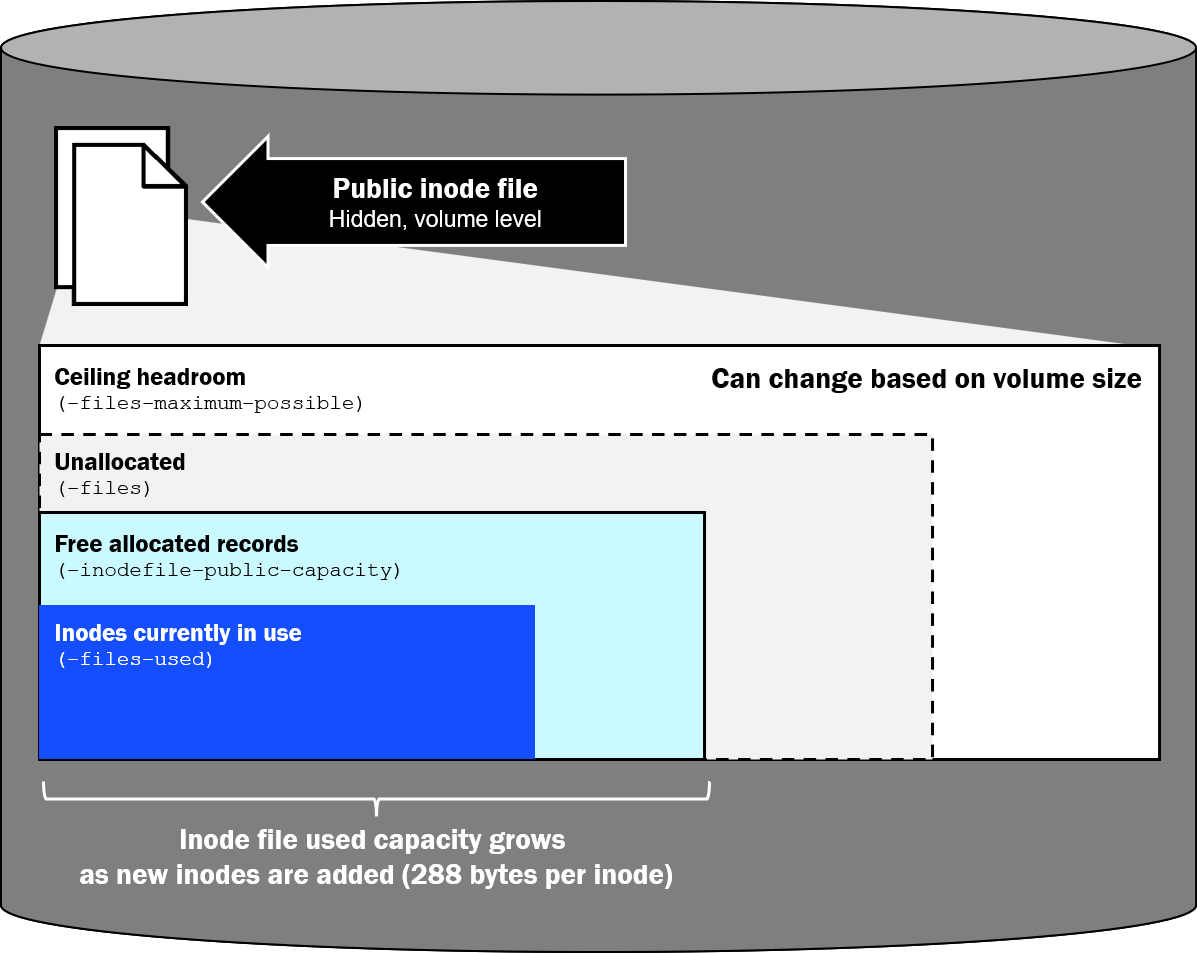
Types of inodes in ONTAP
An inode's type describes what kind of object it represents. ONTAP also places each inode in public or private inode space. Public inodes count toward maxfiles; private inodes do not. A directory-index inode can be in either space depending on volume configuration.
Public inodes
Public inodes are allocated from the volume's public inode file and count toward files and files-used. They include client-visible objects and public metadata objects that do not appear as directory entries.
The following table shows a list of public inodes found in ONTAP and additional information about them. The maxdir-size column indicates whether creating that object adds a directory entry to the parent directory and therefore grows that parent's directory file.
| Type | What it represents | Also counts against maxdir-size |
|---|---|---|
Regular file |
Default file contents and attributes |
Yes. Creating the file adds a name in the parent directory. |
Directory |
A directory's names and the directory's own inode |
Yes. Creating the directory adds a name in the parent. The new directory also has its own directory file, which |
Symbolic link |
A pathname pointer rather than file data |
Yes. * Creating the symbolic link adds a name in the parent directory. |
Special file |
UNIX FIFO, socket, or device node |
Yes. Creating the special file adds a name in the parent directory. |
Named stream |
Extra data besides the file's default contents (NTFS alternate data stream) |
No. The stream is not a name in the parent user directory. |
Stream directory |
Hidden container that holds the names of a file's named streams |
No. It is not a user-visible directory entry. |
ACL (xinode) |
NTFS security descriptor or NFSv4 ACL stored as access control entry (ACE) data |
No. The ACL is not a directory entry. |
Directory index (when public)** |
Companion B+tree used to look up names in a large directory |
No. The index is not a directory entry. |

|
* A symbolic link is its own public inode and directory entry. A hard link is different: it is another directory name for an existing regular-file inode, not a separate inode type. Creating a hard link adds a directory entry and grows the parent directory file, but it does not allocate another public inode. |
|
|
** Directory-index inodes are private by default. They can be moved into public inode space as described in About private and public index inodes. |
ACL inodes
When a file or directory has an NTFS security descriptor or an NFSv4 ACL, ONTAP stores that ACL as a separate ACL inode (also called an extended inode, or xinode). The ACL inode contains the ACEs. ONTAP allocates it from public inode space, so it counts toward files and files-used. The file or directory inode references its ACL inode.
|
|
UNIX mode bits are stored in the file or directory's own inode. They do not allocate an extra public inode. |
ACL inode use is not always a 1:1 relationship with a file or directory:
-
Files or directories with the same stored security descriptor can share an ACL inode when ONTAP's ACL-sharing optimization coalesces them. Inheritance commonly produces identical descriptors that are candidates for sharing.
-
Sharing might not occur when ACEs, owner or group information, control flags, or inheritance results differ. Even identical descriptors are not guaranteed to be coalesced, for example when they are created or updated in separate operations before sharing is recognized.
-
A create can inherit the parent's ACL when the request does not supply its own ACEs and the parent ACL has inheritance attributes.
-
NTFS security-style volumes apply NTFS ACLs by default. New files and directories can share an ACL inode when their resulting stored descriptors are identical, but administrators must not assume that all default or inherited ACLs will share one inode.
-
UNIX security-style objects that remain on mode bits do not consume an ACL inode until an NFSv4 ACL is stored. Mixed security style can contain both mode-bit-only and ACL-protected objects.
Named streams
A named stream is extra data attached to a file besides the content users normally open. In ONTAP it is the WAFL representation of an NTFS alternate data stream (ADS). The file's default, unnamed data lives in the base file inode. Each additional named stream is a separate public inode and counts toward files and files-used.
Named streams persist with the file. They are not a temporary scratch area that ONTAP uses only during an open, copy, or save. A stream remains allocated until that stream is deleted or the base file is deleted. An application can create a stream and later remove it, but ONTAP does not expire named streams on its own.
Some things to note:
-
SMB workloads create and use named streams. Windows addresses them as
filename:stream_name, for examplereport.docx:Zone.Identifier.Zone.Identifieris Windows Mark of the Web metadata. When a file is downloaded from the internet, Windows or the browser records a zone ID (commonly the Internet zone) so Explorer, SmartScreen, and Office can treat the file as untrusted until a user unblocks it. That stream stays on the file until it is removed. Other common sources include backup and security applications, and applications that store sidecar data as ADS. Microsoft Office~$lock files and temporary save files are ordinary files and directory entries, not named streams. Files synchronized by OneDrive do not necessarily receive aZone.Identifierstream; behavior depends on the client and transfer path. -
macOS clients accessing SMB can use named streams for Finder metadata and resource forks, commonly represented as
AFP_AfpInfoandAFP_Resource. -
Ordinary listings hide named streams. Windows Explorer, macOS Finder,
dir, and NFSls/statshow the default file, sofiles-usedcan exceed the visible count. Enumerate streams from a Windows SMB client withdir /ror PowerShellGet-Item <file> -Stream *. ONTAP does not support NFSv4 named attributes, so NFS clients do not see SMB streams as extra names, but the inodes still exist. -
A hidden file, swap file, or backup file created by
vi(for example.file.swporfile~) is an ordinary file and directory entry, not a named stream. -
NFSv4.2 extended attributes (xattrs), supported beginning with ONTAP 9.12.1, are a different feature. They are not ACL inodes and should not be counted as ACL xinodes.
Impact on NDMP backup and restores
During NDMP dump and restore processing, ONTAP identifies object classes such as regular files, directories, NT streams, stream directories, and ACL inodes separately so each object's data and metadata can be serialized, reported in dump statistics, and reconstructed correctly. This classification does not create separate maxfiles limits or separate volume show counters. files-used remains the combined public-inode total.
NDMP dump walks the namespace and serializes those objects one by one. Restore reconstructs them the same way. High public inode counts therefore lengthen dump and restore even when the volume's data capacity is modest or the visible file count looks small. Named streams and ACL inodes are dumped and restored even when Explorer, Finder, dir, or ls do not show them, so dump statistics can report more stream and ACL objects than a simple directory listing suggests.
The job is often metadata-bound rather than throughput-bound. Creating, looking up, and reconstructing millions of inodes, ACLs, and streams consumes CPU, memory, and storage I/O with relatively little data per object. Small files, dense ACL use, and many named streams increase that overhead. Large flat directories add enumeration cost during dump, and restore of a high-file-count volume can also spend time rebuilding directory indexes after the objects exist. Measure dump and restore duration with a representative object count, including streams and ACLs, rather than estimating from data size alone.
Private inodes
Private inodes are ONTAP-internal metadata records. They reside in a separate private inode space, do not count toward files or files-used, and cannot be used as additional client files.
The following table shows common private inode types.
| Type | What it represents | Also counts against maxdir-size |
|---|---|---|
Directory index (default)* |
Companion B+tree used to look up names in a large directory |
No. |
Private metafile |
Hidden WAFL metadata used by ONTAP |
No. |
Zombie |
An unlinked object retained until references or asynchronous delete finish |
No. |
|
|
* Directory indexes are private by default. Public index transfer is described in About private and public index inodes. |
|
|
In most cases, you do not need to monitor private inode usage because private inodes do not count against maxfiles, unless NetApp Support directs you to do so. |
Zombie inodes
An unlinked file cannot always be released immediately. ONTAP can retain it temporarily as a zombie while references or asynchronous work complete. Large asynchronous-delete operations can therefore increase private inode use while cleanup is in progress. Again, private inodes do not count against the total files allowed in the volume.