


Disks and aggregates used for Cloud Volumes ONTAP clusters

 Suggest changes

 PDFs
PDFs
Understanding how Cloud Volumes ONTAP uses cloud storage can help you understand your storage costs.

|
You must create and delete all disks and aggregates from the NetApp Console. You should not perform these actions from another management tool. Doing so can impact system stability, hamper the ability to add disks in the future, and potentially generate redundant cloud provider fees. |
Overview
Cloud Volumes ONTAP uses cloud provider storage as disks and groups them into one or more aggregates. Aggregates provide storage to one or more volumes.
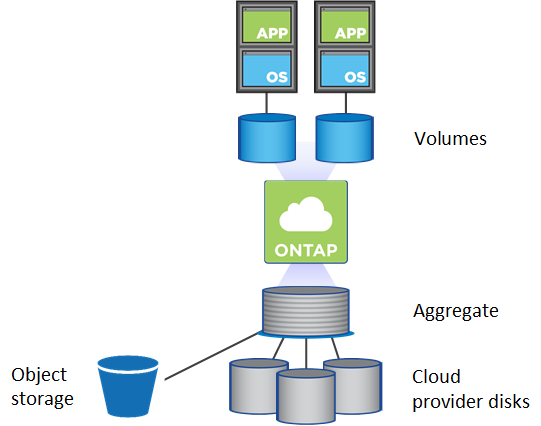
Several types of cloud disks are supported. You choose the disk type when you create a volume and the default disk size when you deploy Cloud Volumes ONTAP.

|
The total amount of storage purchased from a cloud provider is the raw capacity. The usable capacity is less because approximately 12 to 14 percent is overhead that is reserved for Cloud Volumes ONTAP use. For example, if the Console creates a 500 GiB aggregate, the usable capacity is 442.94 GiB. |
Google Cloud storage
In Google Cloud, an aggregate can contain up to 6 disks that are all the same size. The maximum disk size is 64 TiB.
The disk type can be either Zonal SSD persistent disks, Zonal Balanced persistent disks, or Zonal standard persistent disks. You can pair persistent disks with a Google Storage bucket to low-cost object storage.
Related links
RAID type
The RAID type for each Cloud Volumes ONTAP aggregate is RAID0 (striping). Cloud Volumes ONTAP relies on the cloud provider for disk availability and durability. No other RAID types are supported.
Hot spares
RAID0 doesn't support the use of hot spares for redundancy.
Creating unused disks (hot spares) attached to a Cloud Volumes ONTAP instance is an unnecessary expense and may prevent provisioning additional space as needed. Therefore, it's not recommended.