


Supported default configurations for Cloud Volumes ONTAP

 Suggest changes

 PDFs
PDFs
Understanding how Cloud Volumes ONTAP is configured by default can help you set up and administer your systems, especially if you are familiar with ONTAP because the default setup for Cloud Volumes ONTAP is different than ONTAP.
Default setup
-
The NetApp Console creates one data-serving storage VM when it deploys Cloud Volumes ONTAP. Some configurations support additional storage VMs. Learn more about managing storage VMs.
Logical space reporting is enabled on the initial storage VM. When space is reported logically, ONTAP reports the volume space such that all the physical space saved by the storage efficiency features are also reported as used. For information about inline storage efficiency features, refer to the knowledge base article KB: What Inline Storage Efficiency features are supported with CVO?
-
The Console automatically installs the following ONTAP feature licenses on Cloud Volumes ONTAP:
-
CIFS
-
FlexCache
-
FlexClone
-
iSCSI
-
Multi-tenant Encryption Key Management (MTEKM), starting with Cloud Volumes ONTAP 9.12.1 GA
-
NetApp Volume Encryption (only for bring your own license (BYOL) or registered pay-as-you-go (PAYGO) systems)
-
NFS
-
SnapMirror
-
SnapRestore
-
SnapVault
-
-
Several network interfaces are created by default:
-
A cluster management LIF
-
An intercluster LIF
-
An SVM management LIF on HA systems in Google Cloud
-
A node management LIF
In Google Cloud, this LIF is combined with the intercluster LIF.
-
An iSCSI data LIF
-
A CIFS and NFS data LIF

LIF failover is disabled by default for Cloud Volumes ONTAP due to cloud provider requirements. Migrating a LIF to a different port breaks the external mapping between IP addresses and network interfaces on the instance, making the LIF inaccessible.
-
-
Cloud Volumes ONTAP sends configuration backups to the Console agent using HTTP.
The backups are accessible from http://ipaddress/occm/offboxconfig/ where ipaddress is the IP address of the host of the Console agent.
You can use the backups for reconfiguring your Cloud Volumes ONTAP system. For more information about configuration backups, refer to the ONTAP documentation.
-
The Console sets a few volume attributes differently than other management tools (ONTAP System Manager or the ONTAP CLI, for example).
The following table lists the volume attributes set differently from the defaults:
Attribute Value that the Console configures Autosize mode
grow
Maximum autosize
1,000 percent
The organization or account admin can modify this value from the Settings page. Security style
NTFS for CIFS volumes
UNIX for NFS volumesSpace guarantee style
none
UNIX permissions (NFS only)
777
For information about these attributes, refer to ONTAP volume create man page.
Where the disks reside
Storage layout:
-
Boot data resides on a disk attached to the instance or virtual machine.
This disk, which contains the boot image, is not available to Cloud Volumes ONTAP.
-
Root data, which contains the system configuration and logs, resides in aggr0.
-
The storage virtual machine (SVM) root volume resides in aggr1.
-
Data volumes also reside in aggr1.
Disks and aggregates used for Cloud Volumes ONTAP clusters
Understanding how Cloud Volumes ONTAP uses cloud storage can help you understand your storage costs.

|
You must create and delete all disks and aggregates from the NetApp Console. You should not perform these actions from another management tool. Doing so can impact system stability, hamper the ability to add disks in the future, and potentially generate redundant cloud provider fees. |
Cloud Volumes ONTAP uses cloud provider storage as disks and groups them into one or more aggregates. Aggregates provide storage to one or more volumes.
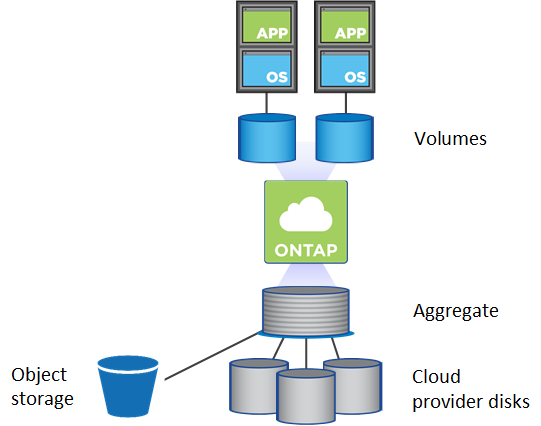
Several types of cloud disks are supported. You choose the disk type when you create a volume and the default disk size when you deploy Cloud Volumes ONTAP.

|
The total amount of storage purchased from a cloud provider is the raw capacity. The usable capacity is less because approximately 12 to 14 percent is overhead that is reserved for Cloud Volumes ONTAP use. For example, if the Console creates a 500 GiB aggregate, the usable capacity is 442.94 GiB. |
RAID type
The RAID type for each Cloud Volumes ONTAP aggregate is RAID0 (striping). Cloud Volumes ONTAP relies on the cloud provider for disk availability and durability. No other RAID types are supported.
Hot spares
RAID0 doesn't support the use of hot spares for redundancy.
Creating unused disks (hot spares) attached to a Cloud Volumes ONTAP instance is an unnecessary expense and may prevent provisioning additional space as needed. Therefore, it's not recommended.