


Replace SG120 and SG1200 cover

 Suggest changes

 PDFs
PDFs
Remove the appliance cover to access internal components for maintenance, and replace the cover when you are finished.
Step 1: Remove cover
-
Wrap the strap end of an ESD wristband around your wrist and secure the clip end to a metal ground to prevent static discharge when working inside the appliance.
-
Remove the appliance from the cabinet or rack to access the top cover.
-
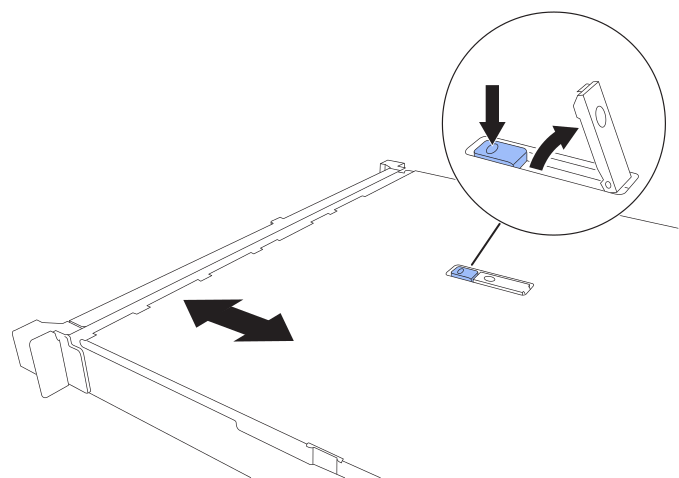
Unlock the cover latch by pressing the blue lock button on the appliance cover.
-
Rotate the latch up and back toward the rear of the appliance chassis until it stops; then, carefully lift the cover from the chassis and set it aside.
Step 2: Reinstall cover
-
With the cover latch open, align the cover above the chassis and carefully lower it.
-
Rotate the cover latch forward and down until it stops and the cover fully seats into the chassis. Verify that there are no gaps along the front edge of the cover.
If the cover is not fully seated, you might not be able to slide the appliance into the rack.