


Replace internal NIC in the SGF6212 or SG6200-CN


 Suggest changes

 PDFs
PDFs
You might need to replace an internal Network Interface Card (NIC) in the SGF6212 or SG6200-CN if it is not functioning optimally or if it has failed.
To prevent service interruptions, confirm that all other Storage Nodes are connected to the grid before starting the Network Interface Card (NIC) replacement or replace the NIC during a scheduled maintenance window when periods of service disruption are acceptable. See the information about monitoring node connection states.

|
If you have ever used an ILM rule that creates only one copy of an object, you must replace the NIC during a scheduled maintenance window because you might temporarily lose access to those objects during this procedure. See information about why you should not use single-copy replication. |
-
You have the correct replacement NIC.
-
You have physically located the SGF6212 appliance or SG6200-CN controller where you are replacing the NIC in the data center.

A controlled shutdown of the appliance is required before removing the appliance from the rack. -
You have disconnected all cables and removed the appliance cover.
-
You have determined the location of the NIC to replace.
The three NICs in the appliance are in three riser assemblies in the following positions in the chassis (rear of appliance with top cover removed shown):
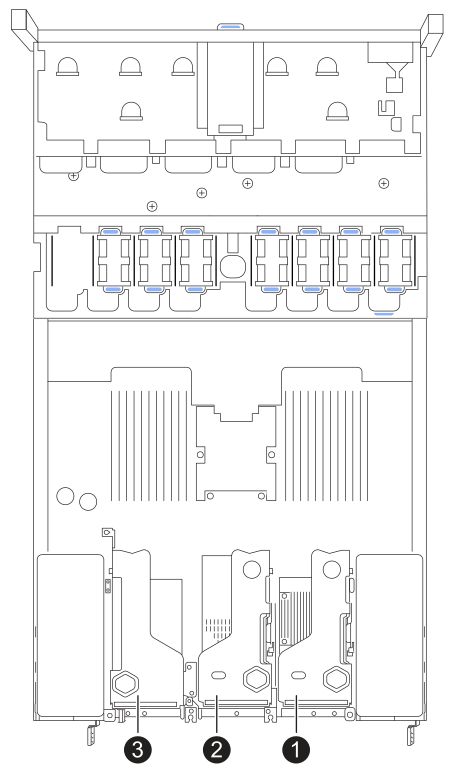
Device or Part name Description 1
NIC 1 in the one-slot riser assembly
10/25-GbE Ethernet network ports for Grid and Client Networks
2
NIC 2 in the one-slot riser assembly
1/10-GbE Ethernet network ports for Admin Network
3
NIC 3 in the one-slot riser assembly
10/25-GbE Ethernet network ports for Grid and Client Networks
Some appliances support higher speed network ports and might have higher speed NICs installed.
Step 1: Remove the NIC
-
Wrap the strap end of the ESD wristband around your wrist, and secure the clip end to a metal ground to prevent static discharge.
-
Locate the riser assembly that contains the NIC at the rear of the appliance.
-
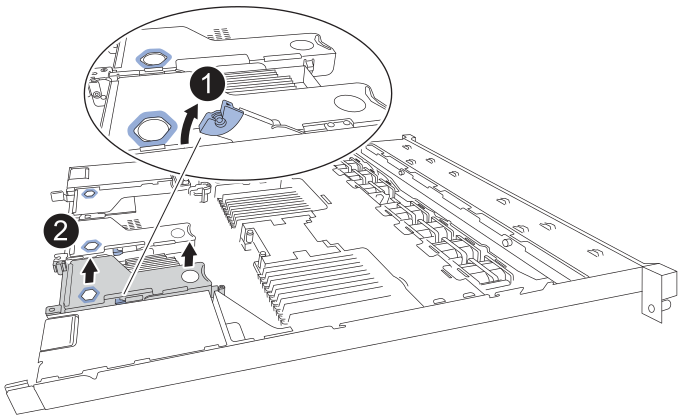
Rotate the blue locking latch on the riser with the failed NIC up and open.
-
Carefully lift the riser assembly with the failed NIC upwards using the blue-marked holes. Move the riser assembly toward the front of the chassis as you lift it to allow the external connectors in its installed NIC to clear the chassis.
-
Place the riser on a flat anti-static surface with the metal frame side down to access the NIC.
-
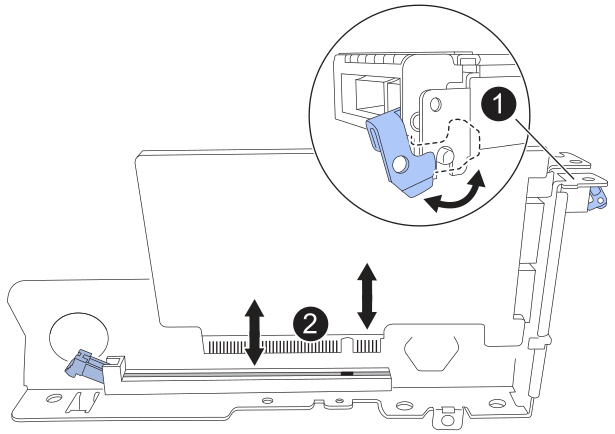
Open the blue latch on the failed NIC and carefully remove it from the riser assembly. Rock the NIC slightly to help remove the NIC from its connector. Don't use excessive force.
-
Place the riser and NIC on a flat anti-static surface.
-
Wrap the strap end of the ESD wristband around your wrist, and secure the clip end to a metal ground to prevent static discharge.
-
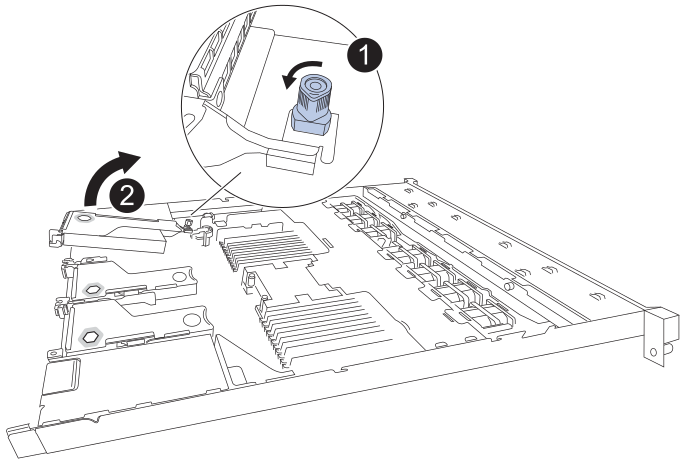
Rotate the blue lock on the riser with the failed NIC to the open position.
-
Carefully lift the riser assembly upwards using the blue-marked hole and riser edge. Move the riser assembly toward the front of the chassis as you lift it to allow the external connectors in its installed NIC to clear the chassis.
-
Place the riser on a flat anti-static surface with the metal frame side down to access the NIC.
-
Open the blue latch on the failed NIC and carefully remove it from the riser assembly. Rock the NIC slightly to help remove the NIC from its connector. Don't use excessive force.
-
Place the riser and NIC on a flat anti-static surface.
Step 2: Reinstall the internal NIC
Install the replacement NIC into the same location as the one that was removed.
-
Wrap the strap end of the ESD wristband around your wrist, and secure the clip end to a metal ground to prevent static discharge.
-
Remove the replacement NIC from its packaging.
-
Install the replacement NIC into the riser assembly.
-
Ensure the blue latch is in the open position.
-
Align the NIC with its connector on the riser assembly. Carefully press the NIC into the connector until it is fully seated, and then close the blue latch.
-
-
Reinstall the riser assembly into chassis.
-
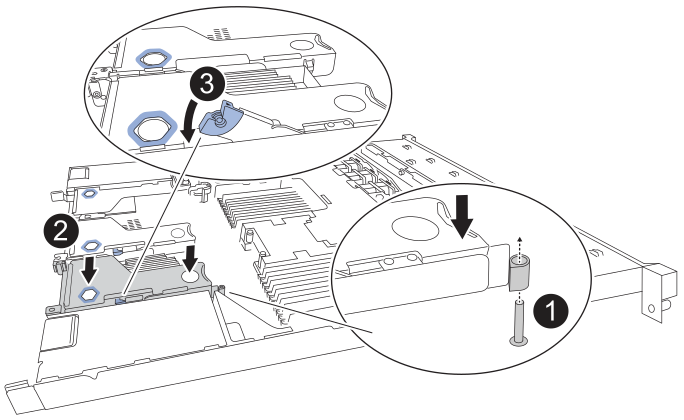
Locate the alignment hole on the riser assembly that aligns with a guide pin on the system board to ensure correct riser assembly positioning.
-
Position the riser assembly in the chassis, making sure that it aligns with the connector on the system board and guide pin.
-
Carefully press the riser assembly in place along its center line, next to the blue-marked holes, until it is fully seated.
-
-
If you have no other maintenance procedures to perform in the appliance, reinstall the appliance cover, return the appliance to the rack, attach cables, and apply power.
After replacing the part, return the failed part to NetApp, as described in the RMA instructions shipped with the kit. See the Parts Return & Replacements page for further information.
-
Wrap the strap end of the ESD wristband around your wrist, and secure the clip end to a metal ground to prevent static discharge.
-
Remove the replacement NIC from its packaging.
-
Install the replacement NIC into the riser assembly.
-
Ensure the blue latch is in the open position.
-
Align the NIC with its connector on the riser assembly. Carefully press the NIC into the connector until it is fully seated, and then close the blue latch.
-
-
Reinstall the riser assembly into chassis.
-
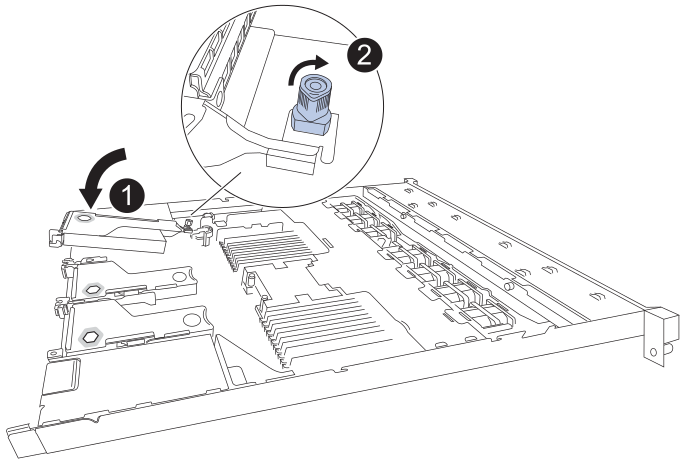
Position the riser assembly in the chassis, making sure that the edges of the riser assembly correctly align with the edges of the chassis.
-
Carefully press the riser assembly in place along its center line, next to the blue-marked hole, until it is fully seated.
-
Rotate the blue lock on the riser to the closed position.
-
-
Remove the protective caps from the NIC ports where you will be reinstalling cables.
-
If you have no other maintenance procedures to perform in the appliance, reinstall the appliance cover, return the appliance to the rack, attach cables, and apply power.
After replacing the part, return the failed part to NetApp, as described in the RMA instructions shipped with the kit. See the Parts Return & Replacements page for further information.