


What's new with NetApp Workload Factory administration features


 Suggest changes

 PDFs
PDFs
Learn what's new with Workload Factory administration features like cloud provider credentials, Codebox enhancements, and more.
14 October 2026
Use your own Amazon Bedrock instance for AI tools
Workload Factory now includes another option on the AI settings page that lets customers use their own Amazon Bedrock instance.
This option is available under customer-managed Bedrock for AI tools and is supported by all Workload Factory AI services.
After you connect, Workload Factory lets you know whether the connection was successful.
04 October 2026
Custom dashboard updates
Custom dashboards now make it easier to manage your work.
You can edit dashboards directly from the catalog, including metrics, charts, and time ranges.
When you edit a dashboard, Workload Factory reopens the chat with your previous prompts and messages. You can then update the dashboard, save your changes, or restore the previous version.
Only the dashboard creator can edit the dashboard. While you are editing, other users cannot see your changes until you save them.
The dashboard catalog now includes more filters to help you quickly find dashboards based on category and status.
If your administrator disables AI features or your monthly credit limit is reached, dashboard creation and editing are disabled.
30 September 2026
AI agents for Workload Factory
Workload Factory AIOps uses AI to analyze your environment and recommend improvements. If you approve, it can also take actions using the credentials and permissions you set up. AI agents analyze your environment, helping you find risks, improve workloads, and troubleshoot issues in Workload Factory and Slack.
Access AI agents in the new Explore Agents section in Ask Me. By default, agents run in read-only mode and provide recommendations and analysis.
Use Agents settings to control how agents work. You can:
-
Choose read-only or read-write mode
-
Select which credentials agents can use
-
Add custom instructions
-
Adjust how detailed responses are
These additional controls give you more visibility and oversight. In read-write mode, agents must get your approval before making changes to AWS, ONTAP, or supported APIs. You can also choose how much detail to see in responses, including information about the agent's reasoning and, in Slack, its tool activity.
Agents also support multi-account environments and easier setup. A single agent can securely work across multiple AWS accounts using multiple credentials.
Scheduled tasks in Ask Me
You can now tailor a prompt in Ask Me chat to create scheduled tasks. Use scheduled tasks to ask Ask Me to run recurring checks and send updates in chat based on the schedule you define.
Example prompts:
-
Check the health and lifecycle status of all FSx for NetApp ONTAP file systems every hour to catch issues early.
-
List all accessible AWS FSx file systems every hour to keep an up-to-date inventory.
Storage support in Ask Me
Ask Me now supports FSx for ONTAP and Google Cloud NetApp Volumes. Use the same chat experience to get answers and insights across your supported storage environments.
Notifications update
NetApp Console notifications are now enabled by default. NetApp Console users will automatically receive Workload Factory notifications without additional configuration.
Link creation notification email
Workload Factory now reminds you to complete link association after you successfully add credentials. While credentials enable resource discovery, advanced ONTAP features require link association with the discovered file systems. You'll receive the email notification once a week on Monday. After you complete the link association, the notifications stop.
Lambda link version notifications and upgrade guidance
Workload Factory now alerts you when a Lambda link is not using the latest available image. If automatic upgrades are not supported for a link, the notification shows when a newer version is available.
You can view upgrade instructions from the Links page. The instructions explain how to manually update the Lambda link image and enable automatic upgrades when available. Keeping links up to date gives you access to the latest features, fixes known issues, and applies recent security updates.
You also get an alert in the FSx for ONTAP dashboard when a newer link version is available for a link that does not support automatic upgrades.
30 August 2026
New onboarding experience for credentials and links
Workload Factory improves the onboarding experience for credentials and links, making it easier to get started. After you create your account and log in, select Get started in any workload tile, for example Storage, and the next page takes you through the setup process step by step.
03 August 2026
Updated IAM permission policies for Databases
Permissions for Databases were updated to improve feature access and limit SSM access where unnecessary.
The view, planning, and analysis permissions are limited to AWS SSM documents. With these permissions, you can view hosts, instances, and databases. You can also run a basic on-demand well-architected analysis of your resources.
The operations and remediation permissions allow you to make changes to your resources, analyze error logs, get a comprehensive well-architected analysis of your resources and fix configuration issues.
Custom dashboards
Notifications for custom dashboards
Workload Factory now notifies you when your custom dashboard is ready or if creation fails.
After you create a custom dashboard, you'll get a notification with a direct link to view it. If creation fails, you'll get a notification with a link to the custom dashboard inventory to try again.
This helps you know when your dashboard is ready and makes it easy to review or recreate it.
Private and public custom dashboards
Custom dashboards now include share settings. You can keep a dashboard private or share it with your team.
New dashboards are private by default and visible only to you. You can make a dashboard public at any time to share it with everyone in your Workload Factory account.
Each dashboard card shows a Private or Public label so you can quickly see which dashboards are shared.
AI features administration
You can control access to AI features across your organization with the following settings in Workload Factory administration.
-
Use NetApp-managed Bedrock (recommended and enabled by default, with monthly credit limits)
-
Turn off all AI features
The new administration page lets you manage these settings in one place.
AI features include Ask Me, custom dashboards, rule builder, and analyzers for EMS, database logs, and volume latency.
If AI features are turned off, users will see a message that AI is unavailable.
05 July 2026
Custom dashboards
Create AI-powered dashboards that match your workloads and priorities so you can easily see how your operations are performing. Instead of relying on fixed views, custom dashboards let you focus on the information that matters most.
Just describe what you want to track in plain language, and the AI will create a dashboard based on your request. For example, you can track disaster recovery status, capacity and costs across regions, storage protection compliance, and other operational metrics.
Custom dashboards are read-only, so they cannot change your storage or workload settings. Anyone in your Workload Factory account can view and manage these dashboards, making it easy for teams to share insights and stay aligned.
GenAI workload removal from Workload Factory
The GenAI workload has been removed from the Workload Factory console.
31 May 2026
New notification for FSx for ONTAP file systems
The NetApp Workload Factory notification service includes the notification for replication delay.
Support for AWS GovCloud (US) accounts
You can now create AWS GovCloud (US) accounts in Workload Factory. This account type uses only AWS US GovCloud endpoints and regions for setup and operations. Credentials and secrets remain in GovCloud. GovCloud (US) regions are supported.
03 May 2026
Email notifications for Workload Factory
You can now receive Workload Factory notifications via email without configuring an Amazon SNS topic. Enable email notifications to send notifications to any email addresses associated with the account.
You can configure email notifications from either the Workload Factory console or the NetApp Console. The NetApp Console also provides the option to configure NetApp Console notifications that appear under the bell icon.
If you configure notifications in NetApp Console, NetApp Console takes ownership of notification delivery. Notification settings in the Workload Factory console become read-only to prevent duplicate notifications.
New notification for EDA latency
The NetApp Workload Factory notification service includes the notification for EDA latency that notifies you when the latency of an EDA operation exceeds a certain threshold.
New notification for FSx for ONTAP file systems
The NetApp Workload Factory notification service includes the notification with a monthly cost summary for your account, showing spending trends, unusual changes, and the best savings opportunities for FSx for ONTAP file systems.
06 April 2026
New notification for Storage
The NetApp Workload Factory notification service includes the notification for NetApp Autonomous Ransomware Protection with AI (ARP/AI) for Storage.
01 March 2026
New Ask Me bookmark available in Workload Factory
We added a new Ask Me bookmark on every screen in Workload Factory console. This improvement makes it easier and faster for you to access Ask Me whenever you need help. Ask Me is our AI assistant, enabling you to ask questions about your own workload environments, get personalized insights directly from your environment, and refer to previous conversations.
You can open Ask Me from any page by clicking the new bookmark. It launches Ask me in a side panel without interrupting your current work and offers quick explanations and recommendations related to what you're currently doing.
01 February 2026
Well-architected updates
NetApp Workload Factory includes the well-architected assessment for Elastic VMware Service (EVS) workloads, and adds new configurations for Storage and Database workloads.
-
VMware workloads NetApp Workload Factory provides best practices and recommendations for operating well-architected Amazon Elastic VMware Service (EVS) workloads.
-
Storage workloads Several new configurations have been added to well-architected feature in the Storage workload so that you have more insight into storage performance and costs.
-
Storage VM logical reporting
-
Optimize cache volume size
-
Orphaned block devices
-
-
Database workloads Workload Factory for Databases includes new storage configuration for Oracle for enabling and setting up Direct NFS (dNFS) to improve I/O performance and decrease the load on the host and the storage system.
-
dNFS enablement
-
dNFS consistent IP resolution
-
dNFS configuration file
-
dNFS
nosharecache
-
New permissions for Storage
New permissions have been added to the Storage workload for enhancements to managing S3 access points.
04 January 2026
Ask me AI assistant home page integration
The Workload Factory console home page embeds the Ask me AI assistant, enabling you to ask questions about your own storage estate, get personalized insights directly from your environment, and refer to previous conversations. You can interact with Ask me to understand your workloads, troubleshoot issues, and learn more about Workload Factory — all without leaving the console.
27 November 2025
Permissions update for Storage
The FSx for ONTAP EMS events analyzer uses the following Amazon Bedrock permissions in the operations and remediation permission policy to fetch events data for the Storage workload.
-
bedrock:ListInferenceProfiles -
bedrock:GetInferenceProfile -
bedrock:InvokeModelWithResponseStream -
bedrock:InvokeModel
06 October 2025
BlueXP workload factory now NetApp Workload Factory
BlueXP has been renamed and redesigned to better reflect the role it has in managing your data infrastructure. As a result, BlueXP workload factory has been renamed to NetApp Workload Factory.
Ask Me integration with MCP
Ask Me, Workload Factory's AI assistant, is integrated with the Model Context Protocol (MCP). Using MCP, Ask Me securely interfaces with external environments and queries API tools to deliver responses tailored to your specific storage environment.
05 October 2025
New notification for Storage
The NetApp Workload Factory notification service includes the notification for well-architected issues for Storage.
09 September 2025
New notification for Storage
The BlueXP workload factory notification service includes the notification for automatic capacity management for Storage.
29 June 2025
Permissions update for Databases
The following permission is now available in read-only mode for Databases: cloudwatch:GetMetricData.
BlueXP workload factory notification service support
The BlueXP workload factory notification service enables workload factory to send notifications to the BlueXP alerts service or to an Amazon SNS topic. Notifications sent to BlueXP alerts appear in the BlueXP alerts panel. When workload factory publishes notifications to an Amazon SNS topic, subscribers to the topic (such as people or other applications) receive the notifications at the endpoints configured for the topic (such as email or SMS messages).
04 May 2025
CloudShell autocomplete support
When using BlueXP workload factory CloudShell, you can start typing a command and press the Tab key to view available options. If multiple possibilities exist, the CLI will display a list of suggestions. This feature enhances productivity by minimizing errors and speeding up command execution.
Updated permissions terminology
The workload factory user interface and documentation now use "read-only" to refer to read permissions and "read/write" to refer to automate permissions.
30 March 2025
CloudShell reports AI-generated error responses for ONTAP CLI commands
When using CloudShell, each time you issue an ONTAP CLI command and an error occurs, you can get AI-generated error responses that include a description of the failure, the cause of the failure, and a detailed resolution.
iam:SimulatePermissionPolicy permission update
Now you can manage the iam:SimulatePrincipalPolicy permission from the workload factory console when you add additional AWS account credentials or add a new workload capability such as the GenAI workload.
02 February 2025
CloudShell available in BlueXP workload factory console
CloudShell is available from anywhere in the BlueXP workload factory console. CloudShell allows you to use the AWS and ONTAP credentials that you've provided in your BlueXP account and execute AWS CLI commands or ONTAP CLI commands in a shell-like environment.
Permissions update for Databases
The following permission is now available in read mode for Databases: iam:SimulatePrincipalPolicy.
22 January 2025
BlueXP workload factory permissions
You can now view the permissions that BlueXP workload factory uses to execute various operations starting from the discovery of your storage environments to deploying AWS resources such as file systems in Storage or knowledge bases for GenAI workloads. You can view IAM policies and permissions for Storage, Databases, VMware, and GenAI workloads.
5 January 2025
Support for service accounts in BlueXP workload factory
Service accounts are now supported in BlueXP workload factory. You can create service accounts to act as machine users that automate infrastructure operations.
11 November 2024
Workload factory integration in the BlueXP console
You now have the ability to use workload factory from the BlueXP console. The BlueXP console experience provides the same functionality as the workload factory console.
1 September 2024
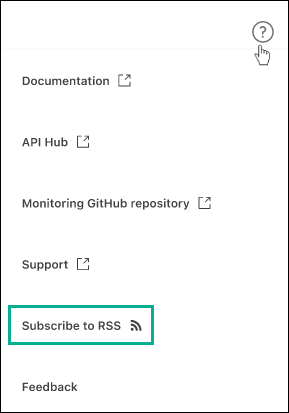
RSS subscription
RSS subscription is available from the workload factory console. Using an RSS feed is an easy way to consume and be aware of changes in BlueXP workload factory.
Support for a single permission policy per workload
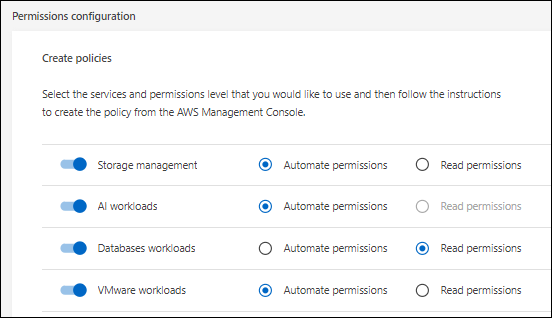
When adding AWS credentials in workload factory, you can now select a single permission policy, either read or automate mode, for each workload and storage management.
4 August 2024
Terraform support
Terraform support is available for Amazon FSx for NetApp ONTAP file system deployment and storage VM creation. The setup and admin guide now has instructions for how to use Terraform from the Codebox.
7 July 2024
Initial release of BlueXP workload factory
BlueXP workload factory is a powerful life-cycle management platform designed to help you optimize your workloads using Amazon FSx for NetApp ONTAP file systems. Workloads that can be streamlined using workload factory and FSx for ONTAP include databases, VMware migrations to VMware Cloud on AWS, AI chatbots, and more.