


为 AI Data Engine 连接数据计算节点


 建议更改
建议更改

 PDF
PDF
将您的 Data Compute Node 连接到主机网络和集群网络交换机,以实现 AI 工作负载处理并与 AFX 1K 存储系统集成。此过程使用 100GbE 连接进行主机网络访问和集群通信,允许节点利用现有的集群基础设施,而无需关闭 AFX 系统。
这些程序显示了常见的配置。具体的布线取决于为您的存储系统订购的组件。有关全面的配置详细信息和插槽优先级,请参阅 "NetApp Hardware Universe"。

|
连接 Data Compute Node 时,无需关闭 AFX 1K 存储系统的电源。您可以将 Data Compute Node 添加到已打开电源并已配置的现有 AFX 1K 存储系统。 |
-
您已安装现有的 AFX 1K 存储系统。有关安装 AFX 1K 存储系统的信息,请参阅"AFX 1K 存储系统安装文档"。
-
您已安装并配置了所需的网络交换机。有关将系统连接到网络交换机的信息,请联系网络管理员。
|
|
部署 AI Data Engine 至少需要三个数据计算节点。 |
步骤 1:将 Data Compute Node 连接到主机网络
您可以将 Data Compute Node 端口连接到主机网络。
-
将以下 Data Compute Node 的端口 e4b 连接到以太网数据网络交换机 A:
-
Data Compute Node 1,端口 e4b
-
Data Compute Node 2,端口 e4b
100GbE 电缆

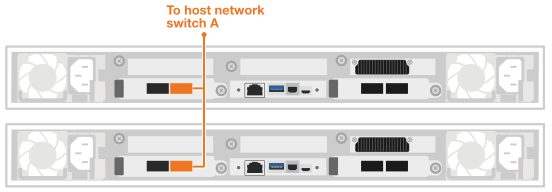
-
-
将以下 Data Compute Node 的端口 e5b 连接到以太网数据网络交换机 B:
-
Data Compute Node 1,端口 e5b
-
Data Compute Node 2,端口 e5b
100GbE 电缆
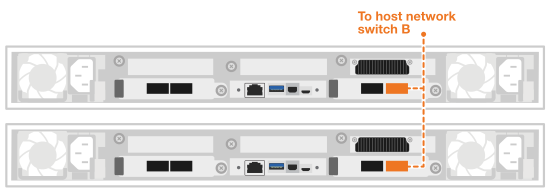
-
步骤 2:为 Data Compute Node 集群连接布线
对于数据计算节点,请使用 4x100GbE 分支电缆连接 e4a/e5a 端口以进行集群连接。
-
从下列 Data Compute Node 将端口 e4a 连接到集群网络交换机 A 上的非 ISL 端口:
-
Data Compute Node 1,端口 e4a
-
Data Compute Node 2,端口 e4a
4x100GbE 分支电缆
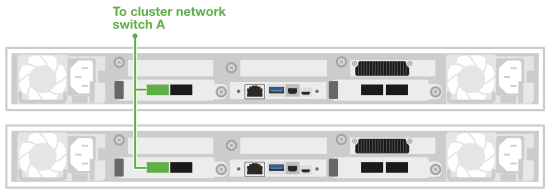
-
-
从下列 Data Compute Node 将端口 e5a 连接到集群网络交换机 B 上的非 ISL 端口:
-
Data Compute Node 1,端口 e5a
-
Data Compute Node 2,端口 e5a
4x100GbE 分支电缆
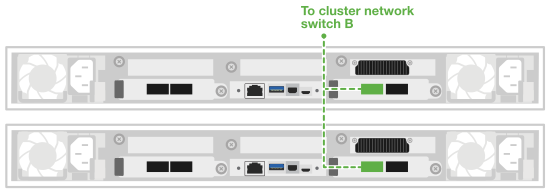
-
在您连接硬件电缆后,"开启您的 Data Compute Node"。