


更换 node1 AFF A800 或 AFF C800 控制器模块

 建议更改
建议更改

 PDF
PDF
将 node1 AFF A800 或 AFF C800 控制器模块替换为 AFF A90、AFF A70 或 AFF C80 控制器模块。
此时,node1 已关闭,所有数据均由 node2 提供服务。您必须注意仅删除 node1 控制器模块。当从系统后部查看控制器时,控制器是堆叠的,控制器 A 通常在上面。控制器标签位于控制器模块正上方的机箱上。

|
请勿关闭机箱电源、因为node1和node2位于同一机箱中并连接到相同的电源。 |
如果您尚未接地,请正确接地。
步骤 1:卸下 AFF A800 或 AFF C800 控制器模块
从现有的 node1 模块中取出电缆管理设备,并将控制器稍微移出机箱。
-
通过使用拇指推动每个驱动器,确保机箱中的所有驱动器都牢固地固定在中间背板上,直到您感觉到正向停止。
视频 - 确认驱动器安装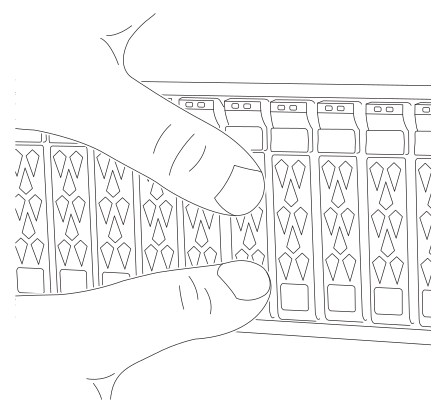
-
根据系统状态检查控制器驱动器:
-
在正常的控制器上,检查是否有任何活动的 RAID 组处于降级状态、失败状态或两者兼而有之:
storage aggregate show -raidstatus !*normal*-
如果命令返回
There are no entries matching your query.,请继续转到下一个子步骤以检查缺少的驱动器。 -
如果命令返回任何其他结果,请从两个控制器收集 AutoSupport 数据并与 NetApp 支持部门联系以获得进一步帮助。
system node autosupport invoke -node * -type all -message '<message_name>'
-
-
event log show -severity * -node * -message-name *disk.missing*-
如果命令返回
There are no entries matching your query.,请继续转至下一步。 -
如果命令返回任何其他结果,请从两个控制器收集 AutoSupport 数据并与 NetApp 支持部门联系以获得进一步帮助。
system node autosupport invoke -node * -type all -message '<message_name>'
-
-
-
从电源拔下node1控制器模块的电源。
-
Release the power cable retainers, and then unplug the cables from the power supplies.
-
Loosen the hook and loop strap binding the cables to the cable management device, and then unplug the system cables and SFP and QSFP modules (if needed) from the controller module, keeping track of where the cables were connected.
Leave the cables in the cable management device so that when you reinstall the cable management device, the cables are organized.
-
Remove the cable management device from the controller module and set it aside.
-
Press down on both of the locking latches, and then rotate both latches downward at the same time.
The controller module moves slightly out of the chassis.
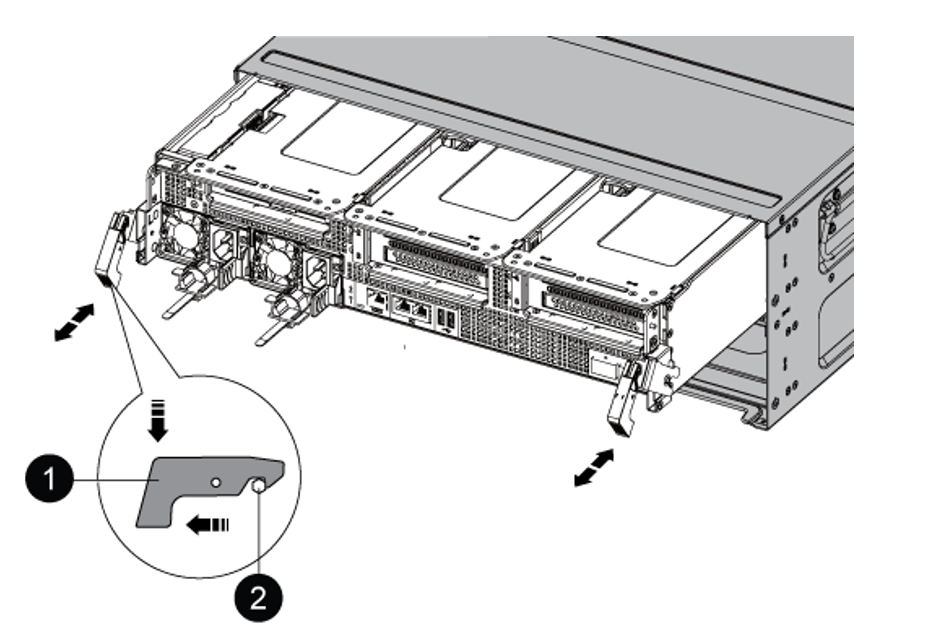

Locking latch

Locking pin
步骤 2:安装 AFF A90、AFF A70 或 AFF C80 控制器模块
在 node1 中安装、布线和连接 AFF A90、AFF A70 或 AFF C80 控制器模块。
-
Align the end of the controller module with the opening in the chassis, and then gently push the controller module halfway into the system.

请勿将控制器模块完全插入机箱中、除非此过程稍后指示您这样做。 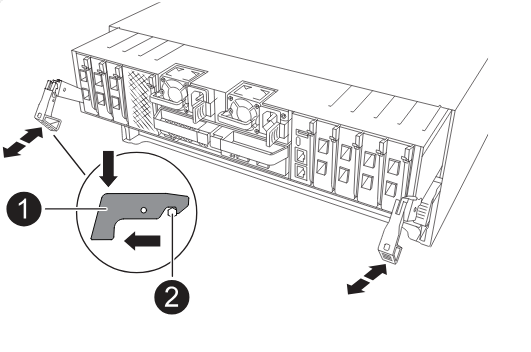
-
使用缆线将管理和控制台端口连接到 node1 控制器模块。
当您在下一步中插入 node1 控制器模块时,node1 立即启动 BIOS 初始化,然后是 AUTOBOOT,因为机箱已通电。在插入模块之前,通过连接串行电缆和控制台电缆来避免此 AUTOBOOT。 -
在机箱的前面,用拇指将每个驱动器牢牢推入顶部和底部磁盘托架,直到感觉到完全停止。这可确保驱动器牢固地固定在机箱中板上。
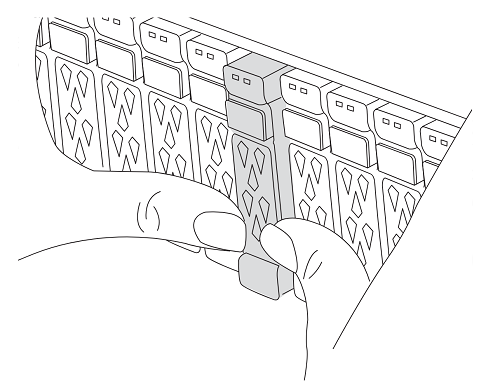
-
转至机箱背面。
-
-
在凸轮把手处于打开位置的情况下、用力推入控制器模块、直至其与中板接触并完全就位。控制器模块完全就位后,锁定闩锁会上升。将凸轮把手关闭至锁定位置。
为避免损坏连接器、将控制器模块滑入机箱时不要用力过大。 -
一旦模块就位,请立即连接串行控制台,并准备好中断 node1 的自动启动。
-
中断自动启动后、node1将停留在加载程序提示符处。
如果不按时中断 AUTOBOOT 并且 node1 开始引导,请等待提示,然后输入 Ctrl-C 进入引导菜单。节点停止在引导菜单后,使用选项 `8`重新引导节点,并在重新引导期间中断 AUTOBOOT。
-
在 LOADER 提示符 node1 处,设置默认环境变量:
set-defaults -
保存默认环境变量设置:
saveenv
安装 AFF A90、AFF A70 或 AFF C80 控制器模块后,"网络引导 node1"。