


在 StorageGRID 中管理物件中繼資料儲存
 建議變更
建議變更

 PDF
PDF
StorageGRID 系統的物件中繼資料容量控制著此系統可儲存的最大物件數量。為確保您的 StorageGRID 系統有足夠的空間來儲存新物件,您必須了解 StorageGRID 將物件中繼資料儲存在哪裡以及如何儲存。
什麼是物件中繼資料?
物件中繼資料是指描述物件的任何資訊。StorageGRID 使用物件中繼資料來追蹤網格中所有物件的位置,並管理每個物件隨時間的生命週期。
對於 StorageGRID 中的物件,物件中繼資料包括以下類型的資訊:
-
系統中繼資料,包括每個物件的唯一 ID (UUID)、物件名稱、S3 儲存桶名稱、租戶帳戶名稱或 ID、物件的邏輯大小、物件首次建立的日期和時間,以及物件最後修改的日期和時間。
-
與物件關聯的任何自訂使用者中繼資料索引鍵值組。
-
對於 S3 物件,任何與該物件關聯的物件標籤索引鍵值組。
-
對於複製的物件複本,每個複本的目前儲存設備位置。
-
對於銷毀編碼物件複本,每個片段的目前儲存設備位置。
-
對於 Cloud Storage Pool 中的物件複本,物件的位置,包括外部儲存桶的名稱和物件的唯一識別碼。
-
對於分段物件和多部分物件,分段識別碼和資料大小。
物件中繼資料是如何儲存的?
StorageGRID 將物件中繼資料維護在 Cassandra 資料庫中,該資料庫獨立於物件資料儲存。為了提供備援並保護物件中繼資料免於遺失,StorageGRID 在每個站點為系統中所有物件儲存三份中繼資料複本。
此圖表示兩個站台的儲存節點。每個站台擁有相同數量的物件中繼資料,且每個站台的中繼資料會分散至該站台的所有儲存節點。
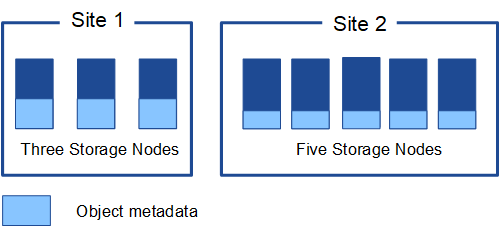
物件中繼資料儲存在哪裡?
此圖表示單一儲存節點的儲存設備 Volume。
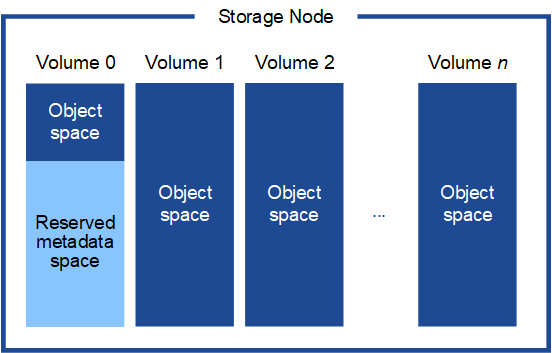
如圖所示,StorageGRID 在每個儲存節點的儲存設備 Volume 0 上保留空間,用於存放物件中繼資料。它利用保留空間來儲存物件中繼資料並執行必要的資料庫操作。儲存設備 Volume 0 以及儲存節點中所有其他儲存設備磁碟區上的剩餘空間,則專門用於存放物件資料(複本和銷除編碼片段)。
特定儲存節點上為物件中繼資料預留的空間大小取決於以下幾個因素。
中繼資料保留空間設定
「中繼資料保留空間」是一個系統層級的設定,代表在每個儲存節點的 Volume 0 上為中繼資料保留的空間大小。如表所示,此設定的預設值是基於:
-
您最初安裝 StorageGRID 時所使用的軟體版本。
-
每個儲存節點上的記憶體容量。
| 用於初始 StorageGRID 安裝的版本 | 儲存節點上的記憶體容量 | 預設中繼資料保留空間設定 |
|---|---|---|
11.5 至 12.0 |
網格中每個儲存節點的容量為 128 GB 或更多 |
8 TB(8,000 GB) |
網格中任何儲存節點上的容量均小於 128 GB |
3 TB(3,000 GB) |
|
11.1 至 11.4 |
任何一個站台的每個儲存節點上,容量至少為 128 GB |
4 TB(4,000 GB) |
每個站台的任何儲存節點上的容量均小於 128 GB |
3 TB(3,000 GB) |
|
11.0 或更早版本 |
任何金額 |
2 TB (2,000 GB) |
檢視中繼資料保留空間設定
請依照以下步驟檢視 StorageGRID 系統的中繼資料保留空間設定。
-
選擇 Configuration > System > Storage settings。
-
在「儲存設定」頁面上,展開「中繼資料保留空間」區段。
對於 StorageGRID 11.8 或更高版本,中繼資料保留空間值必須至少為 100 GB,且不得超過 1 PB。
對於每個儲存節點具有 128 GB 或更多 RAM 的新 StorageGRID 11.6 或更高版本安裝,預設設定為 8,000 GB (8 TB)。
中繼資料實際保留空間
與系統範圍的「Metadata reserved space」設定相比,物件中繼資料的「實際保留空間」是針對每個 Storage Node 決定的。對於任何指定的 Storage Node,中繼資料的實際保留空間取決於該節點的 Volume 0 大小以及系統範圍的「Metadata reserved space」設定。
| 節點的 Volume 0 大小 | 中繼資料實際保留空間 |
|---|---|
小於 500 GB(非生產用途) |
10% 的 Volume 0 |
500 GB 或更多 + 或 + 僅中繼資料儲存節點 |
這兩個值中較小的那個:
注意:僅中繼資料儲存節點只需要一個 rangedb。 |
檢視中繼資料的實際保留空間
請依照下列步驟檢視特定儲存節點上中繼資料的實際保留空間。
-
從 Grid Manager 中選擇 節點 > 儲存節點。
-
選擇 Storage 索引標籤。
-
將遊標停留在「已使用儲存設備 - 物件中繼資料」圖表上,找到「實際保留空間」值。
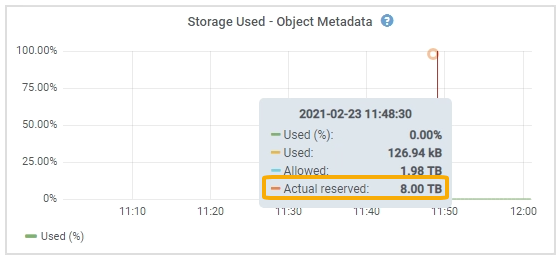
在快照中,* 實際保留 * 值為 8 TB。此快照適用於新安裝 StorageGRID 11.6 中的大型儲存設備節點。由於此儲存設備節點的系統範圍中繼資料保留空間設定小於 Volume 0,因此此節點的實際保留空間等於中繼資料保留空間設定。
實際保留中繼資料空間範例
假設您使用 11.7 或更新版本安裝新的 StorageGRID 系統。在此範例中,假設每個儲存節點(Storage Node)具有超過 128 GB 的 RAM,且儲存節點 1(SN1)的 Volume 0 為 6 TB。根據這些數值:
-
系統範圍的 Metadata reserved space 設定為 8 TB。(如果每個 Storage Node 具有超過 128 GB RAM,則這是全新安裝 StorageGRID 11.6 或更高版本的預設值。)
-
SN1 的中繼資料實際保留空間為 6 TB。(由於 Volume 0 小於 中繼資料保留空間 設定,因此會保留整個 Volume。)
允許的中繼資料空間
每個 Storage Node 實際用於中繼資料的保留空間,會再細分為可用於物件中繼資料的空間(即 允許的中繼資料空間),以及基本資料庫作業(例如資料精簡與修理)和未來硬體與軟體升級所需的空間。允許的中繼資料空間決定了整體的物件容量。
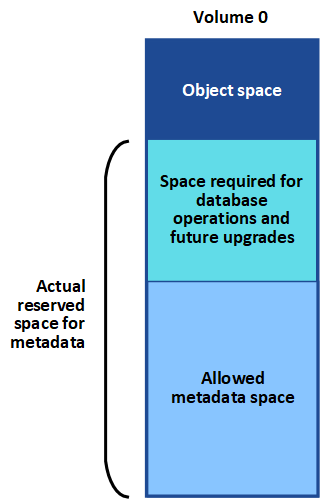
下表顯示 StorageGRID 如何根據節點的記憶體容量和中繼資料的實際保留空間,計算不同儲存節點的*允許的中繼資料空間*。
儲存節點上的記憶體容量 |
|||
< 128 GB |
>= 128 GB |
中繼資料的實際保留空間 |
|
⇐ 4 TB |
實際保留空間的 60% 用於中繼資料,最大可達 1.32 TB |
實際保留空間的 60% 用於中繼資料,最大可達 1.98 TB |
|
檢視允許的中繼資料空間
請依照以下步驟檢視 Storage Node 的允許中繼資料空間。
-
從 Grid Manager 中選擇 Nodes 。
-
選擇儲存節點。
-
選擇 Storage 索引標籤。
-
將遊標停留在「儲存設備使用情況 - 物件中繼資料」圖表上,找到 Allowed 值。
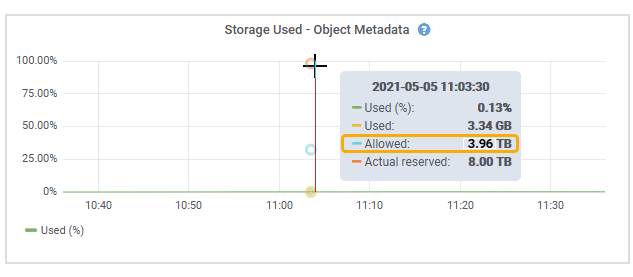
在快照中,允許 值為 3.96 TB,這是儲存節點的最大值,該儲存節點的實際中繼資料保留空間超過 4 TB。
允許 值對應於以下 Prometheus 指標:
storagegrid_storage_utilization_metadata_allowed_bytes
允許的中繼資料空間範例
假設您使用 11.6 版本安裝 StorageGRID 系統。在此範例中,假設每個 Storage Node 的記憶體容量都大於 128 GB,且 Storage Node 1 (SN1) 的 Volume 0 為 6 TB。根據這些值:
-
系統範圍的 中繼資料保留空間 設定為 8 TB。(這是 StorageGRID 11.6 或更高版本的預設值,此時每個 Storage 節點具有超過 128 GB RAM。)
-
SN1 的中繼資料實際保留空間為 6 TB。(由於 Volume 0 小於 中繼資料保留空間 設定,因此會保留整個 Volume。)
-
根據中繼資料允許空間表中所示的計算,SN1 上中繼資料的允許空間為 3 TB:(中繼資料的實際保留空間 − 1 TB)× 60%,最大可達 3.96 TB。
不同大小的儲存節點如何影響物件容量
如上所述,StorageGRID 將物件中繼資料均勻分佈到每個站台的各個儲存節點上。因此,如果一個站台包含大小不同的儲存節點,則該站台中最小的節點決定了該站台的中繼資料容量。
請看以下範例:
-
您有一個單站台網格,其中包含三個不同大小的儲存節點。
-
中繼資料保留空間 設定為 4 TB。
-
儲存節點的實際保留中繼資料空間和允許中繼資料空間具有下列值。
儲存節點 Volume 0 的大小 實際保留的中繼資料空間 允許的中繼資料空間 SN1
2.2 TB
2.2 TB
1.32 TB
SN2
5 TB
4 TB
1.98 TB
SN3
6 TB
4 TB
1.98 TB
由於物件中繼資料均勻分佈在站台內的各個 Storage Node 上,因此本例中每個節點只能容納 1.32 TB 的中繼資料。SN2 和 SN3 額外允許的 0.66 TB 中繼資料空間無法使用。
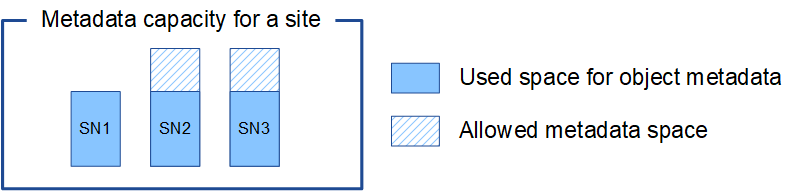
同樣地,由於 StorageGRID 在每個站台維護 StorageGRID 系統的所有物件中繼資料,因此 StorageGRID 系統的整體中繼資料容量取決於最小站台的物件中繼資料容量。
由於物件中繼資料容量控制著最大物件數量,因此當一個節點的中繼資料容量耗盡時,網格實際上就滿了。
-
若要了解如何監控每個 Storage 節點的物件中繼資料容量,請參閱 "監控 StorageGRID" 的說明。
-
若要增加系統的物件中繼資料容量,"擴充網格"請新增儲存節點。